
 controlplaneio/kubesec
Kubernetesリソースのセキュリティリスク分析
[![Testing Workflow][testing_workflow_badge]][testing_workflow_badge] [![Security Analysis Workflow][security_workflow_badge]][security_workflow_badge] [![Release Workflow][release_workflow_badge]][release_workflow_badge]
[![Go Report Card][goreportcard_badge]][goreportcard] [![PkgGoDev][go_dev_badge]][go_dev]
その他の例については、ControlPlaneのホスティングAPIを利用している Kubesec.io をご覧ください(v2.kubesec.io/scan)。
スキャンするKubernetesリソースファイル(例: kubesec-test.yaml)を作成します。簡単なテストとして、次のPodマニフェストを保存できます:
$ cat <<EOF > kubesec-test.yaml
apiVersion: v1
kind: Pod
metadata:
  name: kubesec-demo
spec:
  containers:
  - name: kubesec-demo
    image: gcr.io/google-samples/node-hello:1.0
    securityContext:
      readOnlyRootFilesystem: true
EOF
マニフェストファイルに対してスキャンを実行します:
# Using the local binary
kubesec scan kubesec-test.yaml

# Or using Docker
docker run -i kubesec/kubesec:v2 scan /dev/stdin < kubesec-test.yaml

# Using the local binary with a human-readable table output format
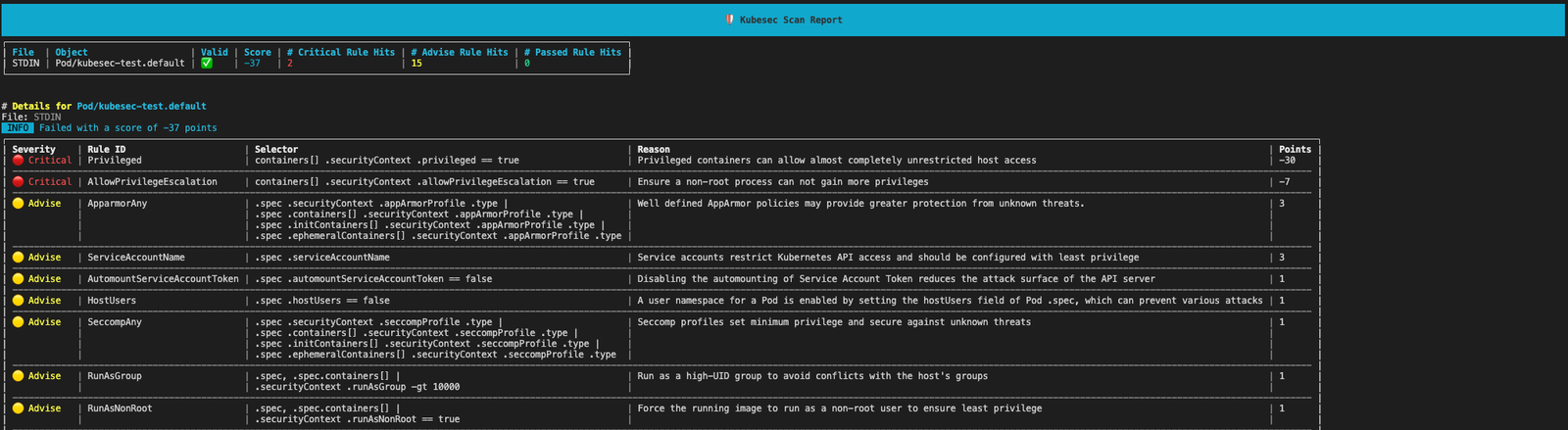
kubesec scan kubesec-test.yaml --format table
[!TIP] 結果をデフォルトのJSON形式ではなく人間が読みやすいテーブルで表示するには、
--format tableフラグを使用してください
kubesec はセキュリティスコアとリソースの詳細な分析を出力します。
Kubesecは次の形式で利用できます:
docker.io/kubesec/kubesec:v2)または、GitHubから最新コミットをインストールします:
$ go install github.com/controlplaneio/kubesec/v2@latest
$ GO111MODULE="on" go get github.com/controlplaneio/kubesec/v2
ローカルファイルまたは標準入力からKubernetesリソースをスキャンします。
Kubesecは、単一の入力ファイル内の複数のYAMLドキュメントをスキャンできます。また、--- で区切られた複数のドキュメントとして正しくフォーマットされていれば、複数のファイルから同時にスキャンすることもできます。
# Scan a specific local YAML file
kubesec scan ./deployment.yaml

# Scan from standard input (JSON or YAML)
cat file.json | kubesec scan -

# Scan a rendered Helm chart
helm template -f values.yaml ./chart | kubesec scan /dev/stdin

# Scan multiple YAML documents separated by '---'
{ cat test/asset/multi.yml; echo "---"; cat test/asset/critical.yml; } | kubesec scan -
公式Dockerイメージを使用して同じスキャンコマンドを実行できます:
# Scan a file via Docker using standard input
docker run -i kubesec/kubesec:v2 scan /dev/stdin < kubesec-test.yaml
Kubesecは、--format / -f フラグで指定する3つの異なる出力形式(json(デフォルト)、table、template)をサポートしており、単一の入力ファイル内の複数のYAMLドキュメントをスキャンできます。
# JSON array output (default behaviour)
kubesec scan ./deployment.yaml --format json

# Human-readable table output
kubesec scan ./deployment.yaml --format table

# Use a custom template for the output
kubesec scan ./deployment.yaml --format template --template report-template.tmpl
# One rule
kubesec scan --rules CapSysAdmin kubesec-test.yaml

# Multiple rules
kubesec scan --rules RunAsNonRoot,SeccompAny,ApparmorAny kubesec-test.yaml
[
  {
    "object": "Pod/security-context-demo.default",
    "valid": true,
    "message": "Failed with a score of -30 points",
    "score": -30,
    "scoring": {
      "critical": [
        {
          "selector": "containers[] .securityContext .capabilities .add == SYS_ADMIN",
          "reason": "CAP_SYS_ADMIN is the most privileged capability and should always be avoided",
          "points": -30
        }
      ],
      "advise": [
        {
          "selector": "containers[] .securityContext .runAsNonRoot == true",
          "reason": "Force the running image to run as a non-root user to ensure least privilege",
          "points": 1
        },
        {
          // ...
        }
      ]
    }
  }
]
# Print all scanning rules with their associated point scores
kubesec print-rules

# Print all scanning rules with their associated point scores as a table
kubesec print-rules --format table
[
  {
    "id": "AllowPrivilegeEscalation",
    "selector": "containers[] .securityContext .allowPrivilegeEscalation == true",
    "reason": "Ensure a non-root process can not gain more privileges",
    "kinds": [
      "Pod",
      "Deployment",
      "StatefulSet",
      "DaemonSet"
    ],
    "points": -7,
    "advise": 0
  },
...
]
Kubesecはkubeconform(@yannhに感謝)を利用して、スキャン対象のマニフェストを検証します。 つまり、別のスキーマ場所を指定する場合は、kubeconform READMEに記載されているルールに従います。
# Usees the latest schema from upstream
# Schema will be fetched from: https://raw.githubusercontent.com/yannh/kubernetes-json-schema/master/master-standalone-strict/pod-v1.json
kubesec scan ./pod.yaml

# Use a specific schema version from upstream (format x.y.z with no v prefix)
# Schema will be fetched from: https://raw.githubusercontent.com/yannh/kubernetes-json-schema/master/v1.25.3-standalone-strict/pod-v1.json
kubesec scan ./pod.yaml --kubernetes-version 1.25.3

# Use a specific schema version in an airgapped environment over HTTP
# Schema will be fetched from: `https://host.server/v<version>-standalone-strict/pod-v1.json`
kubesec scan ./deployment.yaml --kubernetes-version <version> --schema-location https://host.server

# Use a specific schema version in an airgap environment with local files
# Schema will be read from: `/opt/schemas/v<version>-standalone-strict/pod-v1.json`
kubesec scan ./deployment.yaml --kubernetes-version <version> --schema-location /opt/schemas
注記: 外部ネットワーク呼び出しを制限し、インターネットに接続されていない環境での使用を可能にするため、kubesec イメージにはスキーマが組み込まれています。スキーマの場所を変更する場合は、実行時に K8S_SCHEMA_VER と SCHEMA_LOCATION 環境変数を変更する必要があります。
Kubesecには、ネットワーク経由でスキャン要求を受け付けるHTTPサーバーが同梱されており、ローカルまたはコンテナ内で実行できます。
# Start the HTTP server in the background on port 8080
kubesec http 8080 &

# Send a file to the running server via POST
curl -sSX POST --data-binary @deployment.yaml http://localhost:8080/scan

# Stop the background local server when finished
kill %
