
chisel v1.13.0
高速なTCP/UDPトンネルをHTTP上で提供し、SSH暗号化をサポート。リバースポート転送、SOCKS5プロキシ、クライアント認証により、安全なネットワーク経路確保とファイアウォール回避を実現します。
Chisel


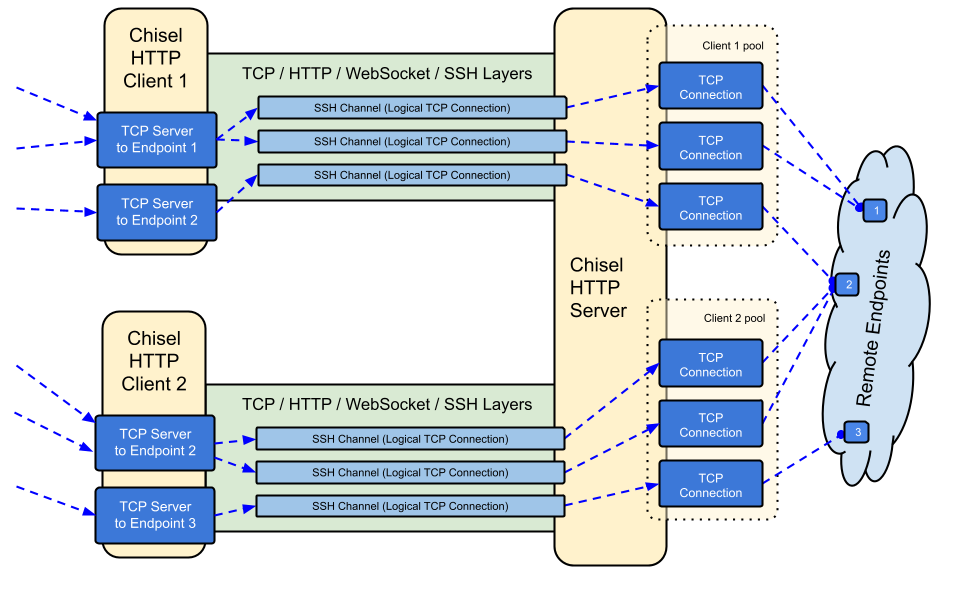
Chiselは、HTTP上で転送され、SSHで保護された高速なTCP/UDPトンネルです。クライアントとサーバーの両方を含む単一の実行ファイルです。Go (golang) で書かれています。Chiselは主にファイアウォールを通過するのに便利ですが、ネットワークへの安全なエンドポイントを提供するためにも使用できます。
目次
機能
- 使いやすい
- 高性能*
- SSHプロトコル(
crypto/ssh経由)を使用した暗号化接続 - 認証された接続;ユーザー設定ファイルによる認証されたクライアント接続、フィンガープリントマッチングによる認証されたサーバー接続。
- クライアントは指数バックオフで自動再接続します(
--min/max-retry-intervalで調整可能);キープアライブpingがタイムアウトするため、サイレントに切断された接続(スリープ/ウェイク、NATタイムアウト、サーバー再起動)が検出され、再確立されます - クライアントは1つのTCP接続上で複数のトンネルエンドポイントを作成できます
- クライアントはオプションでSOCKSまたはHTTP CONNECTプロキシを経由できます
- リバースポートフォワーディング(接続はサーバーを経由してクライアントから出ていきます)
- サーバーはオプションでリバースプロキシとしても機能します
- サーバーはオプションでSOCKS5接続を許可します(以下のガイドを参照)
- クライアントはオプションでリバースポートフォワードからのSOCKS5接続を許可します
- stdio経由のクライアント接続。
ssh -o ProxyCommandをサポートし、HTTP上のSSHを提供します
インストール
バイナリ


最新リリースを参照するか、curl https://i.jpillora.com/chisel! | bashで今すぐダウンロードしてインストールしてください
バイナリは最新のGoリリースでビルドされており、最小OSバージョンは以下の通りです:Windows 10 / Server 2016、macOS 12、Linux kernel 3.2、FreeBSD 12.2。古いシステム(例:Windows 7)の場合は、リリース v1.8.1以前を使用してください。
Docker


docker run --rm -it jpillora/chisel --help
イメージはマルチアーキテクチャで、Docker Hub(jpillora/chisel)とGitHub Container Registry(ghcr.io/jpillora/chisel)の両方に公開されています。
Fedora
このパッケージはFedoraコミュニティによってメンテナンスされています。RPMの使用に関連する問題が発生した場合は、このイシュートラッカーをご利用ください。
sudo dnf -y install chisel
ソース
$ go install github.com/jpillora/chisel@latest
デモ
独自のデモサーバーを数分で実行できます(以前の Heroku デモは Heroku の無料枠の終了に伴いなくなりました)。example/fly.toml は、この chisel server を fly.io の無料枠にデプロイします:
$ chisel server --port $PORT --backend http://example.com
# listens on $PORT, proxies normal web requests to http://example.com
example/ ディレクトリから fly launch --copy-config でデプロイし、サーバーの隣で動作している任意のサービスにトンネルします。例:
$ chisel client https://<your-app>.fly.dev 3000
# connects to your chisel server,
# tunnels your localhost:3000 to the server's localhost:3000
ブラウザでアプリのURLにアクセスすると、サーバーのデフォルトバックエンドプロキシに到達し、example.comのコピーが表示されます。
使用方法
$ chisel --help

  Usage: chisel [command] [--help]

  Version: X.Y.Z

  Commands:
    server - runs chisel in server mode
    client - runs chisel in client mode

  Read more:
    https://github.com/jpillora/chisel
$ chisel server --help

  Usage: chisel server [options]

  Options:

    --host, Defines the HTTP listening host – the network interface
    (defaults the environment variable HOST and falls back to 0.0.0.0).

    --port, -p, Defines the HTTP listening port (defaults to the environment
    variable PORT and falls back to port 8080).

    --key, (deprecated use --keygen and --keyfile instead)
    An optional string to seed the generation of a ECDSA public
    and private key pair. All communications will be secured using this
    key pair. Share the subsequent fingerprint with clients to enable detection
    of man-in-the-middle attacks (defaults to the CHISEL_KEY environment
    variable, otherwise a new key is generate each run).

    --keygen, A path to write a newly generated PEM-encoded SSH private key file.
    If users depend on your --key fingerprint, you may also include your --key to
    output your existing key. Use - (dash) to output the generated key to stdout.

    --keyfile, An optional path to a PEM-encoded SSH private key. When
    this flag is set, the --key option is ignored, and the provided private key
    is used to secure all communications. (defaults to the CHISEL_KEY_FILE
    environment variable). Since ECDSA keys are short, you may also set keyfile
    to the inline key string itself, exactly as printed by --keygen (a base64
    string with a "ck-" prefix); no extra base64 encoding is needed.

    --authfile, An optional path to a users.json file. This file should
    be an object with users defined like:
      {
        "<user:pass>": ["<addr-regex>","<addr-regex>"]
      }
    when <user> connects, their <pass> will be verified and then
    each of the remote addresses will be compared against the list
    of address regular expressions for a match. Patterns are NOT
    anchored by default: "10.0.0.1:80" also matches
    "210.0.0.1:8080", and "." matches any character. Anchor your
    patterns, e.g. "^10\.0\.0\.1:80$". The empty string ""
    matches every address. Addresses will
    always come in the form "<remote-host>:<remote-port>" for normal remotes,
    "R:<local-interface>:<local-port>" for reverse port forwarding
    remotes, and "socks" for SOCKS5 proxy access. Note that SOCKS5
    access previously bypassed this list; existing authfiles which
    should allow SOCKS5 must add an entry matching "socks" (the
    empty wildcard "" matches everything, including "socks"). This
    file will be automatically reloaded on change. Reloads apply
    to new connections and to new tunnels of connected clients;
    established tunnels are not interrupted.

    --auth, An optional string representing a single user with full
    access, in the form of <user:pass>. It is equivalent to creating an
    authfile with {"<user:pass>": [""]}. If unset, it will use the
    environment variable AUTH.

    --keepalive, An optional keepalive interval. Since the underlying
    transport is HTTP, in many instances we'll be traversing through
    proxies, often these proxies will close idle connections. You must
    specify a time with a unit, for example '5s' or '2m'. Defaults
    to '25s' (set to 0s to disable).

    --backend, Specifies another HTTP server to proxy requests to when
    chisel receives a normal HTTP request. Useful for hiding chisel in
    plain sight. --proxy is accepted as an alias for this flag.

    --socks5, Allow clients to access the internal SOCKS5 proxy. See
    chisel client --help for more information.

    --reverse, Allow clients to specify reverse port forwarding remotes
    in addition to normal remotes.