
 jpillora/chisel
高速なTCP/UDPトンネルをHTTP上で提供し、SSH暗号化をサポート。リバースポート転送、SOCKS5プロキシ、クライアント認証により、安全なネットワーク経路確保とファイアウォール回避を実現します。
# Chisel
[](https://godoc.org/github.com/jpillora/chisel) [](https://github.com/jpillora/chisel/actions?workflow=CI)
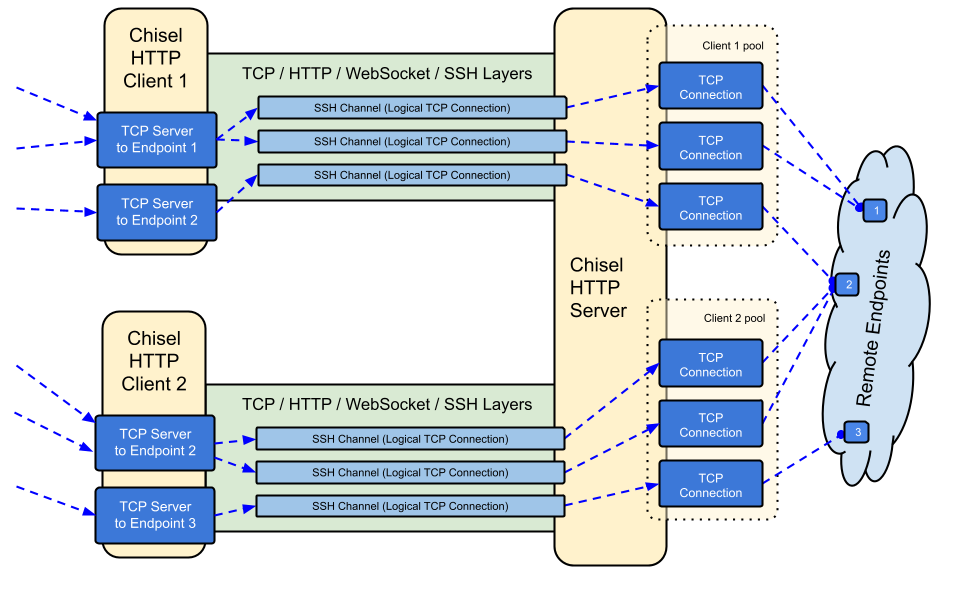
Chiselは、HTTP上で転送され、SSHで保護された高速なTCP/UDPトンネルです。クライアントとサーバーの両方を含む単一の実行ファイルです。Go (golang) で書かれています。Chiselは主にファイアウォールを通過するのに便利ですが、ネットワークへの安全なエンドポイントを提供するためにも使用できます。
## 目次
- [機能](#features)
- [インストール](#install)
- [デモ](#demo)
- [使用方法](#usage)
- [コントリビューション](#contributing)
- [変更履歴](#changelog)
- [ライセンス](#license)
## 機能
- 使いやすい
- [高性能](https://github.com/jpillora/chisel/blob/master/test/bench/perf.md)\*
- SSHプロトコル(`crypto/ssh`経由)を使用した[暗号化接続](#security)
- [認証された接続](#authentication);ユーザー設定ファイルによる認証されたクライアント接続、フィンガープリントマッチングによる認証されたサーバー接続。
- クライアントは[指数バックオフ](https://github.com/jpillora/backoff)で自動再接続します(`--min/max-retry-interval`で調整可能);キープアライブpingがタイムアウトするため、サイレントに切断された接続(スリープ/ウェイク、NATタイムアウト、サーバー再起動)が検出され、再確立されます
- クライアントは1つのTCP接続上で複数のトンネルエンドポイントを作成できます
- クライアントはオプションでSOCKSまたはHTTP CONNECTプロキシを経由できます
- リバースポートフォワーディング(接続はサーバーを経由してクライアントから出ていきます)
- サーバーはオプションで[リバースプロキシ](http://golang.org/pkg/net/http/httputil/#NewSingleHostReverseProxy)としても機能します
- サーバーはオプションで[SOCKS5](https://en.wikipedia.org/wiki/SOCKS)接続を許可します([以下のガイド](#socks5-guide)を参照)
- クライアントはオプションでリバースポートフォワードからの[SOCKS5](https://en.wikipedia.org/wiki/SOCKS)接続を許可します
- stdio経由のクライアント接続。`ssh -o ProxyCommand`をサポートし、HTTP上のSSHを提供します
## インストール
### バイナリ
[](https://github.com/jpillora/chisel/releases) [](https://github.com/jpillora/chisel/releases)
[最新リリース](https://github.com/jpillora/chisel/releases/latest)を参照するか、`curl https://i.jpillora.com/chisel! | bash`で今すぐダウンロードしてインストールしてください
バイナリは最新のGoリリースでビルドされており、最小OSバージョンは以下の通りです:Windows 10 / Server 2016、macOS 12、Linux kernel 3.2、FreeBSD 12.2。古いシステム(例:Windows 7)の場合は、[リリース v1.8.1](https://github.com/jpillora/chisel/releases/tag/v1.8.1)以前を使用してください。
### Docker
[](https://hub.docker.com/r/jpillora/chisel/) [](https://hub.docker.com/r/jpillora/chisel/tags)
```sh
docker run --rm -it jpillora/chisel --help
```
イメージはマルチアーキテクチャで、Docker Hub(`jpillora/chisel`)とGitHub Container Registry(`ghcr.io/jpillora/chisel`)の両方に公開されています。
### Fedora
このパッケージはFedoraコミュニティによってメンテナンスされています。RPMの使用に関連する問題が発生した場合は、この[イシュートラッカー](https://bugzilla.redhat.com/buglist.cgi?bug_status=NEW&bug_status=ASSIGNED&classification=Fedora&component=chisel&list_id=11614537&product=Fedora&product=Fedora%20EPEL)をご利用ください。
```sh
sudo dnf -y install chisel
```
### ソース
```sh
$ go install github.com/jpillora/chisel@latest
```
## デモ
独自のデモサーバーを数分で実行できます(以前の Heroku デモは Heroku の無料枠の終了に伴いなくなりました)。[`example/fly.toml`](https://github.com/jpillora/chisel/blob/master/example/fly.toml) は、この `chisel server` を [fly.io](https://fly.io) の無料枠にデプロイします:
```sh
$ chisel server --port $PORT --backend http://example.com
# listens on $PORT, proxies normal web requests to http://example.com
```
`example/` ディレクトリから `fly launch --copy-config` でデプロイし、サーバーの隣で動作している任意のサービスにトンネルします。例:
```sh
$ chisel client https://<your-app>.fly.dev 3000
# connects to your chisel server,
# tunnels your localhost:3000 to the server's localhost:3000
```
ブラウザでアプリのURLにアクセスすると、サーバーのデフォルトバックエンドプロキシに到達し、[example.com](http://example.com)のコピーが表示されます。
## 使用方法
<!-- render these help texts by hand,
or use https://github.com/jpillora/md-tmpl
with $ md-tmpl -w README.md -->
<!--tmpl,code=plain:echo "$ chisel --help" && go run main.go --help | sed 's#0.0.0-src (go1\..*)#X.Y.Z#' -->
``` plain
$ chisel --help
Usage: chisel [command] [--help]
Version: X.Y.Z
Commands:
server - runs chisel in server mode
client - runs chisel in client mode
Read more:
https://github.com/jpillora/chisel
```
<!--/tmpl-->
<!--tmpl,code=plain:echo "$ chisel server --help" && go run main.go server --help | cat | sed 's#0.0.0-src (go1\..*)#X.Y.Z#' -->
``` plain
$ chisel server --help
Usage: chisel server [options]
Options:
--host, Defines the HTTP listening host – the network interface
(defaults the environment variable HOST and falls back to 0.0.0.0).
--port, -p, Defines the HTTP listening port (defaults to the environment
variable PORT and falls back to port 8080).
--key, (deprecated use --keygen and --keyfile instead)
An optional string to seed the generation of a ECDSA public
and private key pair. All communications will be secured using this
key pair. Share the subsequent fingerprint with clients to enable detection
of man-in-the-middle attacks (defaults to the CHISEL_KEY environment
variable, otherwise a new key is generate each run).
--keygen, A path to write a newly generated PEM-encoded SSH private key file.
If users depend on your --key fingerprint, you may also include your --key to
output your existing key. Use - (dash) to output the generated key to stdout.
--keyfile, An optional path to a PEM-encoded SSH private key. When
this flag is set, the --key option is ignored, and the provided private key
is used to secure all communications. (defaults to the CHISEL_KEY_FILE
environment variable). Since ECDSA keys are short, you may also set keyfile
to the inline key string itself, exactly as printed by --keygen (a base64
string with a "ck-" prefix); no extra base64 encoding is needed.
--authfile, An optional path to a users.json file. This file should
be an object with users defined like:
{
"<user:pass>": ["<addr-regex>","<addr-regex>"]
}
when <user> connects, their <pass> will be verified and then
each of the remote addresses will be compared against the list
of address regular expressions for a match. Patterns are NOT
anchored by default: "10.0.0.1:80" also matches
"210.0.0.1:8080", and "." matches any character. Anchor your
patterns, e.g. "^10\.0\.0\.1:80$". The empty string ""
matches every address. Addresses will
always come in the form "<remote-host>:<remote-port>" for normal remotes,
"R:<local-interface>:<local-port>" for reverse port forwarding
remotes, and "socks" for SOCKS5 proxy access. Note that SOCKS5
access previously bypassed this list; existing authfiles which
should allow SOCKS5 must add an entry matching "socks" (the
empty wildcard "" matches everything, including "socks"). This
file will be automatically reloaded on change. Reloads apply
to new connections and to new tunnels of connected clients;
established tunnels are not interrupted.
--auth, An optional string representing a single user with full
access, in the form of <user:pass>. It is equivalent to creating an
authfile with {"<user:pass>": [""]}. If unset, it will use the
environment variable AUTH.
--keepalive, An optional keepalive interval. Since the underlying
transport is HTTP, in many instances we'll be traversing through
proxies, often these proxies will close idle connections. You must
specify a time with a unit, for example '5s' or '2m'. Defaults
to '25s' (set to 0s to disable).
--backend, Specifies another HTTP server to proxy requests to when
chisel receives a normal HTTP request. Useful for hiding chisel in
plain sight. --proxy is accepted as an alias for this flag.
--socks5, Allow clients to access the internal SOCKS5 proxy. See
chisel client --help for more information.
--reverse, Allow clients to specify reverse port forwarding remotes
in addition to normal remotes.
--tls-key, Enables TLS and provides optional path to a PEM-encoded
TLS private key. When this flag is set, you must also set --tls-cert,
and you cannot set --tls-domain.
--tls-cert, Enables TLS and provides optional path to a PEM-encoded
TLS certificate. When this flag is set, you must also set --tls-key,
and you cannot set --tls-domain.
--tls-domain, Enables TLS and automatically acquires a TLS key and
certificate using LetsEncrypt. Setting --tls-domain requires port 443.
You may specify multiple --tls-domain flags to serve multiple domains.
The resulting files are cached in the "$HOME/.cache/chisel" directory.
You can modify this path by setting the CHISEL_LE_CACHE variable,
or disable caching by setting this variable to "-". You can optionally
provide a certificate notification email by setting CHISEL_LE_EMAIL.
--tls-ca, a path to a PEM encoded CA certificate bundle or a directory
holding multiple PEM encode CA certificate bundle files, which is used to
validate client connections. The provided CA certificates will be used
instead of the system roots. This is commonly used to implement mutual-TLS.
--pid Generate pid file in current working directory
-v, Enable verbose logging
--help, This help text
Signals:
The chisel process is listening for:
a SIGINT or SIGTERM to begin a graceful shutdown
(a second signal forces an immediate exit),
a SIGUSR2 to print process stats, and
a SIGHUP to short-circuit the client reconnect timer
Version:
X.Y.Z
Read more:
https://github.com/jpillora/chisel
```
<!--/tmpl-->
<!--tmpl,code=plain:echo "$ chisel client --help" && go run main.go client --help | sed 's#0.0.0-src (go1\..*)#X.Y.Z#' -->
``` plain
$ chisel client --help
Usage: chisel client [options] <server> <remote> [remote] [remote] ...
<server> is the URL to the chisel server.
<remote>s are remote connections tunneled through the server, each of
which come in the form:
<local-host>:<local-port>:<remote-host>:<remote-port>/<protocol>
■ local-host defaults to 0.0.0.0 (all interfaces).
■ local-port defaults to remote-port.
■ remote-port is required*.
■ remote-host defaults to 127.0.0.1 (server localhost).
■ protocol defaults to tcp.
which shares <remote-host>:<remote-port> from the server to the client
as <local-host>:<local-port>, or:
R:<local-interface>:<local-port>:<remote-host>:<remote-port>/<protocol>
which does reverse port forwarding, sharing <remote-host>:<remote-port>
from the client to the server's <local-interface>:<local-port>.
example remotes
3000
example.com:3000
3000:google.com:80
192.168.0.5:3000:google.com:80
socks
5000:socks
udpsocks
5000:udpsocks
R:2222:localhost:22
R:socks
R:5000:socks
R:5000:udpsocks
stdio:example.com:22
1.1.1.1:53/udp
When the chisel server has --socks5 enabled, remotes can
specify "socks" or "udpsocks" in place of remote-host and
remote-port. Both default to the local host and port
127.0.0.1:1080. Connections to this remote will terminate
at the server's internal SOCKS5 proxy. When the server also
has --authfile set, SOCKS5 access requires an entry matching
the token "socks" in the user's address list.
When the chisel server has --reverse enabled, remotes can
be prefixed with R to denote that they are reversed. That
is, the server will listen and accept connections, and they
will be proxied through the client which specified the remote.
Reverse remotes specifying "R:socks" will listen on the server's
default socks port (1080) and terminate the connection at the
client's internal SOCKS5 proxy.
The "socks" remote supports TCP CONNECT only. Use "udpsocks"
for TCP CONNECT and UDP ASSOCIATE, including "R:udpsocks".
It binds TCP and UDP on the same configured interface and port;
the UDP relay never uses a randomly allocated listening port.
UDP requires support on both Chisel peers. Destination names are
resolved at the exit node. If UDP cannot bind, TCP remains available
and UDP ASSOCIATE fails; no alternate port is used. Clients using
a zero UDP source port allow one pending association per source IP
until the first valid datagram pins it. BIND, UDP fragmentation,
and udpsocks over stdio are not supported.
When stdio is used as local-host, the tunnel will connect standard
input/output of this program with the remote. This is useful when
combined with ssh ProxyCommand. You can use
ssh -o ProxyCommand='chisel client chiselserver stdio:%h:%p' \
[email protected]
to connect to an SSH server through the tunnel.
Options:
--fingerprint, A *strongly recommended* fingerprint string
to perform host-key validation against the server's public key.
Fingerprint mismatches will close the connection.
Fingerprints are generated by hashing the ECDSA public key using
SHA256 and encoding the result in base64.
Fingerprints must be 44 characters containing a trailing equals (=).
Legacy MD5 colon fingerprints (deprecated) are still accepted,
but only in their full 16-octet form; truncated prefixes are
rejected.
--auth, An optional username and password (client authentication)
in the form: "<user>:<pass>". These credentials are compared to
the credentials inside the server's --authfile. defaults to the
AUTH environment variable.
--keepalive, An optional keepalive interval. Since the underlying
transport is HTTP, in many instances we'll be traversing through
proxies, often these proxies will close idle connections. You must
specify a time with a unit, for example '5s' or '2m'. Defaults
to '25s' (set to 0s to disable).
--max-retry-count, Maximum number of times to retry before exiting.
Defaults to unlimited.
--min-retry-interval, Minimum wait time before retrying after a
disconnection. Defaults to 1 second.
--max-retry-interval, Maximum wait time before retrying after a
disconnection. Defaults to 5 minutes.
--proxy, An optional HTTP CONNECT or SOCKS5 proxy which will be
used to reach the chisel server. Authentication can be specified
inside the URL. Credentials must be URL-encoded; for example a
"#" in the password must be written as "%23".
For example, http://admin:[email protected]:8081
or: socks://admin:[email protected]:1080
The socks://, socks5:// and socks5h:// schemes are equivalent:
DNS is always resolved by the proxy.
--header, Set a custom header in the form "HeaderName: HeaderContent".
Can be used multiple times. (e.g --header "Foo: Bar" --header "Hello: World")
--hostname, Optionally set the 'Host' header (defaults to the host
found in the server url).
--sni, Override the ServerName when using TLS (defaults to the
hostname).
--tls-ca, An optional root certificate bundle used to verify the
chisel server. Only valid when connecting to the server with
"https" or "wss". By default, the operating system CAs will be used.
--tls-skip-verify, Skip server TLS certificate verification of
chain and host name (if TLS is used for transport connections to
server). If set, client accepts any TLS certificate presented by
the server and any host name in that certificate. This only affects
transport https (wss) connection. Chisel server's public key
may be still verified (see --fingerprint) after inner connection
is established.
--tls-key, a path to a PEM encoded private key used for client
authentication (mutual-TLS).
--tls-cert, a path to a PEM encoded certificate matching the provided
private key. The certificate must have client authentication
enabled (mutual-TLS).
--pid Generate pid file in current working directory
-v, Enable verbose logging
--help, This help text
Signals:
The chisel process is listening for:
a SIGINT or SIGTERM to begin a graceful shutdown
(a second signal forces an immediate exit),
a SIGUSR2 to print process stats, and
a SIGHUP to short-circuit the client reconnect timer
Version:
X.Y.Z
Read more:
https://github.com/jpillora/chisel
```
<!--/tmpl-->
### セキュリティ
暗号化は常に有効です。chisel サーバーを起動すると、メモリ内に ECDSA の公開鍵/秘密鍵ペアが生成されます。サーバーの起動時に公開鍵のフィンガープリント(base64 エンコードされた SHA256)が表示されます。ランダムな鍵を生成する代わりに、サーバーは `--keyfile` オプションを使用して鍵ファイルを指定することもできます。クライアントが接続すると、サーバーの公開鍵フィンガープリントも表示されます。クライアントは `--fingerprint` オプションを使用して特定のフィンガープリントを強制できます。レガシーな MD5 フィンガープリントも引き続き受け入れられますが、完全な 16 オクテットのコロン形式である必要があり、切り詰められたプレフィックスは拒否されます。詳細については、上記の `--help` を参照してください。
また、サーバーは認証前に受信 websocket メッセージのサイズを制限します(`CHISEL_WS_READ_LIMIT`、デフォルト 512 KiB)。これにより、未認証のピアが過大なメッセージでメモリを枯渇させることができません。デフォルト値は `x/crypto/ssh` の最大トランスポートパケット 256 KiB を余裕を持って上回っているため、有効な SSH パケットが拒否されることはありません。制限を無効にするのは `0` のみで、負の値は安全なデフォルトにフォールバックします。
### 認証
`--authfile` オプションを使用して、サーバーは受け入れ可能なユーザーのリストを作成するための `user.json` 設定ファイルを任意で提供できます。クライアントは `--auth` オプションを使用して認証します。認証設定ファイルの例については [users.json](https://github.com/jpillora/chisel/blob/master/example/users.json) を参照してください。詳細については、上記の `--help` を参照してください。
authfile の動作に関する注意事項:
- ファイルは監視され、**ライブで再読み込み**されます — エディタによるリネーム保存(vim)や kubernetes の configmap 更新も含まれます。再読み込みは新規接続と、すでに接続済みのクライアントの新規トンネルに適用されます。削除されたユーザーは即座に新規トンネルへのアクセスを失いますが、確立済みのトンネルは中断されません。
- アドレスパターンは正規表現であり、**アンカーされません** — `^` と `$` でアンカーしてください(サーバーは読み込み時にアンカーされていないパターンについて警告します)。空文字列 `""` はすべてにマッチします。
- SOCKS5 アクセスは、トークン `socks` にマッチするエントリによって制御されます。**破壊的変更**: 以前は SOCKS5 が authfile を完全にバイパスしていました。`--socks5` と `--authfile` を併用して実行するサーバーは、プロキシアクセスを維持すべきユーザーに `socks` を付与する必要があります(ワイルドカード `""` エントリは引き続き機能します)。
- コロンのない認証文字列(`user:pass`)は、サーバーとクライアントの両方で**起動時の致命的エラー**になりました — 以前はサイレントに認証を無効化していました。
- `--auth` ユーザーは authfile の再読み込みを生き延び、ファイルユーザーとの名前衝突に優先します。
内部的には、これは SSH が提供する _Password_ 認証方式を使用して行われます。`crypto/ssh` の詳細についてはこちらをご覧ください http://blog.gopheracademy.com/go-and-ssh/。セッションの開始/終了(ユーザー、送信元アドレス、リモートを含む)およびログイン失敗の試行は info レベルでログに記録されます。
### TLS ガイド
最もシンプルな安全なセットアップは `--tls-domain` で、LetsEncrypt 証明書を自動的にプロビジョニングします(ポート 443 とサーバーを指す DNS レコードが必要です):
```sh
chisel server --port 443 --tls-domain chisel.example.com --auth user:pass
chisel client --auth user:pass https://chisel.example.com R:2222:localhost:22
```
独自の証明書(自己署名または内部 CA)を使用するには、キー/証明書ペアを生成し、両側を適切なファイルに指定します:
```sh
chisel server --port 443 --tls-key key.pem --tls-cert cert.pem
chisel client --tls-ca ca.pem https://chisel.example.com 3000
```
相互 TLS の場合は、サーバーに `--tls-ca` を、各クライアントに `--tls-cert`/`--tls-key` を渡します。TLS は chisel のトランスポートを外側からラップする点に注意してください。内側の SSH 層は依然として暗号化と認証を行うため、`--fingerprint` による検証は TLS の有無にかかわらず機能します。
### Docker での SOCKS5 ガイド
1. 新しい秘密鍵をターミナルに出力する
```sh
chisel server --keygen -
# or save it to disk --keygen /path/to/mykey
```
1. chisel サーバーを起動する
```sh
jpillora/chisel server --keyfile '<ck-base64 string or file path>' -p 9312 --socks5
```
1. chisel クライアントを接続する(サーバーのフィンガープリントを使用)
```sh
chisel client --fingerprint '<see server output>' <server-address>:9312 socks
```
1. SOCKS5 クライアント(例: OS/ブラウザ)を次のように設定する:
```
<client-address>:1080
```
1. これで、HTTP 上の暗号化・認証済み SOCKS5 接続が利用できます
注: サーバーが `--authfile` も使用している場合、ユーザーはプロキシを利用するためにトークン `socks` に一致するエントリが必要です([Authentication](#authentication) を参照)。
セットアップコマンド、リバースモード、UDP クライアントの例については、[SOCKS5 UDP ユーザーガイド](https://github.com/jpillora/chisel/blob/master/example/udpsocks.md) を参照してください。
通常の `socks` リモートは TCP CONNECT のみをサポートし、UDP ソケットをバインドしません。TCP CONNECT と UDP ASSOCIATE の両方を有効にするには、`udpsocks`(リバースモードの場合は `R:udpsocks`)を使用します。例えば `1080:udpsocks` です。どちらのタイプもデフォルトで `127.0.0.1:1080` を使用し、同じ SOCKS アクセス権限を使用します。`udpsocks` リスナーは、設定された同じインターフェースとポートで TCP と UDP をバインドし、ランダムなリッスンポートを割り当てることなく、1 つの UDP リレーソケットを複数のアソシエーションで共有します。UDP クライアントは TCP 制御接続を開いたままにし、SOCKS でカプセル化されたデータグラムをそのポートに送信します。データグラムの宛先名は出口ノードで解決され、UDP トラフィックは暗号化された SSH トンネルを通ります。UDP を利用するには両方の Chisel ピアをアップグレードしてください。TCP SOCKS は古いピアとの互換性が維持されます。
ファイアウォールやコンテナを通して `udpsocks` リスナーを公開する場合は、設定されたポートで TCP と UDP の両方を許可してください。UDP ASSOCIATE は TCP 接続を受け付けるローカル IP を返し、その IP は SOCKS クライアントから到達可能でなければなりません。Linux Docker リスナーの場合は、`--network host` をリモート `0.0.0.0:1080:udpsocks` とともに使用して、分離されたコンテナアドレスが通知されるのを避けてください。コンテナのポートマッピングには `-p 1080:1080/tcp` と `-p 1080:1080/udp` の両方が必要で、さらに通知されたリレー IP への到達性も必要です。UDP ポートが使用中の場合、Chisel は UDP が利用不可であることをログに記録し、TCP サービスを維持し、代替ポートを使用せずに UDP ASSOCIATE を拒否します。ポートを解放した後にプロキシを再起動してください。
アソシエーションは、その TCP ピアの IP からのパケットを受け付けます。宣言された UDP 送信元ポートはそのエンドポイントを予約し、送信元ポートがゼロの場合は最初の有効なデータグラムによって固定されます。IP ごとに固定されていないアソシエーションは 1 つだけ許可されるため、同じ IP を共有するクライアントは UDP 送信元ポートを宣言するか、別のアソシエーションを開く前に最初のデータグラムを送信する必要があります。送信元ポートの予約が重複した場合は拒否されます。制御接続を閉じるか SSH が切断されるとアソシエーションは終了し、再接続には新しい UDP ASSOCIATE が必要です。BIND、UDP フラグメンテーション、および `stdio:udpsocks` はサポートされていません。
### Authfile を使用したリバース SOCKS
特定のクライアントを SOCKS 出口ノードとして動作させるには、そのクライアントにリバース SOCKS リスナーアドレスを付与します(`R:socks` はサーバーの `127.0.0.1:1080` でリッスンします):
```json
{
"exituser:password": ["^R:127\\.0\\.0\\.1:1080$"]
}
```
```sh
chisel server --reverse --authfile users.json
chisel client --auth exituser:password <server-address> R:socks
# server-side consumers point SOCKS5 clients at 127.0.0.1:1080,
# and their traffic exits via the chisel client's network
```
クライアントコマンドで `R:udpsocks` を使用すると、同じサーバーポートで UDP ASSOCIATE も有効になります。authfile の許可設定は同じままです。
ステップバイステップの[リバーストンネリングの例](https://github.com/jpillora/chisel/blob/master/example/reverse-tunneling-authenticated.md)も参照してください。
### CDN の背後での実行 (Cloudflare)
chisel は WebSocket をサポートする CDN を介して動作します。Cloudflare の場合: WebSocket を有効化し、DNS レコードをプロキシ (オレンジクラウド) し、クライアントを `https://` で接続します。CDN は TLS を終端しますが、内側の SSH レイヤーがあるため `--fingerprint` 検証は依然として chisel サーバーをエンドツーエンドで認証します — CDN はトンネルされたトラフィックを読み取ることも変更することもできません。`--keepalive` はデフォルトの `25s` のままにして CDN のアイドルタイムアウトを回避してください。また、`Upgrade` ヘッダーを削除するプロキシは chisel をまったく通せないことに注意してください。
### 環境変数によるチューニング
あまり一般的でない調整項目は環境変数で、すべて `CHISEL_` プレフィックス付きで読み取られます (例: `CHISEL_WS_TIMEOUT=10s`):
| 変数 | 側 | デフォルト | 目的 |
| --------------- | ----------- | ------------------ | -------------------------------------------------- |
| `WS_TIMEOUT` | クライアント | `45s` | websocket ハンドシェイクタイムアウト |
| `SSH_TIMEOUT` | クライアント | `30s` | ssh ハンドシェイクタイムアウト |
| `CONFIG_TIMEOUT`| サーバー | `10s` | クライアントの config リクエストの待機 |
| `SSH_WAIT` | 両方 | `35s` | 新しいトンネルがアクティブな接続を待つ時間 |
| `PING_TIMEOUT` | 両方 | keepalive 間隔 | keepalive ping 応答タイムアウト (`--keepalive 0` の場合は ping なし) |
| `DIAL_TIMEOUT` | 両方 | `30s` | tcp ターゲットのダイヤル、SOCKS ハンドシェイク、SOCKS UDP DNS タイムアウト |
| `WS_READ_LIMIT` | 両方 | `524288` | 受信 websocket メッセージの最大バイト数 (0 = 無制限、負の値 = デフォルト) |
| `WS_BUFF_SIZE` | 両方 | go デフォルト | websocket 読み書きバッファサイズ |
| `UDP_MAX_SIZE` | 両方 | `9012` | udp パケットの最大バイト数 (SOCKS UDP ヘッダーを含む) |
| `UDP_DEADLINE` | 両方 | `15s` | udp フローの読み取り期限と return-peer の有効期限、SOCKS UDP 宛先のアイドルタイムアウト |
| `UDP_MAX_CONNS` | 両方 | `100` | udp フローまたは return peer の最大数、リスナーごとの SOCKS UDP アソシエーションとアソシエーションごとの宛先数 |
| `SHUTDOWN_GRACE`| サーバー | `5s` | シャットダウン時の http リクエスト排出時間 |
`HOST`、`PORT`、`AUTH`、`CHISEL_KEY`/`CHISEL_KEY_FILE` については上記の `--help` テキストで説明されています。
---
[Read more](https://github.com/jpillora/chisel)
