Scanner avanzato di SQL Injection con analisi basata sull'intelligenza artificiale, framework di conformità etica e reportistica professionale.
Scanner per SQL injection pronto per la produzione con 6 metodi di rilevamento, remediation basata su intelligenza artificiale, output SARIF e integrazione CI/CD.
Avvio rapido · Documentazione · Docker · Analisi AI · Metti una stella su GitHub
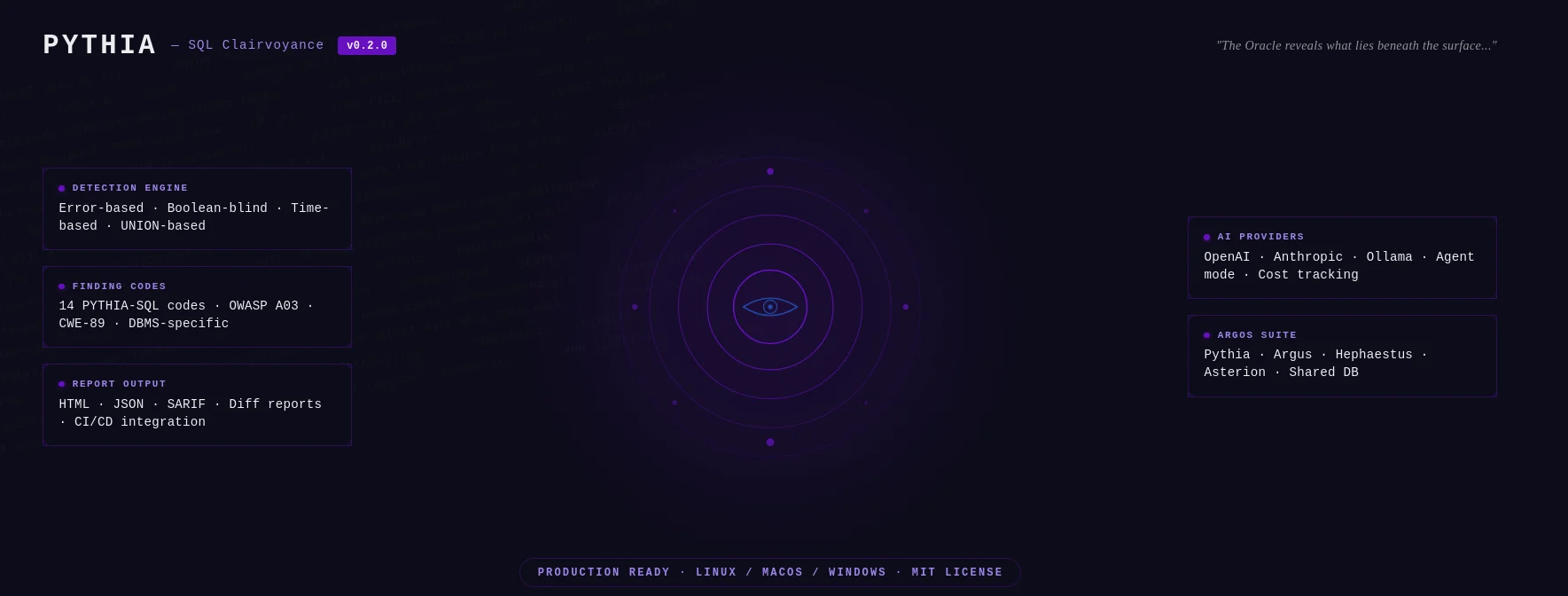
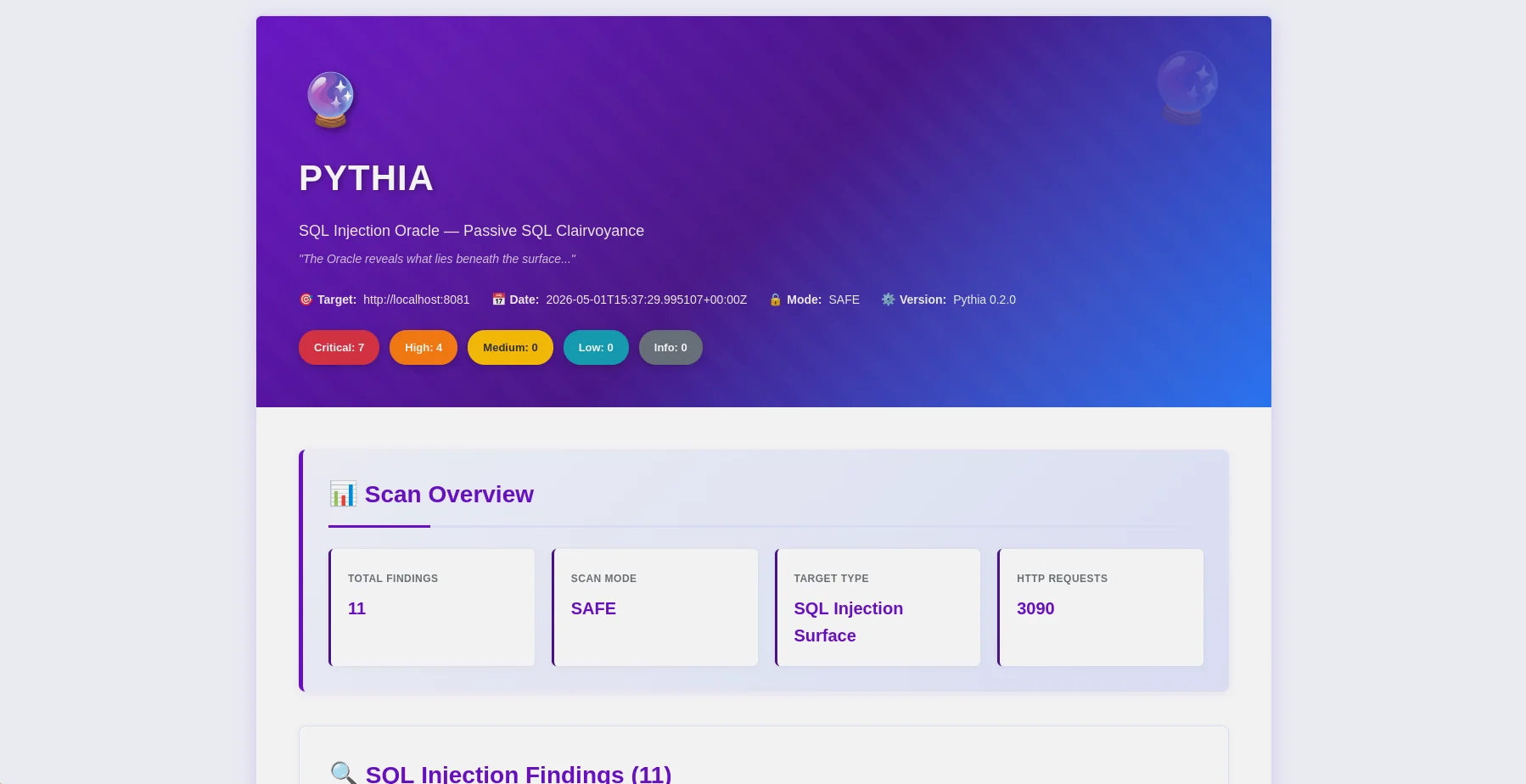
Report HTML — panoramica dei risultati con badge di gravità e mapping OWASP |
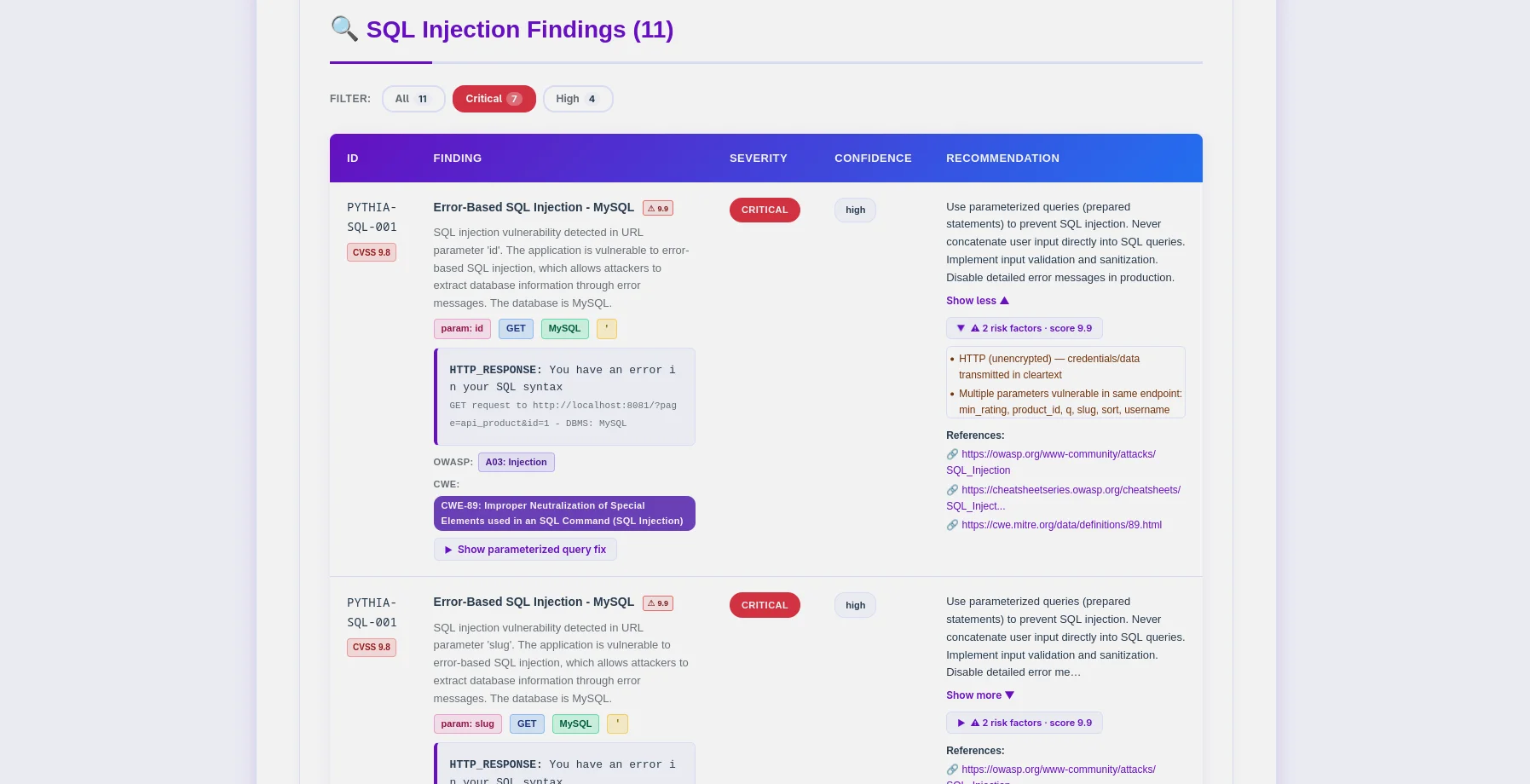
Tabella dei risultati — codici PYTHIA-SQL, rilevamento DBMS, mapping CWE-89 |
Pythia è uno scanner per il rilevamento di SQL injection pronto per la produzione che mette l'etica al primo posto. Progettato per penetration tester, ricercatori di sicurezza e ingegneri DevSecOps, identifica le vulnerabilità di SQL injection con 6 metodi di rilevamento e si integra direttamente nelle pipeline CI/CD.
--fail-on, --sarif, --diff per l'integrazione nei pipeline~/.argos/argos.db)python -m pyth --target http://example.com/products?id=1 --html
- **14 Finding Codes**: specifici per DBMS (MySQL, PostgreSQL, MSSQL, Oracle, SQLite) + specifici per tecnica
- **DBMS Fingerprinting**: rilevamento automatico del tipo e della versione del database
- **WAF Bypass**: 170+ payload di bypass in modalità aggressiva (hex, codifica URL, commenti inline, varianti di maiuscole/minuscole)
- **Session-Variable Detection**: catena POST→GET per pattern di autenticazione in stile DVWA-high
- **Smart Crawler**: BFS con estrazione di popup/onclick (`--js`), sitemap, robots.txt
- **False Positive Hardening**: punteggio di similarità SequenceMatcher + conferma multi-payload
### Integrazione CI/CD```bash
# Pipeline-friendly: exit 10 if high+ findings found
python -m pyth --target https://staging.app.com --aggressive --fail-on high
echo $? # 0=clean, 10=findings found, 1=error
# SARIF for GitHub Security / GitLab SAST
python -m pyth --target https://app.com --aggressive --sarif > results.sarif
# Compare vs last scan — show what's new, what's fixed
python -m pyth --target https://app.com --aggressive --diff last --html
python -m pyth --target https://api.example.com/v1/users
--auth-header "Authorization: Bearer eyJhbGc..."
--auth-header "X-API-Key: sk-prod-xxx"
--aggressive --html
Passa `--auth-header` più volte per più intestazioni.
### Analisi basata sull'IA
Scegli il tuo provider di IA dalla riga di comando:
| Provider | Ideale per | Velocità | Costo | Privacy |
| -------------------------------- | --------------------------------- | ---------- | ----------- | ------------ |
| **OpenAI gpt-4o-mini** (predefinito) | Qualità di produzione, basso costo | Veloce | ~$0.02/scan | Standard |
| **Anthropic Claude** | Focalizzato sulla privacy, correzione del codice | Veloce | ~$0.06/scan | Migliorata |
| **Ollama (Locale)** | Privacy completa | Lento (CPU) | Gratuito | 100% Offline |```bash
# Standard analysis
python -m pyth --target http://example.com --use-ai --ai-tone technical --html
# Agent mode: AI queries NVD for real CVEs (no API key for NVD)
python -m pyth --target http://example.com --use-ai --ai-agent --html
# Multi-provider comparison
python -m pyth --target http://example.com --use-ai \
--ai-compare "openai:gpt-4o-mini,anthropic:claude-3-5-haiku-20241022" --html
# With budget cap
python -m pyth --target http://example.com --use-ai --ai-budget 0.05 --html
Report JSON (leggibili da macchina, schema v0.2.0)```json { "tool": "pythia", "version": "0.2.0", "target": "http://localhost:8081", "mode": "aggressive", "summary": { "total": 26, "critical": 18, "high": 6, "medium": 2 }, "findings": [ { "id": "PYTHIA-SQL-001", "title": "Error-Based SQL Injection (MySQL/MariaDB)", "severity": "critical", "confidence": "high", "parameter": "id", "vector": "GET", "dbms": "MySQL 8.0.32", "cvss": 9.8, "contextual_score": 9.9, "risk_factors": ["no_ssl", "pii_detected"], "payload": "' OR '1'='1' --", "owasp": { "id": "A03", "name": "Injection" }, "cwe": { "id": "CWE-89", "name": "SQL Injection" }, "detection_method": "error-based" } ], "notes": { "scan_duration_seconds": 87.3, "requests_sent": 342, "rate_limit_applied": "5.0 req/s", "false_positive_disclaimer": "..." }, "diff": null }
**Report HTML** (adatti all'utente)
- Barra dei filtri: severità, categoria OWASP, metodo di rilevamento, DBMS
- Badge OWASP/CWE/CVE per ogni rilevazione (cliccabili verso riferimenti esterni)
- Punteggio CVSS di base + contestuale con codifica a colori
- Sezioni di evidenza espandibili con visualizzazione dei payload
- Schede di analisi AI (standard / agent / compare)
- Sezione diff (rilevazioni nuove / corrette / persistenti)
- Tema Oracle (viola `#6a11cb`) — consegnabile ai clienti senza modifiche
### Codici di rilevazione
Tutti i codici → **OWASP A03 Injection** / **CWE-89 SQL Injection**
| Code | Type | DBMS / Vector | Mode |
| ---------------- | ------------------ | ------------------------ | ---------- |
| `PYTHIA-SQL-001` | Basato su errori | MySQL / MariaDB | Sicura |
| `PYTHIA-SQL-002` | Basato su errori | PostgreSQL | Sicura |
| `PYTHIA-SQL-003` | Basato su errori | MSSQL | Sicura |
| `PYTHIA-SQL-004` | Basato su errori | Oracle | Sicura |
| `PYTHIA-SQL-005` | Basato su errori | SQLite | Sicura |
| `PYTHIA-SQL-010` | Blind booleano | Qualsiasi DBMS | Sicura |
| `PYTHIA-SQL-011` | Blind booleano | Tramite iniezione nell'header | Sicura |
| `PYTHIA-SQL-020` | Basato sul tempo | MySQL SLEEP() | Aggressiva |
| `PYTHIA-SQL-021` | Basato sul tempo | MSSQL WAITFOR | Aggressiva |
| `PYTHIA-SQL-022` | Basato sul tempo | PostgreSQL pg_sleep() | Aggressiva |
| `PYTHIA-SQL-030` | Basato su UNION | Parametro GET/POST | Aggressiva |
| `PYTHIA-SQL-031` | Basato su UNION | Tramite cookie | Aggressiva |
| `PYTHIA-SQL-040` | Secondo ordine | Pattern archiviazione → recupero | Aggressiva |
| `PYTHIA-SQL-050` | Iniezione ORDER BY | Parametro di ordinamento numerico | Aggressiva |
---
## Validazione e Test
Pythia v0.2.0 è stata **validata empiricamente** utilizzando applicazioni vulnerabili controllate basate su Docker.
### Risultati QA (Maggio 2026)
| Target | Mode | Findings | Notes |
| ----------------------- | --------------------------------- | --------------- | ------------------------------------------ |
| **PHP Lab** (8081) | `--aggressive` | **26 rilevazioni** | Tutte e 4 le tecniche + secondo ordine + ORDER BY |
| **Flask Lab** (8082) | `--js --aggressive` | **18 rilevazioni** | Session-var + secondo ordine + ORDER BY |
| **DVWA Low** | `--no-crawl --aggressive` | 4/4 tecniche | PYTHIA-SQL-001/010/020/030 |
| **DVWA Medium** | `--no-crawl --aggressive` | 4/4 tecniche | Modulo POST, tutte le tecniche |
| **DVWA High** | `--js --max-pages 2 --aggressive` | 4/4 tecniche | Catena POST→GET con variabile di sessione |
| **Test falso positivo** | `--aggressive` | **0 rilevazioni** | URL statico — confermato nessun falso positivo |
**Validazioni chiave:**
- ✅ Tutti i 14 codici di rilevazione funzionano
- ✅ DVWA high (pattern variabile di sessione) — piena parità 4/4
- ✅ Rilevazione del secondo ordine (PYTHIA-SQL-040)
- ✅ Rilevazione dell'iniezione ORDER BY (PYTHIA-SQL-050)
- ✅ Zero falsi positivi su URL statici
- ✅ Codici di uscita `--fail-on` (0/10/1) corretti
- ✅ Output SARIF 2.1.0 valido
- ✅ Confronto `--diff last` funzionante
- ✅ `--auth-header` inoltra gli header in tutte le richieste
---
## Avvio rapido
### Prerequisiti
- **Python 3.11+** (consigliata la 3.12)
- **pip** (gestore di pacchetti Python)
- **Docker** (opzionale, per lab vulnerabili)
### Installazione
**1. Clona il repository**```bash
git clone https://github.com/rodhnin/pythia-sql-clairvoyance.git
cd pythia-sql-clairvoyance
2. Crea e attiva l'ambiente virtuale```bash python3 -m venv .venv source .venv/bin/activate
**3. Installa le dipendenze**```bash
python -m pip install --upgrade pip
python -m pip install -r requirements.txt
4. Configura le chiavi API (se utilizzi l'AI cloud)```bash export OPENAI_API_KEY="sk-..." export ANTHROPIC_API_KEY="sk-ant-..."
**5. Verifica dell'installazione**```bash
python -m pyth --version
# Output: Pythia v0.2.0
python -m pyth --target "http://testphp.vulnweb.com/artists.php?artist=1"
python -m pyth --target "http://testphp.vulnweb.com/artists.php?artist=1" --html
python -m pyth --gen-consent example.com python -m pyth --verify-consent http --domain example.com --token verify-abc123 python -m pyth --target http://example.com --aggressive --html
Reports salvati in `~/.pythia/reports/`.
---
## Guida all'uso
### Riferimento flag CLI```
Scan Options:
--target URL Target URL to scan
--safe Safe mode (default): error-based + boolean-blind
--aggressive Aggressive mode: all 6 techniques + WAF bypass payloads
Auth:
--cookie COOKIE Session cookie string
--auth-header HEADER Custom HTTP header (pass multiple times for multiple headers)
--auto-csrf Automatically detect and include CSRF tokens
Crawler:
--max-depth N Max crawl depth (default: 2)
--max-pages N Max pages to crawl (default: 100)
--no-robots Ignore robots.txt
--no-crawl Skip BFS crawl, test target URL only
--js JS-aware popup/onclick URL extraction
Output:
--report-dir DIR Output directory for reports (default: ~/.pythia/reports/)
--html Generate HTML report
--db Save findings to database
--diff SCAN_ID Compare vs previous scan (use "last" for most recent)
--sarif Output SARIF 2.1.0 to stdout (logs redirect to stderr)
--fail-on SEVERITY Exit 10 if findings found at this severity or higher
CI/CD:
--fail-on SEVERITY Exit codes: 0=clean, 10=findings found, 1=error
Logging:
-v / -vv / -vvv Verbosity levels
-q Quiet mode (errors only)
--log-file FILE Log to file
--log-json Structured JSON logging
--no-color Disable colored output
AI:
--use-ai Enable AI analysis
--ai-tone TONE Analysis tone: technical, non_technical, both
--api-key-env VAR Environment variable name for API key
--ai-provider NAME AI provider: openai, anthropic, ollama
--ai-model MODEL Model name (e.g. gpt-4o-mini, claude-3-5-haiku-20241022)
--ai-stream Stream AI output token by token
--ai-compare LIST Compare providers (e.g. "openai,anthropic" or "openai:gpt-4o-mini,anthropic:claude-3-5-haiku-20241022")
--ai-agent Agent mode: NVD CVE lookup + iterative analysis
--ai-budget AMOUNT Cost cap per scan in USD
Consent:
--gen-consent DOMAIN Generate consent token for domain
--verify-consent METHOD Verify consent: http or dns
--domain DOMAIN Domain for consent verification
--token TOKEN Consent token value
Advanced:
--rate N Request rate limit (default: 2.0 safe, 5.0 aggressive)
--timeout N HTTP timeout in seconds (default: 10)
--user-agent STRING Custom User-Agent
--no-verify-ssl Disable SSL verification
--threads N Worker threads (default: 5)
--version Show version and exit
python -m pyth --target "http://example.com/search?q=test"
python -m pyth --target "http://example.com/products?id=1" --html
python -m pyth --target "http://example.com/api/users?id=1" -vv
python -m pyth --target "http://example.com/api/users?id=1" --no-crawl
### Integrazione CI/CD```bash
# Exit 10 if high or critical findings exist (blocks pipeline)
python -m pyth \
--target https://staging.myapp.com \
--aggressive \
--fail-on high
# SARIF output for GitHub Security tab
python -m pyth \
--target https://staging.myapp.com \
--aggressive \
--sarif > results.sarif
# Compare vs last scan to see what changed
python -m pyth \
--target https://staging.myapp.com \
--aggressive \
--diff last \
--html
python -m pyth
--target https://api.example.com/v1/products
--aggressive
--auth-header "Authorization: Bearer eyJhbGc..."
--html
python -m pyth
--target https://api.example.com/v1/users
--aggressive
--auth-header "Authorization: Bearer eyJhbGc..."
--auth-header "X-API-Key: sk-prod-xxx"
--html
python -m pyth
--target "http://localhost:8080/vulnerabilities/sqli/?id=1&Submit=Submit"
--no-crawl
--aggressive
--cookie "PHPSESSID=abc123; security=low"
### Crawling consapevole di JS```bash
# Extract popup/onclick URLs for complex navigation patterns
python -m pyth \
--target http://localhost:8082 \
--js \
--aggressive \
--html
# DVWA high: session-variable form (needs popup URL extraction)
python -m pyth \
--target "http://localhost:8080/vulnerabilities/sqli/" \
--js \
--max-pages 2 \
--aggressive \
--cookie "PHPSESSID=abc123; security=high"
Il flag --js utilizza l'estrazione tramite regex dagli attributi onclick — nessuna dipendenza da Playwright richiesta.
python -m pyth --gen-consent example.com
python -m pyth --verify-consent http
--domain example.com
--token verify-a3f9b2c1d8e4
python -m pyth
--target http://example.com
--aggressive
--html -v
---
## Distribuzione Docker
Pythia offre due opzioni di distribuzione Docker:
1. **Immagine Scanner**: Crea Pythia come immagine Docker per scansioni one-shot
2. **Laboratorio di test**: Applicazioni vulnerabili (DVWA, PHP, Flask) per test sicuri
### Avvio rapido```bash
cd docker
./deploy.sh
NON esporre MAI il laboratorio di test a internet pubblico — SOLO TEST LOCALI!```bash
sudo docker compose -f docker/compose.testing.yml up -d
python -m pyth --target http://localhost:8081 --aggressive --html
sudo docker compose -f docker/compose.testing.yml down
---
## Analisi basata sull'IA
Pythia utilizza **LangChain v1.0.0** con supporto per più provider di IA.
### Due modalità di analisi
- **Tecnica**: istruzioni preparate, query parametrizzate, codice di validazione degli input (PHP/PDO, Python/SQLAlchemy, Node.js/pg, Java/PreparedStatement)
- **Esecutiva**: valutazione del rischio in linguaggio semplice per stakeholder e direzione
### Cambiare provider```bash
# CLI flags (v0.2.0) — no YAML editing required
python -m pyth --target http://example.com --use-ai --ai-provider anthropic --ai-model claude-3-5-haiku-20241022 --html
python -m pyth --target http://example.com --use-ai --ai-provider ollama --ai-model llama3.2 --html
La configurazione YAML (config/default.yaml) può ancora essere usata come fallback. Le flag CLI hanno la priorità.
Per la guida completa all'integrazione AI, vedi docs/AI_INTEGRATION.md
~/.pythia/ ├── reports/ │ ├── pythia_sqli_report_localhost_20260318_143022.json │ └── pythia_sqli_report_localhost_20260318_143022.html ~/.argos/ ├── argos.db # Shared Argos Suite database ├── costs.json # AI cost tracking (shared) └── logs/ └── pythia.log # Scan logs
### Mappatura della gravità
- **CRITICAL (9.0-10.0)**: Basata su errori, basata sul tempo, basata su UNION, di secondo ordine con sfruttamento confermato
- **HIGH (7.0-8.9)**: Boolean-blind (alta confidenza), iniezione ORDER BY
- **MEDIUM (4.0-6.9)**: Boolean-blind (confidenza media)
- **LOW (0.1-3.9)**: SQLi potenziale con evidenze inconcludenti
### Codici di uscita
| Code | Meaning |
| ----- | ----------------------------------------------------------------------------- |
| `0` | Scansione completata, nessun finding alla soglia `--fail-on` (o nessun `--fail-on` utilizzato) |
| `1` | Errore tecnico (connessione, timeout, database) |
| `10` | Finding trovati a o sopra la soglia di gravità `--fail-on` |
| `130` | Annullato dall'utente (Ctrl+C) |
---
## Persistenza del database
Database SQLite **condiviso con l'ecosistema Argos** (`~/.argos/argos.db`):
- **Cronologia delle scansioni**: Data, durata, numero di finding, metodi di rilevamento
- **Repository dei finding**: Database ricercabile delle vulnerabilità di SQL injection
- **Domini verificati**: Tracciamento dei token di consenso con scadenza
- **Costi IA**: Tracciamento dei costi per scansione (nuovo nella v0.2.0)```bash
# Query recent Pythia scans
sqlite3 ~/.argos/argos.db "SELECT * FROM scans WHERE tool='pythia' ORDER BY scan_id DESC LIMIT 10"
# Find critical SQL injections
sqlite3 ~/.argos/argos.db "SELECT * FROM findings WHERE severity='critical' AND scan_id IN (SELECT scan_id FROM scans WHERE tool='pythia')"
# View AI cost summary
sqlite3 ~/.argos/argos.db "SELECT provider, model, ROUND(SUM(cost_usd),4) FROM ai_costs WHERE tool='pythia' GROUP BY provider, model"
pythia-sql-clairvoyance/ ├── pyth/ │ ├── checks/ │ │ ├── crawler.py # BFS web crawler (JS-aware with --js) │ │ ├── error_based.py # PYTHIA-SQL-001..005 │ │ ├── boolean_blind.py # PYTHIA-SQL-010..011 │ │ ├── time_based.py # PYTHIA-SQL-020..022 │ │ ├── union_based.py # PYTHIA-SQL-030..031 │ │ ├── second_order.py # PYTHIA-SQL-040 │ │ ├── order_injection.py # PYTHIA-SQL-050 │ │ ├── waf_bypass.py # WAF bypass payloads (aggressive only) │ │ └── forms.py # Form analysis │ ├── core/ │ │ ├── ai.py # AI integration + AICostTracker │ │ ├── config.py # Config loader │ │ ├── consent.py # Consent token system │ │ ├── cve_lookup.py # NVD CVE API client │ │ ├── db.py # ArgosDB (shared SQLite) │ │ ├── diff.py # Diff reports │ │ ├── http_client.py # Rate-limited HTTP session │ │ ├── logging.py # Structured logging + secret redaction │ │ ├── owasp.py # OWASP/CWE mapper │ │ ├── report.py # Report generation (JSON + HTML + SARIF) │ │ └── risk_scoring.py # Contextual CVSS scoring │ ├── cli.py # CLI argument parser (35+ flags) │ ├── scanner.py # Main scan orchestrator │ └── init.py # version = "0.2.0" ├── config/ │ ├── default.yaml │ └── prompts/ # AI prompt templates ├── db/migrate.sql # Shared DB schema ├── schema/report.schema.json # JSON Schema Draft 2020-12 ├── templates/report.html.j2 # HTML template (oracle purple theme) ├── docker/ # Docker deployment + vulnerable labs └── docs/ ├── AI_INTEGRATION.md ├── CONSENT.md ├── DATABASE_GUIDE.md ├── ETHICS.md ├── REPORT_FORMAT.md ├── ROADMAP.md └── TESTING_GUIDE.md
---
## Roadmap
### v0.1.0 — Prima versione (novembre 2025)
**Stato:** Rilasciata
- 4 metodi di rilevamento, remediation AI, sistema di consenso, report HTML+JSON, persistenza SQLite
### v0.2.0 — Piena parità e funzionalità enterprise (maggio 2026)
**Stato:** Rilasciata
- 6 metodi di rilevamento (aggiunti second-order e ORDER BY)
- 14 codici di riscontro specifici per DBMS
- Integrazione CI/CD (`--fail-on`, `--sarif`, `--diff`)
- Header di autenticazione, crawling con supporto JavaScript, payload di bypass WAF
- AI: streaming, confronto, agente (ricerca CVE NVD), monitoraggio costi, flag `--ai-provider`/`--ai-model`
- Punteggio di rischio OWASP/CWE/CVSS/contestuale in ogni riscontro
- Rafforzamento contro i falsi positivi (punteggio di similarità, conferma multi-payload)
- Parità con la sicurezza alta di DVWA (catena di variabili di sessione)
### v0.3.0 — Suite Pytest e strumenti per sviluppatori (Q3 2026)
**In programma:**
- 40+ test pytest che coprono tutti i 14 codici di riscontro
- Gestione interattiva della configurazione (`python -m pyth config set`)
- CLI del database (`python -m pyth db scans list`)
- Rilevamento della scadenza della sessione durante le scansioni autenticate
- Scansione batch multi-sito (`--targets targets.txt`)
### v0.4.0 — Intelligenza e automazione (Q1 2027)
**In programma:**
- Rilevamento anomalie basato su ML
- Sfruttamento automatico in sola lettura (prova di impatto)
- Interfaccia chat AI per l'analisi dei risultati delle scansioni
Per descrizioni dettagliate delle funzionalità, consulta [docs/ROADMAP.md](https://github.com/rodhnin/pythia-sql-clairvoyance/blob/HEAD/docs/ROADMAP.md)
---
## Etica e aspetti legali
### La regola d'oro
**Esegui scansioni solo su sistemi di tua proprietà o per cui hai esplicito permesso scritto di testare.**
### Applicazione del consenso
| Modalità | Test | Consenso richiesto | Limite di richieste |
| --------------- | -------------------------- | ---------------- | ---------- |
| **Sicura** | Error-Based, Boolean-Blind | No | 2.0 req/s |
| **Aggressiva** | Tutte le 6 tecniche | Sì | 5.0 req/s |
| **Analisi AI** | Guida alla remediation | Sì | N/A |
### Quadro giuridico
- USA: Computer Fraud and Abuse Act (CFAA)
- UK: Computer Misuse Act 1990
- UE: Direttiva 2013/40/UE
- Internazionale: varie leggi sul cybercrimine
Per linee guida etiche complete, consulta [docs/ETHICS.md](https://github.com/rodhnin/pythia-sql-clairvoyance/blob/HEAD/docs/ETHICS.md)
---
## Contributi
Accogliamo volentieri contributi — segnalazioni di bug, richieste di funzionalità, miglioramenti alla documentazione e contributi di codice.
### Come contribuire
1. Fai il fork del repository
2. Crea un branch per la funzionalità (`git checkout -b feature/amazing-feature`)
3. Apporta le modifiche e scrivi i test
4. Esegui il commit delle modifiche
5. Fai push sul branch e apri una Pull Request
### Configurazione dell'ambiente di sviluppo```bash
git clone https://github.com/YOUR-USERNAME/pythia-sql-clairvoyance.git
cd pythia-sql-clairvoyance
python -m pip install -r requirements.txt
python -m pip install pytest black flake8 mypy
black pyth/
flake8 pyth/
pytest tests/
Questo progetto è concesso in licenza sotto la MIT License — consulta il file LICENSE per i dettagli.
IMPORTANTE: Questo strumento è destinato esclusivamente a test di sicurezza autorizzati.
Utilizzando Pythia, dichiari di riconoscere e accettare che:
Rodney Dhavid Jimenez Chacin (rodhnin)
Realizzato per ethical hacker, penetration tester e ingegneri DevSecOps di tutto il mondo
Segnala un bug • Richiedi una funzionalità • Documentazione
Pythia v0.2.0 — Maggio 2026
| Metodo di Rilevamento | Descrizione | Modalità Richiesta |
|---|
| Basato su errori | Errori SQL nelle risposte (MySQL, PostgreSQL, MSSQL, Oracle, SQLite) | Sicura |
| Boolean-Blind | Differenze nelle risposte tra condizioni VERO/FALSO | Sicura |
| Time-Based Blind | Ritardi nelle risposte tramite payload SLEEP/WAITFOR | Aggressiva |
| Basato su UNION | Estrazione di dati tramite UNION SELECT | Aggressiva |
| Second-Order | Pattern di iniezione store→retrieve (catena POST→GET) | Aggressiva |
| Iniezione ORDER BY | Iniezione di parametri di ordinamento numerici | Aggressiva |
| Documento | Descrizione |
|---|
| AI_INTEGRATION.md | Guida completa alla configurazione dell'IA (provider, streaming, agente, monitoraggio dei costi) |
| CONSENT.md | Dettagli tecnici del sistema di token di consenso |
| DATABASE_GUIDE.md | Schema SQLite v1.1, query, tabella ai_costs |
| ETHICS.md | Quadro giuridico e linee guida etiche |
| REPORT_FORMAT.md | Schema JSON completo, SARIF, formato diff |
| ROADMAP.md | Cronologia delle funzionalità e piani di sviluppo |
| TESTING_GUIDE.md | Configurazione del lab Docker e scenari di test v0.2.0 |