ragnt/angryoxide
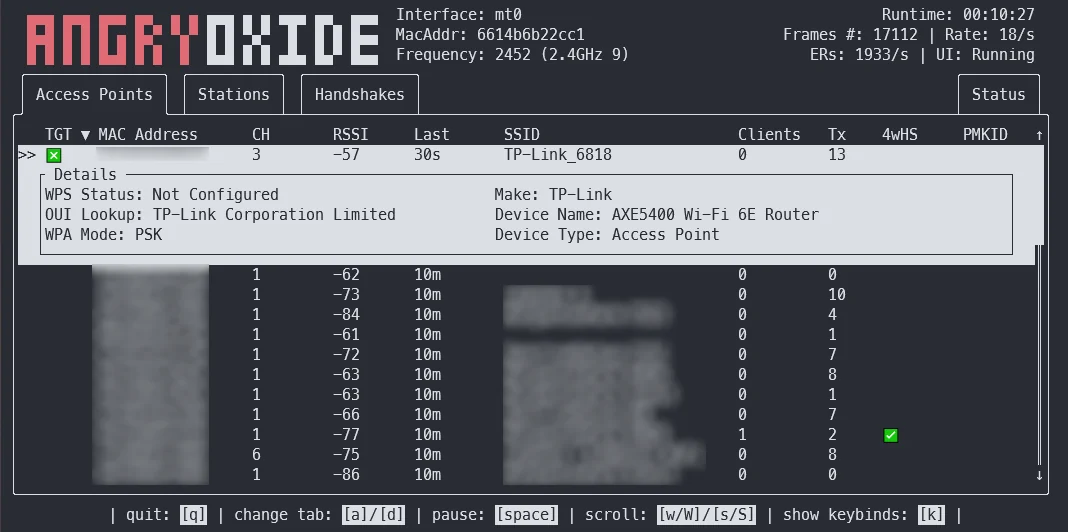
Strumento di auditing offensivo per reti 802.11 che automatizza la cattura degli handshake WPA/WPA2 e dei PMKID tramite attacchi di deautenticazione, rogue-client e cambio di canale, con modalità headless, registrazione GPS e output pronto per Hashcat.



Questo strumento è solo a scopo di ricerca. Non sono responsabile per qualsiasi cosa tu faccia o per i danni che causi usando AngryOxide. Usalo solo contro reti per cui hai il permesso.
AngryOxide è stato sviluppato come un modo per imparare Rust, netlink, i socket del kernel e lo sfruttamento delle reti WiFi tutto in una volta.
Puoi ottenere informazioni su come usare AngryOxide nella Guida per l'utente.
NOTA: Questo progetto è in fase di sviluppo INTENSO e puoi aspettarti un ciclo di rilascio molto rapido.
L'obiettivo generale di questo strumento è fornire una capacità di rilevamento a interfaccia singola con attacchi automatici avanzati che producono hashline valide che puoi craccare con Hashcat.
Questo strumento è fortemente ispirato a hcxdumptool e lo sviluppo non sarebbe stato possibile senza l'aiuto di ZerBea.
Se hai domande o problemi, puoi raggiungermi sul Discord di AngryOxide
Puoi scaricare i binari precompilati di AngryOxide nelle release.
tar -xf angryoxide-linux-x86_64.tar.gz # Untar
chmod +x install.sh # Make executable
sudo ./install.sh # Install (as root, including zsh/bash completions)
Puoi ottenere informazioni su come usare AngryOxide nella Guida per l'utente.
sudo ./install.sh uninstall # Uninstall
Per impostazione predefinita attaccherà TUTTI gli access point nel raggio d'azione, a meno che non venga fornito almeno un target; in tal caso lo strumento trasmetterà solo contro i target definiti. (Ma continuerà comunque a raccogliere passivamente sugli altri access point).
Tutti questi attacchi sono soggetti a controllo della velocità sia per prevenire reset errati dei timer EAPOL sia per mantenere un certo livello di sicurezza operativa.
❯ angryoxide --help
Does awesome things... with wifi.

Usage: angryoxide [OPTIONS] --interface <INTERFACE>

Options:
  -i, --interface <INTERFACE>     Interface to use
  -c, --channel <CHANNEL>         Optional - Channel to scan. Will use "-c 1,6,11" if none specified
  -b, --band <2 | 5 | 6 | 60>     Optional - Entire band to scan - will include all channels interface can support
  -o, --output <Output Filename>  Optional - Output filename
  -h, --help                      Print help
  -V, --version                   Print version

Targeting:
  -t, --target-entry <Target MAC/SSID>
          Optional - Target (MAC or SSID) to attack - will attack everything if none specified
  -w, --whitelist-entry <WhiteList MAC/SSID>
          Optional - Whitelist (MAC or SSID) to NOT attack
      --targetlist <Targets File>
          Optional - File to load target entries from
      --whitelist <Whitelist File>
          Optional - File to load whitelist entries from

Advanced Options:
  -r, --rate <Attack Rate>            Optional - Attack rate (1, 2, 3 || 3 is most aggressive) [default: 2]
      --combine                       Optional - Combine all hc22000 files into one large file for bulk processing
      --active                        Optional - Use Active Monitor mode - WARNING, may cause bugs.
      --rogue <MAC Address>           Optional - Tx MAC for rogue-based attacks - will randomize if excluded
      --gpsd <GPSD Host:Port>         Optional - Alter default HOST:Port for GPSD connection [default: 127.0.0.1:2947]
      --autohunt                      Optional - AO will auto-hunt all channels then lock in on the ones targets are on
      --headless                      Optional - Set the tool to headless mode without a UI. (useful with --autoexit)
      --autoexit                      Optional - AO will auto-exit when all targets have a valid hashline
      --notransmit                    Optional - Do not transmit - passive only
      --notar                         Optional - Do not tar output files
      --disablemouse                  Optional - Disable mouse capture (scroll wheel)
      --dwell <Dwell Time (seconds)>  Optional - Adjust channel hop dwell time [default: 2]

Geofencing:
      --geofence
          Optional - Enable geofencing using a specified latlng and distance
      --center <CENTER>
          Lat,Lng for geofencing (required if geofence is enabled)
      --distance <DISTANCE>
          Distance in meters from the center (required if geofence is enabled)
      --geofence-timeout <GEOFENCE_TIMEOUT>
          Timeout to disable geofence if GPS is lost. (default 300 seconds) [default: 300]