
Skip to content
KitploitKITPLOIT
StrumentiBlog
Invia
StrumentiBlog
Invia

Strumenti di Hacking, PenTest e Cybersecurity per il tuo Arsenale di Sicurezza!

Kitploit è una directory di strumenti di hacking, cybersecurity e pentesting. Scopri gli ultimi aggiornamenti dei progetti per trovare vulnerabilità, analizzare sistemi, automatizzare i test e rafforzare la tua sicurezza.

··Feed·Contatto·Privacy·© 2026 Kitploit

Directory degli strumenti

Categorie

Vedi tutte le categorie
Loading categories
idahunt — idahunt è un framework per analizzare i binari con IDA Pro e cercare elementi in IDA Pro. | Kitploit
Strumenti/GitHubGitHub/nccgroup/idahunt
Sicurezza Sistemi EmbeddedAnalisi delle VulnerabilitàReverse EngineeringScripting e AutomazioneAnalisi MalwareAnalisi di BinariAnalisi del Firmware
GitHubnccgroup/idahunt

idahunt

idahunt è un framework per analizzare i binari con IDA Pro e cercare elementi in IDA Pro.

Vedi Repository
393612 anni faRevisionato da Kitploit

Più Popolari

Vedi tutti →

Scopri gli strumenti più utilizzati dalla nostra community.

Esplora tutti gli strumenti

Sfoglia la nostra collezione di strumenti

Vedi tutti gli strumenti →
Condividi

  • Panoramica
    • Requisiti
    • Funzionalità
    • Scripting
  • Utilizzo
    • Simulare senza eseguire
    • Analisi iniziale
    • Eseguire uno script IDA Python
    • Binary diffing
      • Requisiti
      • Analisi iniziale
      • Diffing dei file
      • Diffing di una funzione
    • Filtri
      • Rilevamento dell'architettura
      • Specifici per target
  • Progetti noti che utilizzano idahunt

Panoramica

idahunt è un framework per analizzare binari con IDA Pro e cercare cose in IDA Pro. È uno strumento a riga di comando per analizzare tutti i file eseguibili ricorsivamente da una cartella data. Esegue IDA in background così non devi aprire manualmente ogni file. Supporta l'esecuzione di script IDA Python esterni.

Requisiti

  • Solo Python3 (tranne gli script IDA Python che possono essere Python2/Python3 a seconda della configurazione di IDA)
  • IDA Pro
  • Windows, Linux, OS X

Funzionalità

  • Specificare quante istanze di IDA vuoi eseguire simultaneamente
  • Automatizzare la creazione di IDB per più eseguibili
  • Eseguire script IDA Python su più eseguibili
  • Aprire più IDB esistenti
  • Supportare qualsiasi formato binario (raw assembly/PE/ELF/MACH-O/etc.) supportato da IDA
  • (Opzionale) Includere helper IDA Python. Puoi usarli per creare facilmente i tuoi script IDA Python oppure puoi usare qualsiasi altra libreria IDA Python come sark o bip per citarne alcune

Esempi utili includono (elenco non esaustivo):

  • Analizzare gli aggiornamenti Patch Tuesday di Microsoft
  • Analizzare malware della stessa famiglia
  • Analizzare più versioni dello stesso software
  • Analizzare un gruppo di binari (UEFI, HP iLO, router Cisco IOS, firewall Cisco ASA, ecc.)

Scripting

Le capacità degli script IDA Python sono illimitate. Puoi importare qualsiasi script IDA Python esistente o crearne uno tuo. Alcuni esempi:

  • Rinominare funzioni in base a stringhe di debug
  • Decriptare stringhe (es. malware)
  • Cercare lo stesso simbolo in più versioni (usando euristiche)
  • Cercare gadget ROP
  • Trasferire nomi/simboli di funzioni reverse-engineered da una versione all'altra usando strumenti come diaphora
  • Ecc.

Utilizzo

  • idahunt.py: strumento principale per analizzare file eseguibili
  • filters/: contiene filtri di base per decidere quali file in una directory di input analizzare con IDA
    • filters/default.py: filtro di base predefinito che non filtra nulla e usato per impostazione predefinita
    • filters/ciscoasa.py: utile per analizzare immagini di Cisco ASA Firewall
    • filters/hpilo.py: utile per analizzare immagini HP iLO
    • filters/names.py: filtro di base basato su nome, lunghezza del nome o estensione
  • script_template.py: contiene uno script IDA Python hello world
root@kitploit:~
C:\idahunt> C:\Python37-x64\python.exe .\idahunt.py -h
usage: idahunt.py [-h] [--inputdir INPUTDIR] [--analyse] [--open]
                  [--ida-args IDA_ARGS] [--scripts SCRIPTS [SCRIPTS ...]]
                  [--filter FILTER] [--cleanup] [--temp-cleanup] [--verbose]
                  [--max-ida MAX_IDA] [--list-only] [--version IDA_VERSION]

optional arguments:
  -h, --help            show this help message and exit
  --inputdir INPUTDIR   Input folder to search for files
  --analyse, --analyze  analyse all files i.e. create .idb for all of them
  --open                open all files into IDA (debug only)
  --ida-args IDA_ARGS   Additional arguments to pass to IDA (e.g.
                        -p<processor> -i<entry_point> -b<load_addr>)
  --scripts SCRIPTS [SCRIPTS ...]
                        List of IDA Python scripts to execute in this order
  --filter FILTER       External python script with optional arguments
                        defining a filter for the names of the files to
                        analyse. See filters/names.py for example
  --cleanup             Cleanup i.e. remove .asm files that we don't need
  --temp-cleanup        Cleanup temporary database files i.e. remove .id0,
                        .id1, .id2, .nam, .dmp files if IDA Pro crashed and
                        did not delete them
  --verbose             be more verbose to debug script
  --max-ida MAX_IDA     Maximum number of instances of IDA to run at a time
                        (default: 10)
  --list-only           List only what files would be handled without
                        executing IDA
  --version IDA_VERSION
                        Override IDA version (e.g. "7.5"). This is used to
                        find the path of IDA on Windows.

Simulare senza eseguire

Puoi usare --list-only con qualsiasi riga di comando per elencare semplicemente cosa farebbe lo strumento senza realmente farlo.

root@kitploit:~
C:\idahunt>idahunt.py --inputdir C:\re --analyse --filter "filters\names.py -a 32 -v" --list-only
[idahunt] Simulating only...
[idahunt] ANALYSING FILES
[idahunt] Analysing C:\re\cves\cve-2014-4076.dll
[idahunt] Analysing C:\re\cves\cve-2014-4076.exe
[idahunt] Analysing C:\re\DownloadExecute.exe
[idahunt] Analysing C:\re\ReverseShell.exe

Analisi iniziale

Qui avviamo un'analisi iniziale. Termina dopo alcuni secondi:

root@kitploit:~
C:\idahunt>idahunt.py --inputdir C:\re --analyse --filter "filters\names.py -a 32 -v"
[idahunt] ANALYSING FILES
[idahunt] Analysing C:\re\cves\cve-2014-4076.dll
[idahunt] Analysing C:\re\cves\cve-2014-4076.exe
[idahunt] Analysing C:\re\DownloadExecute.exe
[idahunt] Analysing C:\re\ReverseShell.exe
[idahunt] Waiting on remaining 4 IDA instances

Qui ripuliamo i file temporanei .asm creati dall'analisi iniziale:

root@kitploit:~
C:\idahunt>idahunt.py --inputdir C:\re --cleanup
[idahunt] Deleting C:\re\cves\cve-2014-4076.asm
[idahunt] Deleting C:\re\DownloadExecute.asm
[idahunt] Deleting C:\re\ReverseShell.asm

Possiamo vedere l'.idb generato e anche alcuni file .log che contengono la finestra di output di IDA Pro.

root@kitploit:~
C:\idahunt>tree /f C:\re
Folder PATH listing
Volume serial number is XXXX-XXXX
C:\RE
│   DownloadExecute.exe
│   DownloadExecute.idb
│   DownloadExecute.log
│   ReverseShell.exe
│   ReverseShell.idb
│   ReverseShell.log
│
└───cves
        cve-2014-4076.dll
        cve-2014-4076.exe
        cve-2014-4076.idb
        cve-2014-4076.log

Eseguire uno script IDA Python

Qui eseguiamo uno script IDA Python di base che stampa [script_template] I execute in IDA, yay! nella finestra di output di IDA Pro.

root@kitploit:~
C:\idahunt>idahunt.py --inputdir C:\re --filter "filters\names.py -a 32 -v" --scripts C:\idahunt\script_template.py
[idahunt] EXECUTE SCRIPTS
[idahunt] Executing script C:\idahunt\script_template.py for C:\re\cves\cve-2014-4076.dll
[idahunt] Executing script C:\idahunt\script_template.py for C:\re\cves\cve-2014-4076.exe
[idahunt] Executing script C:\idahunt\script_template.py for C:\re\DownloadExecute.exe
[idahunt] Executing script C:\idahunt\script_template.py for C:\re\ReverseShell.exe
[idahunt] Waiting on remaining 4 IDA instances

Poiché viene salvato nel file .log, possiamo verificare che è stato eseguito correttamente:

root@kitploit:~
Autoanalysis subsystem has been initialized.
Database for file 'ReverseShell.exe' has been loaded.
Compiling file 'C:\Program Files (x86)\IDA 6.95\idc\ida.idc'...
Executing function 'main'...
[script_template] I execute in IDA, yay!

Binary diffing

idahunt si integra perfettamente con diaphora per eseguire binary diffing a partire da questa PR.

Requisiti

È necessaria una gerarchia di cartelle con le diverse versioni dello stesso file, ad esempio:

root@kitploit:~
C:\> tree C:\tests\ /F
C:\tests
├───patch
│       tm.sys
│
└───vuln
        tm.sys

Analisi iniziale

Se non è già stato fatto, devi eseguire l'analisi iniziale di IDA per creare gli idb.

root@kitploit:~
C:\idahunt> python idahunt.py --inputdir C:\tests\ --analyse --verbose
[idahunt] IDA32 = C:\Program Files\IDA Core 8.1\ida.exe
[idahunt] IDA64 = C:\Program Files\IDA Core 8.1\ida64.exe
[idahunt] ANALYSING FILES
[idahunt] Analysing C:\tests\patch\tm.sys
[idahunt] C:\Program Files\IDA Core 8.1\ida64.exe -B -oC:\tests\patch\tm.i64 -LC:\tests\patch\tm.log C:\tests\patch\tm.sys
[idahunt] Analysing C:\tests\vuln\tm.sys
[idahunt] C:\Program Files\IDA Core 8.1\ida64.exe -B -oC:\tests\vuln\tm.i64 -LC:\tests\vuln\tm.log C:\tests\vuln\tm.sys
[idahunt] Executed IDA 2/2 times IDA instances
[idahunt] Took 0:00:15.03 to execute this
root@kitploit:~
C:\> tree C:\tests\ /F
C:\tests
├───patch
│       tm.i64
│       tm.log
│       tm.sys
│
└───vuln
        tm.i64
        tm.log
        tm.sys

Diffing dei file

Questo usa diaphora per eseguire l'export del diff per ogni file (creando il database sqlite3 <filename>.sqlite) e poi il diff tra le versioni (creando il database sqlite3 <filename>.diaphora).

root@kitploit:~
C:\idahunt> python idahunt.py --diaphora-path C:\diaphora --inputdir C:\tests --diff --filename tm.sys --verbose
[idahunt] IDA32 = C:\Program Files\IDA Core 8.1\ida.exe
[idahunt] IDA64 = C:\Program Files\IDA Core 8.1\ida64.exe
[idahunt] EXECUTE DIFF-EXPORT
[idahunt] Executing script C:\diaphora\diaphora_ida.py for C:\tests\patch\tm.sys
[idahunt] C:\Program Files\IDA Core 8.1\ida64.exe -A -SC:\diaphora\diaphora_ida.py -LC:\tests\patch\tm.log C:\tests\patch\tm.i64
[idahunt] Environment variables:
[idahunt] DIAPHORA_AUTO2=1
[idahunt] DIAPHORA_EXPORT_FILE=tm.sqlite
[idahunt] Executing script C:\diaphora\diaphora_ida.py for C:\tests\vuln\tm.sys
[idahunt] C:\Program Files\IDA Core 8.1\ida64.exe -A -SC:\diaphora\diaphora_ida.py -LC:\tests\vuln\tm.log C:\tests\vuln\tm.i64
[idahunt] Environment variables:
[idahunt] DIAPHORA_AUTO2=1
[idahunt] DIAPHORA_EXPORT_FILE=tm.sqlite
[idahunt] Executed IDA 2/2 times IDA instances
[idahunt] EXECUTE DIFF
[idahunt] Diffing patch vs vuln
[idahunt] C:\Program Files\Python39\python.exe C:\diaphora\diaphora.py C:\tests\patch\tm.sqlite C:\tests\vuln\tm.sqlite -o C:\tests\vuln\patch_vs_vuln\tm.sys.diaphora
[diaphora][Wed Dec 14 10:33:49 2022] Diffing...es
[diaphora][Wed Dec 14 10:33:49 2022] Callgraphs from both programs differ in 0.706714%
[diaphora][Wed Dec 14 10:33:49 2022] Finding best matches...
[diaphora][Wed Dec 14 10:33:49 2022] Finding with heuristic 'Perfect match, same name'
[diaphora][Wed Dec 14 10:33:50 2022] All functions matched in at least one database, finishing.
[diaphora][Wed Dec 14 10:33:50 2022] Finding partial matches
[diaphora][Wed Dec 14 10:33:50 2022] All functions matched in at least one database, finishing.
[diaphora][Wed Dec 14 10:33:50 2022] Finding with heuristic 'Small names difference'
[diaphora][Wed Dec 14 10:33:50 2022] Finding with heuristic 'Call address sequence'
[diaphora][Wed Dec 14 10:33:50 2022] Finding with heuristic 'Call address sequence'
[diaphora][Wed Dec 14 10:33:50 2022] Finding unmatched functions
[diaphora][Wed Dec 14 10:33:50 2022] Done. Took 1.110000000000582 seconds.
[diaphora][Wed Dec 14 10:33:50 2022] Diffing results saved in file 'C:\tests\vuln\patch_vs_vuln\tm.sys.diaphora'.
[idahunt] Executed Python 1/1 times
[idahunt] Took 0:00:30.07 to execute this
root@kitploit:~
C:\> tree C:\tests\ /F
C:\tests
├───patch
│       tm.i64
│       tm.log
│       tm.sqlite
│       tm.sys
│
└───vuln
    │   tm.i64
    │   tm.log
    │   tm.sqlite
    │   tm.sys
    │
    └───patch_vs_vuln
            tm.sys.diaphora
            tm.sys.txt

Come mostrato sopra, crea anche un file <filename>.txt insieme al file <filename>.diaphora con l'elenco delle corrispondenze migliori:

root@kitploit:~
partial,00000,1c0002708,WPP_SF_DDq,1c0002708,WPP_SF_DDq,0.950,1,1,Perfect match, same name
partial,00001,1c0002770,WPP_SF_Dq,1c0002770,WPP_SF_Dq,0.940,1,1,Perfect match, same name
partial,00002,1c00027c8,WPP_SF_qq_guid_D,1c00027c8,WPP_SF_qq_guid_D,0.960,1,1,Perfect match, same name
partial,00003,1c0002844,WPP_SF_qqi,1c0002844,WPP_SF_qqi,0.950,1,1,Perfect match, same name
partial,00004,1c00028a8,WPP_SF_qqii,1c00028a8,WPP_SF_qqii,0.960,1,1,Perfect match, same name
partial,00005,1c0015500,TmRecoverResourceManagerExt,1c0015500,TmRecoverResourceManagerExt,0.860,37,36,Perfect match, same name
partial,00006,1c001a610,TmpHeuristicAbortTransaction,1c001a640,TmpHeuristicAbortTransaction,0.986,6,6,Perfect match, same name
partial,00007,1c001a6c0,TmpHeuristicAbortTransactionAfterCheckpoint,1c001a6f0,TmpHeuristicAbortTransactionAfterCheckpoint,0.992,11,11,Perfect match, same name
partial,00008,1c001ad58,TmpIsClusteredTransactionManager,1c001ad88,TmpIsClusteredTransactionManager,0.994,15,15,Perfect match, same name
partial,00009,1c001b0c0,TmpMigrateEnlistments,1c001b0f0,TmpMigrateEnlistments,0.980,10,10,Perfect match, same name

Diffing di una funzione

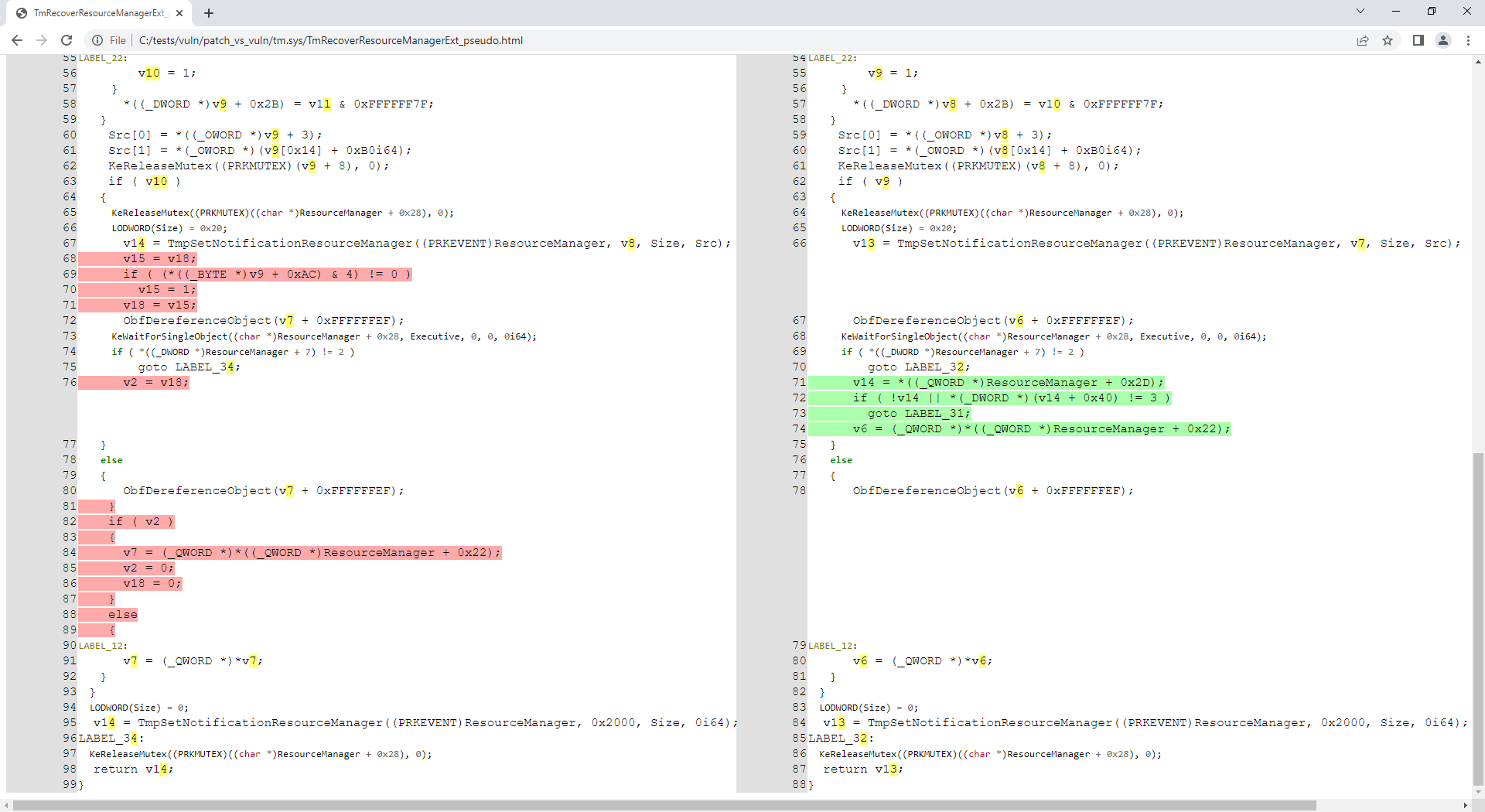
È evidente che i file tm.sys (forniti nel repository) sono correlati a CVE-2018-8611 quindi analizziamo la funzione corretta TmRecoverResourceManagerExt():

root@kitploit:~
C:\idahunt> python idahunt.py --diaphora-path C:\diaphora\ --inputdir C:\tests\ --html --filename tm.sys --funcname TmRecoverResourceManagerExt --verbose
[idahunt] IDA32 = C:\Program Files\IDA Core 8.1\ida.exe
[idahunt] IDA64 = C:\Program Files\IDA Core 8.1\ida64.exe
[idahunt] EXECUTE GENERATE HTML
C:\tests\patch\tm.sqlite C:\tests\vuln\tm.sqlite
C:\tests\vuln\patch_vs_vuln\tm.sys\TmRecoverResourceManagerExt_asm.html C:\tests\vuln\patch_vs_vuln\tm.sys\TmRecoverResourceManagerExt_pseudo.html
[idahunt] Showing patch vs vuln for TmRecoverResourceManagerExt
[idahunt] C:\Program Files\IDA Core 8.1\ida64.exe -A -SC:\diaphora\diaphora_ida.py -LC:\tests\patch\tm.log C:\tests\patch\tm.i64
[idahunt] Environment variables:
[idahunt] DIAPHORA_AUTO4=1
[idahunt] DIAPHORA_DB1=C:\tests\patch\tm.sqlite
[idahunt] DIAPHORA_DB2=C:\tests\vuln\tm.sqlite
[idahunt] DIAPHORA_DIFF=C:\tests\vuln\patch_vs_vuln\tm.sys.diaphora
[idahunt] DIAPHORA_EA1=1c0015500
[idahunt] DIAPHORA_EA2=1c0015500
[idahunt] DIAPHORA_HTML_ASM=C:\tests\vuln\patch_vs_vuln\tm.sys\TmRecoverResourceManagerExt_asm.html
[idahunt] DIAPHORA_HTML_PSEUDO=C:\tests\vuln\patch_vs_vuln\tm.sys\TmRecoverResourceManagerExt_pseudo.html
[idahunt] Executed IDA 1/1 times IDA instances
[idahunt] Took 0:00:10.03 to execute this

Ora abbiamo generato assembly e codice decompilato per questa funzione:

root@kitploit:~
C:\idahunt> tree C:\tests\ /F
C:\tests
├───patch
│       tm.i64
│       ...
│
└───vuln
    │   tm.i64
    │   ...
    │
    └───patch_vs_vuln
        │   tm.sys.diaphora
        │   tm.sys.txt
        │
        └───tm.sys
                TmRecoverResourceManagerExt_asm.html
                TmRecoverResourceManagerExt_pseudo.html

Filtri

Possiamo filtrare affinché idahunt analizzi solo i file con un determinato pattern nel nome (-n Download qui sotto):

root@kitploit:~
C:\idahunt>idahunt.py --inputdir C:\re --filter "filters\names.py -a 32 -v -n Download" --scripts C:\idahunt\script_template.py --list-only
[idahunt] Simulating only...
[idahunt] EXECUTE SCRIPTS
[names] Skipping non-matching name Download in cve-2014-4076.dll
[names] Skipping non-matching name Download in cve-2014-4076.exe
[idahunt] Executing script C:\idahunt\script_template.py for C:\re\DownloadExecute.exe
[names] Skipping non-matching name Download in ReverseShell.exe

Possiamo anche filtrare affinché idahunt analizzi solo i file con una determinata estensione (-e dll qui sotto):

root@kitploit:~
C:\idahunt>idahunt.py --inputdir C:\re --filter "filters\names.py -a 32 -v -e dll" --scripts C:\idahunt\script_template.py --list-only
[idahunt] Simulating only...
[idahunt] EXECUTE SCRIPTS
[idahunt] Executing script C:\idahunt\script_template.py for C:\re\cves\cve-2014-4076.dll
[names] Skipping non-matching extension .dll in cve-2014-4076.exe
[names] Skipping non-matching extension .dll in DownloadExecute.exe
[names] Skipping non-matching extension .dll in ReverseShell.exe

Rilevamento dell'architettura

L'architettura deve essere nota in anticipo a causa di come è fatta IDA Pro e del fatto che contiene 2 eseguibili diversi idaq.exe e idaq64.exe per analizzare binari delle due architetture a 32 bit e 64 bit. Questo è particolarmente vero se vuoi usare il decompilatore HexRays.

idahunt rileva automaticamente le architetture i386, ia64 e amd64 nei file PE di Windows. Se devi rilevare automaticamente altre architetture, puoi aprire una issue o aggiungerla a idahunt e fare una PR.

Se dimentichi di fornire l'architettura dei file che vuoi analizzare, il filters\names.py di base restituirà un errore:

root@kitploit:~
C:\idahunt>idahunt.py --inputdir C:\re --filter "filters\names.py -v -e dll" --scripts C:\idahunt\script_template.py --list-only
[idahunt] Simulating only...
[idahunt] EXECUTE SCRIPTS
[names] Unknown architecture: None. You need to specify it with -a
[names] Skipping non-matching extension .dll in cve-2014-4076.exe
[names] Skipping non-matching extension .dll in DownloadExecute.exe
[names] Skipping non-matching extension .dll in ReverseShell.exe

Specifici per target

Esistono filtri per analizzare firmware HP iLO o Cisco ASA.

Progetti noti che utilizzano idahunt

  • asadbg
Scarica lo strumento