
 mandiant/capa
Strumento di analisi statica e dinamica basato su regole che identifica le capacità nei file PE, ELF, .NET e shellcode, mappandole alle tecniche MITRE ATT&CK per il triage di malware.
capa rileva le capacità nei file eseguibili. Lo esegui su un PE, ELF, modulo .NET, file shellcode o un report sandbox e ti dice cosa pensa che il programma possa fare. Ad esempio, potrebbe suggerire che il file è un backdoor, è in grado di installare servizi o si basa su HTTP per comunicare.
Per ispezionare interattivamente i risultati di capa nel tuo browser, usa capa Explorer Web.
Se vuoi ispezionare o scrivere regole di capa, vai al repository capa-rules. Altrimenti, continua a leggere.
Qui sotto trovi un elenco dei nostri post sul blog su capa con maggiori dettagli.
$ capa.exe suspicious.exe
+--------------------+------------------------------------------------------------------------+ | ATT&CK Tactic | ATT&CK Technique | |--------------------+------------------------------------------------------------------------| | DEFENSE EVASION | Obfuscated Files or Information [T1027] | | DISCOVERY | Query Registry [T1012] | | | System Information Discovery [T1082] | | EXECUTION | Command and Scripting Interpreter::Windows Command Shell [T1059.003] | | | Shared Modules [T1129] | | EXFILTRATION | Exfiltration Over C2 Channel [T1041] | | PERSISTENCE | Create or Modify System Process::Windows Service [T1543.003] | +--------------------+------------------------------------------------------------------------+
+-------------------------------------------+-------------------------------------------------+ | CAPABILITY | NAMESPACE | |-------------------------------------------+-------------------------------------------------| | read and send data from client to server | c2/file-transfer | | execute shell command and capture output | c2/shell | | receive data (2 matches) | communication | | send data (6 matches) | communication | | connect to HTTP server (3 matches) | communication/http/client | | send HTTP request (3 matches) | communication/http/client | | create pipe | communication/named-pipe/create | | get socket status (2 matches) | communication/socket | | receive data on socket (2 matches) | communication/socket/receive | | send data on socket (3 matches) | communication/socket/send | | connect TCP socket | communication/socket/tcp | | encode data using Base64 | data-manipulation/encoding/base64 | | encode data using XOR (6 matches) | data-manipulation/encoding/xor | | run as a service | executable/pe | | get common file path (3 matches) | host-interaction/file-system | | read file | host-interaction/file-system/read | | write file (2 matches) | host-interaction/file-system/write | | print debug messages (2 matches) | host-interaction/log/debug/write-event | | resolve DNS | host-interaction/network/dns/resolve | | get hostname | host-interaction/os/hostname | | create process | host-interaction/process/create | | create registry key | host-interaction/registry/create | | create service | host-interaction/service/create | | create thread | host-interaction/thread/create | | persist via Windows service | persistence/service | +-------------------------------------------+-------------------------------------------------+
# download e utilizzo
Scarica le versioni stabili dei binari standalone di capa [qui](https://github.com/mandiant/capa/releases). Puoi eseguire i binari standalone senza installazione. capa è uno strumento da riga di comando che dovrebbe essere eseguito dal terminale.
Per utilizzare capa come libreria o integrarlo con un altro strumento, consulta [doc/installation.md](https://github.com/mandiant/capa/blob/master/doc/installation.md) per ulteriori istruzioni di configurazione.
**Documentazione:** [Utilizzo e suggerimenti](https://github.com/mandiant/capa/blob/master/doc/usage.md) · [Installazione](https://github.com/mandiant/capa/blob/master/doc/installation.md) · [Limitazioni](https://github.com/mandiant/capa/blob/master/doc/limitations.md) · [FAQ](https://github.com/mandiant/capa/blob/master/doc/faq.md)
# capa Explorer Web
Il [capa Explorer Web](https://mandiant.github.io/capa/explorer/) ti consente di esplorare interattivamente i risultati di capa nel tuo browser web. Oltre alla versione online, puoi scaricare un file HTML standalone per l'utilizzo offline locale.
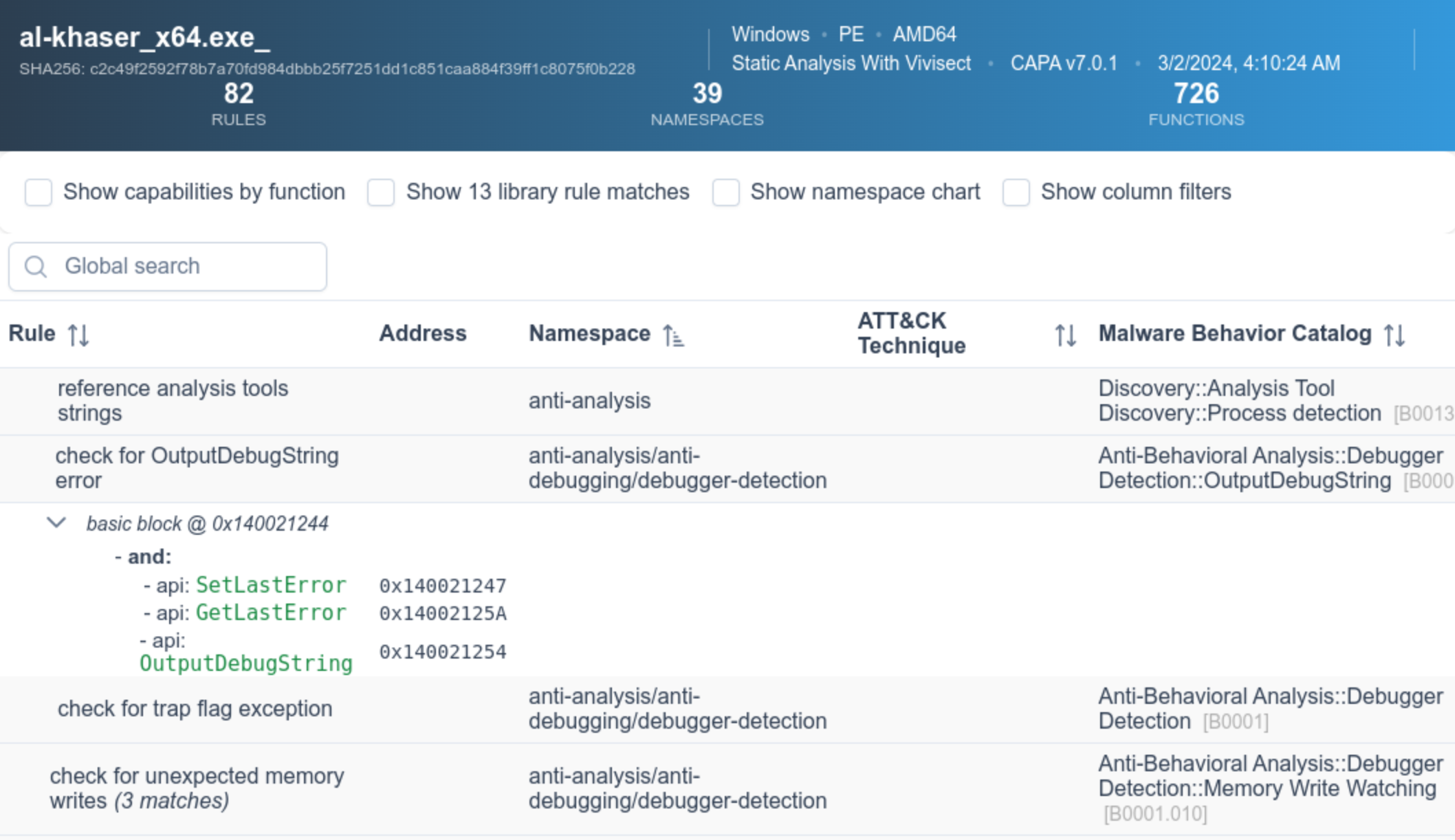
Maggiori dettagli sull'interfaccia web sono disponibili nel [README di capa Explorer Web](https://github.com/mandiant/capa/blob/master/web/explorer/README.md).
# esempio
Nell'output di esempio sopra, eseguiamo capa su un binario sconosciuto (`suspicious.exe`), e lo strumento riporta che il programma può inviare richieste HTTP, decodificare dati tramite XOR e Base64, installare servizi e generare nuovi processi. Considerato insieme, questo ci fa pensare che `suspicious.exe` potrebbe essere una backdoor persistente. Pertanto, il nostro prossimo passo di analisi potrebbe essere eseguire `suspicious.exe` in una sandbox e cercare di recuperare il server di comando e controllo.
## risultati dettagliati
Passando il flag `-vv` (per molto verboso), capa riporta esattamente dove ha trovato prove di queste capacità. Questo è utile per almeno due ragioni:
- aiuta a spiegare perché dovremmo fidarci dei risultati e ci consente di verificare le conclusioni, e
- mostra dove all'interno del binario un analista esperto potrebbe studiare con IDA Pro```
$ capa.exe suspicious.exe -vv
...
execute shell command and capture output
namespace c2/shell
author [email protected]
scope function
att&ck Execution::Command and Scripting Interpreter::Windows Command Shell [T1059.003]
references https://docs.microsoft.com/en-us/windows/win32/api/processthreadsapi/ns-processthreadsapi-startupinfoa
function @ 0x4011C0
and:
match: create a process with modified I/O handles and window @ 0x4011C0
and:
number: 257 = STARTF_USESTDHANDLES | STARTF_USESHOWWINDOW @ 0x4012B8
or:
number: 68 = StartupInfo.cb (size) @ 0x401282
or: = API functions that accept a pointer to a STARTUPINFO structure
api: kernel32.CreateProcess @ 0x401343
match: create pipe @ 0x4011C0
or:
api: kernel32.CreatePipe @ 0x40126F, 0x401280
optional:
match: create thread @ 0x40136A, 0x4013BA
or:
and:
os: windows
or:
api: kernel32.CreateThread @ 0x4013D7
or:
and:
os: windows
or:
api: kernel32.CreateThread @ 0x401395
or:
string: "cmd.exe" @ 0x4012FD
...
capa supporta anche il rilevamento di capacità dinamiche per diversi sandbox, tra cui:
Per utilizzare questa funzionalità, invia il tuo file a un sandbox supportato, quindi scarica ed esegui capa sul file di report generato. Questa funzionalità consente a capa di abbinare le capacità alle caratteristiche dinamiche e statiche catturate dal sandbox durante l'esecuzione.
Ecco un esempio di esecuzione di capa su un file packed, e poi di esecuzione di capa sul report CAPE generato per lo stesso file packed:```yaml $ capa 05be49819139a3fdcdbddbdefd298398779521f3d68daa25275cc77508e42310.exe WARNING:capa.capabilities.common:-------------------------------------------------------------------------------- WARNING:capa.capabilities.common: This sample appears to be packed. WARNING:capa.capabilities.common: WARNING:capa.capabilities.common: Packed samples have often been obfuscated to hide their logic. WARNING:capa.capabilities.common: capa cannot handle obfuscation well using static analysis. This means the results may be misleading or incomplete. WARNING:capa.capabilities.common: If possible, you should try to unpack this input file before analyzing it with capa. WARNING:capa.capabilities.common: Alternatively, run the sample in a supported sandbox and invoke capa against the report to obtain dynamic analysis results. WARNING:capa.capabilities.common: WARNING:capa.capabilities.common: Identified via rule: (internal) packer file limitation WARNING:capa.capabilities.common: WARNING:capa.capabilities.common: Use -v or -vv if you really want to see the capabilities identified by capa. WARNING:capa.capabilities.common:--------------------------------------------------------------------------------
$ capa 05be49819139a3fdcdbddbdefd298398779521f3d68daa25275cc77508e42310.json
┍━━━━━━━━━━━━━━━━━━━━━━━━┯━━━━━━━━━━━━━━━━━━━━━━━━━━━━━━━━━━━━━━━━━━━━━━━━━━━━━━━━━━━━━━━━━━━━━━━━━━━━━━━━━━━━┑ │ ATT&CK Tactic │ ATT&CK Technique │ ┝━━━━━━━━━━━━━━━━━━━━━━━━┿━━━━━━━━━━━━━━━━━━━━━━━━━━━━━━━━━━━━━━━━━━━━━━━━━━━━━━━━━━━━━━━━━━━━━━━━━━━━━━━━━━━━┥ │ CREDENTIAL ACCESS │ Credentials from Password Stores T1555 │ ├────────────────────────┼────────────────────────────────────────────────────────────────────────────────────┤ │ DEFENSE EVASION │ File and Directory Permissions Modification T1222 │ │ │ Modify Registry T1112 │ │ │ Obfuscated Files or Information T1027 │ │ │ Virtualization/Sandbox Evasion::User Activity Based Checks T1497.002 │ ├────────────────────────┼────────────────────────────────────────────────────────────────────────────────────┤ │ DISCOVERY │ Account Discovery T1087 │ │ │ Application Window Discovery T1010 │ │ │ File and Directory Discovery T1083 │ │ │ Query Registry T1012 │ │ │ System Information Discovery T1082 │ │ │ System Location Discovery::System Language Discovery T1614.001 │ │ │ System Owner/User Discovery T1033 │ ├────────────────────────┼────────────────────────────────────────────────────────────────────────────────────┤ │ EXECUTION │ System Services::Service Execution T1569.002 │ ├────────────────────────┼────────────────────────────────────────────────────────────────────────────────────┤ │ PERSISTENCE │ Boot or Logon Autostart Execution::Registry Run Keys / Startup Folder T1547.001 │ │ │ Boot or Logon Autostart Execution::Winlogon Helper DLL T1547.004 │ │ │ Create or Modify System Process::Windows Service T1543.003 │ ┕━━━━━━━━━━━━━━━━━━━━━━━━┷━━━━━━━━━━━━━━━━━━━━━━━━━━━━━━━━━━━━━━━━━━━━━━━━━━━━━━━━━━━━━━━━━━━━━━━━━━━━━━━━━━━━┙
┍━━━━━━━━━━━━━━━━━━━━━━━━━━━━━━━━━━━━━━━━━━━━━━━━━━━━━━┯━━━━━━━━━━━━━━━━━━━━━━━━━━━━━━━━━━━━━━━━━━━━━━━━━━━━━━┑ │ Capability │ Namespace │ ┝━━━━━━━━━━━━━━━━━━━━━━━━━━━━━━━━━━━━━━━━━━━━━━━━━━━━━━┿━━━━━━━━━━━━━━━━━━━━━━━━━━━━━━━━━━━━━━━━━━━━━━━━━━━━━━┥ │ check for unmoving mouse cursor (3 matches) │ anti-analysis/anti-vm/vm-detection │ │ gather bitkinex information │ collection/file-managers │ │ gather classicftp information │ collection/file-managers │ │ gather filezilla information │ collection/file-managers │ │ gather total-commander information │ collection/file-managers │ │ gather ultrafxp information │ collection/file-managers │ │ resolve DNS (23 matches) │ communication/dns │ │ initialize Winsock library (7 matches) │ communication/socket │ │ act as TCP client (3 matches) │ communication/tcp/client │ │ create new key via CryptAcquireContext │ data-manipulation/encryption │ │ encrypt or decrypt via WinCrypt │ data-manipulation/encryption │ │ hash data via WinCrypt │ data-manipulation/hashing │ │ initialize hashing via WinCrypt │ data-manipulation/hashing │ │ hash data with MD5 │ data-manipulation/hashing/md5 │ │ generate random numbers via WinAPI │ data-manipulation/prng │ │ extract resource via kernel32 functions (2 matches) │ executable/resource │ │ interact with driver via control codes (2 matches) │ host-interaction/driver │ │ get Program Files directory (18 matches) │ host-interaction/file-system │ │ get common file path (575 matches) │ host-interaction/file-system │ │ create directory (2 matches) │ host-interaction/file-system/create │ │ delete file │ host-interaction/file-system/delete │ │ get file attributes (122 matches) │ host-interaction/file-system/meta │ │ set file attributes (8 matches) │ host-interaction/file-system/meta │ │ move file │ host-interaction/file-system/move │ │ find taskbar (3 matches) │ host-interaction/gui/taskbar/find │ │ get keyboard layout (12 matches) │ host-interaction/hardware/keyboard │ │ get disk size │ host-interaction/hardware/storage │ │ get hostname (4 matches) │ host-interaction/os/hostname │ │ allocate or change RWX memory (3 matches) │ host-interaction/process/inject │ │ query or enumerate registry key (3 matches) │ host-interaction/registry │ │ query or enumerate registry value (8 matches) │ host-interaction/registry │ │ delete registry key │ host-interaction/registry/delete │ │ start service │ host-interaction/service/start │ │ get session user name │ host-interaction/session │ │ persist via Run registry key │ persistence/registry/run │ │ persist via Winlogon Helper DLL registry key │ persistence/registry/winlogon-helper │ │ persist via Windows service (2 matches) │ persistence/service │ ┕━━━━━━━━━━━━━━━━━━━━━━━━━━━━━━━━━━━━━━━━━━━━━━━━━━━━━━┷━━━━━━━━━━━━━━━━━━━━━━━━━━━━━━━━━━━━━━━━━━━━━━━━━━━━━━┙
# regole di capa
capa utilizza una raccolta di regole per identificare le capacità all'interno di un programma.
Queste regole sono facili da scrivere, anche per chi è nuovo al reverse engineering.
Creando regole, è possibile estendere le capacità che capa riconosce.
Sotto alcuni aspetti, le regole di capa sono un misto dei formati OpenIOC, Yara e YAML.

Ecco un esempio di regola utilizzata da capa:```yaml
rule:
  meta:
    name: create TCP socket
    namespace: communication/socket/tcp
    authors:
      - [email protected]
      - [email protected]
      - [email protected]
    scopes:
      static: basic block
      dynamic: call
    mbc:
      - Communication::Socket Communication::Create TCP Socket [C0001.011]
    examples:
      - Practical Malware Analysis Lab 01-01.dll_:0x10001010
  features:
    - or:
      - and:
        - number: 6 = IPPROTO_TCP
        - number: 1 = SOCK_STREAM
        - number: 2 = AF_INET
        - or:
          - api: ws2_32.socket
          - api: ws2_32.WSASocket
          - api: socket
      - property/read: System.Net.Sockets.TcpClient::Client
Il repository github.com/mandiant/capa-rules contiene centinaia di regole standard distribuite con capa. Impara a scrivere regole e contribuisci con nuove voci quando trovi tecniche interessanti nel malware.
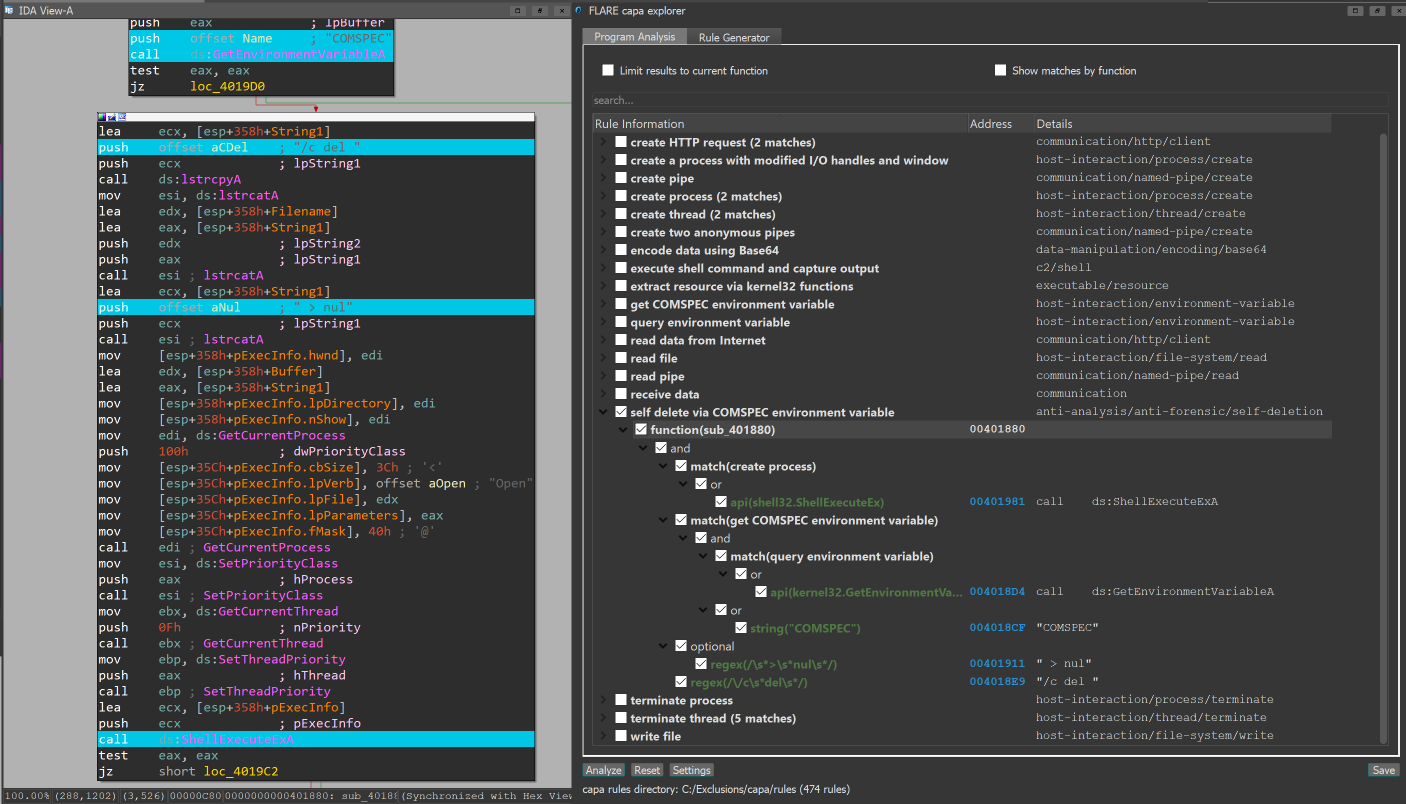
Se usi IDA Pro, puoi utilizzare il plugin capa explorer. capa explorer ti aiuta a identificare aree interessanti di un programma e a creare nuove regole capa utilizzando caratteristiche estratte direttamente dal tuo database IDA Pro. Utilizza anche le tue modifiche locali al file .idb per estrarre caratteristiche migliori, ad esempio quando rinomini una variabile globale che contiene un indirizzo API risolto dinamicamente.
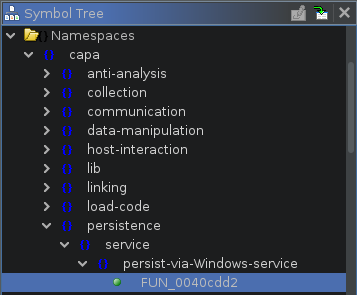
capa supporta l'uso di Ghidra (tramite PyGhidra) come backend per l'estrazione delle caratteristiche. Questo ti permette di eseguire capa su binari utilizzando il motore di analisi di Ghidra.
Puoi eseguire e visualizzare i risultati di capa nell'interfaccia di Ghidra usando capa explorer per Ghidra.
Puoi anche eseguire capa dalla riga di comando usando il backend Ghidra.
Il repository capa-testfiles contiene i dati che usiamo per testare il codice e le regole di capa
Iscriviti alla mailing list FLARE per gli annunci della community! Invia un'email con oggetto "subscribe" a [email protected].