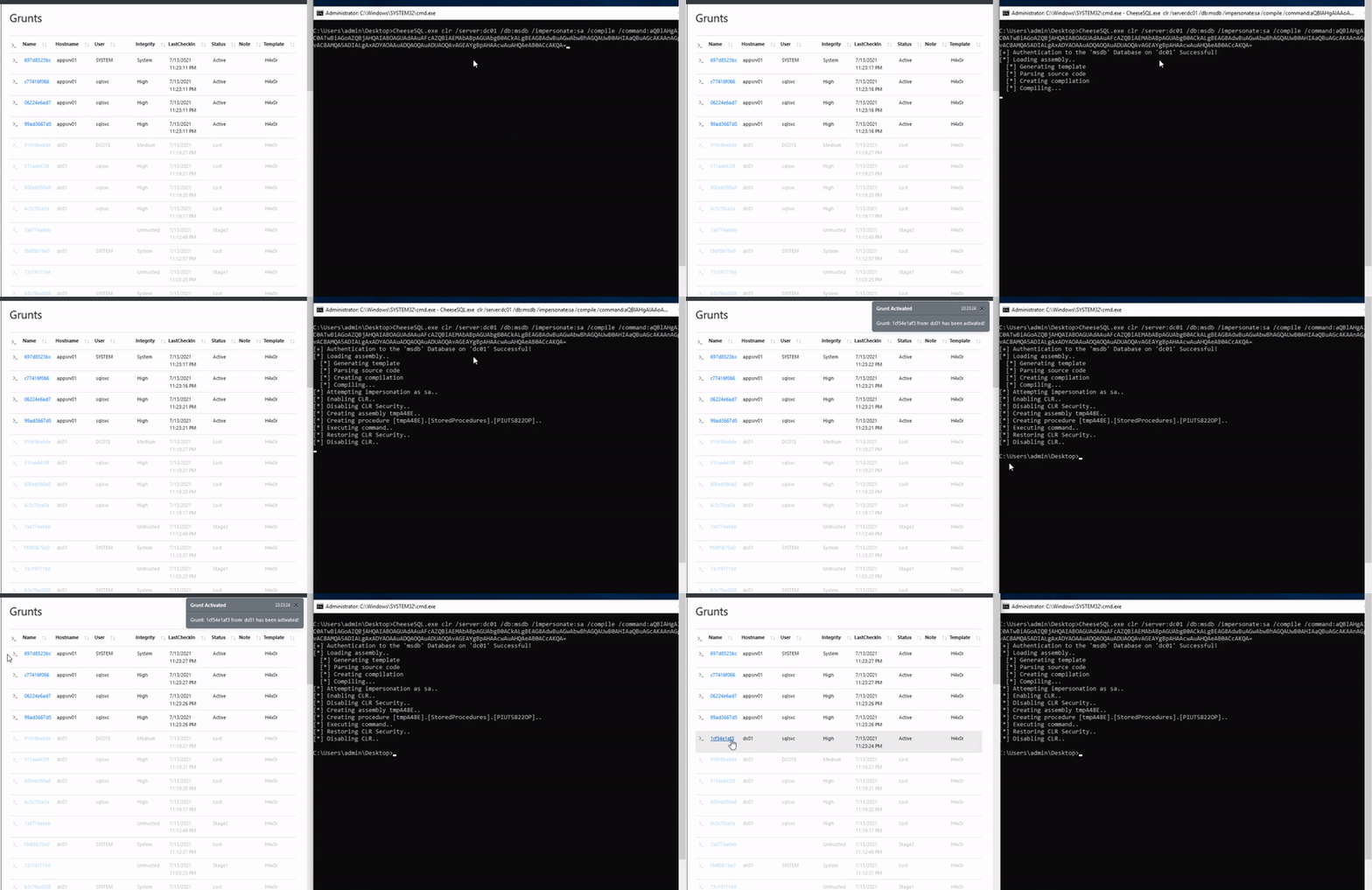
 klezvirus/cheesetools
Strumenti sviluppati autonomamente per Movimento Laterale/Esecuzione di Codice

Questo repository è stato creato basandosi sul già esistente [MiscTool][1], quindi un grande ringraziamento a rasta-mouse per averli rilasciati e per avermi dato la giusta motivazione per lavorarci.
Esecuzione comandi / Movimento laterale tramite funzionalità simile a PsExec. Deve essere eseguito nel contesto di un utente privilegiato. Lo strumento si basa su CsExec di rasta-mouse, ma è progettato per consentire un controllo aggiuntivo sulla creazione del servizio, in particolare:
CheeseExec.exe <targetMachine> <serviceName> <binPath> <action>
Vedi anche [TikiService][2].
CheesePS è un framework per Esecuzione Comandi / Movimento Laterale. Si basa su System.Management.Automation.PowerShell per caricare ed eseguire codice arbitrario tramite PowerShell.
Lo strumento è nativamente in grado di bypassare le restrizioni comuni creando e utilizzando runspaces PowerShell su target locali o remoti.
Deve essere eseguito nel contesto di un utente privilegiato (se si utilizza PowerShell Remoting).
Lo strumento è stato originariamente realizzato come miglioramento di CsPosh di rasta_mouse, ma è cresciuto abbastanza da diventare un framework a sé stante e può ora essere utilizzato come iniettore PowerShell generico.
L'idea alla base di questo strumento è stata riassunta nel seguente articolo:
Le principali funzionalità implementate sono:
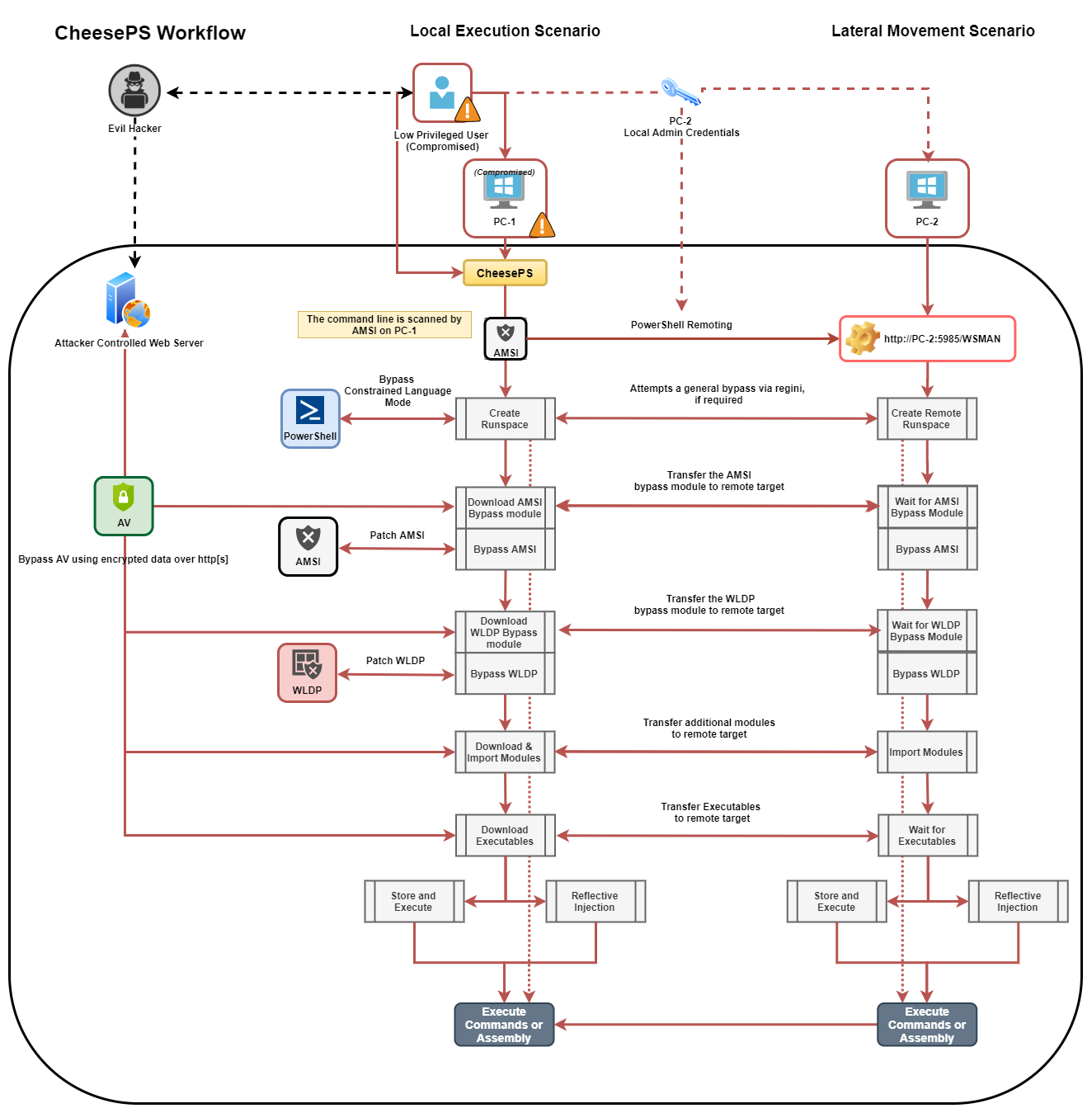
Il seguente screenshot è uno schema abbastanza accurato per descrivere il flusso di lavoro dello strumento:
Usage:
  -t, --target=VALUE         Target machine
  -c, --code=VALUE           Code to execute
  -e, --encoded              Indicates that provided code is base64 encoded
  -a, --am-si-bypass=VALUE   Uses the given PowerShell script to bypass A-M-S-
                               I (fs, smb o http[s])
      --aX, --encrypted-am-si
                             Indicates that provided A.M.S.I. bypass is
                               encrypted
  -i, --import=VALUE         Imports additional PowerShell modules (fs, smb o
                               http[s])
      --iX, --encrypted-imports
                             Indicates that provided PowerShell modules are
                               encrypted
  -o, --outstring            Append Out-String to code
  -r, --redirect             Redirect stderr to stdout
  -d, --domain=VALUE         Domain for alternate credentials
  -u, --username=VALUE       Username for alternate credentials
  -p, --password=VALUE       Password for alternate credentials
  -X, --encrypt=VALUE        Encrypt a script with an hardcoded key
  -D, --decrypt=VALUE        Test decryption of a script with an hardcoded key
  -n, --skip-bypass=VALUE    Skip A.M.S.I (A), WLDP (W) or ALL (*) Bypass
                               techniques
  -l, --lockdown-escape      Try to enable PowerShell FullLanguage mode using
                               REGINI
  -w, --wldp-bypass=VALUE    Uses the given PowerShell script to bypass WLDP
                               (fs, smb o http[s])
      --wX, --encrypted-wldp Indicates that provided WLDP bypass is encrypted
  -x, --executable=VALUE     [Download and] Execute given executable
      --xX, --encrypted-executable
                             Indicates that provided Exe/DLL is encrypted
      --xCS, --executable-csharp
                             Indicates that the executable provided is C# -
                               (.NET)
  -R, --reflective-injection Uses Invoke-ReflectivePEInjection to load the
                               assmebly from memory (requires Invoke-
                               ReflectivePEInjection to be imported!)
  -P, --powershell-decrypt   Force use of PowerShell-based decryption
  -k, --encryption-key=VALUE Uses the provided key for encryption/decryption
      --ssl                  Force use of SSL
  -h, -?, --help             Show Help
Nota: Se eseguito senza un target, lo script verrà eseguito sulla macchina locale
Vedi anche [AmsiBypass][3].
Esecuzione comandi / Movimento laterale tramite DCOM. Deve essere eseguito nel contesto di un utente privilegiato. Questo strumento si basa su CsDCOM di rasta-mouse, ma è stato migliorato per aggiungere metodi aggiuntivi, adattandosi alle nuove ricerche condotte da Philip Tsukerman. Esiste anche un metodo sperimentale per "riparare" eventuali tentativi di disabilitare gli oggetti DCOM interessati tramite dcomcfg, ma richiede alcune precondizioni per funzionare correttamente.
L'idea alla base di questo strumento è stata riassunta nel seguente articolo:
Metodi attuali: MMC20.Application, ShellWindows, ShellBrowserWindow, ExcelDDE, VisioAddonEx,
OutlookShellEx, ExcelXLL, VisioExecLine, OfficeMacro.
Usage:
  -t, --target=VALUE         Target Machine
  -b, --binary=VALUE         Binary: powershell.exe
  -a, --args=VALUE           Arguments: -enc <blah>
  -m, --method=VALUE         Methods: MMC20Application, ShellWindows,
                               ShellBrowserWindow, ExcelDDE, VisioAddonEx,
                               OutlookShellEx, ExcelXLL, VisioExecLine,
                               OfficeMacro
  -r, --reg, --registry      Enable registry manipulation
  -h, -?, --help             Show Help
Nota: Se eseguito con -t ., lo script verrà eseguito sulla macchina locale
Vedi anche [Movimento Laterale Utilizzando Oggetti DCOM e C#][4]
