
Skip to content
KitploitKITPLOIT
StrumentiBlog
Invia
StrumentiBlog
Invia

Strumenti di Hacking, PenTest e Cybersecurity per il tuo Arsenale di Sicurezza!

Kitploit è una directory di strumenti di hacking, cybersecurity e pentesting. Scopri gli ultimi aggiornamenti dei progetti per trovare vulnerabilità, analizzare sistemi, automatizzare i test e rafforzare la tua sicurezza.

··Feed·Contatto·Privacy·© 2026 Kitploit

Directory degli strumenti

Categorie

Vedi tutte le categorie
Loading categories
forbidden — Supera i codici di stato di risposta HTTP 4xx e altro. Lo strumento è basato su Python Requests, PycURL e HTTP Client. | Kitploit
Strumenti/GitHubGitHub/ivan-sincek/forbidden
Scanner di VulnerabilitàEvasione IDS/IPSSfruttamento di Applicazioni WebRaccolta InformazioniBypass WAFSicurezza WebFuzzingPenetration Testing
GitHubivan-sincek/forbidden

forbidden

Supera i codici di stato di risposta HTTP 4xx e altro. Lo strumento è basato su Python Requests, PycURL e HTTP Client.

Vedi Repository
25748111 mesi faRevisionato da Kitploit

Più Popolari

Vedi tutti →

Scopri gli strumenti più utilizzati dalla nostra community.

Esplora tutti gli strumenti

Sfoglia la nostra collezione di strumenti

Vedi tutti gli strumenti →
Condividi

Forbidden

Bypassa i codici di stato della risposta HTTP 4xx e altro ancora.

Lo strumento si basa su Python Requests, PycURL e HTTP Client.

Testato su Kali Linux v2024.2 (64-bit).

Realizzato a scopo educativo. Spero che possa essere d'aiuto!

Piani futuri:

  • Aggiungere l'opzione silent per sopprimere l'output della console.
  • Aggiungere l'opzione no color per disabilitare l'output colorato della console.
  • Aggiungere test per le intestazioni di richiesta HTTP hop-by-hop.
  • Aggiungere test per l'intestazione di richiesta HTTP User-Agent.
  • Aggiungere test per i cookie HTTP.
  • Aggiungere test per l'HTTP smuggling.
  • Aggiungere test per CRLF.
  • Aggiungere test per Log4j.
  • Aggiungere test per SSRF dei metadati AWS.

Table of Contents

  • Come Installare
    • Installare PycURL
    • Installazione Standard
    • Compilare e Installare dal Sorgente
  • Come Usare
  • Test
    • Metodi HTTP
    • Intestazioni di Richiesta HTTP
  • Risultati
  • Utilizzo
  • Immagini

Come Installare

Installare PycURL

Su Kali Linux, dovrebbe funzionare senza problemi; altrimenti, esegui:

root@kitploit:~
apt-get -y install libcurl4-gnutls-dev librtmp-dev

pip3 install --upgrade pycurl

PycURL su Windows OS non è supportato.


Su macOS, esegui:

root@kitploit:~
brew uninstall curl
brew uninstall openssl

brew install curl
brew install openssl

echo 'export PATH="/opt/homebrew/opt/curl/bin:$PATH"' >> ~/.zshrc
echo 'export PATH="/opt/homebrew/opt/openssl@3/bin:$PATH"' >> ~/.zshrc
source ~/.zshrc

export LDFLAGS="-L/opt/homebrew/opt/curl/lib"
export CPPFLAGS="-I/opt/homebrew/opt/curl/include"
export PYCURL_SSL_LIBRARY=openssl

pip3 install --no-cache-dir --compile --ignore-installed --config-setting="--with-openssl=" --config-setting="--openssl-dir=/opt/homebrew/opt/openssl@3" pycurl

In alternativa, installa usando Homebrew (non mantenuto da me):

root@kitploit:~
brew install forbidden

Installazione Standard

root@kitploit:~
pip3 install --upgrade forbidden

Compilare e Installare dal Sorgente

root@kitploit:~
git clone https://github.com/ivan-sincek/forbidden && cd forbidden

python3 -m pip install --upgrade build

python3 -m build

python3 -m pip install dist/forbidden-13.4-py3-none-any.whl

Come Usare

Bypassa il codice di stato della risposta HTTP 403 Forbidden:

root@kitploit:~
forbidden -u https://example.com/admin -t protocols,methods,uploads,overrides,headers,paths-ram,encodings -f GET -l initial,path -o forbidden_403_results.json

Bypassa il codice di stato della risposta HTTP 403 Forbidden con stress testing:

root@kitploit:~
mkdir stresser_403_results

stresser -u https://example.com/admin -r 1000 -th 200 -f GET -l initial -dir stresser_403_results -o stresser_403_results.json

Bypassa il codice di stato della risposta HTTP 401 Unauthorized:

root@kitploit:~
forbidden -u https://example.com/admin -t auths -f GET -l initial -o forbidden_401_results.json

Test per redirect aperti e parser URL rotti, cioè test per interazioni out-of-band (OOB):

root@kitploit:~
forbidden -u https://example.com/admin -t redirects,parsers -f GET -l initial -e xyz.interact.sh -o forbidden_oob_results.json

Test

protocols

  • Testa i protocolli HTTP e HTTPS usando un indirizzo IP e un nome di dominio.
  • Testa un downgrade del protocollo HTTP/1.0 senza l'intestazione di richiesta HTTP Host, usando un indirizzo IP e un nome di dominio.

methods

  • Testa i metodi HTTP consentiti, usando anche l'intestazione di richiesta HTTP Content-Length: 0.
  • Testa Cross-Site Tracing (XST) usando i metodi HTTP TRACE e TRACK.

uploads

  • Testa il caricamento di un file di testo ricorsivamente per ogni directory nel percorso URL usando il metodo HTTP PUT.

overrides

  • Testa le sostituzioni dei metodi HTTP usando parametri della stringa di query URL, intestazioni di richiesta HTTP e corpi di richiesta HTTP.
  • Testa le sostituzioni dello schema URL usando intestazioni di richiesta HTTP, da HTTPS a HTTP e da HTTP a HTTPS.
  • Testa le sostituzioni della porta usando intestazioni di richiesta HTTP.
  • Testa le sostituzioni dell'host HTTP usando intestazioni di richiesta HTTP, anche usando due intestazioni di richiesta HTTP Host.
  • Testa le sostituzioni del percorso URL usando intestazioni di richiesta HTTP con percorsi URL relativi, usando i seguenti URL: un URL accessibile, URL radice e URL completo.

headers

  • Testa intestazioni di richiesta HTTP con indirizzi IP, indirizzi IP separati da virgole, nomi di dominio, URL radice, URL completi e altro ancora.

values

  • Testa intestazioni di richiesta HTTP con indirizzi IP, nomi di dominio, URL radice e URL completi forniti dall'utente.

paths

  • Testa i bypass del percorso URL.

encodings

  • Testa le trasformazioni e le codifiche dell'host e del percorso URL.

auths

  • Testa l'autenticazione/authorization di base usando intestazioni di richiesta HTTP con valori nulli e credenziali predefinite codificate in Base64.
  • Testa l'autenticazione/authorization bearer usando intestazioni di richiesta HTTP con valori nulli, JWT malformati e JWT predefiniti.

redirects

  • Testa redirect aperti usando intestazioni di richiesta HTTP con indirizzi IP di redirect, nomi di dominio, URL radice e URL completi.

parsers

  • Testa parser URL rotti usando intestazioni di richiesta HTTP con indirizzi IP rotti, nomi di dominio, URL radice e URL completi.

Se sei interessato a maggiori dettagli, vedi:

  • /src/forbidden/utils/forbidden.py
  • /src/forbidden/utils/test.py
  • /src/forbidden/utils/value.py

Osservazioni:

  • Tutti i test si basano su write-up pubblici di infosec e bug bounty.
  • Alcuni test si sovrappongono; tuttavia, viene applicato un filtro unico prima di inviare qualsiasi cosa.
  • Tutte le intestazioni di richiesta HTTP, i parametri della stringa di query URL, ecc., sono stati validati in base alla documentazione ufficiale.
  • Per impostazione predefinita, sia Forbidden che Stresser usano il motore Python Requests.
  • Il test del downgrade del protocollo HTTP/1.0 senza l'intestazione di richiesta HTTP Host è bloccato sul motore HTTP Client. Inoltre, il comando cURL fornito non funzionerà correttamente perché cURL non consente di rimuovere l'intestazione di richiesta HTTP Host.
  • Il test della sostituzione dell'host HTTP usando due intestazioni di richiesta HTTP Host è bloccato sul motore Python Requests. Inoltre, il comando cURL fornito non funzionerà correttamente perché cURL non consente di usare due intestazioni di richiesta HTTP Host.
  • Il test delle trasformazioni e codifiche dell'host e del percorso URL è bloccato sul motore PycURL.

Metodi HTTP

Questa è solo una rapida panoramica di ciò che viene utilizzato, ma non di come viene utilizzato.

root@kitploit:~
ACL
ARBITRARY
BASELINE-CONTROL
BIND
CHECKIN
CHECKOUT
CONNECT
COPY
DELETE
GET
HEAD
INDEX
LABEL
LINK
LOCK
MERGE
MKACTIVITY
MKCALENDAR
MKCOL
MKREDIRECTREF
MKWORKSPACE
MOVE
OPTIONS
ORDERPATCH
PATCH
POST
PRI
PROPFIND
PROPPATCH
PUT
REBIND
REPORT
SEARCH
SHOWMETHOD
SPACEJUMP
TEXTSEARCH
TRACE
TRACK
UNBIND
UNCHECKOUT
UNLINK
UNLOCK
UPDATE
UPDATEREDIRECTREF
VERSION-CONTROL

Intestazioni di Richiesta HTTP

Questa è solo una rapida panoramica di ciò che viene utilizzato, ma non di come viene utilizzato.

root@kitploit:~
19-Profile
Accept
Base-URL
CF-Connecting-IP
Client-IP
Cluster-Client-IP
Destination
Forwarded-For
Forwarded-For-IP
From
Front-End-HTTPS
Host
Incap-Client-IP
Origin
Profile
Proxy
Proxy-Client-IP
Redirect
Referer
Remote-Addr
Request-URI
True-Client-IP
URI
URL
WAP-Profile
WL-Proxy-Client-IP
X-Client-IP
X-Cluster-Client-IP
X-Forward
X-Forward-For
X-Forwarded
X-Forwarded-By
X-Forwarded-For
X-Forwarded-For-IP
X-Forwarded-For-Original
X-Forwarded-Host
X-Forwarded-Path
X-Forwarded-Port
X-Forwarded-Proto
X-Forwarded-Protocol
X-Forwarded-SSL
X-Forwarded-Scheme
X-Forwarded-Server
X-HTTP-DestinationURL
X-HTTP-Host-Override
X-HTTP-Method
X-HTTP-Method-Override
X-Host
X-Host-Override
X-Method
X-Method-Override
X-Original-Forwarded-For
X-Original-Remote-Addr
X-Original-URL
X-Originally-Forwarded-For
X-Originating-IP
X-Override-URL
X-Proxy-Host
X-Proxy-URL
X-ProxyUser-IP
X-Real-IP
X-Referer
X-Remote-Addr
X-Remote-IP
X-Rewrite-URL
X-Scheme
X-Server-IP
X-True-Client-IP
X-True-IP
X-URL-Scheme
X-Wap-Profile

Risultati

Osservazioni:

  • I risultati verranno ordinati per codice di stato della risposta HTTP crescente, lunghezza del corpo della risposta HTTP decrescente e ID del test crescente.
  • Per impostazione predefinita, solo i codici di stato della risposta HTTP 2xx e 3xx sono inclusi nei risultati e mostrati nell'output della console.
  • L'attributo length nei risultati si riferisce alla lunghezza del corpo della risposta HTTP.
  • Per filtrare manualmente i risultati falsi positivi, per ogni lunghezza del contenuto della risposta HTTP unica, esegui il comando cURL fornito e controlla se la risposta HTTP risulta in un bypass; in caso contrario, ignora semplicemente tutti i risultati con la stessa lunghezza del contenuto.
root@kitploit:~
[
   {
      "id":"595-HOST-OVERRIDES-1",
      "url":"https://example.com:443/admin",
      "method":"GET",
      "headers":[
         "Host: 127.0.0.1"
      ],
      "cookies":[],
      "body":"",
      "user_agent":"Forbidden/13.4",
      "command":"curl --path-as-is -iskL -A 'Forbidden/13.4' -H 'Host: 127.0.0.1' -X 'GET' 'https://example.com:443/admin'",
      "status":200,
      "length":14301
   },
   {
      "id":"596-HOST-OVERRIDES-1",
      "url":"https://example.com:443/admin",
      "method":"GET",
      "headers":[
         "Host: 127.0.0.1:443"
      ],
      "cookies":[],
      "body":"",
      "user_agent":"Forbidden/13.4",
      "command":"curl --path-as-is -iskL -A 'Forbidden/13.4' -H 'Host: 127.0.0.1:443' -X 'GET' 'https://example.com:443/admin'",
      "status":200,
      "length":14301
   }
]

Utilizzo

root@kitploit:~
Forbidden v13.4 ( github.com/ivan-sincek/forbidden )

Usage:   forbidden -u url                       -t tests [-f force] [-o out         ]
Example: forbidden -u https://example.com/admin -t all   [-f GET  ] [-o results.json]

DESCRIPTION
    Bypass 4xx HTTP response status codes and more
URL
    Inaccessible URL
    -u, --url = https://example.com/admin | etc.
IGNORE PARAMETERS
    Ignore URL query string and fragment
    -ip, --ignore-parameters
IGNORE REQUESTS
    Where applicable, use PycURL instead of the default Python Requests engine
    -ir, --ignore-requests
TESTS
    Tests to run
    Specify '[ip-|host-|url-]values' to test HTTP request headers using only user-supplied values passed with the '-v' option
    Specify 'paths-ram' to use the battering ram attack or 'paths' to use the default cluster bomb attack
    Use comma-separated values
    -t, --tests = protocols | methods | uploads | [method-|scheme-|port-|host-|path-]overrides | headers | [ip-|host-|url-]values | paths[-ram] | encodings | [basic-|bearer-]auths | redirects | parsers | all
VALUES
    File containing HTTP request header values or a single value, e.g., internal IP, etc.
    Tests: all-values
    -v, --values = values.txt | 10.10.15.20 | example.local | https://example.local | etc.
FORCE
    Force an HTTP method for all non-specific tests
    -f, --force = GET | POST | CUSTOM | etc.
PATH
    Accessible URL path to test URL path overrides
    Tests: path-overrides
    Default: /robots.txt, /index.html, /sitemap.xml, /README.txt
    -p, --path = /home | etc.
EVIL
    Evil URL or collaborator service
    Tests: host-overrides, headers, bearer-auths, redirects, parsers
    Default: https://github.com
    -e, --evil = https://xyz.interact.sh | https://xyz.burpcollaborator.net | etc.
HEADER
    Any number of extra HTTP request headers
    Extra HTTP request headers will not override test-specific HTTP request headers
    Semi-colon in, e.g., 'Content-Type;' will expand to an empty HTTP request header
    -H, --header = "Authorization: Bearer ey..." | Content-Type; | etc.
COOKIE
    Any number of extra HTTP cookies
    Extra HTTP cookies will not override test-specific HTTP cookies
    -b, --cookie = PHPSESSIONID=3301 | etc.
IGNORE
    RegEx to filter out false positive 200 OK results
    -i, --ignore = Inaccessible | "Access Denied" | "Error: .+" | etc.
CONTENT LENGTHS
    HTTP response content lengths to filter out false positive 200 OK results
    Specify 'initial' to ignore the content length of the initial HTTP response
    Specify 'path' to ignore the content length of the accessible URL's response
    Use comma-separated values
    -l, --content-lengths = 12 | initial | path | etc.
REQUEST TIMEOUT
    Request timeout in seconds
    Default: 60
    -rt, --request-timeout = 30 | 90 | etc.
THREADS
    Number of parallel threads to run
    Default: 5
    -th, --threads = 20 | etc.
SLEEP
    Sleep time in milliseconds before sending an HTTP request
    Intended for a single-thread use
    -s, --sleep = 500 | etc.
USER AGENT
    User agent to use
    Default: Forbidden/13.4
    -a, --user-agent = random[-all] | curl/3.30.1 | etc.
PROXY
    Web proxy to use
    -x, --proxy = http://127.0.0.1:8080 | etc.
HTTP RESPONSE STATUS CODES
    Include only specific HTTP response status codes in the results
    Default: 2xx, 3xx
    Use comma-separated values
    -sc, --status-codes = 1xx | 2xx | 3xx | 4xx | 5xx | all
SHOW TABLE
    Display the results in a table format instead of JSON format
    Intended for use on a wide screen
    -st, --show-table
OUT
    Output file
    -o, --out = results.json | etc.
DUMP
    Dump all the test records into the output file without running any
    -dmp, --dump
DEBUG
    Enable debug output
    -dbg, --debug
root@kitploit:~
Stresser v13.4 ( github.com/ivan-sincek/forbidden )

Usage:   stresser -u url                       -r repeat -th threads -dir directory [-f force] [-o out         ]
Example: stresser -u https://example.com/admin -r 1000   -th 200     -dir results   [-f GET  ] [-o results.json]

DESCRIPTION
    Bypass 4xx HTTP response status codes with stress testing
URL
    Inaccessible URL
    -u, --url = https://example.com/admin | etc.
IGNORE PARAMETERS
    Ignore URL query string and fragment
    -ip, --ignore-parameters
IGNORE REQUESTS
    Where applicable, use PycURL instead of the default Python Requests engine
    -ir, --ignore-requests
FORCE
    Force an HTTP method for all non-specific tests
    -f, --force = GET | POST | CUSTOM | etc.
HEADER
    Any number of extra HTTP request headers
    Extra HTTP request headers will not override test-specific HTTP request headers
    Semi-colon in, e.g., 'Content-Type;' will expand to an empty HTTP request header
    -H, --header = "Authorization: Bearer ey..." | Content-Type; | etc.
COOKIE
    Any number of extra HTTP cookies
    Extra HTTP cookies will not override test-specific HTTP cookies
    -b, --cookie = PHPSESSIONID=3301 | etc.
IGNORE
    RegEx to filter out false positive 200 OK results
    -i, --ignore = Inaccessible | "Access Denied" | "Error: .+" | etc.
CONTENT LENGTHS
    HTTP response content lengths to filter out false positive 200 OK results
    Specify 'initial' to ignore the content length of the initial HTTP response
    Use comma-separated values
    -l, --content-lengths = 12 | initial | etc.
REQUEST TIMEOUT
    Request timeout in seconds
    Default: 60
    -rt, --request-timeout = 30 | 90 | etc.
REPEAT
    Number of HTTP requests per test
    -r, --repeat = 1000 | etc.
THREADS
    Number of parallel threads to run
    -th, --threads = 20 | etc.
USER AGENT
    User agent to use
    Default: Stresser/13.4
    -a, --user-agent = random[-all] | curl/3.30.1 | etc.
PROXY
    Web proxy to use
    -x, --proxy = http://127.0.0.1:8080 | etc.
HTTP RESPONSE STATUS CODES
    Include only specific HTTP response status codes in the results
    Default: 2xx, 3xx
    Use comma-separated values
    -sc, --status-codes = 1xx | 2xx | 3xx | 4xx | 5xx | all
SHOW TABLE
    Display the results in a table format instead of JSON format
    Intended for use on a wide screen
    -st, --show-table
OUT
    Output file
    -o, --out = results.json | etc.
DIRECTORY
    Output directory
    All valid and unique HTTP responses will be saved in this directory
    -dir, --directory = results | etc.
DUMP
    Dump all the test records into the output file without running any
    -dmp, --dump
DEBUG
    Enable debug output
    -dbg, --debug

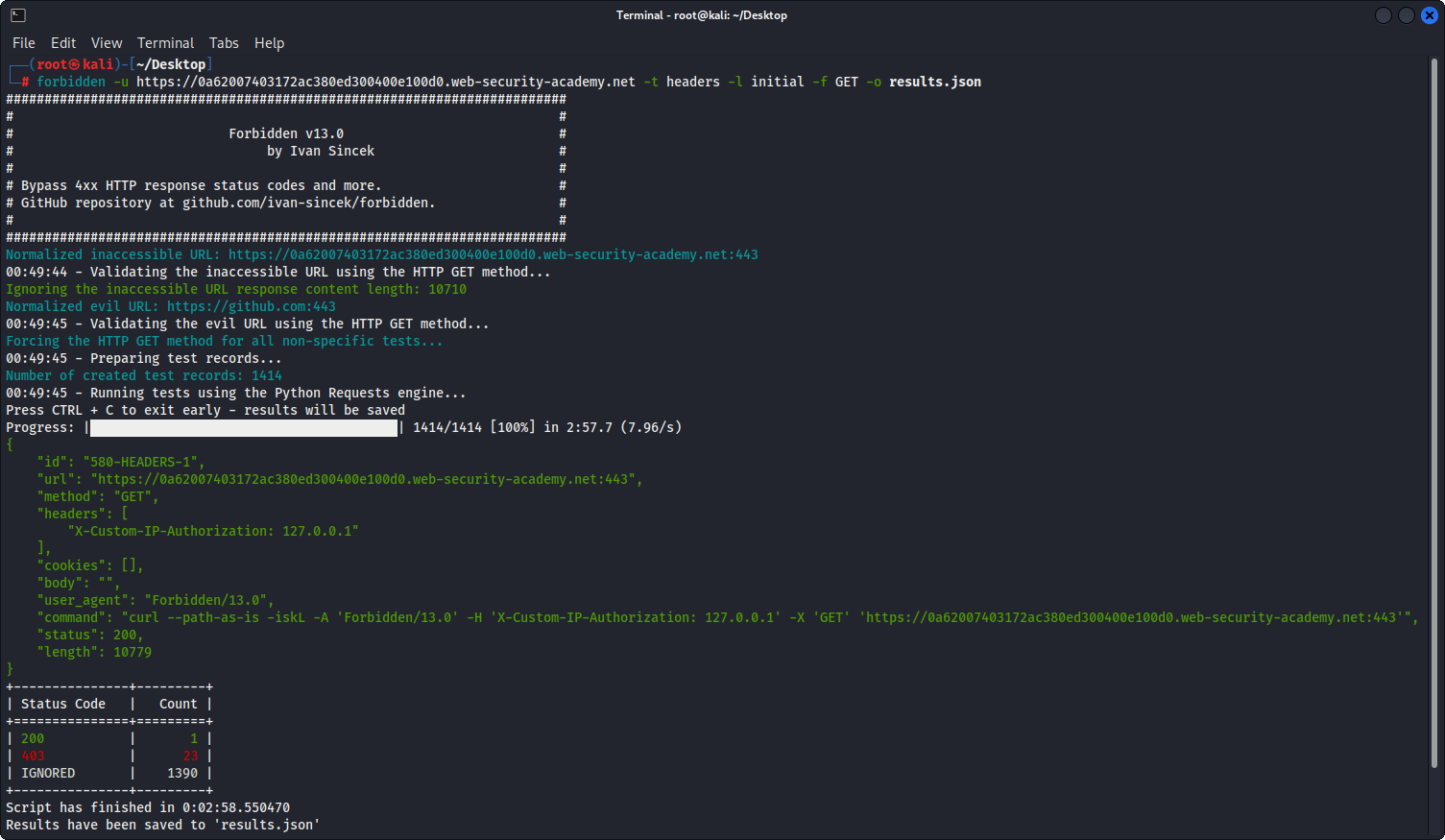
Immagini

Esempio Reale

Figura 1 - Esempio Reale

Esempio Semplice

Figura 2 - Esempio Semplice

Esempio Semplice (Output Tabella)

Figura 3 - Esempio Semplice (Output Tabella)

Scarica lo strumento
  • Alcuni proxy web potrebbero normalizzare gli URL (ad esempio, durante il test di encodings), modificare le richieste HTTP o eliminare completamente le richieste HTTP.
  • Alcuni siti web potrebbero richiedere un'intestazione di richiesta HTTP User-Agent valida o molto specifica.
  • Cross-Site Tracing (XST) non è più considerato una vulnerabilità.
  • Fai attenzione al rate limiting e ad altre protezioni anti-bot simili; attendi un po' prima di eseguire nuovamente lo strumento sullo stesso dominio.