 123wwwa/flowname
Next-generation JavaScript identifier recovery with LLMs.

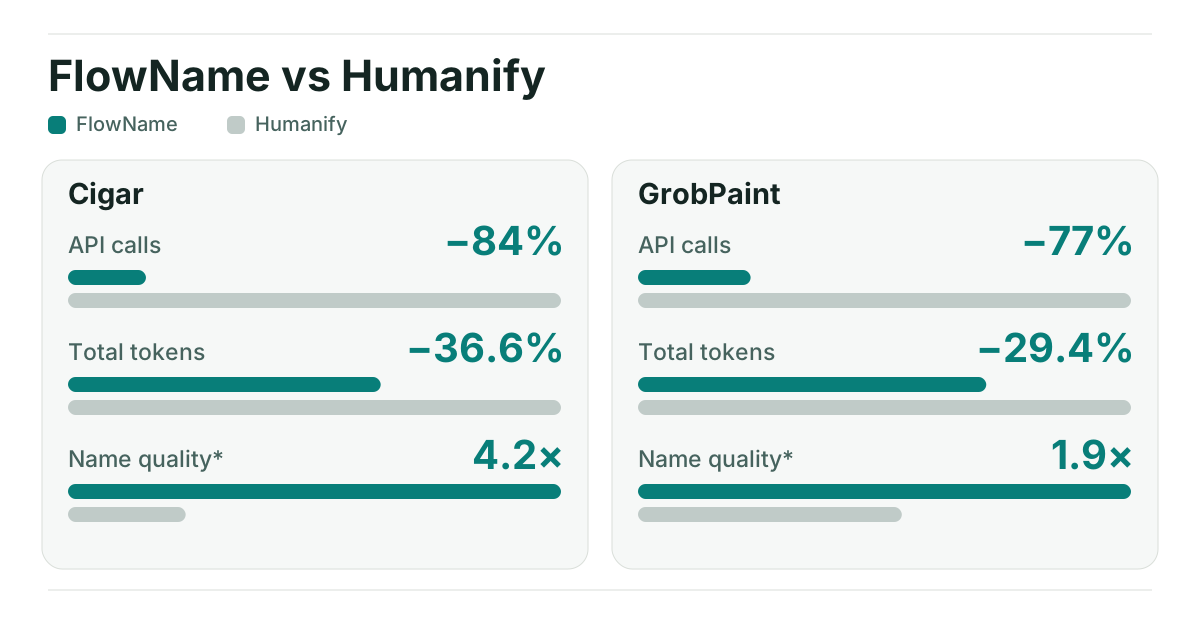
Name quality shows the ratio of names exclusively preferred by an automated, uncalibrated Jev evaluation. Animated chart → · Exact counts, method and limitations →
Try FlowName in your browser → — enter your JavaScript, API key and model; no installation required.
CLI: npx --yes --package=flowname@latest flowname input.js (set GEMINI_API_KEY first).
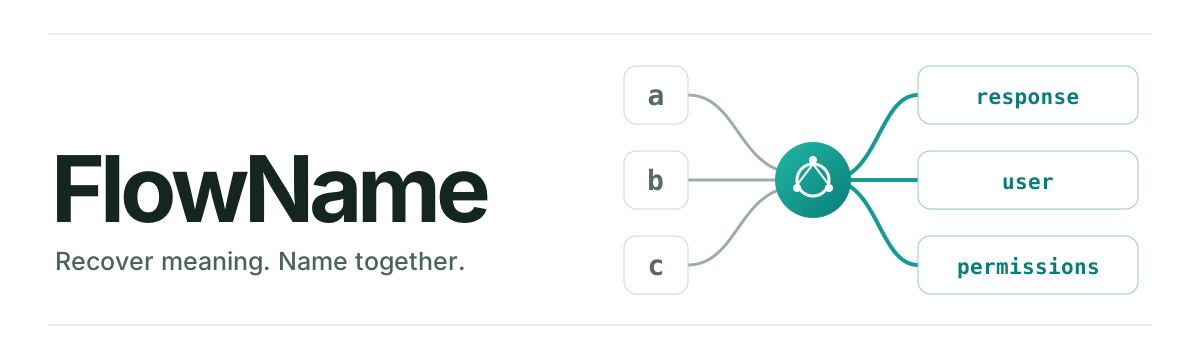
FlowName is a next-generation Semantic Identifier Recoverer for obfuscated JavaScript. By using AST-based static analysis to group logically related variables into budgeted LLM requests, FlowName eliminates the context-loss hallucinations common in naive text-window approaches.
Across two direct benchmarks against a leading symbol-based tool (Humanify) on Cigar and GrobPaint, FlowName delivered these average relative results:
In a second comparison on GrobPaint's 1,786 anonymized bindings, FlowName used 408 vs 1,786 API calls and 29.36% fewer total tokens; original-source-aware Jev gave 512 vs 274 exclusive preferences.
Explore the benchmark summary and both searchable name reports. Jev's judgments are automated and uncalibrated. Humanify's prompt omitted the target spelling for some bindings, and collision-safe suffixes can affect applied-name scores. See the summary for the context split and limitations.
Set GEMINI_API_KEY (or FLOWNAME_API_KEY) in your environment or in a .env file in the current directory, then run:
npx --yes --package=flowname@latest flowname input.js
To use another OpenAI-compatible endpoint, or to skip environment variables, pass everything as flags:
npx --yes --package=flowname@latest flowname input.js --base-url https://api.openai.com/v1 --model MODEL --api-key YOUR_API_KEY
Flags take precedence, then the environment, then .env; the CLI warns when they disagree. A key passed as a flag may be visible in shell history and process listings.
The CLI writes recovered code to a new flowname-output-TIMESTAMP-ID/output.js directory. Add --report to watch each request and proposed name in a live HTML report. No flags are required for the default Gemini model. Requires Node.js 22.8+.
For the browser, open the playground, paste JavaScript, supply your own API key and start recovery. Requests go directly from your browser to the selected provider; Stop interrupts the run.
FlowName names identifiers; it does not unpack bundles or undo structural obfuscation. Use webcrack for supported obfuscation patterns or Wakaru for supported bundles, then pass the resulting JavaScript to FlowName. It resolves lexical bindings, uses lightweight relations and same-scope fallback to group targets, and asks the LLM for several names per request. See how the grouping works.
npm install flowname
import { readFile } from 'node:fs/promises';
import { recoverNames, createProvider } from 'flowname';

const sourceCode = await readFile('./input.js', 'utf8');
const provider = createProvider({
  provider: 'gemini',
  model: 'gemini-3.5-flash-lite',
  apiKey: process.env.GEMINI_API_KEY,
});
const result = await recoverNames(sourceCode, { provider });
console.log(result.code);
See the usage guide for options, CLI reports and a complete library example. The documentation index covers the approach, architecture, limitations, prior work and Humanify comparison.
Licensed under MIT. See the release notes.
