
chisel v1.12.0-rc3
Tunnel TCP/UDP veloce su HTTP con crittografia SSH, supporta reverse port forwarding, proxy SOCKS5 e autenticazione client per un attraversamento sicuro della rete e l'elusione dei firewall.
Chisel


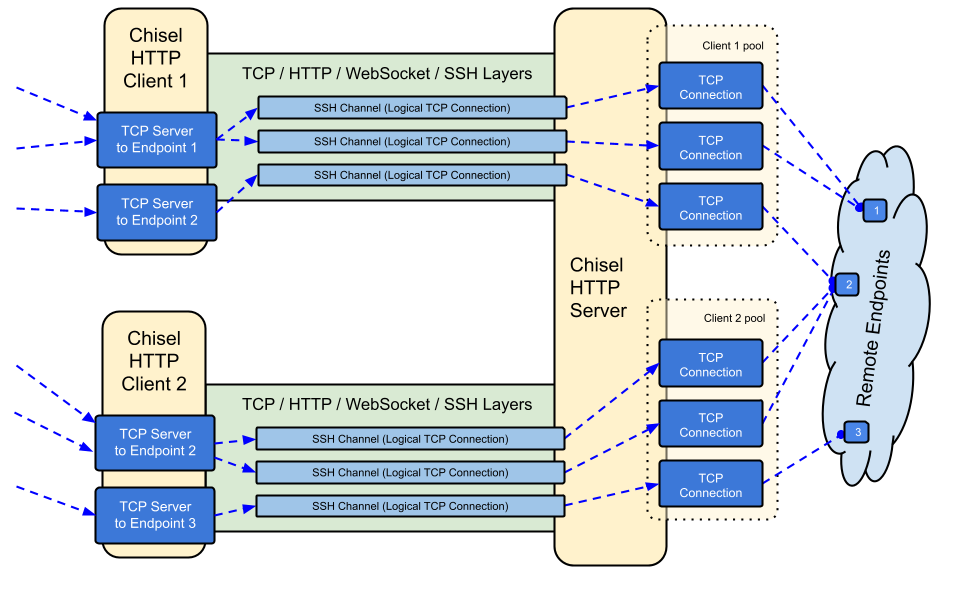
Chisel è un tunnel TCP/UDP veloce, trasportato su HTTP, protetto tramite SSH. Singolo eseguibile che include sia client che server. Scritto in Go (golang). Chisel è principalmente utile per attraversare i firewall, sebbene possa anche essere utilizzato per fornire un endpoint sicuro verso la propria rete.
Indice
Funzionalità
- Facile da usare
- Performante*
- Connessioni cifrate tramite il protocollo SSH (via
crypto/ssh) - Connessioni autenticate; connessioni client autenticate con un file di configurazione utenti, connessioni server autenticate tramite corrispondenza di fingerprint.
- Il client si riconnette automaticamente con backoff esponenziale (regolabile tramite
--min/max-retry-interval); i ping keepalive vanno in timeout, così le connessioni silenziosamente morte (sleep/wake, timeout NAT, riavvii del server) vengono rilevate e ristabilite - I client possono creare molteplici endpoint tunnel su una singola connessione TCP
- I client possono opzionalmente passare attraverso proxy SOCKS o HTTP CONNECT
- Port forwarding inverso (le connessioni passano attraverso il server e fuoriescono dal client)
- Il server può opzionalmente fungere anche da reverse proxy
- Il server può opzionalmente consentire connessioni SOCKS5 (vedi guida sotto)
- I client possono opzionalmente consentire connessioni SOCKS5 da un port forward inverso
- Connessioni client su stdio che supportano
ssh -o ProxyCommandfornendo SSH su HTTP
Installazione
Binari


Vedi l'ultima release oppure scaricala e installala subito con curl https://i.jpillora.com/chisel! | bash
I binari sono compilati con l'ultima release di Go, che imposta le versioni minime del sistema operativo: Windows 10 / Server 2016, macOS 12, kernel Linux 3.2, FreeBSD 12.2. Per sistemi più vecchi (ad es. Windows 7), usa la release v1.8.1 o precedenti.
Docker


docker run --rm -it jpillora/chisel --help
Le immagini sono multi-arch e pubblicate sia su Docker Hub (jpillora/chisel) che su GitHub Container Registry (ghcr.io/jpillora/chisel).
Fedora
Il pacchetto è mantenuto dalla comunità Fedora. Se riscontri problemi relativi all'utilizzo dell'RPM, utilizza questo issue tracker.
sudo dnf -y install chisel
Sorgente
$ go install github.com/jpillora/chisel@latest
Demo
Puoi avviare il tuo server demo in pochi minuti (la vecchia demo su Heroku è scomparsa insieme al piano gratuito di Heroku). example/fly.toml distribuisce questo chisel server sulla quota gratuita di fly.io:
$ chisel server --port $PORT --backend http://example.com
# listens on $PORT, proxies normal web requests to http://example.com
Distribuiscilo con fly launch --copy-config dalla directory example/, poi crea un tunnel verso qualsiasi servizio in esecuzione accanto al server, ad esempio:
$ chisel client https://<your-app>.fly.dev 3000
# connects to your chisel server,
# tunnels your localhost:3000 to the server's localhost:3000
Visitando l'URL della tua app in un browser si raggiunge il proxy backend predefinito del server e viene mostrata una copia di example.com.
Utilizzo
$ chisel --help

  Usage: chisel [command] [--help]

  Version: X.Y.Z

  Commands:
    server - runs chisel in server mode
    client - runs chisel in client mode

  Read more:
    https://github.com/jpillora/chisel
$ chisel server --help

  Usage: chisel server [options]

  Options:

    --host, Defines the HTTP listening host – the network interface
    (defaults the environment variable HOST and falls back to 0.0.0.0).

    --port, -p, Defines the HTTP listening port (defaults to the environment
    variable PORT and falls back to port 8080).

    --key, (deprecated use --keygen and --keyfile instead)
    An optional string to seed the generation of a ECDSA public
    and private key pair. All communications will be secured using this
    key pair. Share the subsequent fingerprint with clients to enable detection
    of man-in-the-middle attacks (defaults to the CHISEL_KEY environment
    variable, otherwise a new key is generate each run).

    --keygen, A path to write a newly generated PEM-encoded SSH private key file.
    If users depend on your --key fingerprint, you may also include your --key to
    output your existing key. Use - (dash) to output the generated key to stdout.

    --keyfile, An optional path to a PEM-encoded SSH private key. When
    this flag is set, the --key option is ignored, and the provided private key
    is used to secure all communications. (defaults to the CHISEL_KEY_FILE
    environment variable). Since ECDSA keys are short, you may also set keyfile
    to the inline key string itself, exactly as printed by --keygen (a base64
    string with a "ck-" prefix); no extra base64 encoding is needed.