jpillora/chisel
Tunnel TCP/UDP veloce su HTTP con crittografia SSH, supporta reverse port forwarding, proxy SOCKS5 e autenticazione client per un attraversamento sicuro della rete e l'elusione dei firewall.
# Chisel
[](https://godoc.org/github.com/jpillora/chisel) [](https://github.com/jpillora/chisel/actions?workflow=CI)
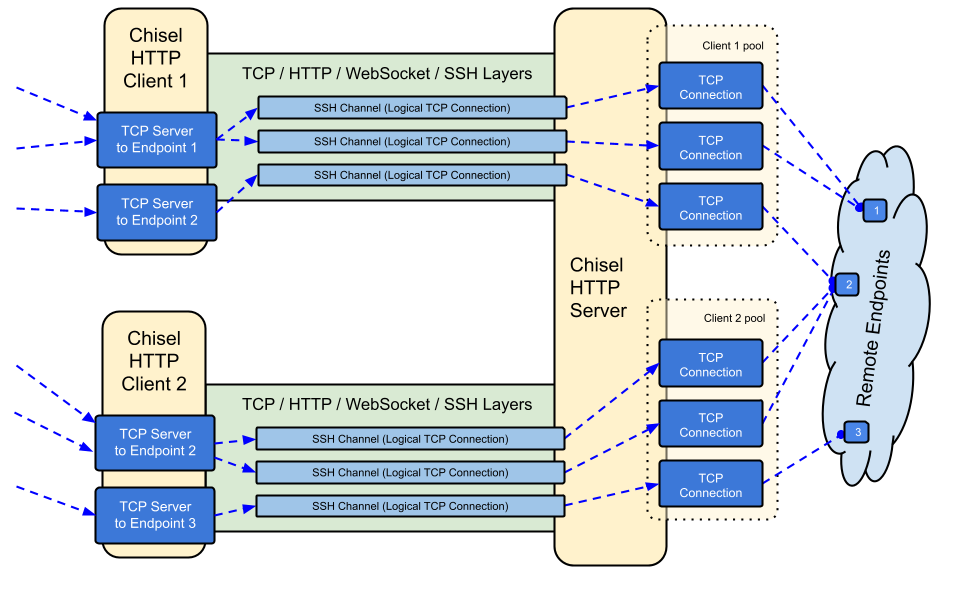
Chisel è un tunnel TCP/UDP veloce, trasportato su HTTP, protetto tramite SSH. Singolo eseguibile che include sia client che server. Scritto in Go (golang). Chisel è principalmente utile per attraversare i firewall, sebbene possa anche essere utilizzato per fornire un endpoint sicuro verso la propria rete.
## Indice
- [Funzionalità](#features)
- [Installazione](#install)
- [Demo](#demo)
- [Utilizzo](#usage)
- [Contribuire](#contributing)
- [Changelog](#changelog)
- [Licenza](#license)
## Funzionalità
- Facile da usare
- [Performante](https://github.com/jpillora/chisel/blob/master/test/bench/perf.md)\*
- [Connessioni cifrate](#security) tramite il protocollo SSH (via `crypto/ssh`)
- [Connessioni autenticate](#authentication); connessioni client autenticate con un file di configurazione utenti, connessioni server autenticate tramite corrispondenza di fingerprint.
- Il client si riconnette automaticamente con [backoff esponenziale](https://github.com/jpillora/backoff) (regolabile tramite `--min/max-retry-interval`); i ping keepalive vanno in timeout, così le connessioni silenziosamente morte (sleep/wake, timeout NAT, riavvii del server) vengono rilevate e ristabilite
- I client possono creare molteplici endpoint tunnel su una singola connessione TCP
- I client possono opzionalmente passare attraverso proxy SOCKS o HTTP CONNECT
- Port forwarding inverso (le connessioni passano attraverso il server e fuoriescono dal client)
- Il server può opzionalmente fungere anche da [reverse proxy](http://golang.org/pkg/net/http/httputil/#NewSingleHostReverseProxy)
- Il server può opzionalmente consentire connessioni [SOCKS5](https://en.wikipedia.org/wiki/SOCKS) (vedi [guida sotto](#socks5-guide))
- I client possono opzionalmente consentire connessioni [SOCKS5](https://en.wikipedia.org/wiki/SOCKS) da un port forward inverso
- Connessioni client su stdio che supportano `ssh -o ProxyCommand` fornendo SSH su HTTP
## Installazione
### Binari
[](https://github.com/jpillora/chisel/releases) [](https://github.com/jpillora/chisel/releases)
Vedi [l'ultima release](https://github.com/jpillora/chisel/releases/latest) oppure scaricala e installala subito con `curl https://i.jpillora.com/chisel! | bash`
I binari sono compilati con l'ultima release di Go, che imposta le versioni minime del sistema operativo: Windows 10 / Server 2016, macOS 12, kernel Linux 3.2, FreeBSD 12.2. Per sistemi più vecchi (ad es. Windows 7), usa la [release v1.8.1](https://github.com/jpillora/chisel/releases/tag/v1.8.1) o precedenti.
### Docker
[](https://hub.docker.com/r/jpillora/chisel/) [](https://hub.docker.com/r/jpillora/chisel/tags)
```sh
docker run --rm -it jpillora/chisel --help
```
Le immagini sono multi-arch e pubblicate sia su Docker Hub (`jpillora/chisel`) che su GitHub Container Registry (`ghcr.io/jpillora/chisel`).
### Fedora
Il pacchetto è mantenuto dalla comunità Fedora. Se riscontri problemi relativi all'utilizzo dell'RPM, utilizza questo [issue tracker](https://bugzilla.redhat.com/buglist.cgi?bug_status=NEW&bug_status=ASSIGNED&classification=Fedora&component=chisel&list_id=11614537&product=Fedora&product=Fedora%20EPEL).
```sh
sudo dnf -y install chisel
```
### Sorgente
```sh
$ go install github.com/jpillora/chisel@latest
```
## Demo
Puoi avviare il tuo server demo in pochi minuti (la vecchia demo su Heroku è scomparsa insieme al piano gratuito di Heroku). [`example/fly.toml`](https://github.com/jpillora/chisel/blob/master/example/fly.toml) distribuisce questo `chisel server` sulla quota gratuita di [fly.io](https://fly.io):
```sh
$ chisel server --port $PORT --backend http://example.com
# listens on $PORT, proxies normal web requests to http://example.com
```
Distribuiscilo con `fly launch --copy-config` dalla directory `example/`, poi crea un tunnel verso qualsiasi servizio in esecuzione accanto al server, ad esempio:
```sh
$ chisel client https://<your-app>.fly.dev 3000
# connects to your chisel server,
# tunnels your localhost:3000 to the server's localhost:3000
```
Visitando l'URL della tua app in un browser si raggiunge il proxy backend predefinito del server e viene mostrata una copia di [example.com](http://example.com).
## Utilizzo
<!-- render these help texts by hand,
or use https://github.com/jpillora/md-tmpl
with $ md-tmpl -w README.md -->
<!--tmpl,code=plain:echo "$ chisel --help" && go run main.go --help | sed 's#0.0.0-src (go1\..*)#X.Y.Z#' -->
``` plain
$ chisel --help
Usage: chisel [command] [--help]
Version: X.Y.Z
Commands:
server - runs chisel in server mode
client - runs chisel in client mode
Read more:
https://github.com/jpillora/chisel
```
<!--/tmpl-->
<!--tmpl,code=plain:echo "$ chisel server --help" && go run main.go server --help | cat | sed 's#0.0.0-src (go1\..*)#X.Y.Z#' -->
``` plain
$ chisel server --help
Usage: chisel server [options]
Options:
--host, Defines the HTTP listening host – the network interface
(defaults the environment variable HOST and falls back to 0.0.0.0).
--port, -p, Defines the HTTP listening port (defaults to the environment
variable PORT and falls back to port 8080).
--key, (deprecated use --keygen and --keyfile instead)
An optional string to seed the generation of a ECDSA public
and private key pair. All communications will be secured using this
key pair. Share the subsequent fingerprint with clients to enable detection
of man-in-the-middle attacks (defaults to the CHISEL_KEY environment
variable, otherwise a new key is generate each run).
--keygen, A path to write a newly generated PEM-encoded SSH private key file.
If users depend on your --key fingerprint, you may also include your --key to
output your existing key. Use - (dash) to output the generated key to stdout.
--keyfile, An optional path to a PEM-encoded SSH private key. When
this flag is set, the --key option is ignored, and the provided private key
is used to secure all communications. (defaults to the CHISEL_KEY_FILE
environment variable). Since ECDSA keys are short, you may also set keyfile
to the inline key string itself, exactly as printed by --keygen (a base64
string with a "ck-" prefix); no extra base64 encoding is needed.
--authfile, An optional path to a users.json file. This file should
be an object with users defined like:
{
"<user:pass>": ["<addr-regex>","<addr-regex>"]
}
when <user> connects, their <pass> will be verified and then
each of the remote addresses will be compared against the list
of address regular expressions for a match. Patterns are NOT
anchored by default: "10.0.0.1:80" also matches
"210.0.0.1:8080", and "." matches any character. Anchor your
patterns, e.g. "^10\.0\.0\.1:80$". The empty string ""
matches every address. Addresses will
always come in the form "<remote-host>:<remote-port>" for normal remotes,
"R:<local-interface>:<local-port>" for reverse port forwarding
remotes, and "socks" for SOCKS5 proxy access. Note that SOCKS5
access previously bypassed this list; existing authfiles which
should allow SOCKS5 must add an entry matching "socks" (the
empty wildcard "" matches everything, including "socks"). This
file will be automatically reloaded on change. Reloads apply
to new connections and to new tunnels of connected clients;
established tunnels are not interrupted.
--auth, An optional string representing a single user with full
access, in the form of <user:pass>. It is equivalent to creating an
authfile with {"<user:pass>": [""]}. If unset, it will use the
environment variable AUTH.
--keepalive, An optional keepalive interval. Since the underlying
transport is HTTP, in many instances we'll be traversing through
proxies, often these proxies will close idle connections. You must
specify a time with a unit, for example '5s' or '2m'. Defaults
to '25s' (set to 0s to disable).
--backend, Specifies another HTTP server to proxy requests to when
chisel receives a normal HTTP request. Useful for hiding chisel in
plain sight. --proxy is accepted as an alias for this flag.
--socks5, Allow clients to access the internal SOCKS5 proxy. See
chisel client --help for more information.
--reverse, Allow clients to specify reverse port forwarding remotes
in addition to normal remotes.
--tls-key, Enables TLS and provides optional path to a PEM-encoded
TLS private key. When this flag is set, you must also set --tls-cert,
and you cannot set --tls-domain.
--tls-cert, Enables TLS and provides optional path to a PEM-encoded
TLS certificate. When this flag is set, you must also set --tls-key,
and you cannot set --tls-domain.
--tls-domain, Enables TLS and automatically acquires a TLS key and
certificate using LetsEncrypt. Setting --tls-domain requires port 443.
You may specify multiple --tls-domain flags to serve multiple domains.
The resulting files are cached in the "$HOME/.cache/chisel" directory.
You can modify this path by setting the CHISEL_LE_CACHE variable,
or disable caching by setting this variable to "-". You can optionally
provide a certificate notification email by setting CHISEL_LE_EMAIL.
--tls-ca, a path to a PEM encoded CA certificate bundle or a directory
holding multiple PEM encode CA certificate bundle files, which is used to
validate client connections. The provided CA certificates will be used
instead of the system roots. This is commonly used to implement mutual-TLS.
--pid Generate pid file in current working directory
-v, Enable verbose logging
--help, This help text
Signals:
The chisel process is listening for:
a SIGINT or SIGTERM to begin a graceful shutdown
(a second signal forces an immediate exit),
a SIGUSR2 to print process stats, and
a SIGHUP to short-circuit the client reconnect timer
Version:
X.Y.Z
Read more:
https://github.com/jpillora/chisel
```
<!--/tmpl-->
<!--tmpl,code=plain:echo "$ chisel client --help" && go run main.go client --help | sed 's#0.0.0-src (go1\..*)#X.Y.Z#' -->
``` plain
$ chisel client --help
Usage: chisel client [options] <server> <remote> [remote] [remote] ...
<server> is the URL to the chisel server.
<remote>s are remote connections tunneled through the server, each of
which come in the form:
<local-host>:<local-port>:<remote-host>:<remote-port>/<protocol>
■ local-host defaults to 0.0.0.0 (all interfaces).
■ local-port defaults to remote-port.
■ remote-port is required*.
■ remote-host defaults to 127.0.0.1 (server localhost).
■ protocol defaults to tcp.
which shares <remote-host>:<remote-port> from the server to the client
as <local-host>:<local-port>, or:
R:<local-interface>:<local-port>:<remote-host>:<remote-port>/<protocol>
which does reverse port forwarding, sharing <remote-host>:<remote-port>
from the client to the server's <local-interface>:<local-port>.
example remotes
3000
example.com:3000
3000:google.com:80
192.168.0.5:3000:google.com:80
socks
5000:socks
udpsocks
5000:udpsocks
R:2222:localhost:22
R:socks
R:5000:socks
R:5000:udpsocks
stdio:example.com:22
1.1.1.1:53/udp
When the chisel server has --socks5 enabled, remotes can
specify "socks" or "udpsocks" in place of remote-host and
remote-port. Both default to the local host and port
127.0.0.1:1080. Connections to this remote will terminate
at the server's internal SOCKS5 proxy. When the server also
has --authfile set, SOCKS5 access requires an entry matching
the token "socks" in the user's address list.
When the chisel server has --reverse enabled, remotes can
be prefixed with R to denote that they are reversed. That
is, the server will listen and accept connections, and they
will be proxied through the client which specified the remote.
Reverse remotes specifying "R:socks" will listen on the server's
default socks port (1080) and terminate the connection at the
client's internal SOCKS5 proxy.
The "socks" remote supports TCP CONNECT only. Use "udpsocks"
for TCP CONNECT and UDP ASSOCIATE, including "R:udpsocks".
It binds TCP and UDP on the same configured interface and port;
the UDP relay never uses a randomly allocated listening port.
UDP requires support on both Chisel peers. Destination names are
resolved at the exit node. If UDP cannot bind, TCP remains available
and UDP ASSOCIATE fails; no alternate port is used. Clients using
a zero UDP source port allow one pending association per source IP
until the first valid datagram pins it. BIND, UDP fragmentation,
and udpsocks over stdio are not supported.
When stdio is used as local-host, the tunnel will connect standard
input/output of this program with the remote. This is useful when
combined with ssh ProxyCommand. You can use
ssh -o ProxyCommand='chisel client chiselserver stdio:%h:%p' \
[email protected]
to connect to an SSH server through the tunnel.
Options:
--fingerprint, A *strongly recommended* fingerprint string
to perform host-key validation against the server's public key.
Fingerprint mismatches will close the connection.
Fingerprints are generated by hashing the ECDSA public key using
SHA256 and encoding the result in base64.
Fingerprints must be 44 characters containing a trailing equals (=).
Legacy MD5 colon fingerprints (deprecated) are still accepted,
but only in their full 16-octet form; truncated prefixes are
rejected.
--auth, An optional username and password (client authentication)
in the form: "<user>:<pass>". These credentials are compared to
the credentials inside the server's --authfile. defaults to the
AUTH environment variable.
--keepalive, An optional keepalive interval. Since the underlying
transport is HTTP, in many instances we'll be traversing through
proxies, often these proxies will close idle connections. You must
specify a time with a unit, for example '5s' or '2m'. Defaults
to '25s' (set to 0s to disable).
--max-retry-count, Maximum number of times to retry before exiting.
Defaults to unlimited.
--min-retry-interval, Minimum wait time before retrying after a
disconnection. Defaults to 1 second.
--max-retry-interval, Maximum wait time before retrying after a
disconnection. Defaults to 5 minutes.
--proxy, An optional HTTP CONNECT or SOCKS5 proxy which will be
used to reach the chisel server. Authentication can be specified
inside the URL. Credentials must be URL-encoded; for example a
"#" in the password must be written as "%23".
For example, http://admin:[email protected]:8081
or: socks://admin:[email protected]:1080
The socks://, socks5:// and socks5h:// schemes are equivalent:
DNS is always resolved by the proxy.
--header, Set a custom header in the form "HeaderName: HeaderContent".
Can be used multiple times. (e.g --header "Foo: Bar" --header "Hello: World")
--hostname, Optionally set the 'Host' header (defaults to the host
found in the server url).
--sni, Override the ServerName when using TLS (defaults to the
hostname).
--tls-ca, An optional root certificate bundle used to verify the
chisel server. Only valid when connecting to the server with
"https" or "wss". By default, the operating system CAs will be used.
--tls-skip-verify, Skip server TLS certificate verification of
chain and host name (if TLS is used for transport connections to
server). If set, client accepts any TLS certificate presented by
the server and any host name in that certificate. This only affects
transport https (wss) connection. Chisel server's public key
may be still verified (see --fingerprint) after inner connection
is established.
--tls-key, a path to a PEM encoded private key used for client
authentication (mutual-TLS).
--tls-cert, a path to a PEM encoded certificate matching the provided
private key. The certificate must have client authentication
enabled (mutual-TLS).
--pid Generate pid file in current working directory
-v, Enable verbose logging
--help, This help text
Signals:
The chisel process is listening for:
a SIGINT or SIGTERM to begin a graceful shutdown
(a second signal forces an immediate exit),
a SIGUSR2 to print process stats, and
a SIGHUP to short-circuit the client reconnect timer
Version:
X.Y.Z
Read more:
https://github.com/jpillora/chisel
```
<!--/tmpl-->
### Sicurezza
La crittografia è sempre abilitata. Quando si avvia un server chisel, questo genera una coppia di chiavi ECDSA pubblica/privata in memoria. L'impronta della chiave pubblica (SHA256 codificata in base64) viene visualizzata all'avvio del server. Invece di generare una chiave casuale, il server può facoltativamente specificare un file di chiave, utilizzando l'opzione `--keyfile`. Quando i client si connettono, visualizzano anch'essi l'impronta della chiave pubblica del server. Il client può forzare una particolare impronta utilizzando l'opzione `--fingerprint`. Le impronte MD5 legacy sono ancora accettate ma devono essere nella forma completa a 16 ottetti separati da due punti — i prefissi troncati vengono rifiutati. Consultare `--help` sopra per maggiori informazioni.
Il server limita inoltre le dimensioni dei messaggi websocket in ingresso prima dell'autenticazione (`CHISEL_WS_READ_LIMIT`, predefinito 512 KiB), in modo che i peer non autenticati non possano esaurire la memoria con messaggi di dimensioni eccessive. Il valore predefinito si colloca comodamente al di sopra del pacchetto di trasporto massimo di 256 KiB di `x/crypto/ssh`, quindi nessun pacchetto SSH valido viene mai rifiutato. Solo `0` disabilita il limite; i valori negativi ricadono sul valore predefinito sicuro.
### Autenticazione
Utilizzando l'opzione `--authfile`, il server può facoltativamente fornire un file di configurazione `user.json` per creare un elenco di utenti accettati. Il client si autentica quindi utilizzando l'opzione `--auth`. Vedere [users.json](https://github.com/jpillora/chisel/blob/master/example/users.json) per un esempio di file di configurazione dell'autenticazione. Consultare `--help` sopra per maggiori informazioni.
Note sul comportamento di authfile:
- Il file viene monitorato e **ricaricato in tempo reale** — inclusi i salvataggi dell'editor tramite rename (vim) e gli aggiornamenti dei configmap di kubernetes. Le ricariche si applicano alle nuove connessioni e ai nuovi tunnel dei client già connessi; gli utenti rimossi perdono immediatamente l'accesso ai nuovi tunnel, sebbene i tunnel già stabiliti non vengano interrotti.
- I pattern degli indirizzi sono espressioni regolari e **non sono ancorati** — ancorarli con `^` e `$` (il server avvisa dei pattern non ancorati al caricamento). La stringa vuota `""` corrisponde a tutto.
- L'accesso SOCKS5 è controllato da una voce che corrisponde al token `socks`. **Breaking**: SOCKS5 in precedenza bypassava completamente l'authfile; i server che eseguono `--socks5` con `--authfile` devono concedere `socks` agli utenti che dovrebbero mantenere l'accesso proxy (le voci con wildcard `""` continuano a funzionare).
- Le stringhe di autenticazione senza due punti (`user:pass`) ora sono un **errore fatale all'avvio** sia sul server che sul client — in precedenza disabilitavano silenziosamente l'autenticazione.
- L'utente `--auth` sopravvive alle ricariche dell'authfile e vince i conflitti di nome con gli utenti del file.
Internamente, questo viene fatto utilizzando il metodo di autenticazione _Password_ fornito da SSH. Ulteriori informazioni su `crypto/ssh` qui http://blog.gopheracademy.com/go-and-ssh/. Le aperture/chiusure di sessione (con utente, indirizzo di origine e remoti) e i tentativi di login falliti vengono registrati a livello info.
### Guida TLS
La configurazione sicura più semplice è `--tls-domain`, che fornisce automaticamente un certificato LetsEncrypt (richiede la porta 443 e un record DNS che punta al server):
```sh
chisel server --port 443 --tls-domain chisel.example.com --auth user:pass
chisel client --auth user:pass https://chisel.example.com R:2222:localhost:22
```
Per usare il proprio certificato (autofirmato o CA interna), generare una coppia chiave/certificato e indicare a entrambe le parti i file corretti:
```sh
chisel server --port 443 --tls-key key.pem --tls-cert cert.pem
chisel client --tls-ca ca.pem https://chisel.example.com 3000
```
Per il mutual TLS, passare anche `--tls-ca` al server e `--tls-cert`/`--tls-key` a ciascun client. Nota che TLS avvolge il trasporto di chisel dall'esterno; il livello SSH interno continua a cifrare e autenticare, quindi la validazione `--fingerprint` funziona con o senza TLS.
### Guida SOCKS5 con Docker
1. Stampare una nuova chiave privata sul terminale
```sh
chisel server --keygen -
# or save it to disk --keygen /path/to/mykey
```
1. Avviare il server chisel
```sh
jpillora/chisel server --keyfile '<ck-base64 string or file path>' -p 9312 --socks5
```
1. Connettere il client chisel (usando il fingerprint del server)
```sh
chisel client --fingerprint '<see server output>' <server-address>:9312 socks
```
1. Puntare i client SOCKS5 (ad es. OS/Browser) a:
```
<client-address>:1080
```
1. Ora si dispone di una connessione SOCKS5 cifrata e autenticata su HTTP
Nota: se il server usa anche `--authfile`, gli utenti necessitano di una voce corrispondente al token `socks` per usare il proxy (vedere [Authentication](#authentication)).
Per i comandi di configurazione, la modalità reverse e un esempio di client UDP, vedere la [guida utente SOCKS5 UDP](https://github.com/jpillora/chisel/blob/master/example/udpsocks.md).
I normali remote `socks` supportano solo TCP CONNECT e non aprono alcun socket UDP. Per abilitare sia TCP CONNECT che UDP ASSOCIATE, usare `udpsocks` (o `R:udpsocks` per la modalità reverse), ad esempio `1080:udpsocks`. Entrambi i tipi usano per impostazione predefinita `127.0.0.1:1080` e condividono gli stessi permessi di accesso SOCKS. Un listener `udpsocks` apre TCP e UDP sulla stessa interfaccia e porta configurate, condividendo un unico socket di relay UDP tra le associazioni senza allocare porte di ascolto casuali. I client UDP mantengono aperta la loro connessione di controllo TCP e inviano datagrammi incapsulati in SOCKS a quella porta. I nomi di destinazione dei datagrammi vengono risolti al nodo di uscita, e il traffico UDP viaggia attraverso il tunnel SSH cifrato. Aggiornare entrambi i peer Chisel per UDP; il SOCKS TCP rimane compatibile con i peer più vecchi.
Quando si espone un listener `udpsocks` attraverso un firewall o un container, consentire sia TCP che UDP sulla porta configurata. UDP ASSOCIATE restituisce l'IP locale che accetta la connessione TCP, che deve essere raggiungibile dal client SOCKS. Per i listener Docker su Linux, usare `--network host` con il remote `0.0.0.0:1080:udpsocks` per evitare di pubblicizzare un indirizzo di container isolato. Le mappature delle porte del container necessitano sia di `-p 1080:1080/tcp` che di `-p 1080:1080/udp`, oltre alla raggiungibilità dell'IP di relay pubblicizzato. Se la porta UDP è occupata, Chisel registra che UDP non è disponibile, mantiene il servizio TCP e rifiuta UDP ASSOCIATE senza usare una porta alternativa; riavviare il proxy dopo aver liberato la porta.
Un'associazione accetta pacchetti dall'IP del suo peer TCP. Una porta sorgente UDP dichiarata riserva quell'endpoint; una porta sorgente zero viene fissata dal suo primo datagramma valido. È consentita una sola associazione non fissata per IP, quindi i client che condividono un IP dovrebbero dichiarare le loro porte sorgente UDP o inviare il primo datagramma prima di aprire un'altra associazione. Le prenotazioni duplicate della porta sorgente vengono rifiutate. La chiusura della connessione di controllo o la perdita di SSH termina l'associazione; la riconnessione richiede un nuovo UDP ASSOCIATE. BIND, la frammentazione UDP e `stdio:udpsocks` non sono supportati.
### SOCKS inverso con un Authfile
Per consentire a un client specifico di agire come nodo di uscita SOCKS, concedergli l'indirizzo del listener reverse-socks (`R:socks` ascolta su `127.0.0.1:1080` del server):
```json
{
"exituser:password": ["^R:127\\.0\\.0\\.1:1080$"]
}
```
```sh
chisel server --reverse --authfile users.json
chisel client --auth exituser:password <server-address> R:socks
# server-side consumers point SOCKS5 clients at 127.0.0.1:1080,
# and their traffic exits via the chisel client's network
```
Usa `R:udpsocks` nel comando client per abilitare anche UDP ASSOCIATE sulla stessa porta del server; la concessione dell'authfile rimane la stessa.
Vedi anche l'[esempio di reverse tunneling](https://github.com/jpillora/chisel/blob/master/example/reverse-tunneling-authenticated.md) passo dopo passo.
### Esecuzione dietro una CDN (Cloudflare)
chisel funziona attraverso le CDN che supportano WebSockets. Per Cloudflare: abilita WebSockets, metti in proxy (orange-cloud) il record DNS e connetti i client con `https://`. La CDN termina il TLS, ma il livello SSH interno fa sì che la validazione `--fingerprint` autentichi comunque il tuo server chisel end-to-end — la CDN non può leggere o modificare il traffico incanalato. Mantieni `--keepalive` al suo valore predefinito di `25s` per rimanere sotto i timeout di inattività della CDN, e nota che i proxy che rimuovono gli header `Upgrade` non possono trasportare chisel affatto.
### Ottimizzazione con variabili d'ambiente
Le opzioni meno comuni sono variabili d'ambiente, tutte lette con un prefisso `CHISEL_` (es. `CHISEL_WS_TIMEOUT=10s`):
| Variabile | Lato | Predefinito | Scopo |
| --------------- | ----------- | ------------------ | -------------------------------------------------- |
| `WS_TIMEOUT` | client | `45s` | timeout dell'handshake websocket |
| `SSH_TIMEOUT` | client | `30s` | timeout dell'handshake ssh |
| `CONFIG_TIMEOUT`| server | `10s` | attesa della richiesta di configurazione del client |
| `SSH_WAIT` | entrambi | `35s` | quanto a lungo i nuovi tunnel attendono una connessione attiva |
| `PING_TIMEOUT` | entrambi | intervallo keepalive | timeout della risposta al ping keepalive (nessun ping se `--keepalive 0`) |
| `DIAL_TIMEOUT` | entrambi | `30s` | dial del target tcp, handshake SOCKS e timeout DNS UDP SOCKS |
| `WS_READ_LIMIT` | entrambi | `524288` | byte massimi dei messaggi websocket in ingresso (0 = nessun limite; negativo = predefinito) |
| `WS_BUFF_SIZE` | entrambi | predefinito di go | dimensioni dei buffer di lettura/scrittura websocket |
| `UDP_MAX_SIZE` | entrambi | `9012` | byte massimi dei pacchetti udp (include l'header UDP SOCKS) |
| `UDP_DEADLINE` | entrambi | `15s` | scadenza di lettura del flusso udp e scadenza del return-peer; timeout di inattività della destinazione UDP SOCKS |
| `UDP_MAX_CONNS` | entrambi | `100` | flussi udp o return peer massimi; associazioni UDP SOCKS per listener e destinazioni per associazione |
| `SHUTDOWN_GRACE`| server | `5s` | tempo di drain delle richieste http allo spegnimento |
`HOST`, `PORT`, `AUTH` e `CHISEL_KEY`/`CHISEL_KEY_FILE` sono documentati nei testi di `--help` sopra.
SOCKS UDP usa limiti rigidi di associazione e destinazione e scarta i pacchetti oltre tali limiti. Ogni associazione accoda fino a 16 datagrammi in uscita; le code piene scartano i pacchetti senza bloccare gli altri client. Per SOCKS UDP, limiti non positivi di dimensione/connessioni o scadenze di inattività usano i valori predefiniti, e la dimensione dei pacchetti è limitata a 65507 byte. I sistemi operativi possono imporre un limite di invio UDP inferiore: macOS usa come predefinito 9216 byte (`net.inet.udp.maxdgram`). Il limite predefinito di Chisel di 9012 byte rientra in tale limite.
#### Avvertenze
Poiché il supporto WebSockets è richiesto:
- I provider IaaS supporteranno tutti WebSockets (a meno che un proxy HTTP non supportante sia stato forzato davanti a te, nel qual caso direi che sei stato declassato a PaaS)
- I provider PaaS variano nel loro supporto per WebSockets
- Heroku ha pieno supporto
- Openshift ha pieno supporto anche se le connessioni sono accettate solo sulle porte 8443 e 8080
- Google App Engine standard **non** ha supporto (l'ambiente flexible sì)
## Contribuire
- http://golang.org/doc/code.html
- http://golang.org/doc/effective_go.html
- `github.com/jpillora/chisel/share` contiene il pacchetto condiviso
- `github.com/jpillora/chisel/server` contiene il pacchetto server
- `github.com/jpillora/chisel/client` contiene il pacchetto client
## Changelog
- `1.0` - Rilascio iniziale
- `1.1` - Sostituita la semplice crittografia simmetrica con ECDSA SSH
- `1.2` - Aggiunto il supporto SOCKS5 (server) e HTTP CONNECT (client)
- `1.3` - Aggiunto il supporto al reverse tunnelling
- `1.4` - Aggiunto il supporto ad header HTTP arbitrari
- `1.5` - Aggiunto il supporto al reverse SOCKS (di @aus)
- `1.6` - Aggiunto il supporto stdio del client (di @BoleynSu)
- `1.7` - Aggiunto il supporto UDP
- `1.8` - Passaggio a un'immagine Docker `scratch`
- `1.9` - Aggiornamento a Go 1.21. Passaggio dal seed `--key` a stringhe di chiave P256 con `--key{gen,file}` (di @cmenginnz)
- `1.10` - Aggiornamento a Go 1.22. Aggiunti `.rpm` `.deb` e `.apk` ai rilasci. Corretto il confronto errato delle versioni.
- `1.11` - Aggiornamento a Go 1.25.1. Aggiornate tutte le dipendenze.
- `1.12` - Passata di affidabilità e sicurezza:
- i ping keepalive ora vanno in timeout (`CHISEL_PING_TIMEOUT`), così le connessioni morte si riconnettono prontamente dopo sleep/wake, timeout NAT e riavvii del server
- i ricaricamenti dell'authfile sopravvivono alle rinomine dell'editor e agli scambi di configmap di kubernetes, e si applicano dal vivo ai client connessi (nuovi tunnel; i tunnel stabiliti non vengono interrotti)
- **breaking**: con `--socks5` + `--authfile`, l'accesso SOCKS5 ora richiede una voce dell'authfile che corrisponda a `socks` (le voci wildcard `""` continuano a funzionare)
- **breaking**: le impronte MD5 legacy troncate vengono rifiutate — `--fingerprint` deve essere la forma SHA256 completa (o la forma MD5 completa a 16 ottetti separati da due punti)
- **breaking**: le stringhe di autenticazione senza due punti (es. `--auth user`) sono un errore fatale all'avvio invece di disabilitare silenziosamente l'autenticazione
- il half-close TCP viene propagato attraverso i tunnel, e i target irraggiungibili rifiutano il tunnel invece di presentare una connessione morta (`CHISEL_DIAL_TIMEOUT`, predefinito 30s)
- spegnimento controllato su SIGTERM con drain delle richieste HTTP (`CHISEL_SHUTDOWN_GRACE`); un secondo segnale forza l'uscita
- i nodi di uscita UDP non si rompono più né perdono dati oltre 100 flussi concorrenti (`CHISEL_UDP_MAX_CONNS`)
- i messaggi websocket in ingresso hanno un limite di dimensione pre-auth (`CHISEL_WS_READ_LIMIT`)
- il server non va più in panic quando un client si disconnette tra l'handshake SSH e la sua richiesta di configurazione (#608)
---
[Read more](https://github.com/jpillora/chisel)