dmdhrumilmistry/security-harness
AI कोडिंग एजेंट्स के लिए मल्टी-एजेंट स्टैटिक एप्लिकेशन-सुरक्षा समीक्षा हार्नेस: कोडबेस को मैप करता है, भेद्यता वर्गों की खोज करता है, निष्कर्षों को श्रृंखलाबद्ध और सत्यापित करता है, और SARIF, JSON, तथा PDF में रिपोर्ट करता है।







Website · Docs · Quick start · Install · Usage · Memory & console · PR review · CLI docs
indra is a multi-agent application-security review harness for Claude Code and other AI agents.
One request runs a team of specialist agents that map a codebase, hunt vulnerabilities with a
per-class knowledge base, chain findings into escalations, verify real impact, and report to
README, JSON, SARIF, HTML and PDF. Every run remembers what it learned, and the indra CLI gives you
a web console to launch agents and watch them work.
/plugin marketplace add dmdhrumilmistry/indra
/plugin install indra@indra
/indra full security review of ./api
A review teamRecon, one hunter per vulnerability class in parallel, an exploit chainer, a verifier that refutes first, and a reporter. Each stage runs on the model its job needs. |
Memory that compoundsindra mem keeps past findings, known guards and confirmed false positives as a graph of
Markdown notes, and hands them to the next run's hunters.
|
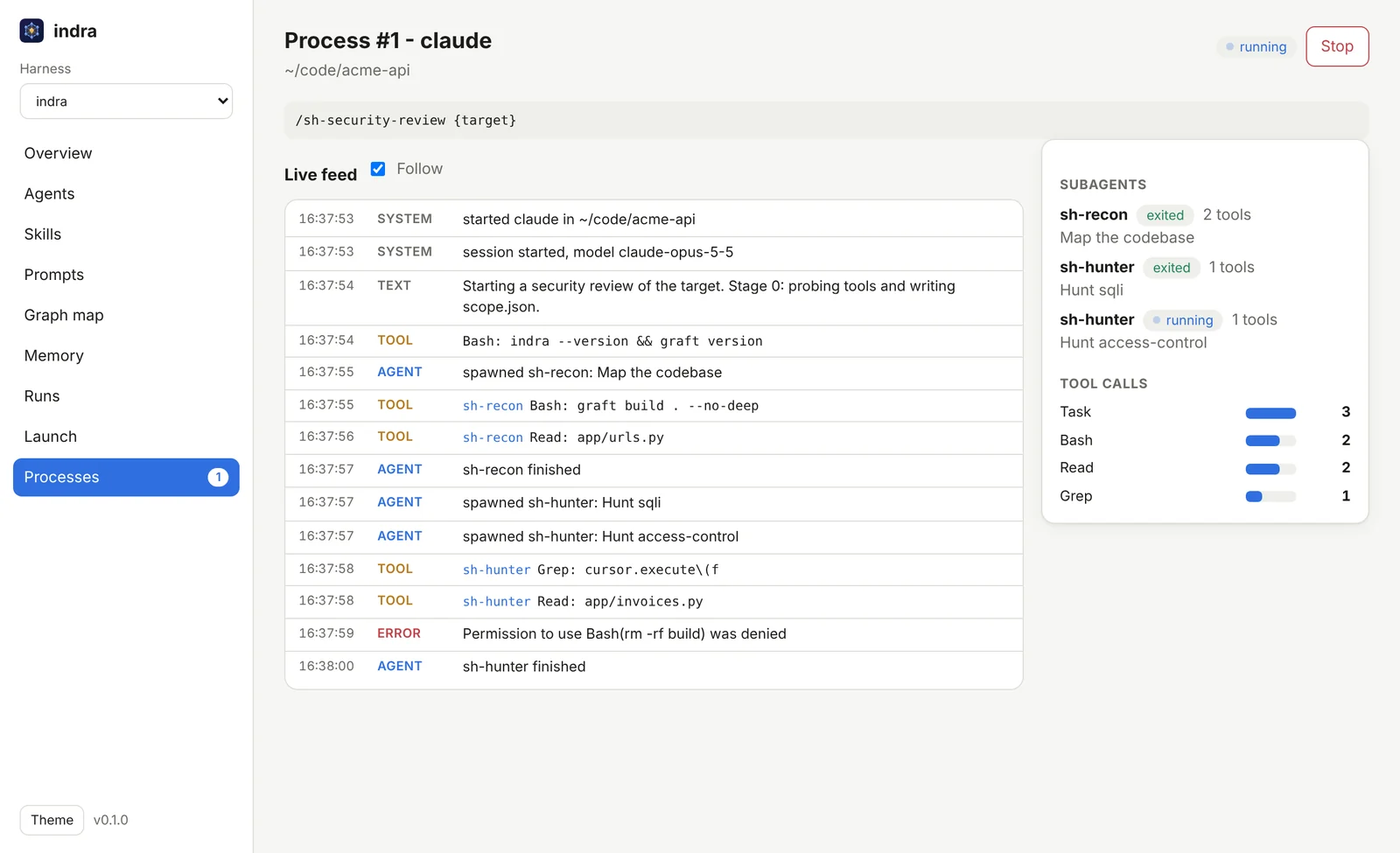
Watch it workindra serve shows every subagent, its tool calls, refused permissions and cost, live,
on this machine or remote ones over SSH, and indra run orchestrates them.
|
Scope: indra performs static analysis (source review, data-flow tracing, PoC and payload construction) on code you own or are authorized to test. It does not attack live third-party systems.
indra/                           # this repository: a plugin marketplace + the indra CLI
├── plugins/indra/               # the indra plugin
│   ├── skills/
│   │   ├── indra                # /indra - the entry point, routes any appsec request
│   │   ├── sh-security-review   # the pipeline orchestrator (stages 0-6)
│   │   ├── sh-pr-review         # review one pull request, post inline comments
│   │   ├── sh-memory            # long-term graph memory across runs
│   │   ├── sh-publish           # findings to Jira, Confluence, GitHub issues, Notion
│   │   └── sh-kb-*  (15)        # per-vulnerability-class knowledge bases
│   ├── agents/
│   │   ├── sh-recon             # map: code graph, stack, SBOM/CVE, attack surface
│   │   ├── sh-hunter            # find: source-to-sink hunting, one per class, in parallel
│   │   ├── sh-chainer           # escalate: combine findings into attack chains
│   │   ├── sh-verifier          # confirm: refute first, then prove impact with a PoC
│   │   └── sh-reporter          # deliver: README/JSON/SARIF/HTML/PDF/doc
│   └── references/              # shared contracts (finding schema, SARIF map, rubrics)
├── tools/indra/                 # the indra CLI (Rust): graph memory + agent web console
├── site/                        # the project website (GitHub Pages)
└── assets/                      # logo, banner and screenshots
sh-kb-* skills)access-control (IDOR/BOLA/priv-esc) · sqli · xss · ssrf · injection (cmd/code/SSTI/LDAP) · auth (session/JWT) · deserialization · path-traversal (LFI/RFI) · secrets · csrf · xxe · open-redirect · crypto · race-conditions · file-upload. Dependency CVEs and the SBOM are handled by the recon stage.
1. Get indra (one file; no Rust, Python or Node needed):
# Linux or macOS
curl -fsSL https://raw.githubusercontent.com/dmdhrumilmistry/indra/main/install.sh | sh
# Windows (PowerShell)
irm https://raw.githubusercontent.com/dmdhrumilmistry/indra/main/install.ps1 | iex
2. Open the console:
indra serve --open
That's it. The console opens in your browser: launch agents, watch them, read their results.
| I want to... | Run |
|---|---|
| Use the console (the "server") | indra serve --open |
| Run agents on another machine too | install there the same way, then paste the line the console shows under Nodes > Add a machine |
| Run Claude Code on a local model (Ollama) | indra claude -m qwen3-coder --pull |
| Give a team accounts and roles | indra user add alice (see users and roles) |
| Get the newest version | indra update (or indra update --auto on to stay up to date by itself) |
| Tab completion in my shell | set up by the installer; else indra completions --install |
| Uninstall | delete the indra file (~/.local/bin/indra, or %LOCALAPPDATA%\Programs\indra on Windows) |
It is one program for every role: the same file is the console on your laptop and the agent runner on a build box, so there is only ever one thing to install and keep up to date.
The harness ships for several agents. Full packaging details and the release
checklist are in docs/DISTRIBUTION.md.
Claude Code - add this repo as a plugin marketplace and install the plugin:
/plugin marketplace add dmdhrumilmistry/indra
/plugin install indra@indra
/plugin marketplace add accepts any of: a GitHub owner/repo (as above), a full git URL
(https://github.com/dmdhrumilmistry/indra.git), or a local path to a clone
(e.g. /plugin marketplace add ./indra from the directory containing your checkout).
Then run /plugin install indra@indra and reload when prompted.
Gemini CLI - a native extension, manifest at the repo root:
gemini extensions install https://github.com/dmdhrumilmistry/indra
opencode, Codex, or any agentskills.io agent - copy the
skills into a discovery directory. Codex additionally picks up AGENTS.md on its own: