 ytkoka/impersonate-proxy
A local MITM proxy that lets you control TLS fingerprints (JA3/JA4), HTTP/2 fingerprints, HTTP header order, and User-Agent — all from a single YAML config file.

# impersonate-proxy
[](https://chromewebstore.google.com/detail/maodbpimhodidbmbiknomgjfhaondncn)
**English** | [日本語](https://github.com/ytkoka/impersonate-proxy/blob/main/README.ja.md) | [简体中文](https://github.com/ytkoka/impersonate-proxy/blob/main/README.zh-CN.md)
A local MITM proxy that lets you control TLS fingerprints (JA3/JA4), HTTP/2 fingerprints, HTTP header order, User-Agent, and source IP headers — all from a single YAML config file.
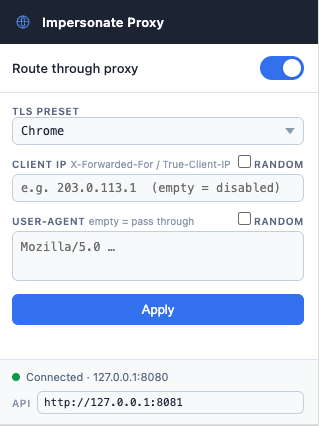
A **Chrome extension** is included for toggling the proxy and switching fingerprint profiles directly from the browser toolbar without restarting the proxy.
Intended for **authorized security testing** of WAF bot-detection systems. Route curl, browsers, or Playwright through the proxy to observe how different fingerprint combinations are classified.
## How it works
```
curl / browser / Playwright
│ HTTP CONNECT (to proxy)
▼
┌─────────────────────────────────────────┐
│ impersonate-proxy │
│ │
│ MITM TLS ◄──────────────► uTLS │
│ (our CA cert) (custom JA3/4) │
│ │
│ Header rewriter (UA, order, add/del) │
│ HTTP/2 framer (SETTINGS, WINDOW_UPDATE│
│ pseudo-header order) │
└─────────────────────────────────────────┘
│ Custom TLS ClientHello + HTTP/2
▼
Target server / WAF
```
| Layer | What you can control |
|-------|----------------------|
| TLS | Cipher suites, extensions, their order (JA3 / JA4) via uTLS presets or a fully custom `custom_hello` spec |
| HTTP/1.1 | Header order, User-Agent, add/remove any header, IP spoofing (`X-Forwarded-For` / `True-Client-IP`) |
| HTTP/2 | SETTINGS values & order, WINDOW_UPDATE, pseudo-header order (HTTP/2 fingerprint) |
## Prerequisites
- **macOS** or **Linux** (amd64 / arm64)
- **Go 1.22+**
### macOS
```bash
brew install go
```
### Linux
The distro-packaged Go is often outdated. Install the official binary directly:
```bash
# Download and extract (replace 1.22.5 with the latest from https://go.dev/dl/)
curl -OL https://go.dev/dl/go1.22.5.linux-amd64.tar.gz
sudo rm -rf /usr/local/go
sudo tar -C /usr/local -xzf go1.22.5.linux-amd64.tar.gz
# Add to PATH (add this line to ~/.bashrc or ~/.zshrc to make it permanent)
export PATH=$PATH:/usr/local/go/bin
```
Verify:
```bash
go version
# go version go1.22.5 linux/amd64
```
> **ARM64 (Raspberry Pi, AWS Graviton, etc.):** replace `linux-amd64` with `linux-arm64` in the download URL.
### Docker (no Go toolchain needed)
Prefer a disposable environment instead of installing Go? Skip straight to [Docker](#docker).
## Setup
### 1. Clone and build
```bash
git clone https://github.com/ytkoka/impersonate-proxy.git
cd impersonate-proxy
make build
```
### 2. Generate the MITM CA certificate
The CA is generated automatically on first run. Start the proxy once to create `ca.crt` and `ca.key`:
```bash
make run
# 2026/04/22 12:00:00 generated CA certificate → ca.crt
# 2026/04/22 12:00:00 listening on 127.0.0.1:8080 preset=chrome
```
Stop it with `Ctrl-C`.
### 3. Trust the CA certificate
Clients need to trust your MITM CA so they don't reject the proxy-generated leaf certificates.
**macOS system keychain** (affects all apps):
```bash
make trust-ca # runs: sudo security add-trusted-cert ...
```
**Linux system trust** (affects all apps; requires ca-certificates package):
```bash
# Debian / Ubuntu
sudo cp ca.crt /usr/local/share/ca-certificates/impersonate-proxy.crt
sudo update-ca-certificates
# RHEL / Fedora / Amazon Linux
sudo cp ca.crt /etc/pki/ca-trust/source/anchors/impersonate-proxy.crt
sudo update-ca-trust
```
**curl only** (no system-wide change):
```bash
curl --cacert ca.crt ...
```
**Playwright / Node.js**:
```bash
export NODE_EXTRA_CA_CERTS="$(pwd)/ca.crt"
```
**Firefox**: Preferences → Privacy & Security → View Certificates → Authorities → Import `ca.crt`
## Docker
Run the proxy in a container — no local Go/Make install required.
### 1. Start the proxy
> **Linux only:** the container runs as an unprivileged user (`nonroot`, UID 65532) and needs write access to the `./data` directory that holds the CA cert/key. If `./data` doesn't exist yet, Docker auto-creates it owned by `root` with no write access for other users, so the container will fail to generate the CA on first run. Create it with the right owner beforehand:
> ```bash
> mkdir -p data && sudo chown 65532:65532 data
> ```
> Not needed on Docker Desktop for Mac/Windows — its bind-mount layer maps ownership automatically.
```bash
git clone https://github.com/ytkoka/impersonate-proxy.git
cd impersonate-proxy
docker compose up -d
```
This builds the image locally and starts the container. On first run it generates the MITM CA and prints:
```
impersonate-proxy | generated CA certificate → /data/ca.crt (add to OS trust store to avoid cert errors)
impersonate-proxy | listening on 0.0.0.0:8080 preset=chrome
```
Or, to run the prebuilt image directly without cloning:
```bash
docker run -d --name impersonate-proxy \
-p 127.0.0.1:8080:8080 -p 127.0.0.1:8081:8081 \
-v "$(pwd)/config.docker.yaml:/config.yaml:ro" \
-v "$(pwd)/data:/data" \
ghcr.io/ytkoka/impersonate-proxy:latest
```
`docker-compose.yml` publishes both ports to `127.0.0.1` only — same loopback-only exposure as a native install (the management API has no authentication, so don't change this to `0.0.0.0` without adding your own access control).
### 2. Trust the CA certificate
The CA is generated inside the container but persisted to `./data/ca.crt` and `./data/ca.key` on the host via the bind-mounted volume, so it survives container restarts/rebuilds. Trust it exactly as in the [native setup](#3-trust-the-ca-certificate) above, just pointing at `./data/ca.crt` instead of `./ca.crt`:
```bash
# curl
curl --proxy http://127.0.0.1:8080 --cacert ./data/ca.crt https://tls.peet.ws/api/all
# macOS system keychain
sudo security add-trusted-cert -d -r trustRoot -k /Library/Keychains/System.keychain ./data/ca.crt
```
### 3. Configure
Edit `config.docker.yaml` (not `config.yaml` — that file is for the native install) and restart:
```bash
docker compose restart
```
`config.docker.yaml` is identical to `config.yaml` except `listen`/`mgmt_listen` are `0.0.0.0` (required for Docker's port publishing to reach the process at all — the container's own `127.0.0.1` is unreachable from the host) and `ca_cert`/`ca_key` point at `/data`, the persisted volume. See [Configuration](#configuration) below for all available fields.
### Makefile shortcuts
| Target | Description |
|--------|-------------|
| `make docker-build` | Build the image via `docker compose build` |
| `make docker-run` | Build and start in the background |
| `make docker-stop` | Stop and remove the container |
### Stop / clean up
```bash
docker compose down # stop the container
rm -rf data # also remove the persisted CA (re-trust required after)
```
## Configuration
Edit `config.yaml` before starting the proxy. All fields have defaults — you only need to specify what you want to override.
```yaml
listen: "127.0.0.1:8080"
mgmt_listen: "127.0.0.1:8081" # management API used by the Chrome extension (empty to disable)
ca_cert: "ca.crt"
ca_key: "ca.key"
tls:
# TLS fingerprint preset (controls JA3 / JA4)
# Options: chrome | firefox | safari | edge | ios | random | golang
preset: "chrome"
http:
# Override User-Agent (leave empty to pass through the client's UA)
# "auto": use the UA matching tls.preset (passed through for random/golang/custom)
# "random": pick a random UA from a built-in list
user_agent: "Mozilla/5.0 (Macintosh; Intel Mac OS X 10_15_7) AppleWebKit/537.36 (KHTML, like Gecko) Chrome/131.0.0.0 Safari/537.36"
# Spoof source IP: sets both X-Forwarded-For and True-Client-IP to this value,
# replacing any values the client may have already set (leave empty to disable)
# client_ip: "1.2.3.4"
# Emit headers in this order; headers not listed are appended after
header_order:
- "Host"
- "User-Agent"
- "Accept"
- "Accept-Language"
- "Accept-Encoding"
- "Connection"
# Add or overwrite headers
add_headers:
Accept-Language: "ja,en-US;q=0.9,en;q=0.8"
# Remove headers before forwarding
remove_headers: []
http2:
enabled: true
# SETTINGS frame entries — id and order both affect the HTTP/2 fingerprint.
# RFC 7540 §11.3 IDs:
# 1=HEADER_TABLE_SIZE 2=ENABLE_PUSH 3=MAX_CONCURRENT_STREAMS
# 4=INITIAL_WINDOW_SIZE 5=MAX_FRAME_SIZE 6=MAX_HEADER_LIST_SIZE
settings:
- { id: 1, val: 65536 } # Chrome defaults shown here
- { id: 2, val: 0 }
- { id: 4, val: 6291456 }
- { id: 6, val: 262144 }
# Connection-level WINDOW_UPDATE increment
window_update: 15663105
# Order of pseudo-headers in the HEADERS frame
pseudo_header_order: [method, authority, scheme, path]
```
### Management API
When the proxy starts it also exposes a lightweight HTTP API on `mgmt_listen` (default `127.0.0.1:8081`). The Chrome extension uses this to read and update settings at runtime without restarting the proxy. You can also call it directly with curl:
| Endpoint | Method | Description |
|---|---|---|
| `/api/config` | `GET` | Return active settings as JSON, including the current `custom_hello` and upstream state |
| `/api/config` | `POST` | Partially update TLS preset / `custom_hello` / client IP / User-Agent / upstream enabled+select — omitted fields are left unchanged |
| `/api/upstream` | `GET` | Return upstream state: `enabled`, `select`, configured proxy **names** (never URLs/credentials), and whether IP-header suppression is active |
`POST /api/config` is a genuine partial update: send only the field you want to change and everything else — including TLS preset and upstream selection — is left as-is.
```bash
# Read current settings
curl http://127.0.0.1:8081/api/config
# Switch to Firefox fingerprint and set a spoofed IP (other fields untouched)
curl -s -X POST http://127.0.0.1:8081/api/config \
-H "Content-Type: application/json" \
-d '{"tls_preset":"firefox","client_ip":"203.0.113.1"}'
# Switch to an arbitrary JA3/JA4 fingerprint at runtime — same fields as the
# config.yaml custom_hello block, sent as JSON (see "Custom TLS fingerprint" below)
curl -s -X POST http://127.0.0.1:8081/api/config \
-H "Content-Type: application/json" \
-d '{
"tls_preset": "custom",
"custom_hello": {
"cipher_suites": [2570, 4865, 4866, 4867, 49195, 49199, 49196, 49200, 52393, 52392, 49171, 49172, 156, 157, 47, 53],
"curves": ["X25519", "P256", "P384"],
"versions": ["1.3", "1.2"],
"extensions": [2570, 0, 23, 65281, 10, 11, 35, 16, 5, 18, 13, 51, 45, 43, 27, 21]
},
"client_ip": "",
"user_agent": ""
}'
# Enable the upstream proxy and pick one by name — leaves TLS preset,
# client IP, and User-Agent exactly as they were
curl -s -X POST http://127.0.0.1:8081/api/config \
-H "Content-Type: application/json" \
-d '{"upstream_enabled": true, "upstream_select": "residential_us"}'
# Read current upstream state
curl -s http://127.0.0.1:8081/api/upstream
```
Changes take effect immediately for new connections. Set `mgmt_listen: ""` to disable the API entirely.
### Browser fingerprint reference
| Browser | TLS preset | HTTP/2 SETTINGS | WINDOW_UPDATE |
|---------|-----------|-----------------|---------------|
| Chrome | `chrome` | `1:65536,2:0,4:6291456,6:262144` | 15663105 |
| Firefox | `firefox` | `1:65536,4:131072,5:16384` | 12517377 |
| Safari | `safari` | `1:4096,3:100,4:2097152,6:16384` | 10485760 |
### User-Agent auto mode (`user_agent: "auto"`)
With `user_agent: "auto"` the proxy sets the User-Agent that matches the current `tls.preset`, so the TLS fingerprint and the UA never contradict each other. Switching the preset (via config or the Chrome extension) switches the UA too.
| `tls.preset` | User-Agent sent |
|---|---|
| `chrome` | Chrome 131 (macOS) |
| `firefox` | Firefox 132 (macOS) |
| `safari` | Safari 17.2 (macOS) |
| `edge` | Edge 131 (Windows) |
| `ios` | iPhone / iOS 17.1 Safari |
| `random`, `golang`, `custom` | not modified — the client's own UA is passed through |
`"random"` is a separate mode that picks a random UA from a built-in list on every request, regardless of the TLS preset.
> **Note:** The `edge` preset sends the same TLS ClientHello as `chrome`, and `ios` the same as `safari` (the older uTLS Edge 85 / iOS 14 hellos contradicted the Edg/131 and iOS 17 User-Agents). Their JA3/JA4 values therefore match Chrome and Safari respectively.
### Custom TLS fingerprint (`preset: "custom"`)
The built-in presets (`chrome`, `firefox`, `safari`, …) cover the most common cases. When you need to match a specific browser version or a fingerprint that differs from those presets, set `preset: "custom"` and provide a `custom_hello` block.
**How JA3 / JA4 map to config fields**
| Fingerprint component | Config field | Notes |
|---|---|---|
| TLS version range | `versions` | Min/max are derived automatically |
| Cipher suite list + order | `cipher_suites` | Use `0x0a0a` as a GREASE placeholder; uTLS randomises it per connection |
| Extension type IDs + order | `extensions` | Order directly controls the JA3 extensions component; values matching the GREASE pattern (`0xXAXA`) are randomised per connection |
| Supported groups (curves) | `curves` | Also controls which key shares are sent |
> JA3 and JA4 are one-way hashes — you cannot reverse a hash back to a spec. Find the underlying parameters for the target browser with [tls.peet.ws](https://tls.peet.ws) or Wireshark, then paste them into `custom_hello`.
**Chrome 131 example**
```yaml
tls:
preset: "custom"
custom_hello:
cipher_suites: # hex IDs; 0x0a0a = GREASE placeholder (randomised per connection)
- 0x0a0a
- 0x1301 # TLS_AES_128_GCM_SHA256
- 0x1302 # TLS_AES_256_GCM_SHA384
- 0x1303 # TLS_CHACHA20_POLY1305_SHA256
- 0xc02b # ECDHE-ECDSA-AES128-GCM-SHA256
- 0xc02f # ECDHE-RSA-AES128-GCM-SHA256
- 0xc02c # ECDHE-ECDSA-AES256-GCM-SHA384
- 0xc030 # ECDHE-RSA-AES256-GCM-SHA384
- 0xcca9 # ECDHE-ECDSA-CHACHA20-POLY1305
- 0xcca8 # ECDHE-RSA-CHACHA20-POLY1305
- 0xc013 # ECDHE-RSA-AES128-SHA
- 0xc014 # ECDHE-RSA-AES256-SHA
- 0x009c # RSA-AES128-GCM-SHA256
- 0x009d # RSA-AES256-GCM-SHA384
- 0x002f # RSA-AES128-SHA
- 0x0035 # RSA-AES256-SHA
curves: # X25519 | X25519Kyber768 | P256 | P384 | P521
- "X25519Kyber768"
- "X25519"
- "P256"
versions: # TLS versions to advertise
- "1.3"
- "1.2"
extensions: # extension type IDs in order (controls JA3 extensions component)
- 0x0a0a # GREASE
- 0 # server_name (SNI)
- 23 # extended_master_secret
- 65281 # renegotiation_info
- 10 # supported_groups
- 11 # ec_point_formats
- 35 # session_ticket
- 16 # ALPN
- 5 # status_request
- 18 # signed_certificate_timestamp
- 13 # signature_algorithms
- 51 # key_share
- 45 # psk_key_exchange_modes
- 43 # supported_versions
- 27 # compress_certificate
- 17513 # application_settings (ALPS)
- 0x0a0a # GREASE
- 21 # padding
```
**Supported extension type IDs**
| ID | Name | Notes |
|---|---|---|
| `0xXAXA` (any GREASE pattern) | GREASE | Randomised per connection |
| `0` | server_name (SNI) | |
| `5` | status_request | OCSP stapling |
| `10` | supported_groups | Uses the `curves` list |
| `11` | ec_point_formats | Fixed: uncompressed (0) |
| `13` | signature_algorithms | Chrome-like defaults |
| `16` | ALPN | Advertises `h2`, `http/1.1` |
| `18` | signed_certificate_timestamp | |
| `21` | padding | BoringSSL-style padding |
| `23` | extended_master_secret | |
| `27` | compress_certificate | |
| `28` | record_size_limit | Fixed: 0x4001 |
| `35` | session_ticket | |
| `43` | supported_versions | Uses the `versions` list |
| `45` | psk_key_exchange_modes | PSK with DHE |
| `50` | signature_algorithms_cert | Chrome-like defaults |
| `51` | key_share | Key shares for X25519 and P256 (from `curves`) |
| `17513` | application_settings (ALPS) | Advertises `h2` |
| `17613` | application_settings (ALPS, new codepoint) | Advertises `h2`; sent by Chrome 133+ instead of `17513` |
| `65037` | encrypted_client_hello (ECH) | GREASE ECH payload (BoringSSL-style) |
| `65281` | renegotiation_info | |
| other | GenericExtension | Sent with empty payload |
> **Runtime updates:** `preset: "custom"` is not limited to `config.yaml` — it can also be switched to at runtime via the management API (`POST /api/config` with a `custom_hello` object, see [Management API](#management-api)) or from the Chrome extension's TLS Preset dropdown, without restarting the proxy.
### Upstream proxy
By default the proxy dials the target directly, so `X-Forwarded-For` / `True-Client-IP` spoofing (above) only changes what a request *claims* — the TCP connection's real source IP is still yours. Setting `upstream.enabled: true` routes the target connection through a SOCKS5 or HTTP CONNECT proxy first, so the **real egress IP** changes too. This lets you test WAF rules that ignore spoofable headers and look at the connecting IP itself, and to separate "fingerprint is fine but the IP is bad" from "IP is clean but the fingerprint is wrong."
Only tunnel-capable schemes are supported — `socks5`, `socks5h`, and `http` (CONNECT). Both hand back a raw TCP tunnel that the proxy then wraps with uTLS itself, so the ClientHello and HTTP/2 framing this whole tool exists to control pass through completely unmodified. An `https://` (TLS-terminating) upstream is **not supported**: it would decrypt and re-establish TLS itself, replacing your uTLS fingerprint with its own.
```yaml
upstream:
enabled: false # off by default; toggle at runtime without restarting
select: "residential_us" # proxy name | "rotate" | "random" | "" (first proxy)
dial_timeout_ms: 15000
suppress_ip_headers_when_active: true # skip XFF/True-Client-IP while upstream is active — avoids a clean IP claiming a spoofed one
proxies:
- name: residential_us
url: "socks5://user:[email protected]:1080" # hostnames are resolved by the proxy (SOCKS5h behavior), never locally
- name: datacenter
url: "http://user:[email protected]:8080"
- name: tor
url: "socks5://127.0.0.1:9050" # free to try: brew install tor && brew services start tor
```
Switch proxies at runtime the same way as the TLS preset — via the Chrome extension's "Upstream proxy" toggle/dropdown, or:
```bash
curl -s -X POST http://127.0.0.1:8081/api/config \
-H "Content-Type: application/json" \
-d '{"upstream_enabled": true, "upstream_select": "residential_us"}'
```
`GET /api/upstream` and the Chrome extension's dropdown only ever show proxy **names** — URLs and credentials never leave the proxy process.
**Verifying it actually worked:** check the real egress IP (e.g. `curl --proxy http://127.0.0.1:8080 https://ifconfig.me`) before and after enabling upstream, and separately confirm the fingerprint is unaffected with [tls.peet.ws](https://tls.peet.ws) — JA3/JA4 and the HTTP/2 fingerprint should be identical with `upstream.enabled` on or off, since only the network path changed.
> **Gotcha:** a browser (unlike `curl`) keeps warm, pooled connections per origin. If you switch `select` (or toggle `enabled`) and then just reload a tab that already had a connection open, the browser may reuse that existing connection instead of opening a new one — so the change won't show up until it actually dials fresh. Test in a new Incognito window, or flush `chrome://net-internals/#sockets`, if a switch doesn't seem to take effect.
> **Don't trust a proxy just because it accepts a connection.** A SOCKS5/CONNECT handshake succeeding tells you nothing about whether the proxy is honest — a malicious one can terminate your TLS itself and hand back its own certificate instead of tunneling raw bytes, letting it read (or alter) everything you thought was end-to-end encrypted. Before relying on any proxy you didn't set up yourself, check for exactly this: hit `https://tls.peet.ws` through it and confirm (a) there's no certificate error and (b) the JA4 matches what you get with `upstream.enabled: false`. A cert error or a changed JA4 means the "proxy" is intercepting your traffic, not tunneling it — don't route anything through it.
> **Docker:** an upstream URL pointing at the host machine (e.g. a local Tor instance at `socks5://127.0.0.1:9050`) won't resolve inside the container — `127.0.0.1` there is the container's own loopback, not the host's. Use `socks5://host.docker.internal:9050` (Docker Desktop on Mac/Windows) or the container's default-gateway IP (Linux) instead.
## Usage
### Start the proxy
```bash
make run
# Kills any previous instance on port 8080, rebuilds, and starts.
```
To switch fingerprint profiles, edit `config.yaml` and re-run `make run`.
### curl
```bash
# With CA trusted system-wide (after make trust-ca):
curl --proxy http://127.0.0.1:8080 https://tls.peet.ws/api/all
# Without system trust — pass CA explicitly:
curl --proxy http://127.0.0.1:8080 --cacert ca.crt https://tls.peet.ws/api/all
```
### Chrome extension
The `chrome-extension/` directory contains a Manifest V3 extension that controls the proxy from the browser toolbar.
<img src="https://assets.kitploit.com/production/public/readmes/50444/46f50a79ddb41e2c12f76a6d5df0e625a4398ed95904bfb3a2c1bcabb05dea8d.png" alt="Chrome extension popup" width="280">
**Installation:**
**Option A — Chrome Web Store (recommended):** [](https://chromewebstore.google.com/detail/maodbpimhodidbmbiknomgjfhaondncn)
**Option B — Load unpacked (for development, or to try unreleased changes):**
1. Open `chrome://extensions` in Chrome
2. Enable **Developer mode** (toggle in the top-right corner)
3. Click **Load unpacked** and select the `chrome-extension/` folder
**Controls:**
| Control | What it does |
|---|---|
| Proxy toggle | Enables / disables Chrome's proxy setting (routes traffic through `:8080`) |
| TLS Preset | Switches the uTLS fingerprint preset (chrome / firefox / safari / edge / ios / random / golang / **custom**) |
| Cipher Suites / Curves / TLS Versions / Extensions | Shown when **Custom (JA3/JA4)** is selected — the same fields as `custom_hello` in `config.yaml`, letting you dial in an arbitrary JA3/JA4 fingerprint without editing YAML or restarting the proxy |
| Client IP | Sets `X-Forwarded-For` and `True-Client-IP` on every request |
| User-Agent | Overrides the HTTP `User-Agent` header. **Auto** follows the selected TLS preset (see [User-Agent auto mode](#user-agent-auto-mode-user_agent-auto)); **Random** picks a random UA per request. Auto and Random are mutually exclusive |
| Upstream proxy | Enables routing through an upstream SOCKS5/HTTP-CONNECT proxy and selects which one (or `rotate`/`random`) — see [Upstream proxy](#upstream-proxy) |
| Apply button | POSTs the new settings to the management API; takes effect immediately |
| API field | Address of the management API (default `http://127.0.0.1:8081`) |
> **User-Agent scope:** The extension changes the HTTP `User-Agent` **header** only. JavaScript's `navigator.userAgent` is controlled by Chrome itself and is not affected. To spoof both simultaneously, launch Chrome with `--user-agent="..."` alongside the proxy settings.
### Playwright (Node.js)
```js
const { chromium } = require('playwright');
const browser = await chromium.launch();
const context = await browser.newContext({
proxy: { server: 'http://127.0.0.1:8080' },
});
// If CA is not in the system keychain, set before launching:
// NODE_EXTRA_CA_CERTS=./ca.crt node script.js
const page = await context.newPage();
await page.goto('https://tls.peet.ws/api/all');
```
For a more complete example — cycling through presets via the management API and recording a WAF's allow/block verdict for each — see [`examples/waf-fingerprint-test.js`](https://github.com/ytkoka/impersonate-proxy/blob/main/examples/waf-fingerprint-test.js).
### Playwright (Python)
```python
from playwright.sync_api import sync_playwright
with sync_playwright() as p:
browser = p.chromium.launch()
context = browser.new_context(proxy={"server": "http://127.0.0.1:8080"})
page = context.new_page()
page.goto("https://tls.peet.ws/api/all")
```
Set `NODE_EXTRA_CA_CERTS` (Node) or `REQUESTS_CA_BUNDLE` (Python) if the CA is not trusted system-wide.
## Verifying fingerprints
[tls.peet.ws](https://tls.peet.ws) returns the full fingerprint breakdown for any request it receives. Pipe the output through `jq` or Python for a readable view:
```bash
curl -s --proxy http://127.0.0.1:8080 --cacert ca.crt \
https://tls.peet.ws/api/all | python3 -m json.tool
```
Key fields to check:
| Field | Description |
|-------|-------------|
| `tls.ja3_hash` | JA3 fingerprint hash |
| `tls.ja4` | JA4 fingerprint string |
| `http2.akamai_fingerprint` | HTTP/2 fingerprint string (SETTINGS + WINDOW\_UPDATE + pseudo-header order) — field name is defined by the tls.peet.ws API |
| `http1.headers` | Header names in the order received by the server |
| `user_agent` | User-Agent as seen by the server |
| `ip` | Source IP as seen by the server — verify `X-Forwarded-For` / `True-Client-IP` spoofing here |
## Project structure
```
impersonate-proxy/
├── main.go # Entry point
├── config/config.go # YAML config struct and defaults
├── fp/dialer.go # uTLS dialer — TLS fingerprint presets
├── h2fp/conn.go # HTTP/2 framer — SETTINGS / WINDOW_UPDATE / pseudo-header control
├── mitm/ca.go # MITM CA: generate, cache, and serve leaf certs
├── upstream/ # Upstream SOCKS5/HTTP-CONNECT proxy: manager, dialers, selection
├── proxy/proxy.go # Proxy server: CONNECT handling, protocol branch, runtime config
├── rewrite/headers.go # HTTP header rewriting (UA, order, add/remove, IP spoof)
├── mgmt/server.go # Management HTTP API (/api/config, /api/upstream)
├── chrome-extension/
│ ├── manifest.json # Manifest V3
│ ├── popup.html # Toolbar popup UI
│ ├── popup.css
│ ├── popup.js # Proxy toggle + upstream toggle + management API client
│ ├── icon.svg
│ └── icon16.png, icon48.png, icon128.png # Toolbar / Web Store icons
├── config.yaml # Default configuration
├── config.docker.yaml # Configuration used by docker-compose.yml
├── examples/
│ └── waf-fingerprint-test.js # Playwright harness: cycle presets, record WAF verdicts
├── Dockerfile
├── docker-compose.yml
└── Makefile
```
## Makefile targets
| Target | Description |
|--------|-------------|
| `make build` | Compile the binary |
| `make run` | Build, kill any existing instance, and start |
| `make trust-ca` | Add `ca.crt` to the macOS system keychain (requires sudo) |
| `make clean` | Remove the binary, `ca.crt`, and `ca.key` |
| `make docker-build` | Build the Docker image ([see Docker](#docker)) |
| `make docker-run` | Build and start the container in the background |
| `make docker-stop` | Stop and remove the container |
## Cleanup
Remove the binary and generated CA files:
```bash
make clean
```
If you added the CA to the macOS system keychain, remove it through **Keychain Access** (search for "impersonate-proxy CA") or:
```bash
sudo security delete-certificate -c "impersonate-proxy CA" /Library/Keychains/System.keychain
```
## Limitations
- **MITM only**: The proxy decrypts and re-encrypts traffic. Clients must trust the generated CA.
- **No HTTP/2 from client**: The client→proxy leg uses HTTP/1.1 (via CONNECT). Only the proxy→server leg uses HTTP/2 with custom fingerprints.
- **Chunked request bodies**: Requests with `Transfer-Encoding: chunked` bodies are not currently supported.
- **No QUIC / HTTP/3**: Out of scope.
- **User-Agent (HTTP header only)**: The proxy rewrites the `User-Agent` HTTP header, but JavaScript's `navigator.userAgent` is set by the browser independently and is unaffected. Use Chrome's `--user-agent` launch flag to override both simultaneously.
- **Upstream proxy is TCP-tunnel-only**: only `socks5` / `socks5h` / `http` (CONNECT) upstreams are supported — an upstream that terminates TLS itself is rejected at startup, since it would strip the uTLS ClientHello. See [Upstream proxy](#upstream-proxy).
## Legal notice
This tool is intended for **authorized security testing only** — for example, testing WAF and bot-detection configurations on systems you own or have explicit written permission to test.
Using this tool against systems without authorization may violate applicable laws (such as the Computer Fraud and Abuse Act, Japan's Unauthorized Computer Access Law, or equivalent legislation in your jurisdiction) and the terms of service of the target.
**The authors accept no liability for misuse.**
## Acknowledgements
- [uTLS](https://github.com/refraction-networking/utls) — TLS fingerprint customization
- [tls.peet.ws](https://tls.peet.ws) — Fingerprint inspection API used in examples
- [JA4+](https://github.com/FoxIO-LLC/ja4) — Fingerprinting standard reference
## License
[](LICENSE)