
 projectdiscovery/httpx
Kit de herramientas HTTP rápido y con múltiples sondas para reconocimiento y recopilación de información. Sondas TLS, CSP, encabezados, pila tecnológica y CDN. Soporta coincidentes, filtros y salida JSON para pruebas de seguridad automatizadas.
<h1 align="center">
  <img src="https://assets.kitploit.com/production/public/readmes/405/4dc5206927fe161f6f2bb22d21326c0518dc3d5cb655fda1739b30b6bd29dec9.png" alt="httpx" width="200px">
  <br>
</h1>


<p align="center">
<a href="https://opensource.org/licenses/MIT"><img src="https://img.shields.io/badge/license-MIT-_red.svg"></a>
<a href="https://goreportcard.com/badge/github.com/projectdiscovery/httpx"><img src="https://goreportcard.com/badge/github.com/projectdiscovery/httpx"></a>
<a href="https://github.com/projectdiscovery/httpx/releases"><img src="https://img.shields.io/github/release/projectdiscovery/httpx"></a>
<a href="https://hub.docker.com/r/projectdiscovery/httpx"><img src="https://img.shields.io/docker/pulls/projectdiscovery/httpx.svg"></a>
<a href="https://twitter.com/pdiscoveryio"><img src="https://img.shields.io/twitter/follow/pdiscoveryio.svg?logo=twitter"></a>
<a href="https://discord.gg/projectdiscovery"><img src="https://img.shields.io/discord/695645237418131507.svg?logo=discord"></a>
</p>

<p align="center">
  <a href="#features">Características</a> •
  <a href="#installation-instructions">Instalación</a> •
  <a href="#usage">Uso</a> •
  <a href="https://docs.projectdiscovery.io/tools/httpx/">Documentación</a> •
  <a href="#notes">Notas</a> •
  <a href="https://discord.gg/projectdiscovery">Únete a Discord</a>
</p>


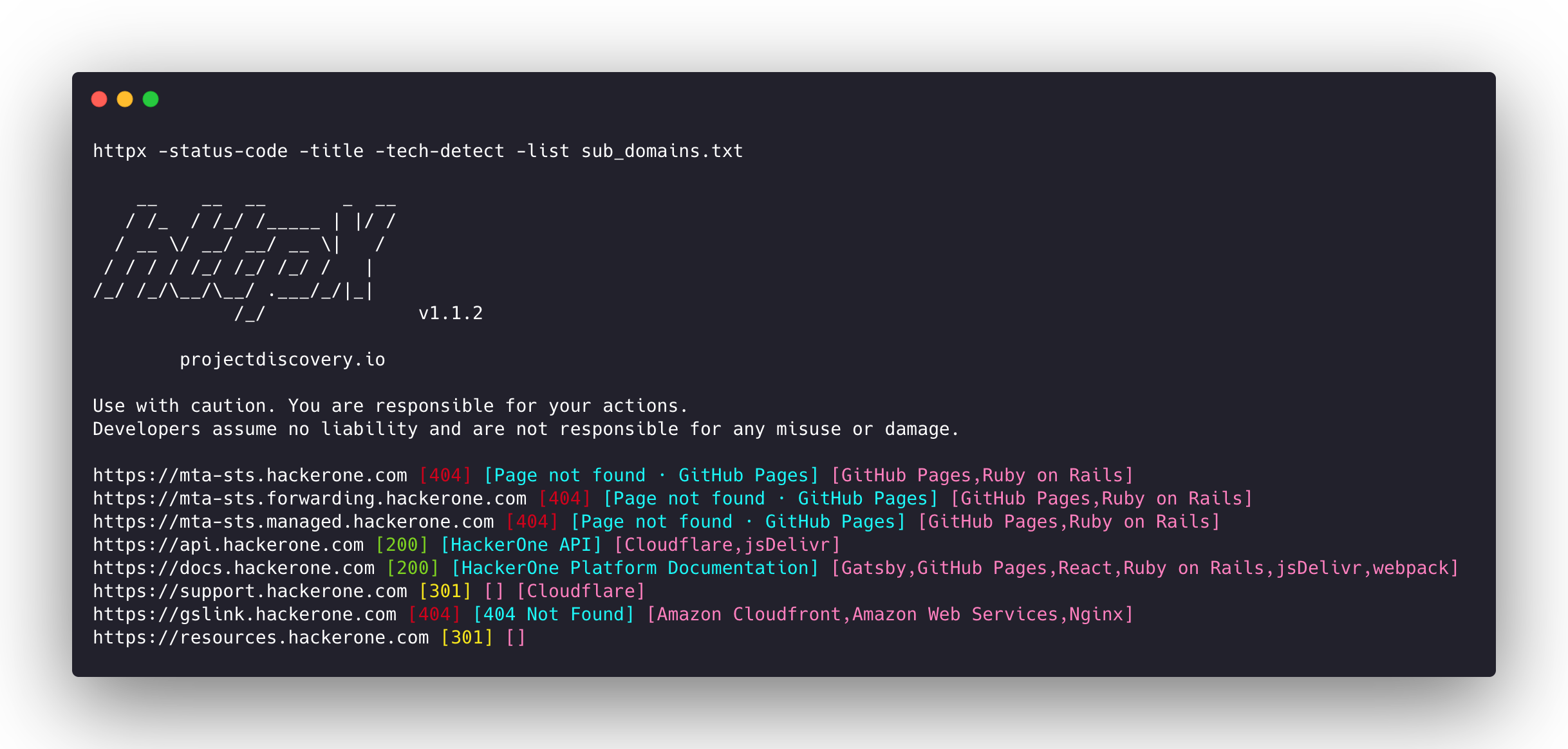
`httpx` es un toolkit HTTP rápido y multipropósito que permite ejecutar múltiples sondas utilizando la librería [retryablehttp](https://github.com/projectdiscovery/retryablehttp-go). Está diseñado para mantener la fiabilidad de los resultados con un mayor número de hilos.

# Características

<h1 align="center">
  <img src="https://assets.kitploit.com/production/public/readmes/405/844a8c468c1b9ef257f46c2bf9f9efe0d2e5b1b676a3ac5be70918d44c9e7403.png" alt="httpx" width="700px">
  <br>
</h1>

 - Base de código simple y modular que facilita las contribuciones.
 - Flags rápidos y totalmente configurables para sondear múltiples elementos.
 - Soporta múltiples sondeos basados en HTTP.
 - Fallback automático inteligente de https a http por defecto.
 - Soporta hosts, URLs y CIDR como entrada.
 - Maneja casos límite realizando reintentos, backoffs, etc. para gestionar WAFs.

### Sondas soportadas

| Sondas          | Comprobación por defecto | Sondas         | Comprobación por defecto |
|-----------------|---------------|----------------|---------------|
| URL             | true          | IP             | true          |
| Title           | true          | CNAME          | true          |
| Status Code     | true          | Raw HTTP       | false         |
| Content Length  | true          | HTTP2          | false         |
| TLS Certificate | true          | HTTP Pipeline  | false         |
| CSP Header      | true          | Virtual host   | false         |
| Line Count      | true          | Word Count     | true          |
| Location Header | true          | CDN            | false         |
| Web Server      | true          | Paths          | false         |
| Web Socket      | true          | Ports          | false         |
| Response Time   | true          | Request Method | true          |
| Favicon Hash    | false         | Probe  Status  | false         |
| Body Hash       | true          | Header  Hash   | true          |
| Redirect chain  | false         | URL Scheme     | true          |
| JARM Hash       | false         | ASN            | false         |

# Instrucciones de instalación

`httpx` requiere **go >=1.26.10** para instalarse correctamente. Ejecuta el siguiente comando para obtener el repositorio:

```sh
go install -v github.com/projectdiscovery/httpx/cmd/httpx@latest
```

Para obtener más información sobre cómo instalar httpx, consulte https://docs.projectdiscovery.io/tools/httpx/install.

| :exclamation:  **Aviso legal**  |
|---------------------------------|
| **Este proyecto está en desarrollo activo**. Espere cambios que rompan la compatibilidad con las versiones. Revise el registro de cambios antes de actualizar. |
| Este proyecto se creó principalmente para usarse como una herramienta CLI independiente. **Ejecutarlo como servicio puede plantear riesgos de seguridad.** Se recomienda usarlo con precaución y con medidas de seguridad adicionales. |

# Uso

```sh
httpx -h
```

Esto mostrará la ayuda para la herramienta. Aquí están todos los modificadores que admite.


```console
httpx is a fast and multi-purpose HTTP toolkit that allows running multiple probes using the retryablehttp library.

Usage:
  ./httpx [flags]

Flags:
INPUT:
   -l, -list string              input file containing list of hosts to process
   -rr, -request string          file containing raw request
   -u, -target string[]          input target host(s) to probe
   -im, -input-mode string       mode of input file (burp)

PROBES:
   -sc, -status-code                      display response status-code
   -cl, -content-length                   display response content-length
   -ct, -content-type                     display response content-type
   -location                              display response redirect location
   -favicon                               display mmh3 hash for '/favicon.ico' file
   -hash string                           display response body hash (supported: md5,mmh3,simhash,sha1,sha256,sha512)
   -jarm                                  display jarm fingerprint hash
   -rt, -response-time                    display response time
   -lc, -line-count                       display response body line count
   -wc, -word-count                       display response body word count
   -title                                 display page title
   -bp, -body-preview                     display first N characters of response body (default 100)
   -server, -web-server                   display server name
   -td, -tech-detect                      display technology in use based on wappalyzer dataset
   -cff, -custom-fingerprint-file string  path to a custom fingerprint file for technology detection
   -kb, -knowledge-base                   enable knowledge base classification
   -method                                display http request method
   -ws, -websocket                        display server using websocket
   -ip                                    display host ip
   -cname                                 display host cname
   -extract-fqdn, -efqdn                  get domain and subdomains from response body and header in jsonl/csv output
   -asn                                   display host asn information
   -cdn                                   display cdn/waf in use (default true)
   -probe                                 display probe status

HEADLESS:
   -ss, -screenshot                 enable saving screenshot of the page using headless browser
   -system-chrome                   enable using local installed chrome for screenshot
   -ho, -headless-options string[]  start headless chrome with additional options
   -esb, -exclude-screenshot-bytes  enable excluding screenshot bytes from json output
   -ehb, -exclude-headless-body     enable excluding headless header from json output
   -no-screenshot-full-page         disable saving full page screenshot
   -st, -screenshot-timeout value   set timeout for screenshot in seconds (default 10s)
   -sid, -screenshot-idle value     set idle time before taking screenshot in seconds (default 1s)
   -jsc, -javascript-code string[]  execute JavaScript code after navigation

MATCHERS:
   -mc, -match-code string            match response with specified status code (-mc 200,302)
   -ml, -match-length string          match response with specified content length (-ml 100,102)
   -mlc, -match-line-count string     match response body with specified line count (-mlc 423,532)
   -mwc, -match-word-count string     match response body with specified word count (-mwc 43,55)
   -mfc, -match-favicon string[]      match response with specified favicon hash (-mfc 1494302000)
   -ms, -match-string string[]        match response with specified string (-ms admin)
   -mr, -match-regex string[]         match response with specified regex (-mr admin)
   -mcdn, -match-cdn string[]         match host with specified cdn provider (cloudfront, fastly, google, etc.)
   -mrt, -match-response-time string  match response with specified response time in seconds (-mrt '< 1')
   -mdc, -match-condition string      match response with dsl expression condition

EXTRACTOR:
   -er, -extract-regex string[]   display response content with matched regex
   -ep, -extract-preset string[]  display response content matched by a pre-defined regex (url,ipv4,mail)

FILTERS:
   -fc, -filter-code string               filter response with specified status code (-fc 403,401)
   -fpt, -filter-page-type string[]       filter response with specified page type (e.g. -fpt login,captcha,parked)
   -fep, -filter-error-page               [DEPRECATED: use -fpt] filter response with ML based error page detection
   -fd, -filter-duplicates                filter out near-duplicate responses (only first response is retained)
   -fl, -filter-length string             filter response with specified content length (-fl 23,33)
   -flc, -filter-line-count string        filter response body with specified line count (-flc 423,532)
   -fwc, -filter-word-count string        filter response body with specified word count (-fwc 423,532)
   -ffc, -filter-favicon string[]         filter response with specified favicon hash (-ffc 1494302000)
   -fs, -filter-string string[]           filter response with specified string (-fs admin)
   -fe, -filter-regex string[]            filter response with specified regex (-fe admin)
   -fcdn, -filter-cdn string[]            filter host with specified cdn provider (cloudfront, fastly, google, etc.)
   -frt, -filter-response-time string     filter response with specified response time in seconds (-frt '> 1')
   -fdc, -filter-condition string         filter response with dsl expression condition
   -strip                                 strips all tags in response. supported formats: html,xml (default html)
   -lof, -list-output-fields              list of fields to output (comma separated)
   -eof, -exclude-output-fields string[]  exclude output fields output based on a condition

RATE-LIMIT:
   -t, -threads int              number of threads to use (default 50)
   -rl, -rate-limit int          maximum requests to send per second (default 150)
   -rlm, -rate-limit-minute int  maximum number of requests to send per minute

MISCELLANEOUS:
   -pa, -probe-all-ips        probe all the ips associated with same host
   -p, -ports string[]        ports to probe (nmap syntax: eg http:1,2-10,11,https:80)
   -path string               path or list of paths to probe (comma-separated, file)
   -tls-probe                 send http probes on the extracted TLS domains (dns_name)
   -csp-probe                 send http probes on the extracted CSP domains
   -tls-grab                  perform TLS(SSL) data grabbing
   -pipeline                  probe and display server supporting HTTP1.1 pipeline
   -http2                     probe and display server supporting HTTP2
   -vhost                     probe and display server supporting VHOST
   -ldv, -list-dsl-variables  list json output field keys name that support dsl matcher/filter

UPDATE:
   -up, -update                 update httpx to latest version
   -duc, -disable-update-check  disable automatic httpx update check

OUTPUT:
   -o, -output string                     file to write output results
   -oa, -output-all                       filename to write output results in all formats
   -sr, -store-response                   store http response to output directory
   -srd, -store-response-dir string       store http response to custom directory
   -ob, -omit-body                        omit response body in output
   -csv                                   store output in csv format
   -csvo, -csv-output-encoding string     define output encoding
   -j, -json                              store output in JSONL(ines) format
   -irh, -include-response-header         include http response (headers) in JSON output (-json only)
   -irr, -include-response                include http request/response (headers + body) in JSON output (-json only)
   -irrb, -include-response-base64        include base64 encoded http request/response in JSON output (-json only)
   -include-chain                         include redirect http chain in JSON output (-json only)
   -store-chain                           include http redirect chain in responses (-sr only)
   -svrc, -store-vision-recon-cluster     include visual recon clusters (-ss and -sr only)
   -pr, -protocol string                  protocol to use (unknown, http11, http2, http3)
   -fepp, -filter-error-page-path string  path to store filtered error pages (default "filtered_error_page.json")
   -rdb, -result-db                       store results in database
   -rdbc, -result-db-config string        path to database config file
   -rdbt, -result-db-type string          database type (mongodb, postgres, mysql)
   -rdbcs, -result-db-conn string         database connection string (env: HTTPX_DB_CONNECTION_STRING)
   -rdbn, -result-db-name string          database name (default "httpx")
   -rdbtb, -result-db-table string        table/collection name (default "results")
   -rdbbs, -result-db-batch-size int      batch size for database inserts (default 100)
   -rdbor, -result-db-omit-raw            omit raw request/response data from database

CONFIGURATIONS:
   -config string                   path to the httpx configuration file (default $HOME/.config/httpx/config.yaml)
   -ptm, -page-type-model string    path to a local dit model for page classification (requires -kb or -fpt; skips model download)
   -r, -resolvers string[]          list of custom resolver (file or comma separated)
   -allow string[]                  allowed list of IP/CIDR's to process (file or comma separated)
   -deny string[]                   denied list of IP/CIDR's to process (file or comma separated)
   -sni, -sni-name string           custom TLS SNI name
   -random-agent                    enable Random User-Agent to use (default true)
   -auto-referer                    set the Referer header to the current URL
   -H, -header string[]             custom http headers to send with request
   -http-proxy, -proxy string       proxy (http|socks) to use (eg http://127.0.0.1:8080)
   -unsafe                          send raw requests skipping golang normalization
   -resume                          resume scan using resume.cfg
   -fr, -follow-redirects           follow http redirects
   -maxr, -max-redirects int        max number of redirects to follow per host (default 10)
   -fhr, -follow-host-redirects     follow redirects on the same host
   -rhsts, -respect-hsts            respect HSTS response headers for redirect requests
   -vhost-input                     get a list of vhosts as input
   -x string                        request methods to probe, use 'all' to probe all HTTP methods
   -body string                     post body to include in http request
   -s, -stream                      stream mode - start elaborating input targets without sorting
   -sd, -skip-dedupe                disable dedupe input items (only used with stream mode)
   -ldp, -leave-default-ports       leave default http/https ports in host header (eg. http://host:80 - https://host:443
   -ztls                            use ztls library with autofallback to standard one for tls13
   -no-decode                       avoid decoding body
   -tlsi, -tls-impersonate string    enable experimental client hello (ja3) tls impersonation (chrome, or ja3 full string)
   -no-stdin                        Disable Stdin processing
   -hae, -http-api-endpoint string  experimental http api endpoint
   -sf, -secret-file string         path to secret file for authentication

DEBUG:
   -health-check, -hc        run diagnostic check up
   -debug                    display request/response content in cli
   -debug-req                display request content in cli
   -debug-resp               display response content in cli
   -version                  display httpx version
   -stats                    display scan statistic
   -profile-mem string       optional httpx memory profile dump file
   -silent                   silent mode
   -v, -verbose              verbose mode
   -si, -stats-interval int  number of seconds to wait between showing a statistics update (default: 5)
   -mp, -metrics-port int    port to expose httpx metrics on (default 63636)
   -nc, -no-color            disable colors in cli output
   -tr, -trace               trace

OPTIMIZATIONS:
   -nf, -no-fallback                  display both probed protocol (HTTPS and HTTP)
   -nfs, -no-fallback-scheme          probe with protocol scheme specified in input
   -maxhr, -max-host-error int        max error count per host before skipping remaining path/s (default 30)
   -e, -exclude string[]              exclude host matching specified filter ('cdn', 'private-ips', cidr, ip, regex)
   -retries int                       number of retries
   -timeout int                       timeout in seconds (default 10)
   -delay value                       duration between each http request (eg: 200ms, 1s) (default -1ns)
   -rsts, -response-size-to-save int  max response size to save in bytes (default 50000000)
   -rstr, -response-size-to-read int  max response size to read in bytes (default 50000000)

CLOUD:
   -auth                           configure projectdiscovery cloud (pdcp) api key (default true)
   -ac, -auth-config string        configure projectdiscovery cloud (pdcp) api key credential file
   -pd, -dashboard                 upload / view output in projectdiscovery cloud (pdcp) UI dashboard
   -tid, -team-id string           upload asset results to given team id (optional)
   -aid, -asset-id string          upload new assets to existing asset id (optional)
   -aname, -asset-name string      assets group name to set (optional)
   -pdu, -dashboard-upload string  upload httpx output file (jsonl) in projectdiscovery cloud (pdcp) UI dashboard
```

# Ejecutando httpx

Para obtener detalles sobre cómo ejecutar httpx, consulte https://docs.projectdiscovery.io/tools/httpx/running.

### Usar `httpx` como biblioteca
`httpx` se puede usar como biblioteca creando una instancia de la estructura `Option` y completándola con las mismas opciones que se especificarían mediante la CLI. Una vez validada, la estructura debe pasarse a una instancia de runner (que se cerrará al final del programa) y se debe llamar al método `RunEnumeration`. En la carpeta [examples](https://github.com/projectdiscovery/httpx/blob/dev/examples) hay un ejemplo mínimo de cómo hacerlo.

### Usar un modelo local de clasificación de páginas

Para entornos que no pueden acceder a Hugging Face, aprovisione el [modelo dit model.json](https://huggingface.co/datasets/happyhackingspace/dit/resolve/main/model.json) en una máquina accesible y cópielo al entorno de escaneo. Selecciónelo con `-page-type-model` (`-ptm`):

```bash
httpx -l hosts.txt -kb -json -ptm /opt/httpx/model.json
httpx -l hosts.txt -fpt error,parked -ptm /opt/httpx/model.json
```

La ruta selecciona un modelo local y omite el descubrimiento y la descarga automáticos de modelos. Un modelo ausente o ilegible, o un JSON de modelo no válido, detiene la inicialización en lugar de recurrir a una descarga. La clasificación sigue siendo opcional: use `-kb` o `-fpt` (también se admite el obsoleto `-fep`). Establecer solo `-ptm` no carga el modelo ni habilita la clasificación. Los usuarios de la biblioteca pueden establecer `Options.PageTypeModel` junto con `KnowledgeBase` o `OutputFilterPageType`. Sin una ruta personalizada, el comportamiento existente de descubrimiento y descarga de modelos no cambia.

Los modelos explícitos también deben pasar una verificación de clasificación de página y formulario antes de que comience el escaneo o se modifiquen los índices de salida existentes. Esto verifica que el modelo pueda ejecutarse, en lugar de certificar cada parte de su contenido. Un error de clasificación posterior deja esa respuesta sin información de tipo de página; los diagnósticos están disponibles con `-debug`.

## Recetas comunes

A continuación se presentan one-liners prácticos para casos de uso comunes que aprovechan las primitivas componibles de httpx. Estas recetas están validadas en `runner/wellknown_recipes_test.go`.

Use `-mdc` con helpers de DSL como `contains(content_type, ...)` y `contains(body, ...)` para hacer coincidir metadatos de respuesta y contenido del cuerpo. (`-mr`/`-ms` coinciden con la respuesta sin procesar completa; use `-mdc` para la coincidencia de campos estructurados).

### Archivos well-known

**security.txt**
Sondear en busca de un archivo security.txt válido según [RFC 9116](https://www.rfc-editor.org/rfc/rfc9116.html) en las rutas estándar (`/.well-known/security.txt`, `/security.txt`):

```bash
echo target.com | httpx -path '/.well-known/security.txt,/security.txt' -mc 200 -mdc 'contains(content_type, "text/plain") && contains(body, "Contact:") && contains_any(body, "mailto:", "https://")'
```

- `-path` prueba ruta(s) personalizada(s)
- `-mc 200` coincide con HTTP 200
- `-mdc` coincide usando expresiones DSL en campos de respuesta como `content_type` y `body`

**robots.txt**

```bash
echo target.com | httpx -path '/robots.txt' -mc 200 -mdc 'contains(content_type, "text/plain")'
```

**sitemap.xml**

```bash
echo target.com | httpx -path '/sitemap.xml' -mc 200 -mdc 'contains_any(content_type, "application/xml", "text/xml") && contains(body, "<urlset")'
```

**humans.txt**

```bash
echo target.com | httpx -path '/humans.txt' -mc 200 -mdc 'contains(content_type, "text/plain")'
```

**ads.txt**

```bash
echo target.com | httpx -path '/ads.txt' -mc 200 -mdc 'contains(content_type, "text/plain") && contains(body, "google.com")'
```

### URI bien conocidos

**Descubrimiento de OpenID Connect** ([spec](https://openid.net/specs/openid-connect-discovery-1_0.html))

```bash
echo target.com | httpx -path '/.well-known/openid-configuration' -mc 200 -mdc 'contains(content_type, "application/json") && contains(body, "\"issuer\"")'
```

**Apple Universal Links**

```bash
echo target.com | httpx -path '/.well-known/apple-app-site-association,/.well-known/apple-app-site-association.json' -mc 200 -mdc 'contains(content_type, "application/json") && contains(body, "\"applinks\"")'
```

**Enlaces de aplicaciones de Android**

```bash
echo target.com | httpx -path '/.well-known/assetlinks.json' -mc 200 -mdc 'contains(content_type, "application/json") && contains(body, "\"android_app\"")'
```

**crossdomain.xml** (archivo de políticas Flash heredado)

```bash
echo target.com | httpx -path '/crossdomain.xml' -mc 200 -mdc 'contains_any(content_type, "application/xml", "text/xml") && contains(body, "cross-domain-policy")'
```

**Otras URI bien conocidas** ([registro de la IANA](https://www.iana.org/assignments/well-known-uris/well-known-uris.xhtml)):

```bash
echo target.com | httpx -path '/.well-known/security.txt,/.well-known/change-password,/.well-known/openid-configuration' -mc 200
```

# Notas

- Por defecto, `httpx` sondea con esquema **HTTPS** y recurre a **HTTP** solo si **HTTPS** no es accesible.
- Las exportaciones XML de Burp Suite se pueden usar como entrada con `-l burp-export.xml -im burp`
- Un objetivo se puede fijar a una IP con una línea de entrada JSON, en el formato de las líneas de objetivo de nuclei, como `curl --resolve` pero en cada puerto de su host:
  ```
  {"target": "https://app.example.com", "ip": "192.0.2.10"}
  {"target": "https://app.example.com", "ip": "192.0.2.11"}
  ```
  - Cada conexión al nombre de host, incluidas las redirecciones, va a la IP que `host_ip` informa y que la salida muestra. El nombre de host se conserva para la cabecera Host y SNI y no se resuelve. Un host puede listarse con varias IPs, y una línea sin `ip` es el objetivo simple.
  - Las claves que usa nuclei para seleccionar plantillas, como `tags`, se ignoran, y cualquier otra clave hace que la línea sea inválida. Una línea inválida se informa y se omite. El `input` de un resultado es la línea en forma canónica.
  - `-u` divide su valor por comas, así que pasa dichas líneas en un archivo (`-l`) o por stdin.
  - Una línea con una IP detiene la ejecución con `-proxy`, `-pr http2`, `-unsafe`, `-pipeline`, `-http2`, `-jarm`, `-screenshot` y `-vhost-input`, ya que no se conectan a través de la IP o, para HTTP/2, no comparten una conexión entre las IPs de un host. Un proxy configurado con `HTTP_PROXY`/`HTTPS_PROXY` también resuelve el host por sí mismo, por lo que un sondeo a través de él falla: añade los hosts fijados a `NO_PROXY`.
  - `-pa` sondea cada IP de un host de la misma manera, por lo que tampoco puede usarse con `-proxy`. Las IPs de un host se mantienen separadas: `-maxhr` cuenta sus fallos y `-sr` almacena sus respuestas por separado.
  - Los nombres de host encontrados por `-tls-probe` y `-csp-probe`, incluido el fijado, se sondean como nuevos objetivos y se resuelven.
- La flag `-no-fallback` puede usarse para sondear y mostrar tanto el resultado **HTTP** como **HTTPS**.
- Se puede definir un esquema personalizado para los puertos, por ejemplo `-ports http:443,http:80,https:8443`
- El resolver personalizado admite múltiples protocolos (**doh|tcp|udp**) en forma de `protocol:resolver:port` (p. ej. `udp:127.0.0.1:53`)
- Los archivos de secretos pueden usarse para autenticación basada en dominio mediante `-sf secrets.yaml`. Tipos de autenticación admitidos: `BasicAuth`, `BearerToken`, `Header`, `Cookie`, `Query`. Ejemplo:
  ```yaml
  id: example-auth
  info:
    name: Example Auth Config
  static:
    - type: Header
      domains:
        - api.example.com
      headers:
        - key: X-API-Key
          value: secret-key-here
    - type: BasicAuth
      domains-regex:
        - ".*\\.internal\\.com$"
      username: admin
      password: secret
  ```
- Los siguientes flags deben usarse para casos de uso específicos en lugar de ejecutarlos por defecto junto con otras sondas:
   - `-ports`
   - `-path`
   - `-vhost`
   - `-screenshot`
   - `-csp-probe`
   - `-tls-probe`
   - `-favicon`
   - `-http2`
   - `-pipeline`
   - `-tls-impersonate`


# Agradecimientos

La funcionalidad de sondeo está inspirada en el trabajo de [@tomnomnom/httprobe](https://github.com/tomnomnom/httprobe) ❤️


--------

<div align="center">

`httpx` está hecho con 💙 por el equipo de [projectdiscovery](https://projectdiscovery.io) y se distribuye bajo la [Licencia MIT](https://github.com/projectdiscovery/httpx/blob/dev/LICENSE.md).


<a href="https://discord.gg/projectdiscovery"><img src="https://assets.kitploit.com/production/public/readmes/405/d0624f94cb9ea6401be5a089bb694bc963c47fa82aa3b758c893e3b0bbfdf663.png" width="300" alt="Únete a Discord"></a>

</div>





