
Herramienta de análisis estático y dinámico basada en reglas que identifica capacidades en archivos PE, ELF, .NET y shellcode, mapeándolos a técnicas MITRE ATT&CK para el triaje de malware.
capa detecta capacidades en archivos ejecutables. Lo ejecutas contra un PE, ELF, módulo .NET, shellcode o un sandbox report y te dice lo que cree que el programa puede hacer. Por ejemplo, puede sugerir que el archivo es un backdoor, es capaz de instalar servicios, o depende de HTTP para comunicarse.
Para inspeccionar interactivamente los resultados de capa en tu navegador, usa el capa Explorer Web.
Si quieres inspeccionar o escribir reglas de capa, dirígete al repositorio capa-rules. De lo contrario, sigue leyendo.
A continuación encontrarás una lista de nuestras publicaciones de blog sobre capa con más detalles.
$ capa.exe suspicious.exe
+--------------------+------------------------------------------------------------------------+ | ATT&CK Tactic | ATT&CK Technique | |--------------------+------------------------------------------------------------------------| | DEFENSE EVASION | Obfuscated Files or Information [T1027] | | DISCOVERY | Query Registry [T1012] | | | System Information Discovery [T1082] | | EXECUTION | Command and Scripting Interpreter::Windows Command Shell [T1059.003] | | | Shared Modules [T1129] | | EXFILTRATION | Exfiltration Over C2 Channel [T1041] | | PERSISTENCE | Create or Modify System Process::Windows Service [T1543.003] | +--------------------+------------------------------------------------------------------------+
+-------------------------------------------+-------------------------------------------------+ | CAPABILITY | NAMESPACE | |-------------------------------------------+-------------------------------------------------| | read and send data from client to server | c2/file-transfer | | execute shell command and capture output | c2/shell | | receive data (2 matches) | communication | | send data (6 matches) | communication | | connect to HTTP server (3 matches) | communication/http/client | | send HTTP request (3 matches) | communication/http/client | | create pipe | communication/named-pipe/create | | get socket status (2 matches) | communication/socket | | receive data on socket (2 matches) | communication/socket/receive | | send data on socket (3 matches) | communication/socket/send | | connect TCP socket | communication/socket/tcp | | encode data using Base64 | data-manipulation/encoding/base64 | | encode data using XOR (6 matches) | data-manipulation/encoding/xor | | run as a service | executable/pe | | get common file path (3 matches) | host-interaction/file-system | | read file | host-interaction/file-system/read | | write file (2 matches) | host-interaction/file-system/write | | print debug messages (2 matches) | host-interaction/log/debug/write-event | | resolve DNS | host-interaction/network/dns/resolve | | get hostname | host-interaction/os/hostname | | create process | host-interaction/process/create | | create registry key | host-interaction/registry/create | | create service | host-interaction/service/create | | create thread | host-interaction/thread/create | | persist via Windows service | persistence/service | +-------------------------------------------+-------------------------------------------------+
# descarga y uso
Descarga las versiones estables de los binarios independientes de capa [aquí](https://github.com/mandiant/capa/releases). Puedes ejecutar los binarios independientes sin instalación. capa es una herramienta de línea de comandos que debe ejecutarse desde la terminal.
Para usar capa como biblioteca o integrarlo con otra herramienta, consulta [doc/installation.md](https://github.com/mandiant/capa/blob/master/doc/installation.md) para obtener más instrucciones de configuración.
**Documentación:** [Uso y consejos](https://github.com/mandiant/capa/blob/master/doc/usage.md) · [Instalación](https://github.com/mandiant/capa/blob/master/doc/installation.md) · [Limitaciones](https://github.com/mandiant/capa/blob/master/doc/limitations.md) · [Preguntas frecuentes](https://github.com/mandiant/capa/blob/master/doc/faq.md)
# capa Explorer Web
El [capa Explorer Web](https://mandiant.github.io/capa/explorer/) te permite explorar interactivamente los resultados de capa en tu navegador web. Además de la versión en línea, puedes descargar un archivo HTML independiente para uso local sin conexión.
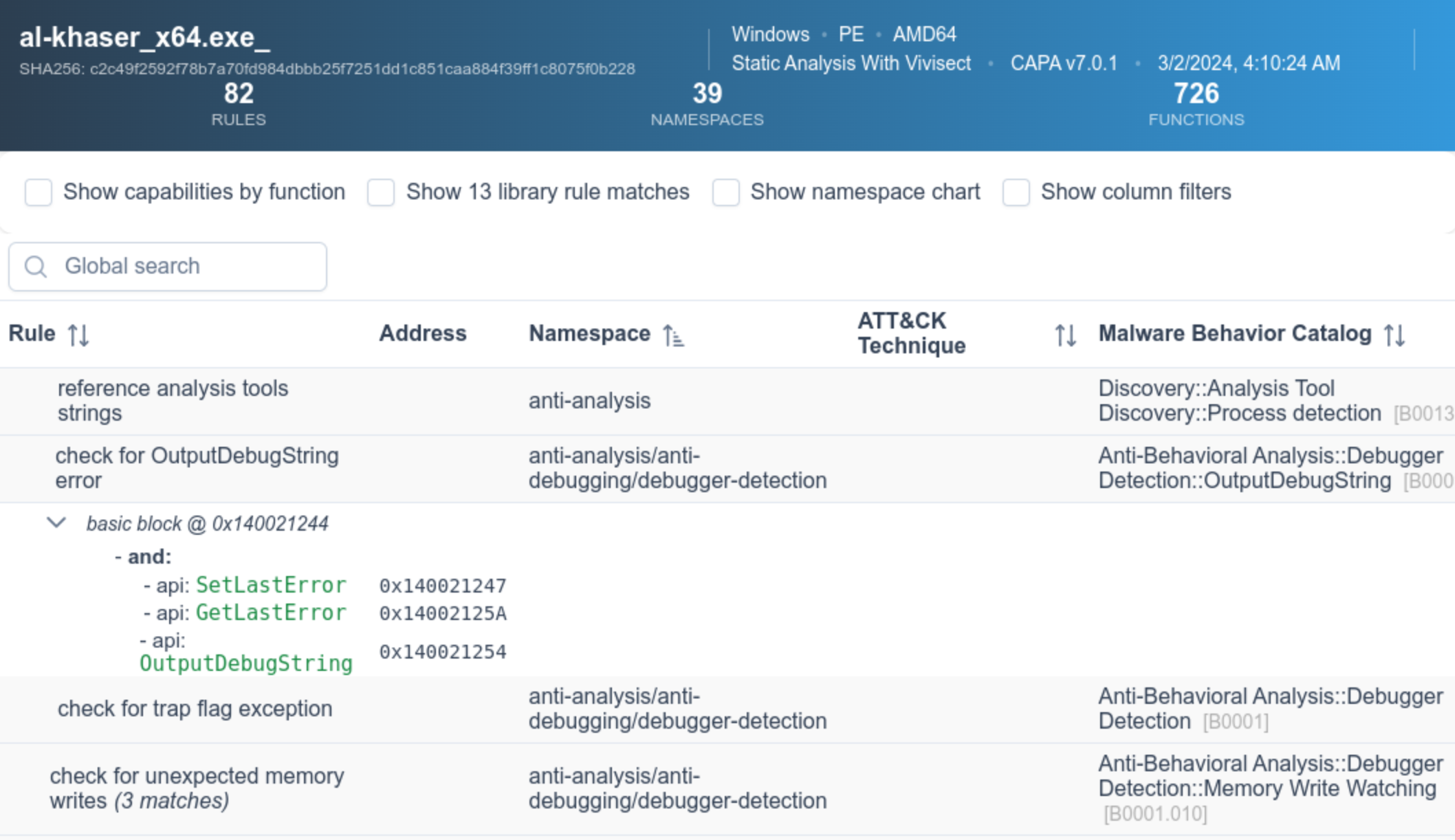
Más detalles sobre la interfaz web están disponibles en el [README de capa Explorer Web](https://github.com/mandiant/capa/blob/master/web/explorer/README.md).
# ejemplo
En el ejemplo de salida anterior, ejecutamos capa contra un binario desconocido (`suspicious.exe`), y la herramienta informa que el programa puede enviar solicitudes HTTP, decodificar datos mediante XOR y Base64, instalar servicios y generar nuevos procesos. En conjunto, esto nos hace pensar que `suspicious.exe` podría ser una puerta trasera persistente. Por lo tanto, nuestro próximo paso de análisis podría ser ejecutar `suspicious.exe` en un entorno aislado e intentar recuperar el servidor de comando y control.
## resultados detallados
Al pasar la bandera `-vv` (para muy detallado), capa informa exactamente dónde encontró evidencia de estas capacidades. Esto es útil por al menos dos razones:
- ayuda a explicar por qué deberíamos confiar en los resultados y nos permite verificar las conclusiones, y
- muestra dónde dentro del binario un analista experimentado podría estudiar con IDA Pro```
$ capa.exe suspicious.exe -vv
...
execute shell command and capture output
namespace c2/shell
author [email protected]
scope function
att&ck Execution::Command and Scripting Interpreter::Windows Command Shell [T1059.003]
references https://docs.microsoft.com/en-us/windows/win32/api/processthreadsapi/ns-processthreadsapi-startupinfoa
function @ 0x4011C0
and:
match: create a process with modified I/O handles and window @ 0x4011C0
and:
number: 257 = STARTF_USESTDHANDLES | STARTF_USESHOWWINDOW @ 0x4012B8
or:
number: 68 = StartupInfo.cb (size) @ 0x401282
or: = API functions that accept a pointer to a STARTUPINFO structure
api: kernel32.CreateProcess @ 0x401343
match: create pipe @ 0x4011C0
or:
api: kernel32.CreatePipe @ 0x40126F, 0x401280
optional:
match: create thread @ 0x40136A, 0x4013BA
or:
and:
os: windows
or:
api: kernel32.CreateThread @ 0x4013D7
or:
and:
os: windows
or:
api: kernel32.CreateThread @ 0x401395
or:
string: "cmd.exe" @ 0x4012FD
...
capa también soporta la detección de capacidades dinámicas para múltiples sandboxes, incluyendo:
Para usar esta funcionalidad, envía tu archivo a un sandbox compatible y luego descarga y ejecuta capa contra el archivo de informe generado. Esta funcionalidad permite a capa comparar capacidades con características dinámicas y estáticas que el sandbox capturó durante la ejecución.
Aquí hay un ejemplo de ejecución de capa contra un archivo empaquetado, y luego ejecutando capa contra el informe CAPE generado para el mismo archivo empaquetado:```yaml $ capa 05be49819139a3fdcdbddbdefd298398779521f3d68daa25275cc77508e42310.exe WARNING:capa.capabilities.common:-------------------------------------------------------------------------------- WARNING:capa.capabilities.common: This sample appears to be packed. WARNING:capa.capabilities.common: WARNING:capa.capabilities.common: Packed samples have often been obfuscated to hide their logic. WARNING:capa.capabilities.common: capa cannot handle obfuscation well using static analysis. This means the results may be misleading or incomplete. WARNING:capa.capabilities.common: If possible, you should try to unpack this input file before analyzing it with capa. WARNING:capa.capabilities.common: Alternatively, run the sample in a supported sandbox and invoke capa against the report to obtain dynamic analysis results. WARNING:capa.capabilities.common: WARNING:capa.capabilities.common: Identified via rule: (internal) packer file limitation WARNING:capa.capabilities.common: WARNING:capa.capabilities.common: Use -v or -vv if you really want to see the capabilities identified by capa. WARNING:capa.capabilities.common:--------------------------------------------------------------------------------
$ capa 05be49819139a3fdcdbddbdefd298398779521f3d68daa25275cc77508e42310.json
┍━━━━━━━━━━━━━━━━━━━━━━━━┯━━━━━━━━━━━━━━━━━━━━━━━━━━━━━━━━━━━━━━━━━━━━━━━━━━━━━━━━━━━━━━━━━━━━━━━━━━━━━━━━━━━━┑ │ ATT&CK Tactic │ ATT&CK Technique │ ┝━━━━━━━━━━━━━━━━━━━━━━━━┿━━━━━━━━━━━━━━━━━━━━━━━━━━━━━━━━━━━━━━━━━━━━━━━━━━━━━━━━━━━━━━━━━━━━━━━━━━━━━━━━━━━━┥ │ CREDENTIAL ACCESS │ Credentials from Password Stores T1555 │ ├────────────────────────┼────────────────────────────────────────────────────────────────────────────────────┤ │ DEFENSE EVASION │ File and Directory Permissions Modification T1222 │ │ │ Modify Registry T1112 │ │ │ Obfuscated Files or Information T1027 │ │ │ Virtualization/Sandbox Evasion::User Activity Based Checks T1497.002 │ ├────────────────────────┼────────────────────────────────────────────────────────────────────────────────────┤ │ DISCOVERY │ Account Discovery T1087 │ │ │ Application Window Discovery T1010 │ │ │ File and Directory Discovery T1083 │ │ │ Query Registry T1012 │ │ │ System Information Discovery T1082 │ │ │ System Location Discovery::System Language Discovery T1614.001 │ │ │ System Owner/User Discovery T1033 │ ├────────────────────────┼────────────────────────────────────────────────────────────────────────────────────┤ │ EXECUTION │ System Services::Service Execution T1569.002 │ ├────────────────────────┼────────────────────────────────────────────────────────────────────────────────────┤ │ PERSISTENCE │ Boot or Logon Autostart Execution::Registry Run Keys / Startup Folder T1547.001 │ │ │ Boot or Logon Autostart Execution::Winlogon Helper DLL T1547.004 │ │ │ Create or Modify System Process::Windows Service T1543.003 │ ┕━━━━━━━━━━━━━━━━━━━━━━━━┷━━━━━━━━━━━━━━━━━━━━━━━━━━━━━━━━━━━━━━━━━━━━━━━━━━━━━━━━━━━━━━━━━━━━━━━━━━━━━━━━━━━━┙
┍━━━━━━━━━━━━━━━━━━━━━━━━━━━━━━━━━━━━━━━━━━━━━━━━━━━━━━┯━━━━━━━━━━━━━━━━━━━━━━━━━━━━━━━━━━━━━━━━━━━━━━━━━━━━━━┑ │ Capability │ Namespace │ ┝━━━━━━━━━━━━━━━━━━━━━━━━━━━━━━━━━━━━━━━━━━━━━━━━━━━━━━┿━━━━━━━━━━━━━━━━━━━━━━━━━━━━━━━━━━━━━━━━━━━━━━━━━━━━━━┥ │ check for unmoving mouse cursor (3 matches) │ anti-analysis/anti-vm/vm-detection │ │ gather bitkinex information │ collection/file-managers │ │ gather classicftp information │ collection/file-managers │ │ gather filezilla information │ collection/file-managers │ │ gather total-commander information │ collection/file-managers │ │ gather ultrafxp information │ collection/file-managers │ │ resolve DNS (23 matches) │ communication/dns │ │ initialize Winsock library (7 matches) │ communication/socket │ │ act as TCP client (3 matches) │ communication/tcp/client │ │ create new key via CryptAcquireContext │ data-manipulation/encryption │ │ encrypt or decrypt via WinCrypt │ data-manipulation/encryption │ │ hash data via WinCrypt │ data-manipulation/hashing │ │ initialize hashing via WinCrypt │ data-manipulation/hashing │ │ hash data with MD5 │ data-manipulation/hashing/md5 │ │ generate random numbers via WinAPI │ data-manipulation/prng │ │ extract resource via kernel32 functions (2 matches) │ executable/resource │ │ interact with driver via control codes (2 matches) │ host-interaction/driver │ │ get Program Files directory (18 matches) │ host-interaction/file-system │ │ get common file path (575 matches) │ host-interaction/file-system │ │ create directory (2 matches) │ host-interaction/file-system/create │ │ delete file │ host-interaction/file-system/delete │ │ get file attributes (122 matches) │ host-interaction/file-system/meta │ │ set file attributes (8 matches) │ host-interaction/file-system/meta │ │ move file │ host-interaction/file-system/move │ │ find taskbar (3 matches) │ host-interaction/gui/taskbar/find │ │ get keyboard layout (12 matches) │ host-interaction/hardware/keyboard │ │ get disk size │ host-interaction/hardware/storage │ │ get hostname (4 matches) │ host-interaction/os/hostname │ │ allocate or change RWX memory (3 matches) │ host-interaction/process/inject │ │ query or enumerate registry key (3 matches) │ host-interaction/registry │ │ query or enumerate registry value (8 matches) │ host-interaction/registry │ │ delete registry key │ host-interaction/registry/delete │ │ start service │ host-interaction/service/start │ │ get session user name │ host-interaction/session │ │ persist via Run registry key │ persistence/registry/run │ │ persist via Winlogon Helper DLL registry key │ persistence/registry/winlogon-helper │ │ persist via Windows service (2 matches) │ persistence/service │ ┕━━━━━━━━━━━━━━━━━━━━━━━━━━━━━━━━━━━━━━━━━━━━━━━━━━━━━━┷━━━━━━━━━━━━━━━━━━━━━━━━━━━━━━━━━━━━━━━━━━━━━━━━━━━━━━┙
# Reglas de capa
capa utiliza una colección de reglas para identificar capacidades dentro de un programa.
Estas reglas son fáciles de escribir, incluso para aquellos nuevos en la ingeniería inversa.
Al crear reglas, puedes extender las capacidades que capa reconoce.
En algunos aspectos, las reglas de capa son una mezcla de los formatos OpenIOC, Yara y YAML.
Aquí hay un ejemplo de regla usada por capa:```yaml
rule:
meta:
name: create TCP socket
namespace: communication/socket/tcp
authors:
- [email protected]
- [email protected]
- [email protected]
scopes:
static: basic block
dynamic: call
mbc:
- Communication::Socket Communication::Create TCP Socket [C0001.011]
examples:
- Practical Malware Analysis Lab 01-01.dll_:0x10001010
features:
- or:
- and:
- number: 6 = IPPROTO_TCP
- number: 1 = SOCK_STREAM
- number: 2 = AF_INET
- or:
- api: ws2_32.socket
- api: ws2_32.WSASocket
- api: socket
- property/read: System.Net.Sockets.TcpClient::Client
El repositorio github.com/mandiant/capa-rules contiene cientos de reglas estándar que se distribuyen con capa. Por favor, aprende a escribir reglas y contribuye con nuevas entradas a medida que encuentres técnicas interesantes en malware.
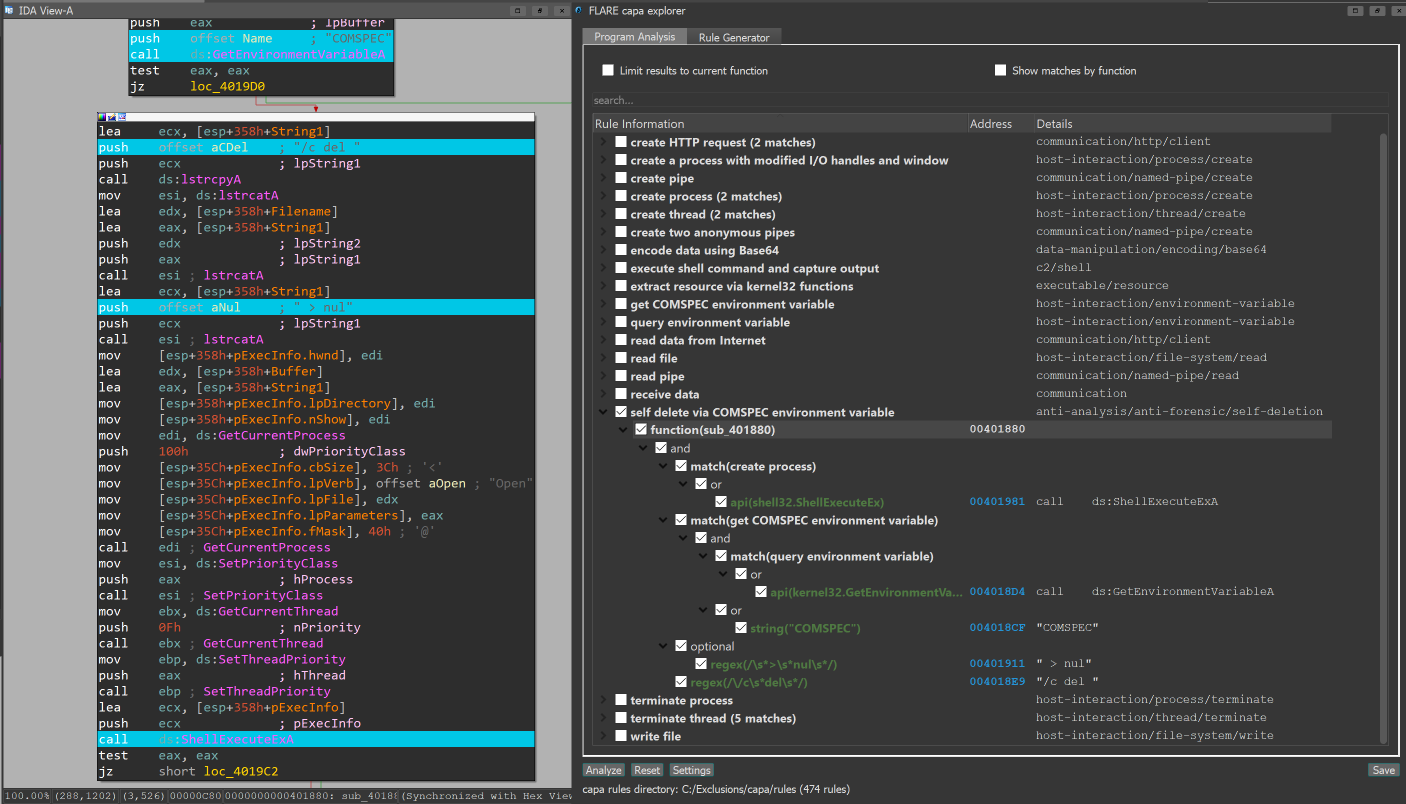
Si usas IDA Pro, entonces puedes usar el plugin capa explorer. capa explorer te ayuda a identificar áreas interesantes de un programa y construir nuevas reglas de capa utilizando características extraídas directamente de tu base de datos de IDA Pro. También utiliza tus cambios locales en el .idb para extraer mejores características, como cuando renombras una variable global que contiene una dirección de API resuelta dinámicamente.

capa admite el uso de Ghidra (a través de PyGhidra) como backend de extracción de características. Esto te permite ejecutar capa contra binarios utilizando el motor de análisis de Ghidra.
Puedes ejecutar y ver los resultados de capa en la interfaz de Ghidra usando capa explorer para Ghidra.

También puedes ejecutar capa desde la línea de comandos usando el backend de Ghidra.
El repositorio capa-testfiles contiene los datos que usamos para probar el código y las reglas de capa
¡Suscríbete a la lista de correo de FLARE para anuncios de la comunidad! Envía un correo con "subscribe" a [email protected].