
 gojue/ecapture
Capture SSL/TLS plaintext with eBPF—no MITM proxy or custom CA installation. Supports Linux and Android on x86_64 and arm64.


eCapture (旁观者)
Capture SSL/TLS plaintext with eBPF—no MITM proxy or custom CA installation.
English · 汉字



[!IMPORTANT] Supports Linux on x86_64 (kernel 4.18+), aarch64 (kernel 5.5+), and LoongArch64
loong64(kernel 6.6+). Android supports x86_64 and aarch64 with the existing kernel minimums. Requires root privileges or specific Linux capabilities. Does not support Windows or macOS.
[!TIP] Supports Linux on x86_64, aarch64, and LoongArch64; Android supports x86_64 and aarch64.
Download the ELF binary package from the releases page, extract it, and run:
sudo ecapture --help
[!TIP] Linux only.
# Pull the Docker image
docker pull gojue/ecapture:latest

# Run it
docker run --rm --privileged=true --net=host -v ${HOST_PATH}:${CONTAINER_PATH} gojue/ecapture ARGS
⚠️ Security note:
--privileged=truegrants full host access. For production use, prefer specific capabilities instead. See the Minimum Privileges Guide.
See Docker Hub for more information.
sudo ecapture tls
eCapture automatically detects the system's OpenSSL library and starts capturing plaintext traffic. When you make an HTTPS request, such as curl https://google.com, the captured request and response are displayed:
...
INF module started successfully. moduleName=EBPFProbeOPENSSL
??? UUID:233851_233851_curl_5_1_172.16.71.1:51837, Name:HTTP2Request, Type:2, Length:304
header field ":method" = "GET"
header field ":path" = "/"
header field ":authority" = "google.com"
...
📄 For complete output examples, see docs/example-outputs.md.
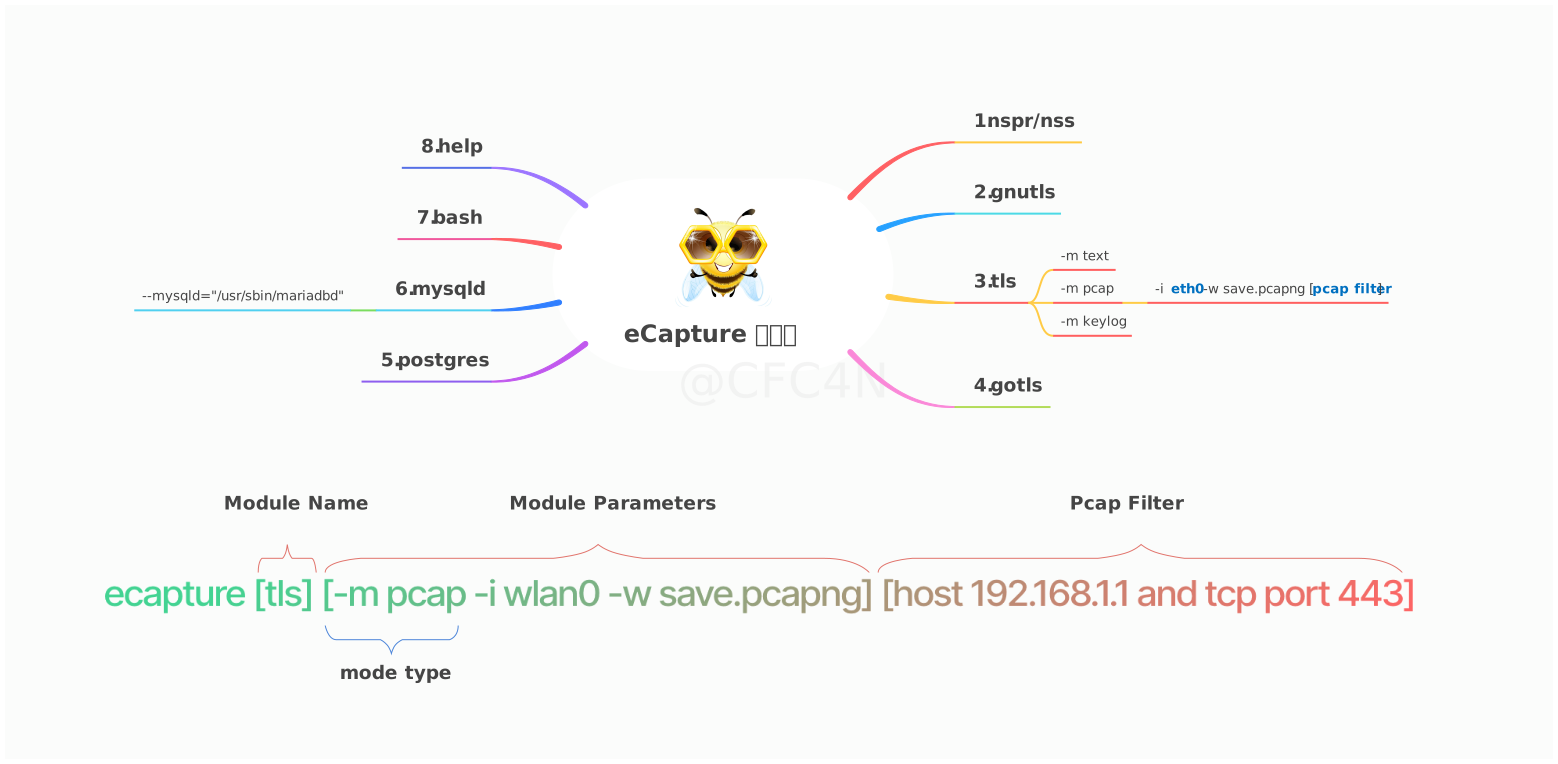
The eCapture tool includes 8 modules that can capture plaintext data from TLS/SSL libraries such as OpenSSL, GnuTLS, NSS/NSPR, BoringSSL, and GoTLS. It also supports auditing commands and queries from Bash, MySQL, and PostgreSQL applications.
You can use ecapture -h to view the full list of subcommands.
eCapture searches the default library paths from /etc/ld.so.conf to locate shared libraries and detect the OpenSSL library location. You can also set the library path explicitly with the --libssl flag.
If the target program is statically linked, you can set the program path directly as the value of the --libssl flag.
The OpenSSL module supports three capture modes:
pcap/pcapng mode stores captured plaintext data in pcap-NG format.keylog/key mode saves TLS handshake keys to a file.text mode captures plaintext data directly, either writing it to a file or printing it to the console.For OpenSSL, GoTLS, and GnuTLS, --eventaddr is the uniform primary event
destination. It accepts stdout, a plain path or file:// URI,
tcp://host:port, and ws:///wss:// (ordered binary frames). The mode
selects text, NSS Key Log, or pcapng representation; the address selects only
the transport. --keylogfile and --pcapfile remain compatible primary-file
aliases in their respective modes. Setting --eventaddr together with the
corresponding alias is an error. In pcapng mode, --keylogfile is a separate
optional keylog artifact.
--logaddr carries eCapture runtime logs only. Console runtime logs use
stderr, while captured stdout contains only event bytes. eCaptureQ is additive:
enabling it does not replace --eventaddr or --logaddr.
Supports TLS-encrypted HTTP 1.0/1.1/2.0 over TCP and HTTP/3 (QUIC) over UDP.
You can specify -m pcap or -m pcapng together with --pcapfile and -i. The current compatible default value of --pcapfile is save.pcapng.
sudo ecapture tls -m pcap -i eth0 --pcapfile=ecapture.pcapng tcp port 443
This command saves captured plaintext packets as a pcapng file, which can be opened with Wireshark.
📄 For complete pcapng mode output, see docs/example-outputs.md.
