 tancik/stegastamp
Invisible Hyperlinks in Physical Photographs

Matthew Tancik, Ben Mildenhall, Ren Ng University of California, Berkeley
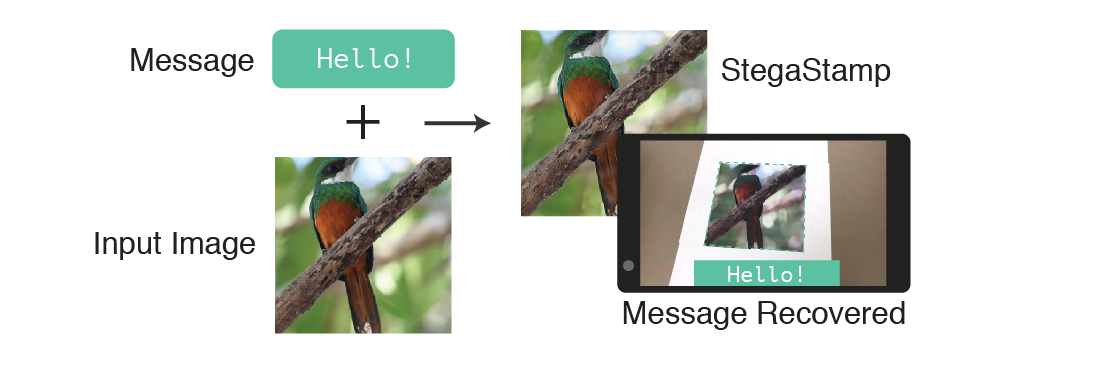
This repository is a code release for the ArXiv report found here. The project explores hiding data in images while maintaining perceptual similarity. Our contribution is the ability to extract the data after the encoded image (StegaStamp) has been printed and photographed with a camera (these steps introduce image corruptions). This repository contains the code and pretrained models to replicate the results shown in the paper. Additionally, the repository contains the code necessary to train the encoder and decoder models.
If you find our work useful, please consider citing:
    @inproceedings{2019stegastamp,
        title={StegaStamp: Invisible Hyperlinks in Physical Photographs},
        author={Tancik, Matthew and Mildenhall, Ben and Ng, Ren},
        booktitle={IEEE Conference on Computer Vision and Pattern Recognition (CVPR)},
        year={2020}
    }
git clone --recurse-submodules https://github.com/tancik/StegaStamp.git
cd StegaStamp
pip install -r requirements.txt
TRAIN_PATH = DIR_OF_DATASET_IMAGES
bash scripts/base.sh EXP_NAME
The training is performed in train.py. There are a number of hyperparameters, many corresponding to the augmentation parameters. scripts/bash.sh provides a good starting place.
The training code for the detector model (used to segment StegaStamps) is not included in this repo. The model used in the paper was trained using the BiSeNet model released here. CROP_WIDTH and CROP_HEIGHT were set to 1024, all other parameters were set to the default. The dataset was generated by randomly placing warped StegaStamps onto larger images.
To visualize the training run the following command and navigate to http://localhost:6006 in your browser.
tensorboard --logdir logs
The script encode_image.py can be used to encode a message into an image or a directory of images. The default model expects a utf-8 encoded secret that is <= 7 characters (100 bit message -> 56 bits after ECC).
Encode a message into an image:
python encode_image.py \
  saved_models/stegastamp_pretrained \
  --image test_im.png  \
  --save_dir out/ \
  --secret Hello
This will save both the StegaStamp and the residual that was applied to the original image.
The script decode_image.py can be used to decode a message from a StegaStamp.
Example usage:
python decode_image.py \
  saved_models/stegastamp_pretrained \
  --image out/test_hidden.png
The script detector.py can be used to detect and decode StegaStamps in an image. This is useful in cases where there are multiple StegaStamps are present or the StegaStamp does not fill the frame of the image.
To use the detector, make sure to download the detector model as described in the installation section. The recomended input video resolution is 1920x1080.
python detector.py \
  --detector_model detector_models/stegastamp_detector \
  --decoder_model saved_models/stegastamp_pretrained \
  --video test_vid.mp4
Add the --save_video FILENAME flag to save out the results.
The --visualize_detector flag can be used to visualize the output of the detector network. The mask corresponds to the segmentation mask, the colored polygons are fit to this segmentation mask using a set of heuristics. The detector outputs can noisy and are sensitive to size of the stegastamp. Further optimization of the detection network is not explored in this paper.