
 quarkslab/quokka
Quokka: A Fast and Accurate Binary Exporter


image generated by DALL-E
Quokka is a binary exporter: from the disassembly of a program, it generates an export file that can be used without the disassembler. It currently supports IDA Pro, Ghidra and Binary Ninja as disassembly backends.
The main objective of Quokka is to enable to completely manipulate the binary without ever opening a disassembler after the initial export. Moreover, it abstracts the disassembler's API to expose a clean interface to the users.
Quokka is heavily inspired by BinExport, the binary exporter used by BinDiff.
     IDA Pro               Ghidra               Binary Ninja
        │                      │                      │
IDA Plugin (C++)    Ghidra Plugin (Java)   BinaryNinja Plugin (Python)
        │                      │                      │
        └────────────── quokka.proto ─────────────────┘
                     (protobuf schema)
                              │
                        .quokka files
                              │
              Python bindings (quokka.Program)
              ├── Capstone backend (primary)
              └── Pypcode backend (optional)
The plugin is built in the CI and available in the registry.
It should be possible to install directly from PIP using this kind of commmand:
$ pip install quokka-project
Note: The IDA plugin is not needed to read a Quokka generated file. It is
only used to generate them.
Quokka is compatible with IDA 9.1+.
Quokka is published to the Hex-Rays plugin repository and can be installed with
hcli:
user@host:~$ hcli plugin install quokka
The plugin is also built on the CI and available in the Releases tab.
To download the plugin, get the file named quokka_plugin.so (or the
quokka-ida<version>.zip archive for your IDA version) and copy it into your
IDA plugins directory.
Quokka also supports exporting from Ghidra (>= 12.0.3) via a dedicated
extension. It produces the same .quokka protobuf files that the Python
library can load.
For build instructions, installation, and usage details see the Ghidra extension README.
Quokka also supports exporting from Binary Ninja via a Python plugin. It
produces the same .quokka protobuf files that the Python library can load.
For installation and usage details see the BinaryNinja extension README.
The first manual way to export a binary is to use the plugin inside IDA Pro.
The default shortcut inside IDA is Alt+A. It opens the following dialog:
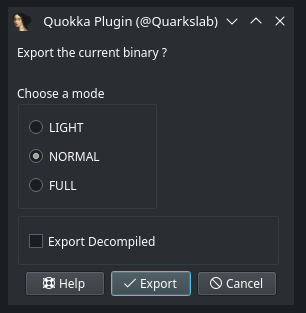
Modes available are:
Note: FULL mode is not yet implemented. Only LIGHT mode is currently functional.
Note: This requires a working IDA installation.
$ idat -OQuokkaAuto:true -OQuokkaDecompiled:true -A /path/to/hello.i64
All available options are described in the Usage.
Note: idat is used instead of ida to increase the export speed as graphical interface
is not needed.
$ analyzeHeadless /tmp/proj Test \
    -import /path/to/binary \
    -scriptPath ghidra_extension/src/script/ghidra_scripts \
    -postScript QuokkaExportHeadless.java \
    --out=/path/to/output.quokka --mode=LIGHT
See the Ghidra extension README for more details.
Note: headless usage of the Binary Ninja API requires a commercial license. Without one, use the export command inside the Binary Ninja UI instead.
$ python binaryninja_extension/export_headless.py /path/to/binary \
    -o /path/to/output.quokka --mode LIGHT
See the BinaryNinja extension README for more details.
Quokka provides a CLI utility tool to automatically export one or more files and/or directories (all executable files in each directory) in parallel. It supports both IDA Pro and Ghidra backends:
$ quokka-cli --backend ghidra -t 8 dir/
$ quokka-cli --backend ida --ida-path /opt/ida -t 8 dir/
$ quokka-cli -t 8 dir/                          # auto-detect backend
$ quokka-cli -o "%p/exports/%f.quokka" binary   # custom output directory
$ quokka-cli -b ida -o %F_ida.quokka -t 4 dir/  # Using relative path
$ quokka-cli -t 8 dir1/ dir2/ binary1 binary2   # multiple inputs
By default, the .quokka file is placed next to the input binary (e.g.
/usr/bin/ls produces /usr/bin/ls.quokka). Use -o to override this with a
literal path or a template expanded per file (%f = stem, %F = filename,
%p = parent dir, %P = full path, %e = extension, %% = literal %).
Run quokka-cli --help for all options. Key flags include:
-b, --backend to choose the disassembler backend (ida, ghidra, or auto)-i, --ida-path to provide the path to the IDA installation directory (the folder containing idat)--ghidra-path to provide the Ghidra installation directory (overrides GHIDRA_INSTALL_DIR)-o, --output to set the output path or template (default: %F.quokka)-m, --mode to choose the export mode (light or full)--decompiled to enable decompiled code export (IDA only)-v, --verbose to enable verbose loggingimport quokka
from quokka.types import Disassembler
# Directly from the binary (auto-detects available backend)
prog = quokka.Program.from_binary("/bin/ls")
# Explicitly choose a backend
prog = quokka.Program.from_binary("/bin/ls", disassembler=Disassembler.GHIDRA)
prog = quokka.Program.from_binary("/bin/ls", disassembler=Disassembler.IDA)
# From the exported file
prog = quokka.Program("ls.quokka", # the exported file
"/bin/ls") # the original binary
# Add new types from C declarations
prog.add_type("struct context { int id; char name[64]; };")
prog.add_type("enum status { OK=0, ERROR=1 };")

# Save the .quokka file
prog.write()

# Or apply changes (including new types) back to the IDA database
prog.commit(database_file="ls.i64", overwrite=True)
See the full editing documentation for details on renaming functions, setting prototypes, and more.
The process for building depends on which version of the IDA SDK you are using. These two modes are also referred as the new mode and the old mode.
