 nextronsystems/evtx-baseline
A repository hosting example goodware evtx logs containing sample software installation and basic user interaction

A repository hosting example goodware evtx logs containing sample software installation and basic user interaction
If you want to donate, create an issue or contact @phantinuss at twitter or keybase (the large files are only organised in releases, not the repo itself)
Install a Windows VM using a trial license (https://www.microsoft.com/en-us/evalcenter/)
Install Sysmon (http://live.sysinternals.com/tools/Sysmon64.exe) using sysmonconfig-trace.xml which is a modified fork of Cyb3rWard0g's config
Open a powershell console as an administrator and copy paste the following script
Application, Security and System logs to 512MBMicrosoft-Windows-TaskScheduler/Operational eventlog channelMicrosoft-Windows-DNS-Client/Operational eventlog channelMicrosoft-Windows-DriverFrameworks-UserMode/Operational eventlog channelMicrosoft-Windows-LSA/Operational eventlog channel# Incrase Sysmon logs Size
$sysmon = Get-WinEvent -ListLog Microsoft-Windows-Sysmon/Operational
$sysmon.MaximumSizeInBytes = 2147483648 #2GB
$sysmon.SaveChanges()
# Incrase Powershell logs Size
$ps1 = Get-WinEvent -ListLog Microsoft-Windows-PowerShell/Operational
$ps1.MaximumSizeInBytes = 2147483648 #2GB
$ps1.SaveChanges()
$ps2 = Get-WinEvent -ListLog "Windows PowerShell"
$ps2.MaximumSizeInBytes = 2147483648 #2GB
$ps2.SaveChanges()
# Incrase Application logs Size
$application = Get-WinEvent -ListLog Application
$application.MaximumSizeInBytes = 537919488 #512MB
$application.SaveChanges()
# Incrase Security logs Size
$security = Get-WinEvent -ListLog Security
$security.MaximumSizeInBytes = 537919488 #512MB
$security.SaveChanges()
# Incrase System logs Size
$system = Get-WinEvent -ListLog System
$system.MaximumSizeInBytes = 537919488 #512MB
$system.SaveChanges()
# Enable various Log Channels
wevtutil sl Microsoft-Windows-DNS-Client/Operational /e:true
wevtutil sl Microsoft-Windows-DriverFrameworks-UserMode/Operational /e:true
wevtutil sl Microsoft-Windows-LSA/Operational /e:true
wevtutil sl Microsoft-Windows-TaskScheduler/Operational /e:true
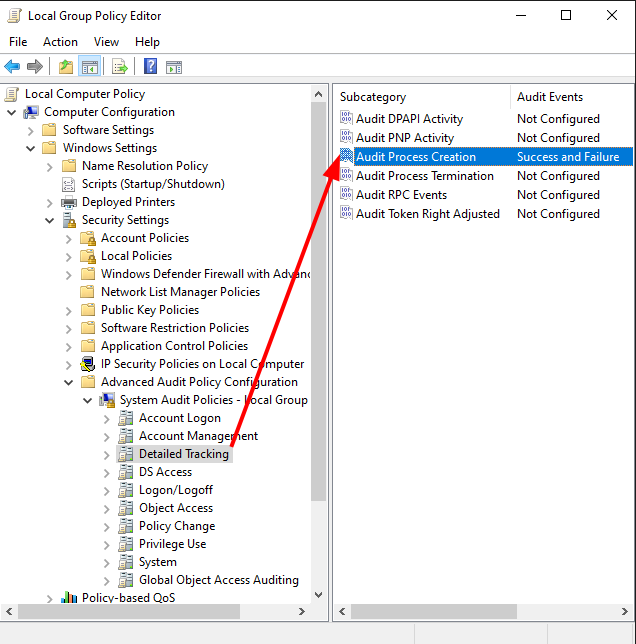
(Location: Open "gpedit" > "Computer Configuration" > "Windows Settings" > "Security Settings" > "Advanced Audit Policy Configuration"
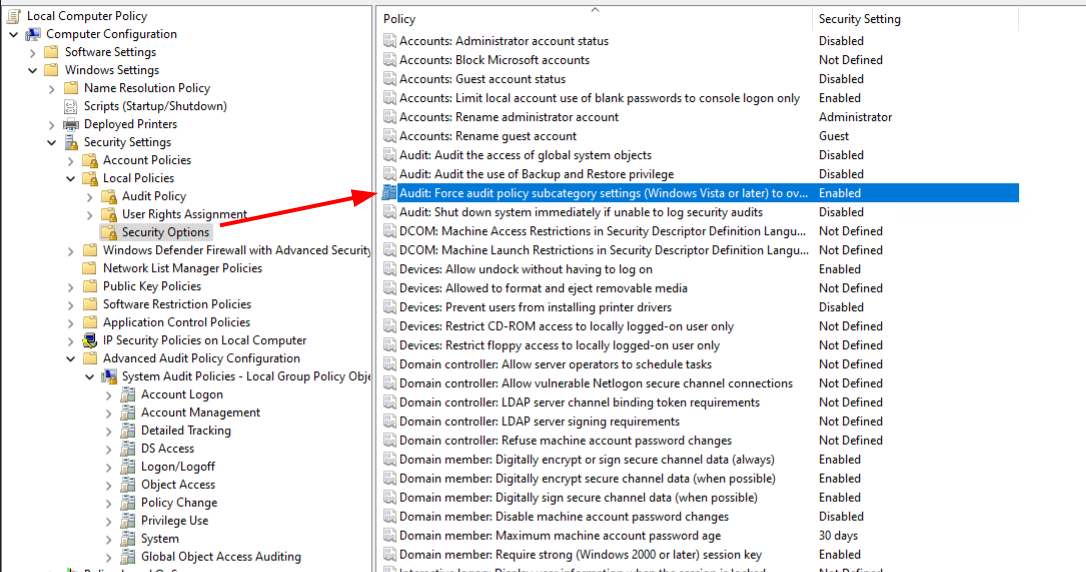
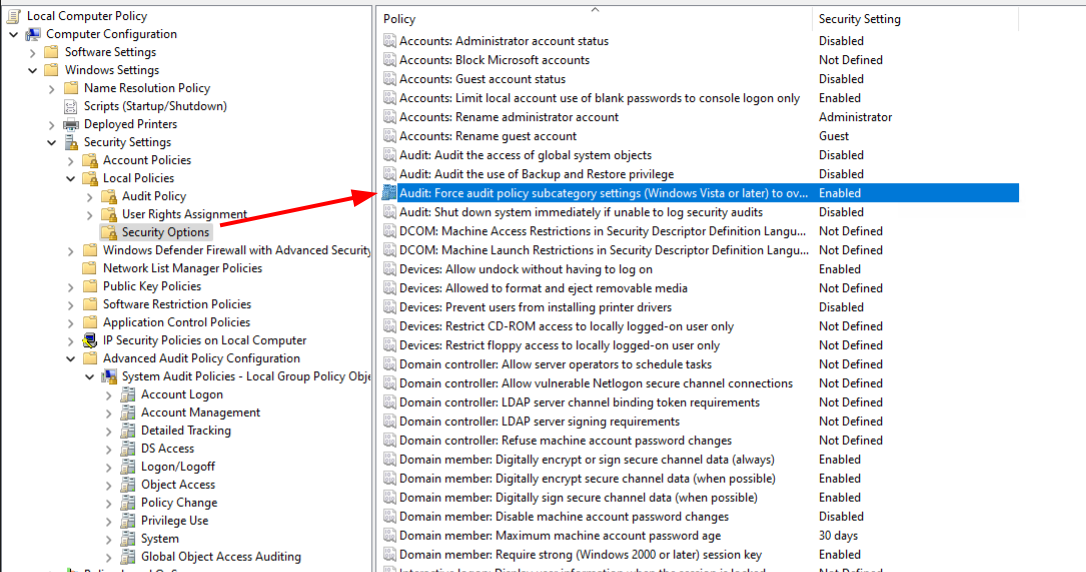
Note: When Advanced Audit Policy Configuration settings are used, the "Audit: Force audit policy subcategory settings (Windows Vista or later) to override audit policy category settings" policy setting under Local Policies\Security Options must als be enabled.
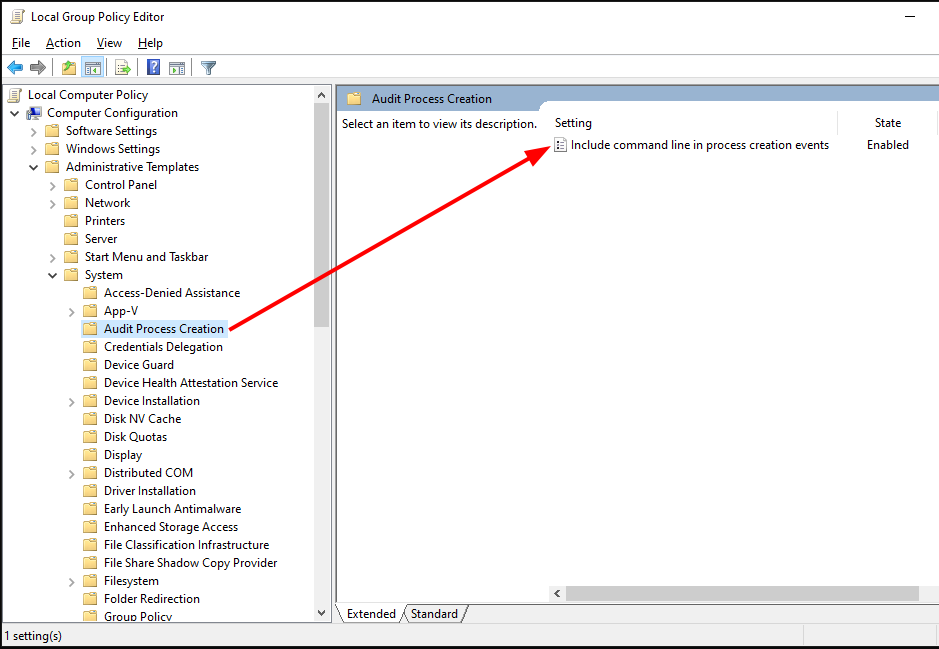
(Location: Open "gpedit" > "Computer Configuration" > "Administrative Templates" > "System" > "Audit Process Creation" > "Include command line in process creation events" set to "Enabled")
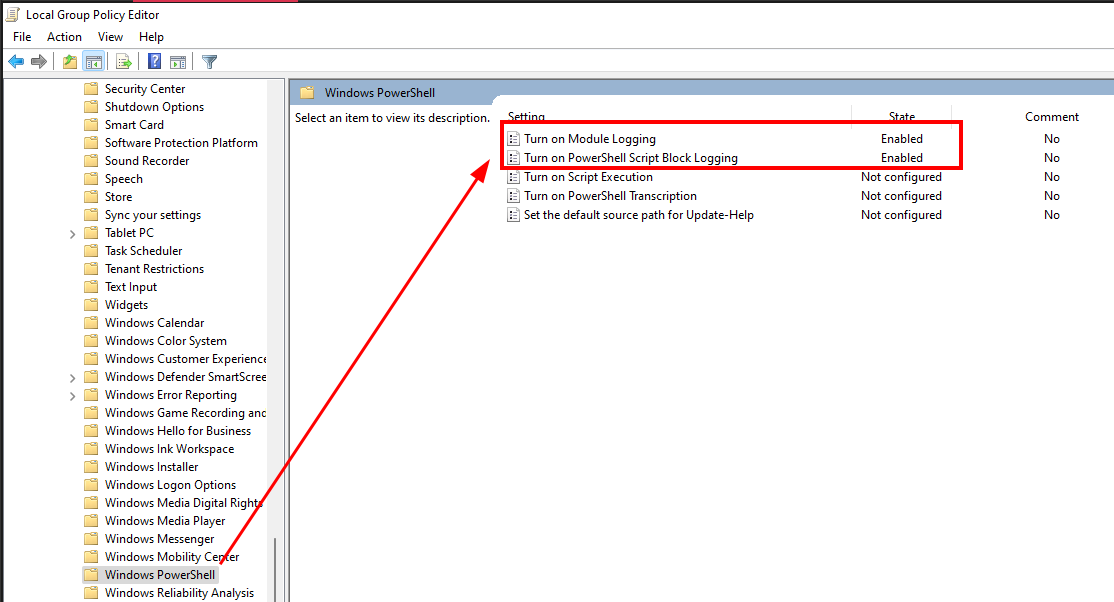
(Location: Open "gpedit" > "Computer Configuration" > "Administrative Templates" > "Windows Components" > "Windows PowerShell" > "Turn on Module Logging" & "Turn on Script Block Logging" set to "Enabled")
Install software and simulate interaction
Export the eventlog using the method described below and contribute
Once all is done and you're ready to donate the event log, open a powershell console as administrator and execute the following command
mkdir $ENV:UserProfile\evtx; Copy-Item "C:\Windows\System32\winevt\Logs\*.evtx" -Destination $ENV:UserProfile\evtx\; $filename = "$ENV:UserProfile\donation-evtx-" + $([System.Environment]::OSVersion.Version.Major) + "-" + $([System.Environment]::OSVersion.Version.Minor) + "-" + $([System.Environment]::OSVersion.Version.Build); Compress-Archive -Path $ENV:UserProfile\evtx -CompressionLevel Optimal -DestinationPath $filename; Remove-Item $ENV:UserProfile\evtx\ -Recurse; explorer $ENV:UserProfile\
If you have 7-Zip (C:\Program Files\7-Zip\7z.exe) installed on your system and for faster results, please use the following command from an elevated powershell prompt
mkdir $ENV:UserProfile\evtx; Copy-Item "C:\Windows\System32\winevt\Logs\*.evtx" -Destination $ENV:UserProfile\evtx\; $filename = "$ENV:UserProfile\donation-evtx-" + $([System.Environment]::OSVersion.Version.Major) + "-" + $([System.Environment]::OSVersion.Version.Minor) + "-" + $([System.Environment]::OSVersion.Version.Build); & "C:\Program Files\7-Zip\7z.exe" a $filename $ENV:UserProfile\evtx\*; Remove-Item $ENV:UserProfile\evtx\ -Recurse; explorer $ENV:UserProfile\
The resulting file will be located in $ENV:UserProfile\evtx\ and have the following naming convention donation-evtx-[MajorVersion]-[MinorVersion]-[Build] and is now ready to be donated :)
The following chapters show what we did on out test systems to simulate real user activity. It is meant as an example of what we did to create auhtentic log data. You could use your own systems or simulate your own user activity.
(performed by https://ninite.com/)
