
Skip to content
KitploitKITPLOIT
ToolsExploitsBlog
Log in
Submit
ToolsExploitsBlog
Submit

Hacking, PenTest, and Cybersecurity Tools for Your Security Arsenal!

Kitploit is a directory of hacking, cybersecurity, and pentesting tools. Discover the latest project updates to find vulnerabilities, analyze systems, automate testing, and strengthen your security.

FeedsContactPrivacy© 2026 Kitploit

Tool Directory

Categories

View all categories
Loading categories
EAST — Extensible Azure Security Tool - Documentation | Kitploit
Tools/GitHubGitHub/jsa2/east
Cloud Infrastructure SecurityVulnerability ScannersConfiguration AuditingPenetration TestingCloud SecurityIdentity & Access Management (IAM)Log AnalysisArchived
GitHubjsa2/east

EAST

Extensible Azure Security Tool - Documentation

View Repository
8411403 years agoReviewed by Kitploit

Most Popular

View all →

Discover the most used tools by our community.

Explore all tools

Browse our collection of tools

View all tools →
Share

Extensible Azure Security Tool

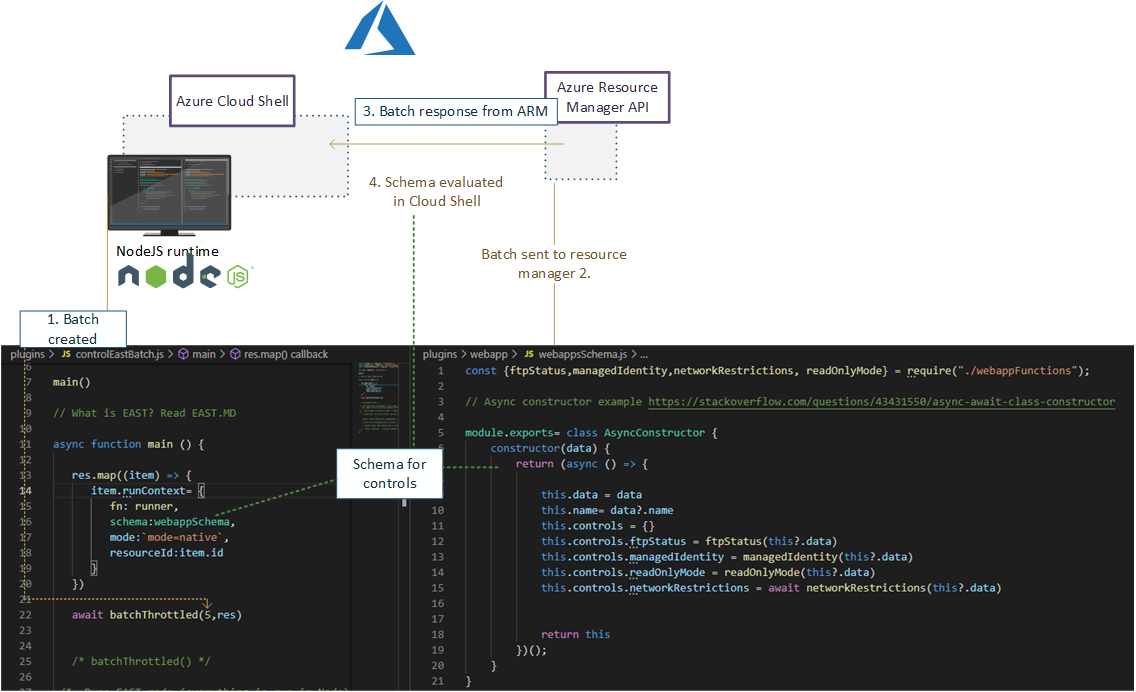
Extensible Azure Security Tool (Later referred as E.A.S.T) is tool for assessing Azure and to some extent Azure AD security controls. Primary use case of EAST is Security data collection for evaluation in Azure Assessments. This information (JSON content) can then be used in various reporting tools, which we use to further correlate and investigate the data.

This tool is licensed under MIT license.
img

image

Collaborators

  • Yours truly
  • Nixu Cloud Security Team

Table of contents

  • Extensible Azure Security Tool
  • Collaborators
  • Release notes
  • Important
  • Tool operation
    • Depedencies
    • Controls
      • Basic
      • Advanced
      • Composite
    • Reporting
      • Running EAST scan
        • Detailed Prerequisites (This is if you opted no to do the "fire and forget version")
        • Login Az CLI and run the scan
    • Licensing
  • Tool operation documentation
    • Principles
      • AZCLI USE
      • Speedup
    • Parameters reference
    • (Highly experimental) Running in restricted environments where only browser use is available
    • Developing controls
    • Updates and examples
      • Auditing Microsoft.Web provider (Functions and web apps)
      • Azure RBAC baseline authorization
    • Contributing
      • Other

Release notes

v 0.5

  • Refactors:
    • Managed Identity role and Azure AD Assignments are now done via single module, previous version was showing it's age, and the logic was not correct anymore. New module is miGeneral.js
    • ASB is not ASB anymore, it is now Microsoft cloud security benchmark, see query.js

v 0.4

  • Preview branch introduced

    Changes:

    • Installation now accounts for use of Azure Cloud Shell's updated version in regards to depedencies (Cloud Shell has now Node.JS v 16 version installed)

    • Checking of Databricks cluster types as per advisory

      • Audits Databricks clusters for potential privilege elevation - This control requires typically permissions on the databricks cluster"
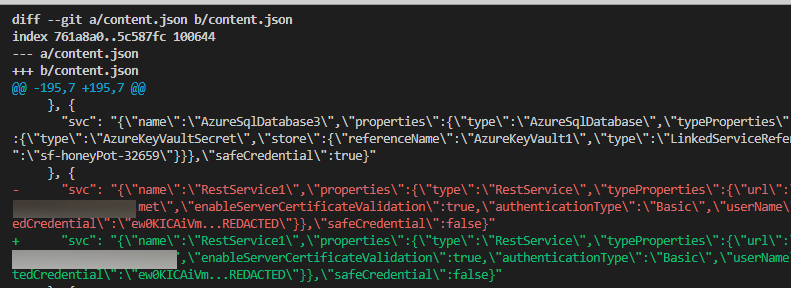
    • Content.json is has now key and content based sorting. This enables doing delta checks with git diff HEAD^1 ¹ as content.json has predetermined order of results
      image

    ¹ ⚠️ Word of caution, if want to check deltas of content.json, then content.json will need to be "unignored" from .gitignore exposing results to any upstream you might have configured.

    Use this feature with caution, and ensure you don't have public upstream set for the branch you are using this feature for

  • Change of programming patterns to avoid possible race conditions with larger datasets. This is mostly changes of using var to let in for await -style loops


Important

⚠️ Current status of the tool is beta

  • Fixes, updates etc. are done on "Best effort" basis, with no guarantee of time, or quality of the possible fix applied
  • We do some additional tuning before using EAST in our daily work, such as apply various run and environment restrictions, besides formalizing ourselves with the environment in question. Thus we currently recommend, that EAST is run in only in test environments, and with read-only permissions.
    • All the calls in the service are largely to Azure Cloud IP's, so it should work well in hardened environments where outbound IP restrictions are applied. This reduces the risk of this tool containing malicious packages which could "phone home" without also having C2 in Azure.
      • Essentially running it in read-only mode, reduces a lot of the risk associated with possibly compromised NPM packages (Google compromised NPM)
      • Bugs etc: You can protect your environment against certain mistakes in this code by running the tool with reader-only permissions
  • Lot of the code is "AS IS": Meaning, it's been serving only the purpose of creating certain result; Lot of cleaning up and modularizing remains to be finished
  • There are no tests at the moment, apart from certain manual checks, that are run after changes to main.js and various more advanced controls.
  • The control descriptions at this stage are not the final product, so giving feedback on them, while appreciated, is not the focus of the tooling at this stage
  • As the name implies, we use it as tool to evaluate environments. It is not meant to be run as unmonitored for the time being, and should not be run in any internet exposed service that accepts incoming connections.
  • Documentation could be described as incomplete for the time being
  • EAST is mostly focused on PaaS resource, as most of our Azure assessments focus on this resource type
  • ⚠️ No Input sanitization is performed on launch params, as it is always assumed, that the input of these parameters are controlled. That being said, the tool uses extensively exec() - While I have not reviewed all paths, I believe that achieving shellcode execution is trivial. This tool does not assume hostile input, thus the recommendation is that you don't paste launch arguments into command line without reviewing them first.

Tool operation

Depedencies

To reduce amount of code we use the following depedencies for operation and aesthetics are used (Kudos to the maintainers of these fantastic packages)

packageaestheticsoperationlicense
axios✅MIT
yargs✅MIT
jsonwebtoken✅MIT
chalk✅MIT
js-beautify ✅MIT

Other depedencies for running the tool: If you are planning to run this in Azure Cloud Shell you don't need to install Azure CLI:

  • This tool does not include or distribute Microsoft Azure CLI, but rather uses it when it has been installed on the source system (Such as Azure Cloud Shell, which is primary platform for running EAST)
Download Tool