Pyison
Pyison is a tarpit for AI webcrawlers
Introduction
- Like all web crawlers, AI bots request pages from webservers, and then follow links on the page to other pages. By doing this, they can build an index of an entire website.
- Unlike other web crawlers, though, AI bots present some unique issues
- Server admins can configure a robots.txt file, which tells web crawlers what pages they should and shouldn't crawl.
- Some AI crawlers have been found to ignore this file. There are privacy and copyright concerns with allowing these bots to use a website's data to train LLMs, especially when the user has explicitly opted out of crawling.
- Some crawlers also ignore ratelimiting. When they request pages as fast as possible, they can put significant load on a webserver.
- Enter Pyison. Like other AI crawler tarpits (Nepenthes, Iocane), Pyison feeds web crawlers an endless list of links to other pages on its site. This traps the crawlers on a single site, where they'll endlessly navigate an ever-growing sea of links.
- Keeping AI crawlers stuck in one place prevents them from indexing other parts of the site that the owner might not want to feed to LLMs.
- At the same time, these pages can contain tons of useless text. When LLMs incorporate this text into their models, they can gradually be "poisoned" as the random input will make their responses less coherent.
Motivations
- Creating useful software to address the rise in LLM content thievery
- Solving problems in existing AI tarpits:
- Generating random text without use of a Markov Chain, LLMs, or any existing writing samples
- Not discriminating AI bots by User-Agent header, since crawlers will often disguise themselves as normal users
- Designing a realistic blog-esque site in order to prevent detection
- Creating an extremely customizable framework to allow further configuration
- Providing a solution that can easily integrate into an existing website
- Supports but doesn't require reverse proxies/specific webservers, provides sub-path configuration with a document root setting
- Running with a small footprint rather than an entire CMS or feature-rich webserver
Technical Specifications
- This project runs a dynamic web server using Python's HTTPServer library
- Sentences are produced from a 50/50 mix between random english words and "stop words"
- Pyison uses a global salt as well as a page url to seed its RNG. This ensures that if crawlers ever perform a "sanity check" by reloading a page, it will be the same as the last time they checked it. At the same time, different servers should use different global seeds so that not all sites using Pyison look the same.
- It's possible to generate an unlimited number of pages, since Pyison isn't actually creating any permanent files. It's a dynamic web server, so it just generates html and sends it to the client.
- Use of HTML content tags, CSS formatting, and images should make the site seem a bit more realistic to a crawler.
- It's possible to configure Pyison's output without rewriting the program, by changing the config, static, and template files
- Pyison responds to errant POST and PUT requests with a 404 in case crawlers test that those HTTP verbs are configured
Getting Started
-
Clone this project to a local folder
-
Change settings in the config/config.json file
- Set the
random-seed to a random number!
- Set the
port number for the server to use
- See the Configuration section for more info
-
(Optional but recommended) Update the HTML template, CSS, images, and robots.txt to your liking
- This project is more effective if pages look different, which can be done by varying the HTML and CSS structure. Rearrange and rename some stuff, or rewrite it completely.
-
(Optional) Edit the robots.txt if you want to change which bots are affected
-
Set up the server environment with any of the methods below
-
Put the server behind a Reverse Proxy
Running locally
- Install nltk
- Run Pyison
- Check it's running
- Open
http://localhost:<your port number> in a browser
Docker
With docker compose
With docker run
docker run --tty --name pyison -p "127.0.0.1:80:80" --rm ghcr.io/jonaslong/pyison:main
- (Optional) Remove the
--rm flag to persist the container
Building from source
- Clone the repository locally
docker build -t pyison:latest .- Run the container with
docker run --tty --name pyison -p "127.0.0.1:80:80" --rm pyison:latest
Reverse Proxy
It is highly recommended that you use a reverse proxy to serve this content. It can reduce server load by caching pages and introducing ratelimits, as well as serve the content over https and protect from some basic webserver exploits.
Considerations
- These examples use Nginx Proxy Manager, but any reverse proxy software should work
- Pyison supports NPM's strictest SSL settings
- NPM should pass the
User-Agent http header from NPM to the Pyison server without any special configuration. Use proxy_pass_header User-Agent; if needed.
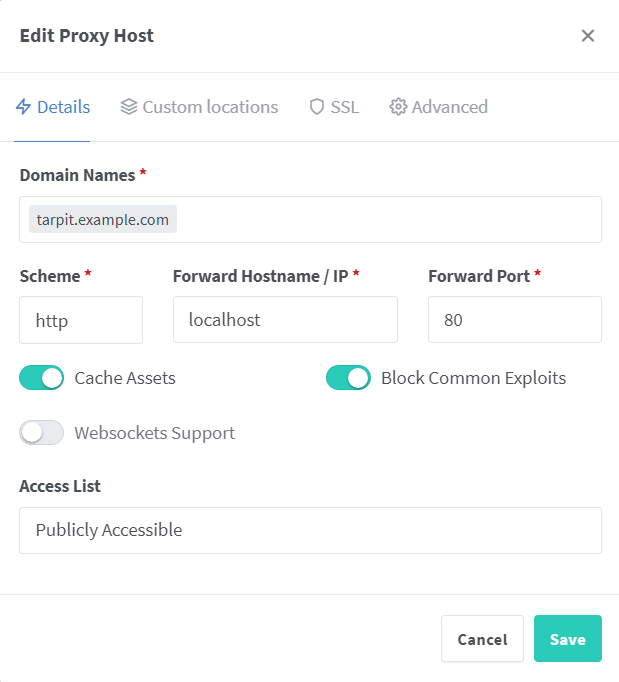
Independent Subdomain Configuration
Sub-path Configuration
-
To use Pyison in a sub-path, use the following location configuration
# Handles the root page ("example.com/tarpit")
location /tarpit {
    proxy_pass http://localhost:80;
}

# Handles all sub-pages ("example.com/tarpit/a" and "example.com/tarpit/a/b")
location /tarpit/ {
    proxy_pass http://localhost:80;
}
 jonaslong/pyison