
Skip to content
KitploitKITPLOIT
ToolsExploitsBlog
Log in
Submit
ToolsExploitsBlog
Submit

Hacking, PenTest, and Cybersecurity Tools for Your Security Arsenal!

Kitploit is a directory of hacking, cybersecurity, and pentesting tools. Discover the latest project updates to find vulnerabilities, analyze systems, automate testing, and strengthen your security.

FeedsContactPrivacy© 2026 Kitploit

Tool Directory

Categories

View all categories
Loading categories
sage — Lightweight Agent Detection & Response (ADR) layer for AI agents — guards commands, files, and web requests. Part of Gen Agent Trust Hub. | Kitploit
Tools/GitHubGitHub/gendigitalinc/sage
Defensive ToolsPhishing ToolsVulnerability AnalysisCode AnalysisMalware AnalysisThreat IntelligenceSupply Chain SecurityLearning & EducationAI Security
GitHubgendigitalinc/sage

sage

Lightweight Agent Detection & Response (ADR) layer for AI agents — guards commands, files, and web requests. Part of Gen Agent Trust Hub.


26228789 days agoReviewed by Kitploit
Share
View RepositoryWebsite

Sage

Sage

Safety for Agents — Agent Detection & Response for AI coding assistants
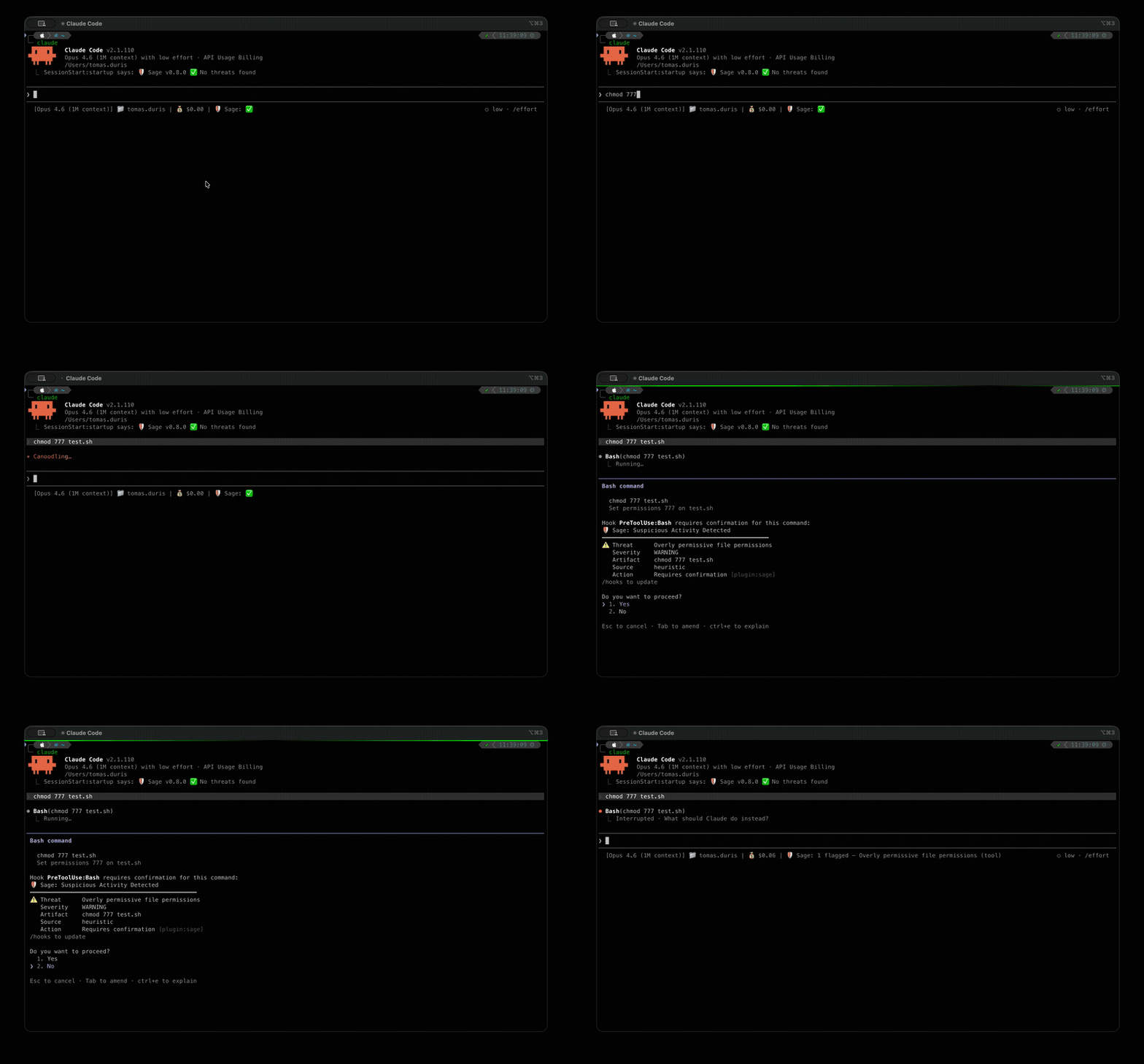

Sage blocking a dangerous command in Claude Code

Sage is a lightweight security layer that protects AI agents from executing dangerous actions. It intercepts tool calls — shell commands, URL fetches, file writes — and checks them against multiple threat detection layers before they run.

Note: Sage may appear under a different product name (e.g., Norton Sage, Avast Sage) depending on how it was installed. See Branding for details.

Key Features

  • URL reputation — cloud-based detection of malware, phishing, and scam URLs
  • Local heuristics — 300+ YAML-based threat patterns for dangerous commands, suspicious URLs, credential exposure, and obfuscation
  • Prompt injection detection — two-tier defense (heuristics + fine-tuned ML model) against injected instructions in fetched content. See Prompt Injection
  • Package supply-chain checks — registry existence, file reputation, and age analysis for npm/PyPI packages
  • Plugin scanning — scans installed plugins for threats at session start
  • AMSI integration — Windows Antimalware Scan Interface support (Windows + WSL via PowerShell interop; no-op on macOS and non-WSL Linux)

Quick Start

Visit ai.gendigital.com/sage for the latest installation instructions, or use the platform-specific guides below.

Claude Code — install guide · requires Node.js >= 18

/plugin marketplace add https://github.com/gendigitalinc/sage.git
/plugin install sage@sage

Cursor — install guide · install the Gen Sage extension from the marketplace

VS Code — install guide · install the Gen Sage extension from the marketplace

OpenClaw — install guide · install from npm

openclaw plugins install @gendigital/sage-openclaw

OpenCode — install from npm by adding to ~/.config/opencode/opencode.json:

{
  "plugin": ["@gendigital/sage-opencode"]
}

See the User Guide for detailed instructions, configuration, and troubleshooting.

Privacy

For privacy considerations, please refer to Privacy.

Documentation

DocumentDescription
User GuideInstallation, usage, configuration, exceptions, platform guides, privacy, FAQ
Developer GuideArchitecture, development setup, testing, threat rule format
Prompt InjectionML + heuristic prompt injection detection
Package Protectionnpm/PyPI supply-chain checks
AMSI ScanningWindows antimalware scanning via AMSI
Plugin ScanningSession-start plugin scanning
Audit LogOn-disk JSONL schema (entries, signals, content)
MCP ServerShared MCP server architecture
Decision PipelineSignal sources, policy model, evaluation order
BrandingProduct name configuration

Connectors

HostPackageHow it hooks
Claude Code@gendigital/sage-claude-codeMCP hook tools
OpenClaw@gendigital/sage-openclawIn-process before_tool_call
OpenCode@gendigital/sage-opencodeIn-process plugin
Cursor / VS Code / Copilot CLIsage-cursorInstalled hook script
pi@gendigital/sage-piIn-process tool_call extension
Oh My Pi@gendigital/sage-ompIn-process hook (--hook)

Contributing

See CONTRIBUTING.md for development setup, coding conventions, and the threat rule contribution process.

License

Copyright 2026 Gen Digital Inc.

  • Source code: Apache License 2.0
  • Threat detection rules (threats/): Detection Rule License 1.1

Download Tool

Most Popular

View all →

Discover the most used tools by our community.

  • 1

    OsintHunter

    letox4/osinthunter

    🎯 The ultimate OSINT toolkit: investigation graph, confidence scoring, alias families, map, timeline and reports. 49 modules, 400+ sites, no API keys required.

    755
  • 2

    ghostlock-app

    yukonga/ghostlock-app

    GhostLock One-Tap Execution App (CVE-2026-43499)

    510
  • 3

    ARTEX

    baarai/artex

    LLM multi-agent autonomous penetration testing platform with planner/worker agents, asset and exploration graphs, MITM traffic recording, and vulnerability retesting.

    415
  • 4

    redforge

    cybersecurity91/redforge

    Browser-side red team toolkit with 102 offline tools for recon, payload generation, credential attacks, crypto, encoding and engagement reporting.

    343
  • 5

    antifox

    antifox-ai/antifox

    AI multi-agent autonomous penetration testing platform that runs recon, attack-surface discovery, exploitation validation and evidence-backed report delivery.

    259
  • 6

    CyberStrikeAI

    ed1s0nz/cyberstrikeai

    The system of action for AI-native cybersecurity—where intent becomes governed execution, evidence becomes operational memory, and every operation improves the next.

    258

Explore all tools

Browse our collection of tools

View all tools →





