 eldavoo/wa-crypt-tools
Manage WhatsApp .crypt12, .crypt14 and .crypt15 files.



Decrypt and encrypt WhatsApp and WA Business' .crypt12, .crypt14 and .crypt15 files with ease!
For decryption, you NEED the key file or the 64-characters long key
(or a screenshot of it).
The key file is named "key" if the backup is crypt14 or
"encrypted_backup.key" if the backup is crypt15 (encrypted E2E backups).
Those who are looking for a more complete suite for
WhatsApp forensics, check out whapa.
If you do not want to install programs in your computer, you can run this program in Google Colab .
If you are familiar with Jupyter (read here if you're not), you can use the notebook version of the program.
You can install this script as a package through pip. Just run:
python -m pip install wa-crypt-tools
for the stable version and
python -m pip install git+https://github.com/ElDavoo/wa-crypt-tools
for the development version.
You might have to create a virtual environment to avoid conflicts with other packages.
If you would rather not use a terminal at all, wagui is a small window that decrypts a
backup: pick your key, pick the backup, press Decrypt.
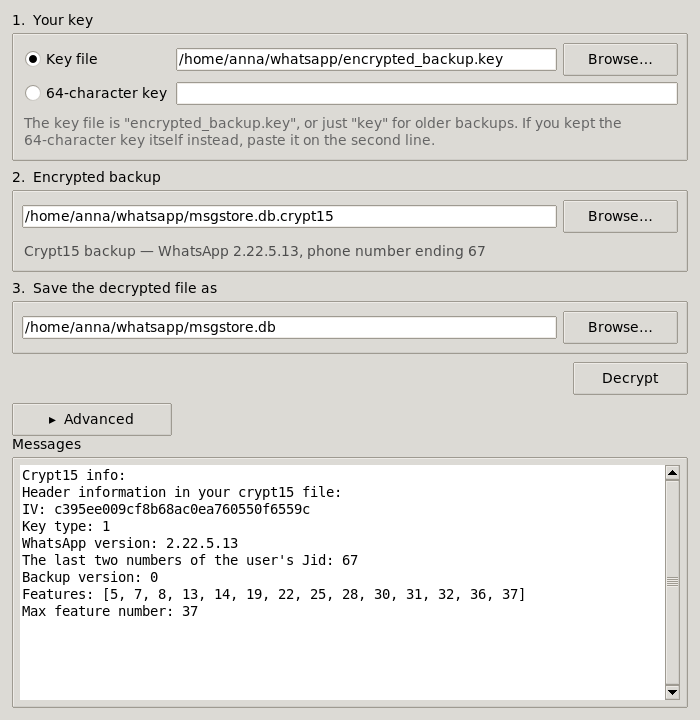
Download it and double-click it. Every release carries a self-contained build that needs no Python and no installation:
| File | For |
|---|---|
wagui-windows-x64.exe | Windows |
wagui-macos-arm64.zip | macOS (Apple Silicon) |
wagui-linux-x64 | Linux (chmod +x it first) |
The macOS build is not code-signed, so the first time you open it macOS will refuse: right-click the app and choose Open, then confirm.
If you already installed the package with pip, the same window is one command away:
wagui
On Linux, a pip install also needs your distribution's tkinter package (python3-tk on
Debian/Ubuntu, python3-tkinter on Fedora) -- it is part of Python but packaged separately.
The downloadable build has it built in and needs nothing.
The window covers decrypting, which is what most people are here for. It also tells you what a
file is as soon as you pick it, the way wainfo does. Encrypting, creating key files and
guessing offsets stay in the command-line tools below.
usage: wadecrypt [-h] [-nm] [-bs BUFFER_SIZE] [-nd] [-v] [-f] [-y] [keyfile] [encrypted] [decrypted]
So, for decrypting a crypt12/14/15, we give the program the key file, the encrypted file and the name of the output file.
It will not write over a file that already exists; pass -y/--yes if that is what you want.
$ wadecrypt encrypted_backup.key msgstore.db.crypt15 msgstore.db
key15.py:51     : [I] Crypt15 / Raw key loaded
wadecrypt.py:271        : [I] Done
usage: waencrypt [-h] [-f] [-y] [-v] [--enable-features [ENABLE_FEATURES ...]] [--max-feature MAX_FEATURE]
                 [--multi-file] [--type {12,14,15}] [--iv IV] [--reference REFERENCE] [--noparse]
                 [--wa-version WA_VERSION] [--jid JID] [--backup-version BACKUP_VERSION] [--no-compress]
                 [-c [0-9]] [keyfile] [decrypted] [encrypted]
waencrypt will not write over a file that already exists; pass -y/--yes if that is what
you want.
With --reference, waencrypt reproduces the referenced backup byte for byte: the IV, the
header (including fields this library does not model) and the compression level all come off
it, so re-encrypting an unmodified database gives you back the md5 you started with.
-c/--compression-level is the zlib level, 9 by default, which is what WhatsApp uses now.
It compressed at 1 historically. With --reference the level is taken from the reference, so
reproducing an older backup needs nothing extra; pass -c to override it.
Encryption is more complex and untested: it is advised to use another encrypted file from the same account, which we will call "reference".
waencrypt --reference msgstore.db.crypt15 encrypted_backup.key msgstore.db msgstore-new.db.crypt15
waencrypt.py:57         : [W] This script is in beta stage
waencrypt.py:89         : [I] Done!
You need to supply the following parameters:
wa.db, stickers.db, the rest of
WhatsApp/Backups/ -- carries no feature information at all, which is what wainfo means
by "No feature table found (not a msgstore DB or very old)". To write a header of that
shape, pass --enable-features with nothing after it: an empty list writes neither the
migration flags nor the backup version, and --max-feature then does nothing.Defaults will be used if parameters are omitted, and they are taken from a real 2.26.34.7
backup: given the right --iv and --jid, waencrypt writes the same header bytes as the
phone does, with no reference at all. Passing --reference is still the better way, since it
takes the IV, the compression level and the whole header off a backup you already have.
To sum it up:
$ waencrypt --enable-features 5 6 7 8 9 10 11 12 13 14 15 16
 17 18 19 20 21 22 23 24 25 26 27 28 29 30 31 32 33 34 35 36 37 39 --type 15 --wa-version 2.26.34.7 --jid 00 --backup
-version 1 encrypted_backup.key msgstore.db msgstore-new.db.crypt15
waencrypt.py:57         : [W] This script is in beta stage
waencrypt.py:89         : [I] Done!
You can get info about a backup file with the wainfo tool.
WhatsApp shows the 64-digit key once and never again, so most people screenshot it. You can give that screenshot to any of the tools wherever the key file goes -- there is no extra flag, the tools work out what they were handed:
$ wadecrypt Screenshot_20260901-184609_WhatsApp.png msgstore.db.crypt15 msgstore.db
ocr.py:503      : [I] Reading the key from the screenshot, this takes a few seconds...
key15.py:55     : [I] Crypt15 / Raw key loaded
wadecrypt.py:301        : [I] Done
wainfo -k <screenshot> prints just the key, if you only want to read it. wagui takes one
too: pick it where you would pick the key file.
This is optional and needs two things installed:
python -m pip install 'wa-crypt-tools[ocr]'
