
 ehabhussein/autogadgetfs
USB testing made easy


AutoGadgetFS is an open source framework that allows users to assess USB devices and their associated hosts/drivers/software without an in-depth knowledge of the USB protocol. The tool is written in Python3 and utilizes RabbitMQ and WiFi access to enable researchers to conduct remote USB security assessments from anywhere around the globe. By leveraging ConfigFS, AutoGadgetFS allows users to clone and emulate devices quickly, eliminating the need to dig deep into the details of each implementation. The framework also allows users to create their own fuzzers on top of it.
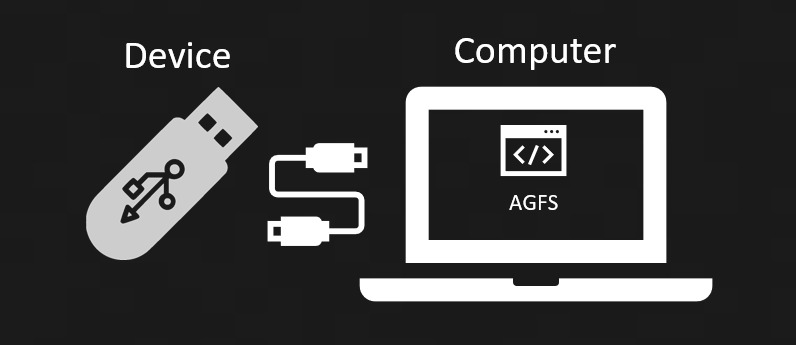
Device testing only:
Minimal agfs in the middle setup:
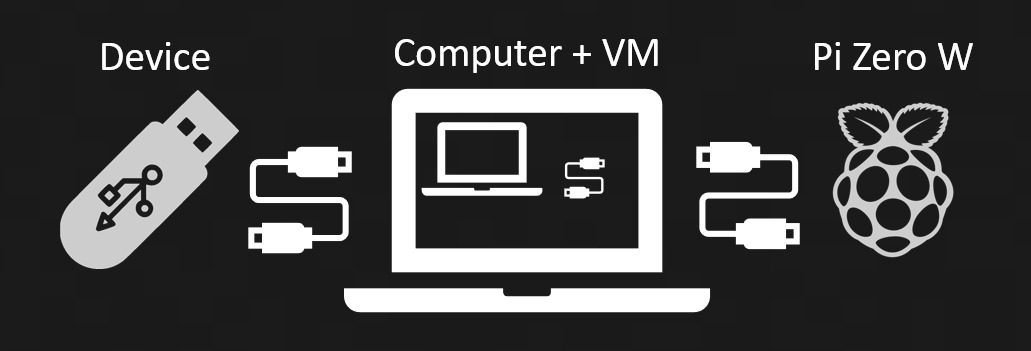
Complete agfs in the middle setup with debugging support:

[✔️] USB HID Devices fully supported (Man in the middle)
[⚠️] Device only testing .. All USB devices (NO Man in the middle)
[⏳] Future releases... All USB devices (Man in the middle)
Note: WSL/WSL2 is not supported due to issues with USB pass-through.
Install Python3, ipython3 ,git, pip and rabbitMQ server
sudo apt install python3 ipython3 git python3-pip rabbitmq-server dfu-util
sudo service rabbitmq-server start
Clone the repository
git clone https://github.com/ehabhussein/AutoGadgetFS
cd AutoGadgetFS
Install the requirements
sudo -H pip3 install -r requirements.txt
Downgrade prompt toolkit for better ipython experience:
sudo python3 -m pip install prompt-toolkit~=2.0
Enable the web interface for rabbitMQ
sudo rabbitmq-plugins enable rabbitmq_management
http://localhost:15672/ to reach the web interface
login to the web interface with the credentials guest:guest
NOTE: if you are not installing rabbitMQ on localhost add the following user and login with it:
sudo rabbitmqctl add_user autogfs usb4ever
sudo rabbitmqctl set_user_tags autogfs administrator
Upload the rabbitMQ configuration file
sudo service rabbitmq-server restart
Test the installation
sudo ipython3

Python 3.7.7 (default, Apr  1 2020, 13:48:52)
Type 'copyright', 'credits' or 'license' for more information
IPython 7.9.0 -- An enhanced Interactive Python. Type '?' for help.

In [1]: import libagfs

In [2]: x = libagfs.agfs()

***************************************
AutoGadgetFS: USB testing made easy
***************************************
Enter IP address of the rabbitmq server: 127.0.0.1

In [3]: exit

sudo `python3` agfsconsole.py

***************************************
AutoGadgetFS: USB testing made easy
***************************************
Enter IP address of the rabbitmq server: 127.0.0.1
Give your project a name?!:
Patch Pyusb langID ( Not needed unless you get pyusb errors for langID ):
/usr/local/lib/python3/dist-packages/usb/util.py
make changes to the def get_string method to look like below:
if 0 == len(langids):
    return "Error Reading langID"
    #raise ValueError("The device has no langid")
if langid is None:
    langid = langids[0]
elif langid not in langids:
    return "Error Reading langID"
    #raise ValueError("The device does not support the specified langid")
If you prefer to use patch apply the following patch to the file: AutoGadgetFS/pyusb_patches/pyusb_langid.patch
Obtain a copy of Raspian Lite Edition
Mount the SD card on your machine and make the following changes:
In the /path/to/sdcard/boot/config.txt file add to the very end of the file:
enable_uart=1
dtoverlay=dwc2
