Skip to content
KitploitKITPLOIT
ToolsExploitsBlog
Log in
Submit
ToolsExploitsBlog
Submit

Hacking, PenTest, and Cybersecurity Tools for Your Security Arsenal!

Kitploit is a directory of hacking, cybersecurity, and pentesting tools. Discover the latest project updates to find vulnerabilities, analyze systems, automate testing, and strengthen your security.

FeedsContactPrivacy© 2026 Kitploit

Tool Directory

Categories

View all categories
Loading categories
DotGit — An extension for checking if .git is exposed in visited websites | Kitploit
Tools/GitHubGitHub/davtur19/dotgit
Vulnerability ScannersInformation GatheringWeb Security
GitHubdavtur19/dotgit

DotGit

An extension for checking if .git is exposed in visited websites

View Repository
479498128 days agoReviewed by Kitploit
Share

FF users Chrome users

DotGit

An extension for checking if .git is exposed in visited websites

Features

  • Check if a .git/.svn/.hg folder exists for each site you visit
  • Check if a .env file exists for each site you visit
  • Check if a .DS_Store file exists for each site you visit
  • Check if the site is open source (github/gitlab)
  • Check if the site has security.txt
  • You will be notified when a folder is found
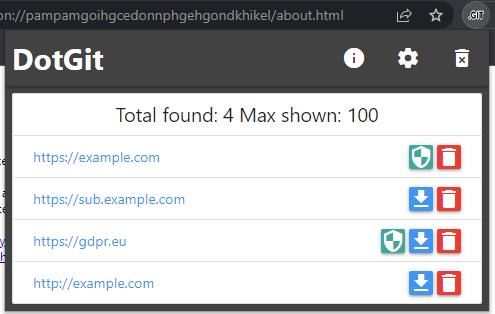
  • List of exposed sites found
  • Download the entire .git folder in zip format, even if the files are not listed on the site
  • View .git/config with one click
  • Options for: colors, notifications, timeouts and downloads

Some checks are turned off by default, open the settings to turn them on

Timeouts

Every network request (checks, downloads and the open-source probe) is aborted after the same request timeout, 15 seconds by default. You can change it in the settings: raise it if your connection is slow, lower it if you want the checks to fail fast.

How the download works

There is a queue for downloads, with a maximum of simultaneous connections; if this number is exceeded, subsequent files are queued and started as soon as a connection is free. A request that does not answer within the request timeout is counted as a network error, so a dead server cannot keep the download open forever.

Note:

  • Downloading is an extra feature to DotGit, it is not meant to download large repositories (there are limits to the memory usable by extensions, and DotGit does everything in RAM)
  • Changing the download settings is recommended as by default the values are kept low to avoid problems for those who do not have a good connection or a good CPU, however too high values could freeze the browser even on powerful computers
  • By default, svn, mercurial, dotenv and .DS_Store are disabled, to activate them just go to settings and turn them on

Screenshot
ScreenShot

Download: Firefox | Chrome

Download Tool

Most Popular

View all →

Discover the most used tools by our community.

  • 1

    OsintHunter

    letox4/osinthunter

    🎯 The ultimate OSINT toolkit: investigation graph, confidence scoring, alias families, map, timeline and reports. 49 modules, 400+ sites, no API keys required.

    717
  • 2

    ghostlock-app

    yukonga/ghostlock-app

    GhostLock One-Tap Execution App (CVE-2026-43499)

    504
  • 3

    ARTEX

    baarai/artex

    LLM multi-agent autonomous penetration testing platform with planner/worker agents, asset and exploration graphs, MITM traffic recording, and vulnerability retesting.

    402
  • 4

    redforge

    cybersecurity91/redforge

    Browser-side red team toolkit with 102 offline tools for recon, payload generation, credential attacks, crypto, encoding and engagement reporting.

    342
  • 5

    CyberStrikeAI

    ed1s0nz/cyberstrikeai

    The system of action for AI-native cybersecurity—where intent becomes governed execution, evidence becomes operational memory, and every operation improves the next.

    260
  • 6

    antifox

    antifox-ai/antifox

    AI multi-agent autonomous penetration testing platform that runs recon, attack-surface discovery, exploitation validation and evidence-backed report delivery.

    259

Explore all tools

Browse our collection of tools

View all tools →