

Skip to content
KitploitKITPLOIT
ToolsBlog
Submit
ToolsBlog
Submit

Hacking, PenTest, and Cybersecurity Tools for Your Security Arsenal!

Kitploit is a directory of hacking, cybersecurity, and pentesting tools. Discover the latest project updates to find vulnerabilities, analyze systems, automate testing, and strengthen your security.

··Feeds·Contact·Privacy·© 2026 Kitploit

Tool Directory

Categories

View all categories
Loading categories
BlueBunny — BLE-based C2 server for Hak5 Bash Bunny enabling wireless command injection, payload delivery, and remote control over Bluetooth Low Energy. | Kitploit
Tools/GitHubGitHub/90n45-d3v/bluebunny
Bluetooth SecurityCommand and ControlHardware & IoT SecurityRed TeamingPayload Development
GitHub90n45-d3v/bluebunny

BlueBunny

BLE-based C2 server for Hak5 Bash Bunny enabling wireless command injection, payload delivery, and remote control over Bluetooth Low Energy.


View Repository
2032 years agoReviewed by Kitploit

Most Popular

View all →

Discover the most used tools by our community.

Explore all tools

Browse our collection of tools

View all tools →
Share
Website

BlueBunny-Banner


C2 solution that communicates directly over Bluetooth-Low-Energy with your Bash Bunny Mark II.
Send your Bash Bunny all the instructions it needs just over the air.
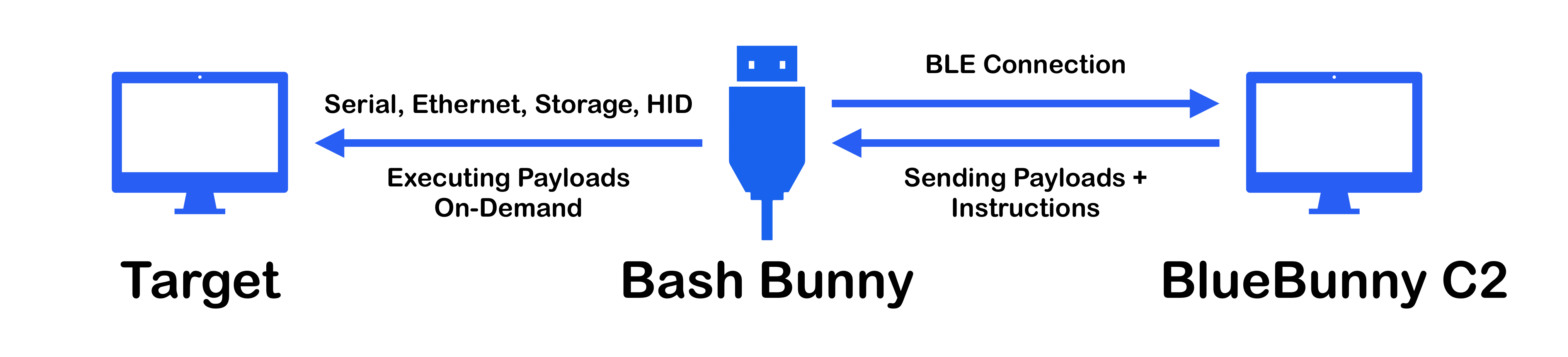
Table of contents

  • Overview
  • Installation & Start
  • Manual communication with the Bash Bunny through Python
  • Troubleshooting
  • Working on...
  • Additional information

Overview

Structure

BlueBunny-Structure

Installation & Start

  1. Install required dependencies
root@kitploit:~
pip install pygatt "pygatt[GATTTOOL]"

Make sure BlueZ is installed and gatttool is usable

root@kitploit:~
sudo apt install bluez
  1. Download BlueBunny's repository (and switch into the correct folder)
root@kitploit:~
git clone https://github.com/90N45-d3v/BlueBunny
cd BlueBunny/C2
  1. Start the C2 server
root@kitploit:~
sudo python c2-server.py
  1. Plug your Bash Bunny with the BlueBunny payload into the target machine (payload at: BlueBunny/payload.txt).
  2. Visit your C2 server from your browser on localhost:1472 and connect your Bash Bunny (Your Bash Bunny will light up green when it's ready to pair).

Manual communication with the Bash Bunny through Python

You can use BlueBunny's BLE backend and communicate with your Bash Bunny manually.

Example Code

root@kitploit:~
# Import the backend (BlueBunny/C2/BunnyLE.py)
import BunnyLE

# Define the data to send
data = "QUACK STRING I love my Bash Bunny"
# Define the type of the data to send ("cmd" or "payload") (payload data will be temporary written to a file, to execute multiple commands like in a payload script file)
d_type = "cmd"

# Initialize BunnyLE
BunnyLE.init()

# Connect to your Bash Bunny
bb = BunnyLE.connect()

# Send the data and let it execute
BunnyLE.send(bb, data, d_type)

Troubleshooting

Connecting your Bash Bunny doesn't work? Try the following instructions:

  • Try connecting a few more times
  • Check if your bluetooth adapter is available
  • Restart the system your C2 server is running on
  • Check if your Bash Bunny is running the BlueBunny payload properly
  • How far away from your Bash Bunny are you? Is the environment (distance, interferences etc.) still sustainable for typical BLE connections?

Bugs within BlueZ

The Bluetooth stack used is well known, but also very buggy. If starting the connection with your Bash Bunny does not work, it is probably a temporary problem due to BlueZ. Here are some kind of errors that can be caused by temporary bugs. These usually disappear at the latest after rebooting the C2's operating system, so don't be surprised and calm down if they show up.

  • Timeout after 5.0 seconds
  • Unknown error while scanning for BLE devices

Working on...

  • Remote shell access
  • BLE exfiltration channel
  • Improved connecting process

Additional information

As I said, BlueZ, the base for the bluetooth part used in BlueBunny, is somewhat bug prone. If you encounter any non-temporary bugs when connecting to Bash Bunny as well as any other bugs/difficulties in the whole BlueBunny project, you are always welcome to contact me. Be it a problem, an idea/solution or just a nice feedback.

Download Tool

