
WQFiles v0.9.18-debug4
File browser, app data manager and cache cleaner for iOS 26 and 27 (worse_query, no jailbreak)
Worse Query Files
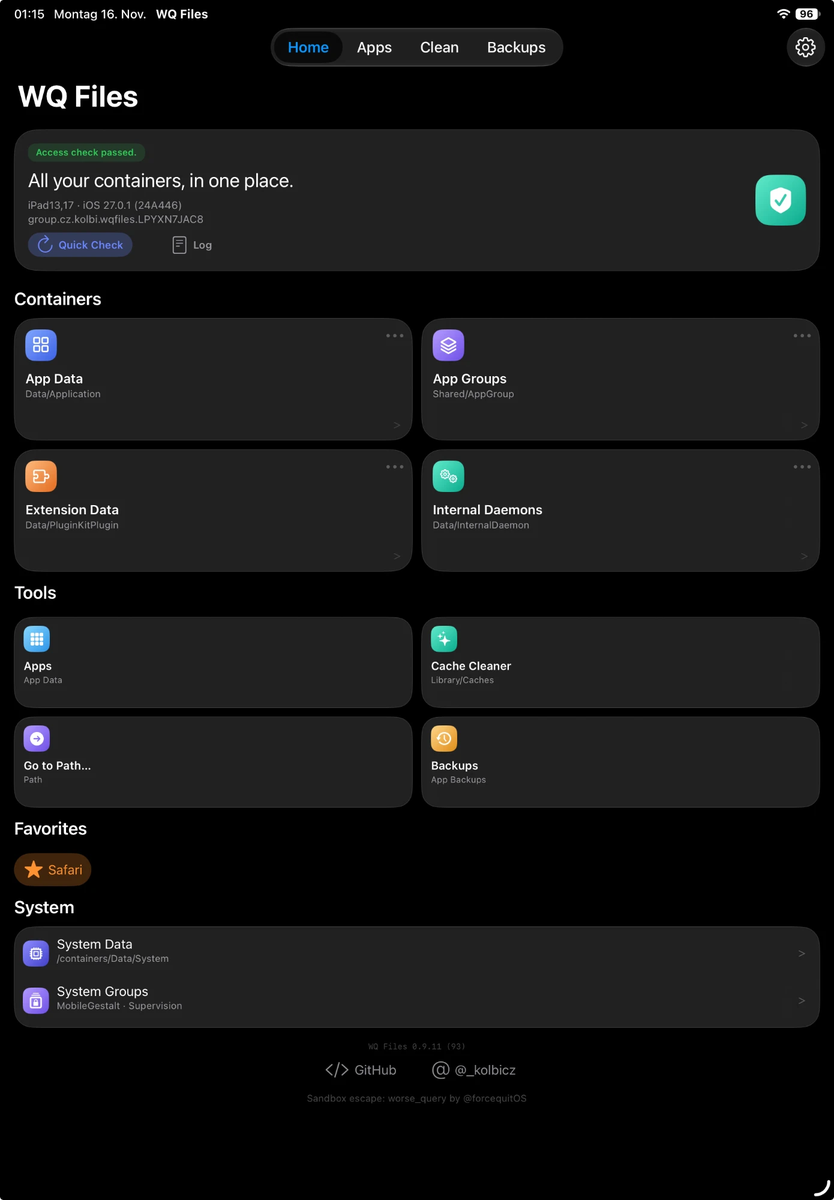
WQ Files is a file browser, app data manager and cache cleaner for iOS 26 and 27. "WQ" stands for worse_query, the sandbox technique it is built on. It reaches other apps' and system containers with no jailbreak and no kernel exploit. Tested on iOS 26.5 to 27.3 beta 1; see Tested devices.
[!WARNING] Apple patched worse_query in iOS 27.3 beta 2 (build 24C5049d). WQ Files can't open other apps' folders there or on any later build, and its startup check says so. It works up to iOS 27.3 beta 1 (24C5037i) and on iOS 26.0 to 26.7.2. Don't update to the 27.3 beta 2 or later if you want to keep using it.
iOS 26 (26.0 to 26.7.2): supported since 0.7; tested on 26.7.1. worse_query reaches the app, extension, daemon and app group containers there, but not System Data or the system groups, so WQ Files hides those two and the Cache Cleaner has no crash-log section. A full inode scan would take most of an hour on iOS 26, so App Data, Extension Data and App Groups are listed from the LaunchServices database instead (found once and remembered). Internal Daemons aren't in that database: the first scan for them takes long, later ones only check new files. Apps, backups, restores, clearing app data, the Cache Cleaner and the file browser work as on iOS 27. App icons don't: iOS 26 hands WQ Files only placeholder icons and doesn't let it read other apps' bundles, so apps show symbol tiles.
WQ Files is available in English, German, Italian, Spanish, Portuguese (Brazil), Russian, Polish, Turkish, Thai, Vietnamese, Korean, Arabic, Japanese and Simplified Chinese. It follows the device language; Language in WQ Files' Settings picks another, used from the next start.
Tested devices
Tested by the maintainer on:
| Device | iOS |
|---|---|
| iPhone 16 Pro Max (iPhone17,2) | 27.2.1 |
| iPhone 17 Pro Max (iPhone18,2) | 27.0.1 |
| iPad Air 5 | iPadOS 27.0.1 |
| iPhone 14 Pro (iPhone15,2) | 26.7.1 |
Users have also reported it working on iOS 26.5, 27.2 and 27.3 beta 1. It does not work on 27.3 beta 2 or later (see above). Works on a device or iOS version not listed here? Open an issue with the Log (Settings → Log → Share).
Not supported: iOS 18 and older. worse_query doesn't exist there; WQ Files shows a notice instead of scanning. On iOS 17 and 18 use Cyanide.
What it opens
- App Data: every app's data container (
Containers/Data/Application), shown with the app's name, bundle ID and icon instead of a UUID. - App Groups: shared group containers.
- Extension Data and Internal Daemons.
- App Bundles: each installed app's bundle container
(
/var/containers/Bundle/Application) with its.app, labeled with the app's name; also from Apps: long-press an app → Open App Bundle. Shown only where iOS lets WQ Files open these folders (the startup check tries; iOS 26 and 27.0.1 don't). - System Data:
/var/containers/Data/System(listing only; its contents are owned by root). - System Groups: the parent cannot be listed on 27.0.1, so known container names are tried one by one; tap + to try another name. Covers the MobileGestalt cache and the configuration-profiles (Supervision) folder.
- Go to Path for any absolute path.
The container parents can't be listed, so App Data, Extension Data and App
Groups come from the LaunchServices database, which lists every installed
app's and extension's containers. It is found once (among the newest files,
usually within seconds) and remembered. Internal Daemons, and the app folders
when the database can't be read, need a scan of every file id (fsgetpath,
the way KAMUI does it): minutes on a well-used device the first time, so WQ
Files asks before it starts and shows a scan window; later scans only check
new files.