Back to updates
New releaseSep 3, 2026

Specter-FlipperZero v2.8

πŸ‘» Specter β€” passive 13.56 MHz NFC reader/skimmer bug-sweep for Flipper Zero. Counter-surveillance EMF meter using the onboard NFC chip. No extra hardware.
Share

Specter β€” NFC reader and skimmer bug-sweep for Flipper Zero

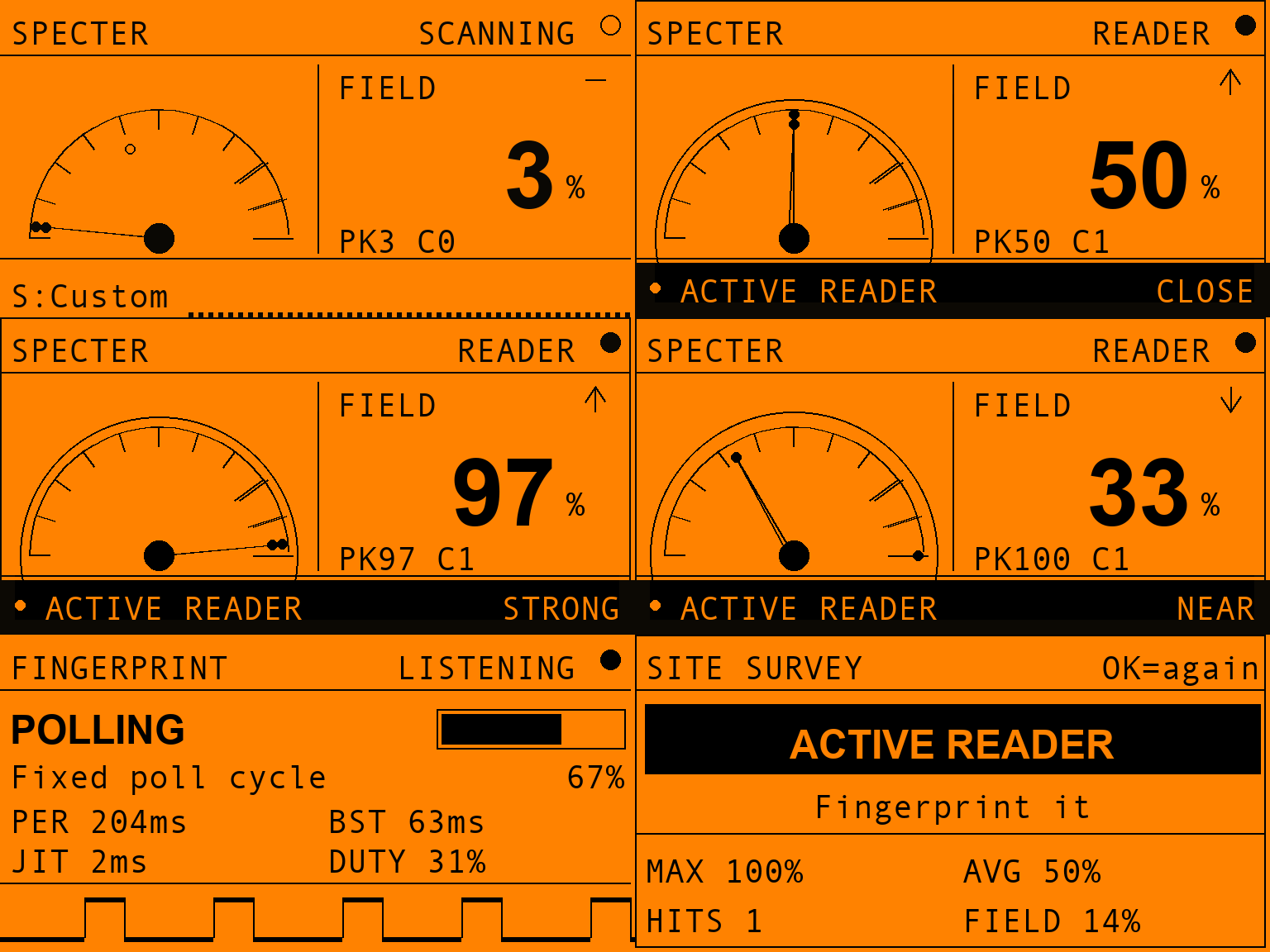
The waveform is not a graphic. It is 128 columns of 13.56Β MHz carrier that Specter recorded off a real polling reader at 8Β ms per column, read back out of the screenshot beside it. Its duty measures 28% where the device's own counter printed 27%, and both numbers are on the banner.

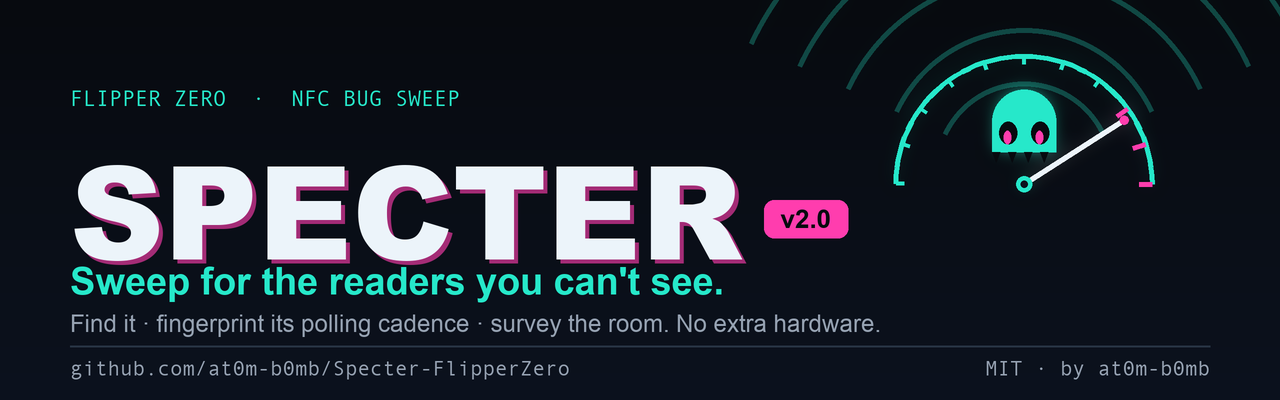
Sweep for the readers you can't see.

Latest release Downloads Stars Build

Flipper Zero Onboard NFC No extra hardware Listen-only MIT

Specter turns your Flipper Zero into a pocket counter-surveillance bug-sweep for active 13.56 MHz NFC readers. It passively listens for the RF field that a powered-on reader is constantly emitting β€” a hidden card skimmer slipped into a payment terminal, a covert reader behind a door panel, a rogue logger taped under a desk β€” then tells you where it is, what kind of thing it is, whether the room is clean, and β€” left on watch β€” the moment one appears while you're away. It never transmits.

The readers are invisible. Specter makes them visible.

As featured in
Help Net Security Β Β·Β  Cyber Security News


On the Flipper

Specter in use: sweeping a quiet room, closing in on a reader, locking on at MAX, fingerprinting its polling cadence, then a site-survey verdict

A sweep, start to finish: quiet room β†’ closing in β†’ locked on β†’ what it is β†’ the room's verdict.

Straight off the device

Four qFlipper captures from a real unit: Sweep on a live reader with the meter pegged, Sweep in a quiet room showing its key hints, Watch alarming with a strength bar, and Watch standing guard with one contact logged

Not mockups β€” qFlipper captures from a real unit. The generated screens below are drawn from the firmware's own layout constants, and the two are checked against each other: every capture here was downsampled back to 128Γ—64 and its inked rows compared with the source.

Every screen

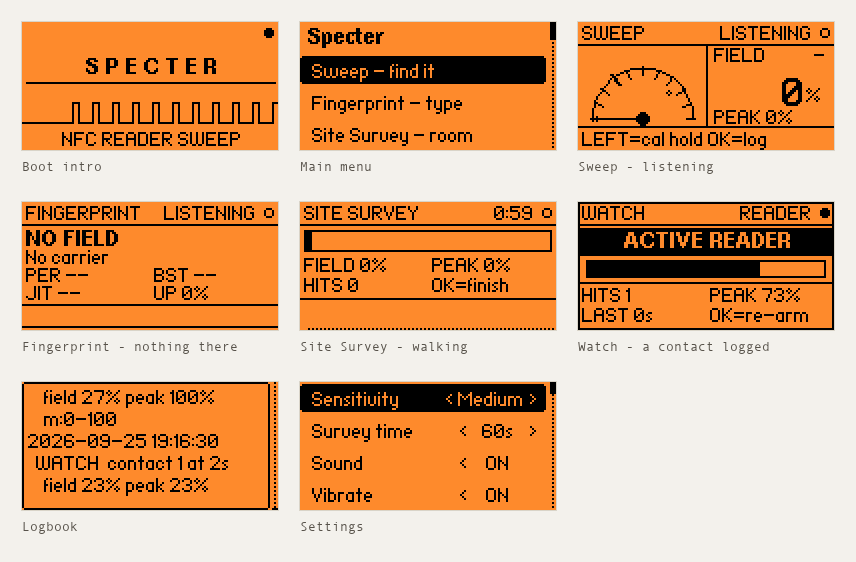
Specter screens

Sweep (quiet) Β Β·Β  Sweep (reader locked) Β Β·Β  Fingerprint Β Β·Β  Survey (running) Β Β·Β  Survey (verdict)
Watch (clear) Β Β·Β  Watch (reader!) Β Β·Β  Logbook Β Β·Β  Calibrate Β Β·Β  Settings


The five modes

Specter is five tools around one sensor. Each answers a different question, so the right one depends on what you are actually trying to find out:

ModeThe question it answersUse it when
SweepWhere is it?You suspect a device and want to pinpoint it by moving around
FingerprintWhat kind of thing is it?You have found an emitter and want to know how it behaves
Site SurveyIs this room clean?You want one verdict for a whole space, hands-free
Watch ModeDid one appear while I was away?You are leaving the Flipper somewhere to stand guard
LogbookWhat did I find, and when?You are writing it up, or comparing today with last week β€” filter by finding type

Sweep β€” where is it?

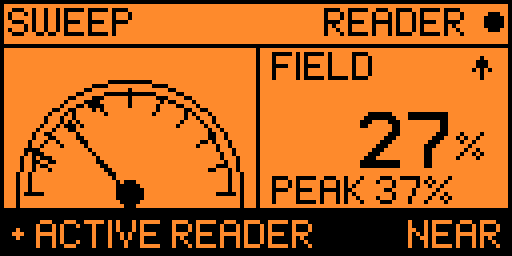
Sweep β€” reader found, meter pegged

What it does. A live EMF-style meter. Hold the Flipper flat and move it slowly over the thing you're checking β€” a card terminal, a door reader, the underside of an ATM lip, a parcel, a desk. The needle rides the field strength in real time.

What you see.

  • The dial β€” needle = live reading, the small dot = peak-hold (the strongest spot you've touched, so you can compare positions).
  • FIELD % β€” the same reading as a number, with a β–² / β–Ό trend arrow telling you whether the last half-second made things warmer or colder. When you're hunting, that arrow matters more than the number.
  • PEAK % β€” the strongest reading since you armed, the number behind the peak-hold dot.
  • The mark across the dial β€” where READER begins at your current sensitivity. Everything past it is what Specter will call a hit, so the dial answers "what counts?" instead of leaving you to guess.
  • Bottom strip β€” until you've found your first reader it carries the two keys you can't discover by pressing things (LEFT=cal, hold OK=log); after that, your sensitivity and a live waveform. It flips to a black ● ACTIVE READER alarm bar with a proximity word the moment a carrier is detected.
  • Proximity β€” FAINT β†’ NEAR β†’ CLOSE β†’ STRONG β†’ MAX. MAX means the meter is pegged: you're as close as this measurement can resolve.

Sound. Optional geiger clicks that speed up as you get closer, so you can sweep with the Flipper in your pocket and hunt by ear alone.

KeyAction
OKReset peak-hold and contact count
hold OKSave this reading to the logbook
LEFTCalibrate to the room's noise floor (3 s)
UP / DOWNStep sensitivity without leaving the hunt

Fingerprint β€” what kind of thing is it?

Fingerprint β€” polling reader identified

What it does. Once Sweep has found something, hold the Flipper still against it. Fingerprint stops measuring proximity and starts timing the carrier's on/off edges, which is what actually distinguishes one kind of emitter from another.

What you see. A verdict, a confidence bar, and the evidence behind both:

ClassWhat it means in practice
CONTINUOUSThe carrier is held permanently up
POLLINGA fixed, crystal-timed poll cycle β€” the period is shown in ms
INTERMITTENTBursty but irregular β€” often a phone or a reader in use

Underneath are PER (poll period), BST (burst width), JIT (jitter) and UP (true duty-cycle), plus a logic-analyser pulse train of the raw carrier β€” so the verdict is never something you have to take on faith. A genuine polling reader shows up as an unmistakable square wave.

A ~ before a timing means it's close to the 2 ms sampling floor, and the confidence is discounted to match.

KeyAction
OKSave the finding to the logbook
hold OKRestart the measurement

Site Survey β€” is this room clean?

Site Survey β€” verdict

What it does. A timed sweep of a whole space. Start it, walk the room normally, and get a single verdict at the end β€” no needle-watching.

What you see. A countdown and progress bar while it runs, then a verdict card:

  • CLEAN β€” nothing crossed the noise floor
  • TRACE β€” brief or faint hits; worth a slower second pass
  • ACTIVE READER β€” something was genuinely up and emitting
  • TOO SHORT β€” you stopped it before it had earned the right to say CLEAN

…with PEAK / AVG field, contact count, and UP % β€” how much of the survey a carrier was actually up, which is often the most telling number of the four. Runs for 30 s, 60 s or 2 min, and logs the result automatically. The card names the length it was graded over, because a 30-second CLEAN is not the same finding as a two-minute one β€” and a run cut shorter than 10 s reports TOO SHORT instead of CLEAN. The asymmetry is deliberate: presence is proof, absence is not. Finding something in one second is a real finding, so TRACE and ACTIVE READER are never withheld for being quick; finding nothing in one second is a claim about the whole room that one second cannot support.

KeyAction
OK (running)Stop now and grade what it has
OK (on the card)Run another survey

Watch Mode β€” did one appear while I was away?

Watch Mode β€” reader present

What it does. Stands guard indefinitely. Arm it, set the Flipper down, walk away. Where Sweep is you hunting and Survey is a fixed-length test, Watch just waits β€” for minutes or hours.

What you see. A large elapsed clock and NO READER while nothing is there. The instant a reader appears the band inverts to ACTIVE READER, a strength bar shows how close it is, the screen wakes, and the alarm sounds. The band is steady rather than flashing β€” on a 1-bit screen a solid inverted block is already the loudest thing on it, and the readouts that genuinely change carry the liveness. After it passes, the screen keeps the evidence: HITS (how many separate contacts), PEAK, LAST (how long ago the most recent one was) and UP (total time a carrier was actually up). The clock rolls over to hh:mm past 99:59 rather than freezing, so an overnight watch still adds up.

Watch deliberately ignores stealth mode β€” a dark, silent guard that never tells you it saw something would be worse than useless.

KeyAction
OKRe-arm β€” clears the clock and counters

Logbook β€” what did I find, and when?

Findings are saved twice, from one action, so they're readable on the device and already a spreadsheet β€” no export step to remember:

logbook.txt β€” grouped, for the on-device viewerlogbook.csv β€” one flat row per entry
2026-07-18 14:35:11
  SURVEY 60s ACTIVE max74…
2026-07-18 14:32:07
  READER POLLING 204ms…
timestamp,type,detail
2026-07-18 14:35:11,SURVEY,60s ACTIVE …
2026-07-18 14:32:07,READER,POLLING 204ms …

Entries are tagged SWEEP, READER, SURVEY or WATCH and stamped from the Flipper's clock. Both files live in apps_data/specter/ on the SD card. Nothing ever leaves the device. Clear them from Settings β†’ Clear logbook (confirmed first β€” it's the one irreversible thing the app can do).


The supporting bits

Auto-calibration

Press LEFT on the Sweep screen and Specter listens to the ambient noise floor for 3 seconds, then sets the detection threshold just above whatever it measured β€” saved as your Custom sensitivity. Every room has a different RF floor; this tunes to the one you're standing in rather than a number baked in at build time. Stand somewhere quiet when you run it.

Stealth mode

Keeps the screen and LED dark for the whole sweep, so the Flipper doesn't glow while you're the one doing the looking. Sound and vibration keep working β€” the point isn't to disable the feedback you're sweeping by. Exiting a stealth screen re-lights the display, so BACK always lands you on a lit menu.

Reading the meter

Why a reader you're touching doesn't emit 100% of the time. The detector measures one physical thing: what fraction of the time a 13.56 MHz carrier is up. But readers poll β€” a short burst, a sleep, another burst. A typical terminal is only radiating 20–35% of the time, so raw duty-cycle saturates around 30% no matter how close you get.

Showing that raw number on the gauge made a perfect detection look like a third of one. The meter is scaled against that real polling band instead:

Raw carrier dutyMeterProximity
3% (room noise)10%FAINT
12%40%NEAR
20%67%CLOSE
28%93%STRONG
β‰₯30% (resting on a reader)100%PEGGED

The raw duty is never lost: the noise floor, auto-calibration and the Fingerprint screen's UP all still work in true duty-cycle, because those describe the signal, not your distance from it. Want the literal number? Settings β†’ Meter scale β†’ Duty %.

Everything persists

Sensitivity, survey length, sound, vibe, LED, stealth, logging and meter mode are saved to the SD card the moment you change them. A sweep kit that forgets its setup is worse than no persistence at all.


How it works

Every powered-on NFC reader continuously pings the air with a 13.56 MHz carrier, waiting for a card to wake up. You can't see it, but the Flipper's NFC chip can: the ST25R3916 has a hardware external-field detector (the same circuit that lets the Flipper emulate a card and know when a reader is talking to it). Specter parks the chip in detect-only mode and samples that "field present?" bit ~500 times a second β€” without ever switching on its own carrier.

That single bit, sampled fast enough, carries two independent signals:

flowchart LR
    R["Hidden 13.56 MHz reader / skimmer<br/>(constantly polling its field)"] -- "RF carrier" --> A

    subgraph FLIP["Flipper Zero β€” Specter.fap"]
      A["ST25R3916 NFC chip<br/>external-field detector"] --> S["Sampler thread<br/>~500 samples/s"]
      S --> M["<b>How much?</b><br/>carrier duty-cycle<br/>peak Β· average Β· contacts"]
      S --> C["<b>What rhythm?</b><br/>burst / gap edge timing<br/>period Β· jitter"]
      M --> G["EMF gauge Β· waveform<br/>geiger clicks Β· LED Β· vibe"]
      M --> V["Survey verdict<br/>CLEAN / TRACE / ACTIVE"]
      C --> K["Emitter class<br/>CONTINUOUS / POLLING /<br/>INTERMITTENT + pulse train"]
      V --> L["SD logbook"]
      K --> L
    end

How much β†’ strength. Over a short window Specter measures what fraction of the time a carrier is present and smooths it into the FIELD %. A reader sitting right on top of the Flipper pegs the meter; a weaker or further one nudges it. That drives the needle, the proximity word and the click rate.

What rhythm β†’ identity. Separately, every transition of that bit is timed. A reader that wakes for 20 ms every 200 ms produces a burst/gap pattern with almost no jitter, because its polling loop is driven by a crystal-timed state machine. Hand movement and RF noise are not that steady. That difference is what separates POLLING from INTERMITTENT.

The decision layers are tested on a real computer

The places where Specter turns numbers into a claim β€” "this is a polling reader", "this room is clean", "this is what the needle should read" β€” are pure C with no hardware dependencies, and they're pinned down by host tests rather than discovered on the device:

make -C test     # 527 checks: classifier, verdict, meter scaling, presence,
                 #             cadence, log filtering, log wrapping

Install

No devboard, no firmware to flash β€” it's a single .fap.

Option A β€” prebuilt .fap (easiest)

  1. Grab the right .fap from the Releases page:

    Your firmwareFile
    Official / stockspecter.fap
    Unleashed, RogueMaster, Momentum or anything newerspecter-fw-dev.fap

    If the Flipper says APP:87 < FW:88 β€” This app might not work, you have the wrong one β€” take the other file. The app's API version is fixed when it's compiled, so a single build can't satisfy both firmware lines. It usually still runs if you press Continue, but the matching build won't ask.

  2. Open qFlipper, drag the file onto SD Card / apps / NFC /.

  3. On the Flipper: Apps β†’ NFC β†’ Specter.

Option B β€” build it yourself with ufbt

# one-time
python3 -m pip install --upgrade ufbt

# from the repo root, with your Flipper plugged in over USB:
ufbt            # build specter.fap into ./dist
ufbt launch     # build, upload to the Flipper and open it
make -C test    # run the host tests for the pure logic

The .fap lands in dist/specter.fap; ufbt launch copies it to apps/NFC/ and starts it for you.

Icons in icons/, screenshots and the banner in images/ are generated β€” regenerate with python3 tools_gen_icons.py, python3 tools_gen_mockups.py and python3 tools_gen_banner.py (needs pillow).


Using it

A sweep, end to end:

  1. Launch Specter. On the Sweep screen, press LEFT and hold still for 3 seconds to calibrate to the room's noise floor.
  2. Hold the Flipper flat and move it slowly across the thing you're checking β€” a card terminal, a door reader, the underside of an ATM lip, a parcel, a desk.
    • Quiet / flat waveform β†’ no active reader in range.
    • Needle climbing, clicks speeding up β†’ you're approaching an emitter. Keep going toward the peak.
    • ● ACTIVE READER + alarm border β†’ an active reader is right here.
  3. Found something? Back out and open Fingerprint. Hold the Flipper still against it and let the cadence settle β€” a few seconds is usually enough. Press OK to save the finding.
  4. Clearing a whole room instead? Open Site Survey, walk the space until the bar fills, and read the verdict.
  5. Leaving the area? Drop the Flipper in Watch Mode and it'll stand guard, waking and sounding off if a reader turns up while you're gone.
  6. Check Logbook for everything you've saved, timestamped β€” or pull logbook.csv off the card into a spreadsheet.

Sweep a known-good reader first (your own phone doing NFC, or a contactless terminal you trust) to see what a strong, legitimate field looks like on the meter β€” and what its fingerprint reads as. Then go hunting.

Controls

ScreenKeyAction
SweepOKReset peak / contacts
hold OKLog the current reading
LEFTCalibrate the noise floor (3 s)
FingerprintOKSave the finding to the logbook
hold OKRestart the measurement
Site SurveyOKRun the survey again
Watch ModeOKRe-arm (clear count and clock)
anywhereBACKUp a level

Honest limitations

  • 13.56 MHz (HF) only. Specter senses the NFC band β€” the one used by contactless payment skimmers, most modern access readers, transit and hotel readers. It cannot see 125 kHz (LF) readers (older HID Prox / EM4100 door panels); the Flipper's LF path has no equivalent field-detect bit.
  • It senses a reader's carrier, not what it reads. Specter tells you an active reader is here, roughly how close, and what rhythm it polls on β€” it does not decode, identify, or capture anything the reader does.
  • Strength is relative, not calibrated. FIELD % and the proximity words are a comparative "warmer / colder" guide for sweeping, not a measured distance in cm. It's a scaled reading of carrier duty-cycle against a typical polling band (see Reading the meter); a reader that polls unusually sparsely will read lower at the same distance, and one in continuous-wave mode will peg from further away.
  • The meter tops out. PEGGED means the carrier is up as much as this reader ever keeps it up β€” past that point, closing in genuinely cannot produce a bigger number. The Flipper buzzes once when it happens, so you know to stop moving even when you can't see the screen. Use the PEAK hold to compare positions instead.
  • Cadence resolves to ~2 ms. That's the sampling period. Timings anywhere near it are shown with a ~ and the confidence is discounted accordingly β€” Specter would rather flag its own resolution floor than quote a precise-looking number it can't stand behind.
  • CLEAN means clean at the sensitivity you chose. A dormant skimmer that only wakes on a real tap, or one that's shielded, stays invisible at any threshold. Absence of a reading isn't a guarantee of absence.
  • One radio at a time. Specter takes over the NFC chip while sweeping, so close any other NFC app first (it'll say NFC unavailable if something else holds the radio).

Specter is a defensive, listen-only tool β€” it never transmits, never powers a field, never touches the reader. Use it to sweep your own POS area, door, desk or belongings, or hardware you're explicitly authorised to assess. You are responsible for how you use it. Know your local laws.


Roadmap

  • Persist sensitivity / sound / vibe / LED across reboots
  • "Logbook" of detections with timestamps to the SD card
  • Background sweep with the screen off β€” stealth mode
  • Adjustable threshold for finer range control β€” auto-calibration + Custom sensitivity
  • Fingerprint an emitter by its polling cadence
  • Timed site survey with a room verdict
  • Export the logbook as CSV for reporting β€” written live alongside the .txt
  • Long-run unattended watch mode with a wake-on-detection alarm
  • Make the meter use its full range against real polling readers
  • Warmer/colder trend arrow while hunting
  • Investigate an LF (125 kHz) coil-based reader sense as a separate mode
  • On-device logbook filtering by type

Project layout

Specter-FlipperZero/
β”œβ”€β”€ application.fam               # Flipper app manifest (category: NFC)
β”œβ”€β”€ specter.c / specter_i.h       # app entry, wiring, alert feedback, stealth
β”œβ”€β”€ helpers/
β”‚   β”œβ”€β”€ field_detector.{c,h}      # worker thread: samples the field-present bit,
β”‚   β”‚                             #   duty-cycle + edge timing + calibration
β”‚   β”œβ”€β”€ emitter_classify.{c,h}    # pure: cadence -> CONTINUOUS/POLLING/INTERMITTENT
β”‚   β”œβ”€β”€ survey_verdict.{c,h}      # pure: survey stats -> CLEAN/TRACE/ACTIVE
β”‚   β”œβ”€β”€ field_scale.{c,h}         # pure: raw carrier duty -> full-scale meter
β”‚   β”œβ”€β”€ present_hold.h            # pure: debounce presence across poll gaps
β”‚   β”œβ”€β”€ cadence.h                 # pure: burst/gap/period timing with liveness
β”‚   β”œβ”€β”€ ema.h                     # pure: the strength smoother
β”‚   β”œβ”€β”€ log_filter.h              # pure: keep only one kind of finding
β”‚   β”œβ”€β”€ log_wrap.h                # pure: wrap an entry at words, not mid-word
β”‚   β”œβ”€β”€ specter_settings.{c,h}    # persisted settings (saved_struct)
β”‚   └── specter_log.{c,h}         # SD logbook, RTC-stamped .txt + live .csv
β”œβ”€β”€ views/
β”‚   β”œβ”€β”€ view_chrome.h             # the header, presence dot and error screen
β”‚   β”‚                             #   every measurement view shares
β”‚   β”œβ”€β”€ sweep_view.{c,h}          # the EMF gauge / waveform / alarm screen
β”‚   β”œβ”€β”€ fingerprint_view.{c,h}    # classification card + pulse-train trace
β”‚   β”œβ”€β”€ survey_view.{c,h}         # progress + verdict card
β”‚   └── watch_view.{c,h}          # unattended guard: clock + count + alarm
β”œβ”€β”€ scenes/                       # scene-manager navigation
β”œβ”€β”€ test/                         # host tests for the pure decision layers
β”œβ”€β”€ icons/                        # 1-bit Flipper icons (generated)
β”œβ”€β”€ images/                       # banner + screen mockups (generated), plus
β”‚                                 #   device_*.png: real captures off a Flipper
β”œβ”€β”€ screenshots/                  # the six captures the Apps Catalog listing uses
β”œβ”€β”€ docs/catalog/                 # the prepared catalog manifest + how to submit
β”œβ”€β”€ tools_check_layout.py         # static overlap + clearance checker (CI-gated)
└── tools_gen_*.py                # regenerate icons / mockups / banner / GIF

Branding

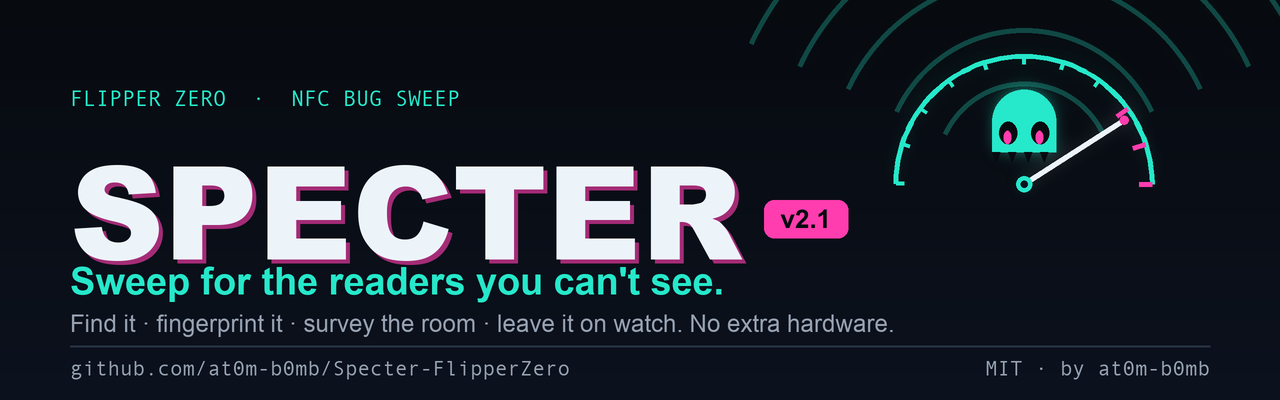
BACKLIGHT. Set in Didot for identity, Futura for voice, Andale Mono for every measured value. The orange is #FE8A2C β€” sampled from a qFlipper capture of this app running, so it is the Flipper's own backlight rather than a colour chosen to resemble it. Every capture in screenshots/ is exactly two colours, (254,138,44) and (0,0,0); that is what the hardware emits.

It is never used as a brand colour. The only ember on any asset is light the device actually emitted β€” pixels inside a real capture, pasted untouched at an integer scale. Artwork is drawn in the same hue fifteen degrees cooler. One ramp, read from opposite ends: more ink means more signal on paper, more light means more signal on black β€” because paper is where a sweep ends (Specter writes a timestamped logbook you can hand to someone) and black is where it happens (stealth mode forces the backlight off).

The accent draws one thing and nothing else: measured carrier. It is never a rule, a frame, a margin or a word β€” there are no gold words anywhere in the system, and the renderer raises if one is attempted. So the banner carries exactly one accent-coloured object, and that object is a measurement.

The waveform is 128 columns of carrier Specter recorded off a real polling reader at 8 ms per column, scraped back out of the screenshot beside it. The flat run at the left is the trace buffer before it filled, not silence anyone measured. Its duty reads 28% where the device's own counter printed 27%, and both numbers are on the banner. The mark is one poll cycle at 30% duty β€” that reader's 12 ms of 40 ms, and also SPECTER_FULL_SCALE_DUTY, the duty at which the meter reads 100%. One number, two independent reasons to be it.

#FE8A2C is the only colour here we did not choose.

AssetSizeWhere it goes
images/banner.png2560Γ—800README header, paper ground (2Γ— so it stays crisp on retina)
images/banner-dark.png2560Γ—800The same drawing on true black, served by <picture> to dark-mode readers
images/social-preview.png1280Γ—640Settings β†’ Social preview β€” GitHub's recommended size (min 640Γ—320, 1 MB cap)
images/mark.png512Γ—512Square logo mark: social posts, slides, favicon. Not a repo avatar β€” GitHub shows the owner's profile picture next to a repo, so there is no per-repo avatar to set
images/mark-180/64/32/16.pngas named180 and 64 downscaled; 32 and 16 are drawn natively so nothing anti-aliases into mush
images/demo.gif768Γ—384The animation above, ~9 s, built from the real view constants
images/device.png1122Γ—698Four real qFlipper captures, not generated β€” tools_gen_device.py
images/series.jsonβ€”The extracted carrier, its duty, and the capture it came from
python3 tools_brand_data.py    # print the facts the branding is allowed to state
python3 tools_gen_banner.py    # banner (light + dark), social preview, logo mark
python3 tools_gen_gif.py       # the demo animation
python3 tools_gen_mockups.py   # screen stills
python3 tools_gen_icons.py     # 1-bit Flipper icons

The social preview is the one asset GitHub can't pick up from the repo β€” it has to be uploaded once by hand in Settings β†’ Social preview. It's what renders when the repo is shared on Slack, X, LinkedIn or Discord.


Credits

License

MIT Β© 2026 at0m-b0mb

Categories