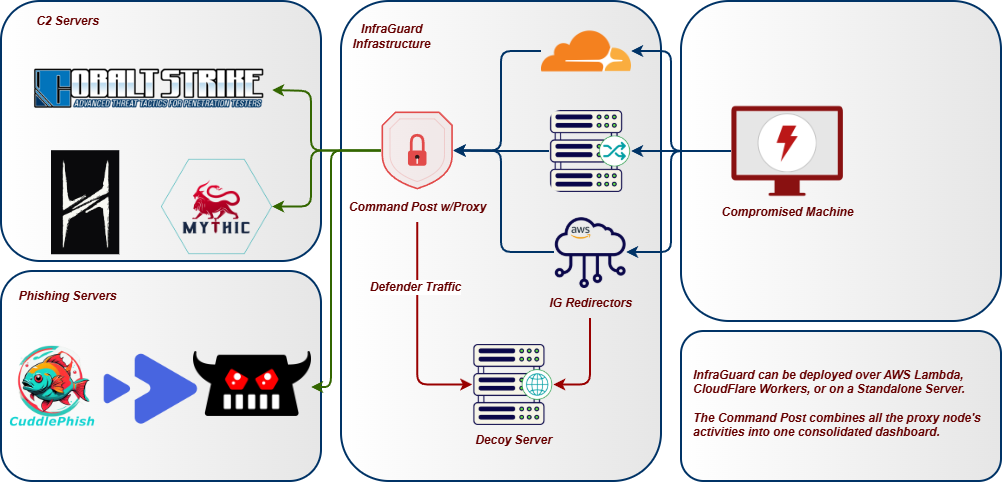
Red-Team-Infrastruktur-Tracker und C2-Redirector -- eine moderne Alternative zu RedWarden.
InfraGuard sitzt zwischen dem Internet und deinem C2-Teamserver, validiert jede eingehende Anfrage gegen dein malleable C2-Profil und blockiert alles, was nicht konform ist. Scanner, Bots und Blue-Team-Sonden werden auf eine Decoy-Site umgeleitet, während legitimer Beacon-Traffic zu deinem Teamserver durchgelassen wird.
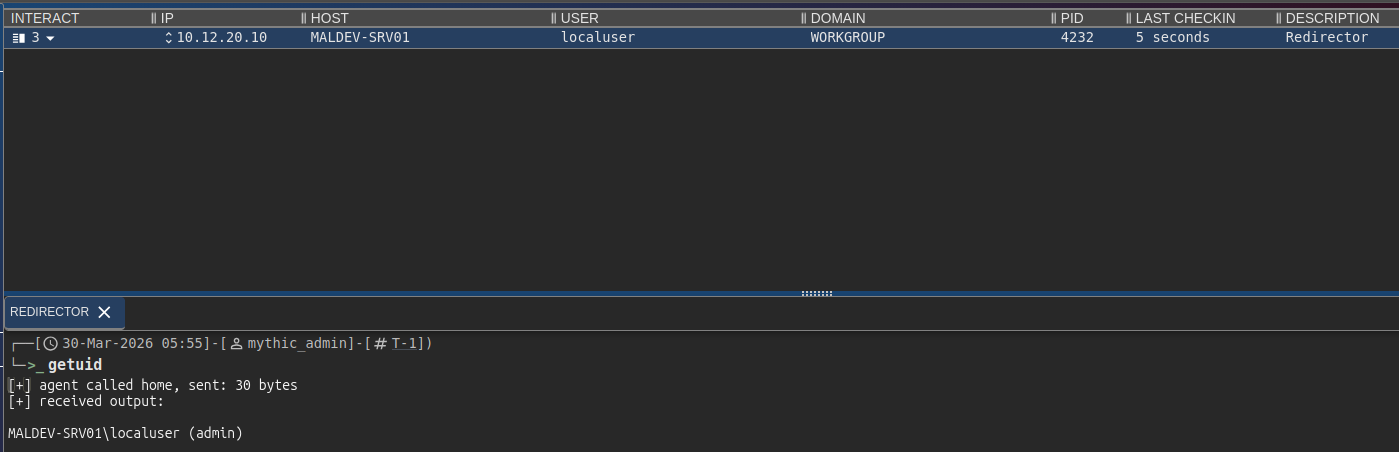
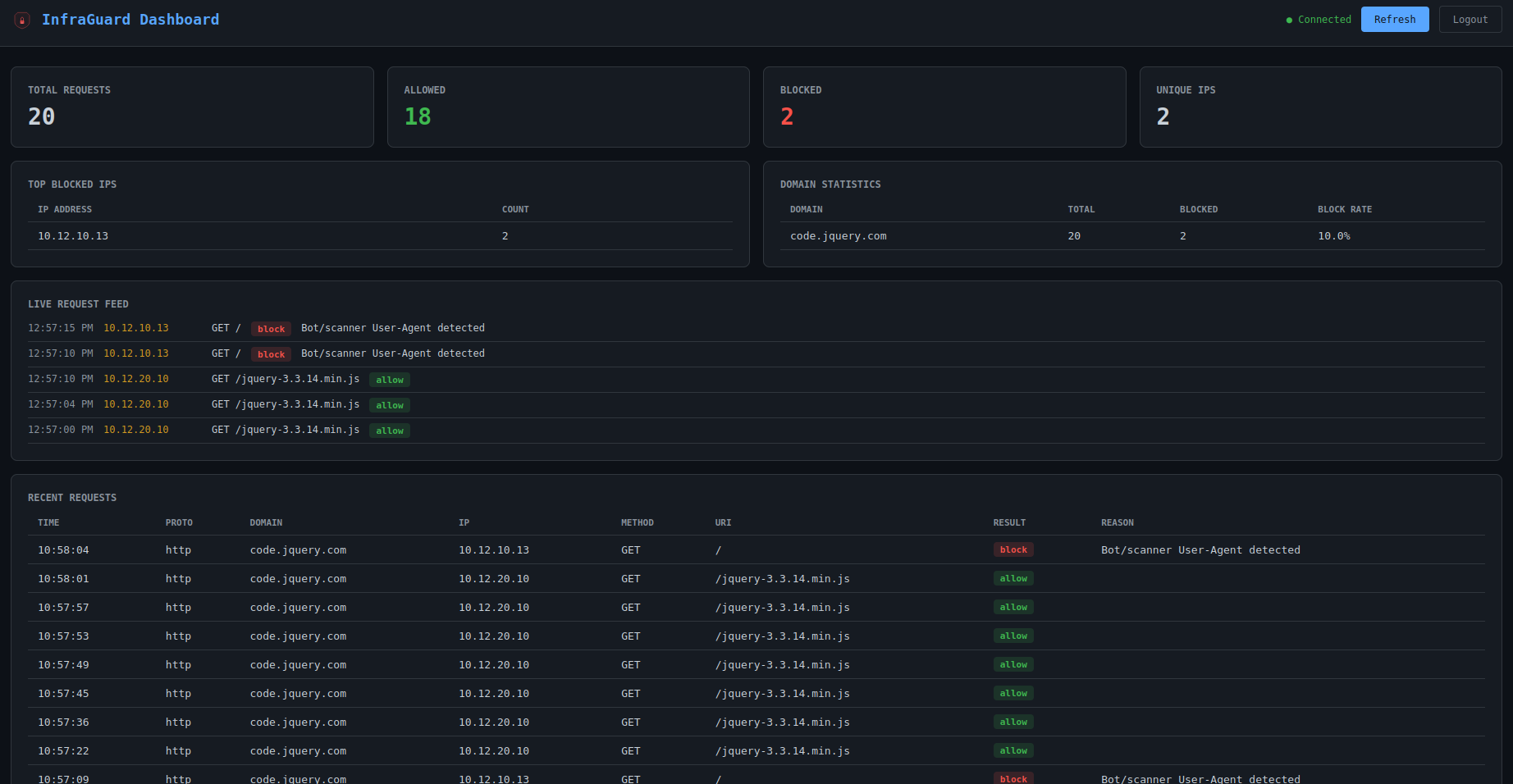
Architektur
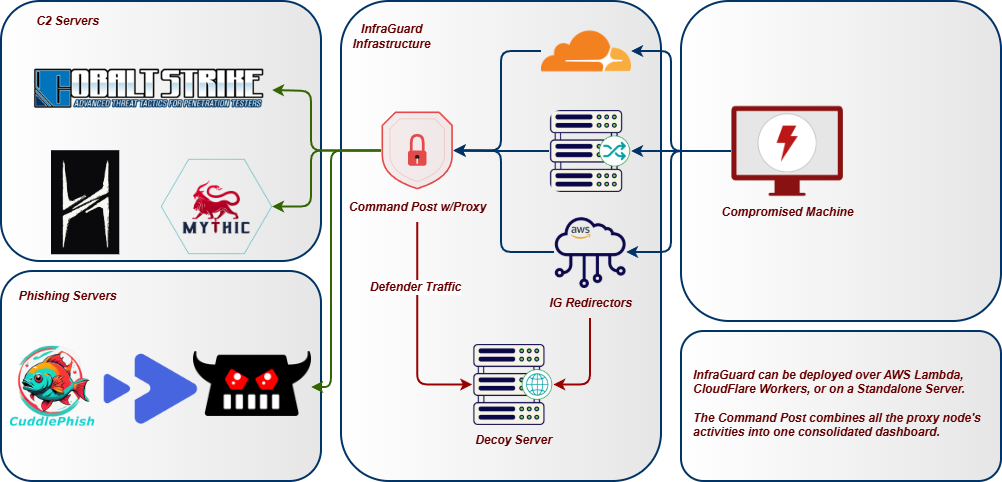
Funktionen
Proxying & Listener
- Multi-Domain-Proxying -- proxy mehrere Domains gleichzeitig, jede mit unabhängigen C2-Profilen, Upstreams und Regeln
- Multi-Protokoll-Listener -- HTTP/HTTPS, HTTP/3 (QUIC), WebSocket, gRPC, DNS, MQTT und TCP-Tunnel-Listener laufen gleichzeitig mit gemeinsamer IP-Intelligence und Event-Tracking
- Circuit Breaker -- Schutz vor Ausfällen pro Upstream mit closed/open/half-open-Zuständen; fällt auf die Drop-Action der Domain zurück, wenn Backends nicht erreichbar sind
- Protokoll-Failover -- automatisches Failover und Failback zwischen Listener-Protokollen, nach Priorität geordnet
C2-Profil-Unterstützung
- C2-Profil-Validierung -- Cobalt Strike-, Mythic-, Brute Ratel C4-, Sliver-, Havoc-, Nighthawk- und PoshC2-Profile als Redirector-Regeln parsen und durchsetzen
- Hot-Swap-fähige Profile -- das aktive C2-Profil einer Domain zur Laufzeit über das Dashboard austauschen, ohne den Proxy neu zu starten
- Profil-Generierungs-Assistent -- neue C2-Profile von Grund auf für alle 8 unterstützten Typen über ein geführtes Formular generieren oder bestehende Profile mit automatischer Typerkennung und Validierung importieren und hochladen
- KI-gestützte Profilgenerierung -- optionale Ollama-Integration bietet ein Chat-Panel im Dashboard für Hilfe bei der Profilerstellung und OPSEC-Beratung
Filter-Pipeline
- Scoring-basierte Filter-Pipeline -- 10 Filter tragen jeweils einen Score von 0,0--1,0 bei; ein konfigurierbarer Schwellenwert bestimmt Block/Allow. Filter: JA3, IP, Bot, Header, DNS, Geo, Profil, Replay, Enumeration, Sandbox.
- JA3-TLS-Fingerprint-Filterung -- Masscan, ZGrab2, Shodan, curl, Python requests und Nmap auf TLS-Handshake-Ebene blockieren, bevor HTTP-Daten ausgetauscht werden; funktioniert über Reverse-Proxy-Header oder ein benutzerdefiniertes asyncio-Protokoll; optionaler Allowlist-Modus erzwingt Beacon-JA3
- Sandbox- und Headless-Browser-Erkennung -- Score-Akkumulation über HTTP-Signale: HeadlessChrome-UA, fehlendes Accept-Language, Chrome ohne sec-ch-ua, Safe-Links- und msnbot-Scanner-UAs, Nicht-Browser-Accept-Reihenfolge
- Pfad-Enumeration-Erkennung -- Verfolgung eindeutiger URIs pro IP in einem gleitenden Fenster; blockiert dirbuster/ffuf/gobuster, bevor sie den URI-Raum kartieren
- DNS-Subdomain-Enumeration-Erkennung -- verfolgt NXDOMAIN-Antworten pro Client-IP; blockiert Quell-IPs automatisch bei Überschreitung des Schwellenwerts
- Anti-Bot / Anti-Crawling -- über 40 bekannte Scanner-/Bot-User-Agent-Muster, Header-Anomalie-Erkennung
- Replay-Schutz -- doppelte Anfragen per Content-Hash ablehnen; Hashes werden in SQLite persistiert, sodass der Schutz Neustarts übersteht
- Drop-Actions -- Redirect, TCP-Reset, Proxy zu Decoy-Site oder Tarpit (langsame Antwort, um Scanner-Zeit zu verschwenden)
Intelligence
- IP-Intelligence -- integrierte CIDR-Blocklisten für 19 Security-Vendor-Bereiche (Shodan, Censys, Rapid7 usw.), GeoIP-Filterung, Reverse-DNS-Keyword-Matching
- Threat-Intel-Feeds -- automatische Aktualisierung von Blocklisten aus öffentlichen Quellen (abuse.ch, Emerging Threats, Spamhaus DROP, Binary Defense) mit konfigurierbarem Aktualisierungsintervall und Disk-Caching
- Dynamische IP-Blockierung -- IPs außerhalb von Whitelist-Bereichen blockieren; IPs nach N gültigen C2-Anfragen automatisch auf die Whitelist setzen
- Whitelist-Anreicherung -- Whitelisted CIDRs werden beim Start über GeoIP-Datenbanken automatisch mit ASN-, Organisation-, Länder- und Kontinentdaten angereichert
- Burn-Erkennung -- Certificate-Transparency-Log-Überwachung über crt.sh, Domain-Reputation-Selbstüberwachung über URLhaus/OpenPhish/Google Safe Browsing und Cross-Domain-Analyst-Erkennung, wenn eine einzelne IP auf mehrere Operator-Domains zugreift
- Burn-Confidence-Scoring -- kontinuierlicher Score von 0--100 aus 6 gewichteten Signalen: JA3-Diversität, Volumenspitzen, neue ASNs, CT-Log-Exposition, Reputation-Treffer und fehlgeschlagene Auth-Versuche. Enthält empfohlene Aktionen: monitor, rotate oder immediate burn.
- Canary-Token-Injection -- Tracking-Pixel, Honeypot-Links und Honeypot-Formulare werden automatisch in Decoy-Seiten injiziert, um Blue-Team-Untersuchungen zu erkennen
- Passives DNS-Monitoring -- fragt CIRCL PDNS nach externer Auflösung deiner Domains ab; erkennt neue Records, NXDOMAIN-Spitzen und erstmalige Exposition
Payload-Auslieferung
- Content-Delivery-Routen -- Payloads, Decoys und statische Dateien unter bestimmten Pfaden über PwnDrop, Mythic File Store, lokales Dateisystem oder HTTP-Proxy-Backends ausliefern; optionale bedingte Auslieferung, um echten Inhalt an Ziele und Decoys an Scanner auszuliefern
- Mythic-File-Staging --
mythic_file-Backend proxyt Mythics /direct/download/{uuid} unter sauberen URLs; feste UUID oder Proxy-Modus; Zugriffskontrolle durch InfraGuards Filter-Stack
- Einmal-Payload-Tokens -- Tokens werden automatisch ausgegeben, wenn ein Beacon dynamisch auf die Whitelist gesetzt wird; atomare Single-Use-Durchsetzung in SQLite verhindert URL-Replay durch Analysten oder Sandboxes; konfigurierbare TTL und maximale Nutzungsanzahl
- Rate-Limiting pro Route -- gleitendes Download-Rate-Limit pro IP auf Content-Routen; bei Überschreitung wird der konfigurierte Scanner-Decoy oder 429 ausgeliefert
- Delivery-Guards -- Environment-Keying für Content-Routen: Beacon-IP erforderlich, UA-Allowlist, erforderliche Header-Werte, verbotene Header; fehlgeschlagene Prüfungen lösen die Drop-Action der Domain aus, nicht ein rohes 403
- Phishing-Kampagnen-Tokens -- Phishing-Seiten hinter kampagnenspezifischen Tokens absichern, die in E-Mail-Links eingebettet sind; statische Token-Liste oder HMAC-signierte, selbstvalidierende Tokens mit konfigurierbarer TTL
Resilienz