Zurück zu den Updates
New releaseAug 31, 2026

seccomp-tools v1.7.1

Bietet leistungsstarke Tools für die seccomp-Analyse.

Teilen

Downloads

Gem Version Build Status Maintainability Code Coverage Inline docs Yard Docs MIT License

Seccomp Tools

Leistungsstarke Werkzeuge für die Seccomp-Analyse.

Dieses Projekt zielt in erster Linie (aber nicht ausschließlich) auf die Analyse von Seccomp-Sandboxes in CTF-Pwn-Challenges ab. Einige Funktionen sind CTF-spezifisch, aber sie sind ebenso nützlich für die Analyse realer Seccomp-Filter.

Funktionen

  • Dump – Dumpet automatisch Seccomp-BPF aus ausführbaren Dateien.
  • Disasm – Konvertiert Seccomp-BPF in ein menschenlesbares Format.
    • Mit einfacher Dekompilierung.
    • Mit Syscall-Namen und -Argumenten, wann immer möglich.
    • Farbenfroh!
  • Asm – Macht das Schreiben von Seccomp-Regeln so einfach wie das Schreiben von Code.
  • Emu – Emuliert Seccomp-Regeln.
  • Explain – Fasst einen Filter als Richtlinie pro Aktion zusammen (welche Syscalls erlaubt/getötet werden und wann).
  • Audit – Scannt einen Filter auf Schwachstellen und Ausbruchswege (fehlende Arch/x32-Guards, gefährliche Syscalls, ...).
  • Multi-Architektur-Unterstützung.

Installation

Verfügbar auf RubyGems.org!``` $ gem install seccomp-tools

Wenn die Kompilierung fehlschlägt, versuchen Sie:```
sudo apt install gcc ruby-dev make

dann installiere seccomp-tools erneut.

Befehlszeilenschnittstelle

seccomp-tools```bash

$ seccomp-tools --help

Usage: seccomp-tools [--version] [--help] []

List of commands:

asm Seccomp bpf assembler.

audit Assess a seccomp filter for weaknesses and escape routes.

completion Print a shell completion script.

disasm Disassemble seccomp bpf.

dump Automatically dump seccomp bpf from executable(s).

emu Emulate seccomp rules.

explain Summarize a seccomp filter as a per-action policy.

See 'seccomp-tools --help' to read about a specific subcommand.

$ seccomp-tools dump --help

dump - Automatically dump seccomp bpf from executable(s).

NOTE: This command is only available on Linux.

Usage: seccomp-tools dump [EXEC] [options]

-c, --sh-exec Executes the given command (via sh) and dumps its seccomp.

Use this to pass arguments or pipe things to the executable.

e.g. use -c "./bin > /dev/null" to keep the program output out of the result.

Takes precedence over the positional argument.

-l, --limit LIMIT Dump only the first LIMIT installed filters.

Only meaningful when the input is an executable or --pid. Default: 1

An executable is killed once it reaches LIMIT.

-p, --pid PID Dump the seccomp filters installed on an existing process.

You must have CAP_SYS_ADMIN (e.g. be root) to use this option.

-t, --timeout SEC Timeout (seconds) for the execution. Default: no timeout

This option is ignored when --pid is given.

-f, --format FORMAT Output format. FORMAT can only be one of <disasm|raw|inspect>.

Default: disasm

-o, --output FILE Write output to FILE instead of stdout.

If multiple seccomp syscalls have been invoked (see --limit),

results are written to FILE, FILE_1, FILE_2, etc.

For example, with "--output out.bpf" the output files are out.bpf, out_1.bpf, ...

### dump

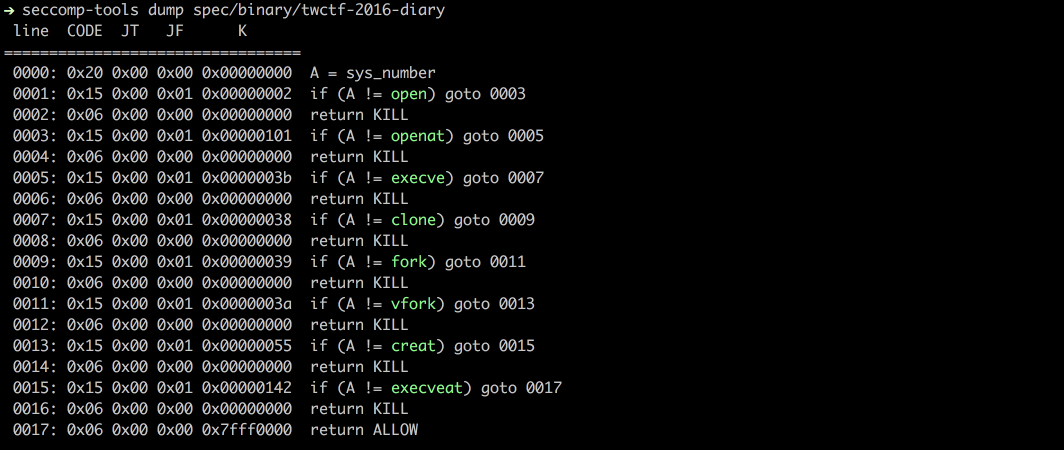
Dumpt das seccomp-BPF aus einer ausführbaren Datei mithilfe des `ptrace`-Syscalls.

HINWEIS: Die Ziel-Ausführbare Datei wird tatsächlich ausgeführt. Seien Sie daher bei nicht vertrauenswürdigen Binärdateien vorsichtig.```bash
$ file spec/binary/twctf-2016-diary
# spec/binary/twctf-2016-diary: ELF 64-bit LSB executable, x86-64, version 1 (SYSV), dynamically linked, interpreter /lib64/ld-linux-x86-64.so.2, for GNU/Linux 2.6.24, BuildID[sha1]=3648e29153ac0259a0b7c3e25537a5334f50107f, not stripped

$ seccomp-tools dump spec/binary/twctf-2016-diary
#  line  CODE  JT   JF      K
# =================================
#  0000: 0x20 0x00 0x00 0x00000000  A = sys_number
#  0001: 0x15 0x00 0x01 0x00000002  if (A != open) goto 0003
#  0002: 0x06 0x00 0x00 0x00000000  return KILL
#  0003: 0x15 0x00 0x01 0x00000101  if (A != openat) goto 0005
#  0004: 0x06 0x00 0x00 0x00000000  return KILL
#  0005: 0x15 0x00 0x01 0x0000003b  if (A != execve) goto 0007
#  0006: 0x06 0x00 0x00 0x00000000  return KILL
#  0007: 0x15 0x00 0x01 0x00000038  if (A != clone) goto 0009
#  0008: 0x06 0x00 0x00 0x00000000  return KILL
#  0009: 0x15 0x00 0x01 0x00000039  if (A != fork) goto 0011
#  0010: 0x06 0x00 0x00 0x00000000  return KILL
#  0011: 0x15 0x00 0x01 0x0000003a  if (A != vfork) goto 0013
#  0012: 0x06 0x00 0x00 0x00000000  return KILL
#  0013: 0x15 0x00 0x01 0x00000055  if (A != creat) goto 0015
#  0014: 0x06 0x00 0x00 0x00000000  return KILL
#  0015: 0x15 0x00 0x01 0x00000142  if (A != execveat) goto 0017
#  0016: 0x06 0x00 0x00 0x00000000  return KILL
#  0017: 0x06 0x00 0x00 0x7fff0000  return ALLOW

$ seccomp-tools dump spec/binary/twctf-2016-diary -f inspect
# "\x20\x00\x00\x00\x00\x00\x00\x00\x15\x00\x00\x01\x02\x00\x00\x00\x06\x00\x00\x00\x00\x00\x00\x00\x15\x00\x00\x01\x01\x01\x00\x00\x06\x00\x00\x00\x00\x00\x00\x00\x15\x00\x00\x01\x3B\x00\x00\x00\x06\x00\x00\x00\x00\x00\x00\x00\x15\x00\x00\x01\x38\x00\x00\x00\x06\x00\x00\x00\x00\x00\x00\x00\x15\x00\x00\x01\x39\x00\x00\x00\x06\x00\x00\x00\x00\x00\x00\x00\x15\x00\x00\x01\x3A\x00\x00\x00\x06\x00\x00\x00\x00\x00\x00\x00\x15\x00\x00\x01\x55\x00\x00\x00\x06\x00\x00\x00\x00\x00\x00\x00\x15\x00\x00\x01\x42\x01\x00\x00\x06\x00\x00\x00\x00\x00\x00\x00\x06\x00\x00\x00\x00\x00\xFF\x7F"

$ seccomp-tools dump spec/binary/twctf-2016-diary -f raw | xxd
# 00000000: 2000 0000 0000 0000 1500 0001 0200 0000   ...............
# 00000010: 0600 0000 0000 0000 1500 0001 0101 0000  ................
# 00000020: 0600 0000 0000 0000 1500 0001 3b00 0000  ............;...
# 00000030: 0600 0000 0000 0000 1500 0001 3800 0000  ............8...
# 00000040: 0600 0000 0000 0000 1500 0001 3900 0000  ............9...
# 00000050: 0600 0000 0000 0000 1500 0001 3a00 0000  ............:...
# 00000060: 0600 0000 0000 0000 1500 0001 5500 0000  ............U...
# 00000070: 0600 0000 0000 0000 1500 0001 4201 0000  ............B...
# 00000080: 0600 0000 0000 0000 0600 0000 0000 ff7f  ................

disasm

Disassembliert rohes Seccomp-BPF in ein lesbares Format.```bash $ xxd spec/data/twctf-2016-diary.bpf | head -n 3

00000000: 2000 0000 0000 0000 1500 0001 0200 0000 ...............

00000010: 0600 0000 0000 0000 1500 0001 0101 0000 ................

00000020: 0600 0000 0000 0000 1500 0001 3b00 0000 ............;...

$ seccomp-tools disasm spec/data/twctf-2016-diary.bpf

line CODE JT JF K

=================================

0000: 0x20 0x00 0x00 0x00000000 A = sys_number

0001: 0x15 0x00 0x01 0x00000002 if (A != open) goto 0003

0002: 0x06 0x00 0x00 0x00000000 return KILL

0003: 0x15 0x00 0x01 0x00000101 if (A != openat) goto 0005

0004: 0x06 0x00 0x00 0x00000000 return KILL

0005: 0x15 0x00 0x01 0x0000003b if (A != execve) goto 0007

0006: 0x06 0x00 0x00 0x00000000 return KILL

0007: 0x15 0x00 0x01 0x00000038 if (A != clone) goto 0009

0008: 0x06 0x00 0x00 0x00000000 return KILL

0009: 0x15 0x00 0x01 0x00000039 if (A != fork) goto 0011

0010: 0x06 0x00 0x00 0x00000000 return KILL

0011: 0x15 0x00 0x01 0x0000003a if (A != vfork) goto 0013

0012: 0x06 0x00 0x00 0x00000000 return KILL

0013: 0x15 0x00 0x01 0x00000055 if (A != creat) goto 0015

0014: 0x06 0x00 0x00 0x00000000 return KILL

0015: 0x15 0x00 0x01 0x00000142 if (A != execveat) goto 0017

0016: 0x06 0x00 0x00 0x00000000 return KILL

0017: 0x06 0x00 0x00 0x7fff0000 return ALLOW

### asm

Setzt Seccomp-Regeln in rohe Bytes um.
Nützlich, wenn du deine eigenen Seccomp-Regeln schreiben möchtest.

Unterstützt Sprungmarken und Syscall-Namen. Siehe die Beispiele unten.```bash
$ seccomp-tools asm
# asm - Seccomp bpf assembler.
#
# Usage: seccomp-tools asm IN_FILE [options]
#     -o, --output FILE                Write output to FILE instead of stdout.
#     -f, --format FORMAT              Output format. FORMAT can only be one of <inspect|raw|c_array|c_source|assembly>.
#                                      Default: inspect
#     -a, --arch ARCH                  Specify architecture.
#                                      Supported architectures are <aarch64|amd64|i386|riscv64|s390x>.
#                                      Default: auto-detected from the host machine.
#                                      Set it when the filter targets an architecture other than the host.

# Input file for asm
$ cat spec/data/libseccomp.asm
# # check if arch is X86_64
# A = arch
# A == ARCH_X86_64 ? next : dead
# A = sys_number
# A >= 0x40000000 ? dead : next
# A == write ? ok : next
# A == close ? ok : next
# A == dup ? ok : next
# A == exit ? ok : next
# return ERRNO(5)
# ok:
# return ALLOW
# dead:
# return KILL

$ seccomp-tools asm spec/data/libseccomp.asm
# " \x00\x00\x00\x04\x00\x00\x00\x15\x00\x00\b>\x00\x00\xC0 \x00\x00\x00\x00\x00\x00\x005\x00\x06\x00\x00\x00\x00@\x15\x00\x04\x00\x01\x00\x00\x00\x15\x00\x03\x00\x03\x00\x00\x00\x15\x00\x02\x00 \x00\x00\x00\x15\x00\x01\x00<\x00\x00\x00\x06\x00\x00\x00\x05\x00\x05\x00\x06\x00\x00\x00\x00\x00\xFF\x7F\x06\x00\x00\x00\x00\x00\x00\x00"

$ seccomp-tools asm spec/data/libseccomp.asm -f c_source
# #include <linux/seccomp.h>
# #include <stdio.h>
# #include <stdlib.h>
# #include <sys/prctl.h>
#
# static void install_seccomp() {
#   static unsigned char filter[] = {32,0,0,0,4,0,0,0,21,0,0,8,62,0,0,192,32,0,0,0,0,0,0,0,53,0,6,0,0,0,0,64,21,0,4,0,1,0,0,0,21,0,3,0,3,0,0,0,21,0,2,0,32,0,0,0,21,0,1,0,60,0,0,0,6,0,0,0,5,0,5,0,6,0,0,0,0,0,255,127,6,0,0,0,0,0,0,0};
#   struct prog {
#     unsigned short len;
#     unsigned char *filter;
#   } rule = {
#     .len = sizeof(filter) >> 3,
#     .filter = filter
#   };
#   if(prctl(PR_SET_NO_NEW_PRIVS, 1, 0, 0, 0) < 0) { perror("prctl(PR_SET_NO_NEW_PRIVS)"); exit(2); }
#   if(prctl(PR_SET_SECCOMP, SECCOMP_MODE_FILTER, &rule) < 0) { perror("prctl(PR_SET_SECCOMP)"); exit(2); }
# }

$ seccomp-tools asm spec/data/libseccomp.asm -f assembly
# install_seccomp:
#   push   rbp
#   mov    rbp, rsp
#   push   38
#   pop    rdi
#   push   0x1
#   pop    rsi
#   xor    eax, eax
#   mov    al, 0x9d
#   syscall
#   push   22
#   pop    rdi
#   lea    rdx, [rip + _filter]
#   push   rdx /* .filter */
#   push   _filter_end - _filter >> 3 /* .len */
#   mov    rdx, rsp
#   push   0x2
#   pop    rsi
#   xor    eax, eax
#   mov    al, 0x9d
#   syscall
#   leave
#   ret
# _filter:
# .ascii "\040\000\000\000\004\000\000\000\025\000\000\010\076\000\000\300\040\000\000\000\000\000\000\000\065\000\006\000\000\000\000\100\025\000\004\000\001\000\000\000\025\000\003\000\003\000\000\000\025\000\002\000\040\000\000\000\025\000\001\000\074\000\000\000\006\000\000\000\005\000\005\000\006\000\000\000\000\000\377\177\006\000\000\000\000\000\000\000"
# _filter_end:


# let's asm then disasm!
$ seccomp-tools asm spec/data/libseccomp.asm -f raw | seccomp-tools disasm -
#  line  CODE  JT   JF      K
# =================================
#  0000: 0x20 0x00 0x00 0x00000004  A = arch
#  0001: 0x15 0x00 0x08 0xc000003e  if (A != ARCH_X86_64) goto 0010
#  0002: 0x20 0x00 0x00 0x00000000  A = sys_number
#  0003: 0x35 0x06 0x00 0x40000000  if (A >= 0x40000000) goto 0010
#  0004: 0x15 0x04 0x00 0x00000001  if (A == write) goto 0009
#  0005: 0x15 0x03 0x00 0x00000003  if (A == close) goto 0009
#  0006: 0x15 0x02 0x00 0x00000020  if (A == dup) goto 0009
#  0007: 0x15 0x01 0x00 0x0000003c  if (A == exit) goto 0009
#  0008: 0x06 0x00 0x00 0x00050005  return ERRNO(5)
#  0009: 0x06 0x00 0x00 0x7fff0000  return ALLOW
#  0010: 0x06 0x00 0x00 0x00000000  return KILL

Seit v1.6.0 [noch nicht veröffentlicht] ist asm auf einen yacc-basierten Parser umgestiegen, der eine flexiblere und intuitivere Syntax ermöglicht!```bash $ cat spec/data/example.asm

# An example of supported assembly syntax

if (A == X)

goto next # 'next' is a reserved label, means the next statement ("A = args[0]" in this example)

else

goto err_label # custom defined label

A = args[0]

if (

A # put a comment here is also valid

== 0x123

) goto disallow

if (! (A & 0x1337)) # support bang in if-conditions

goto 0 # equivalent to 'goto next'

else goto 2 # goto $ + 2, 'mem[0] = A' in this example

A = sys_number

A = instruction_pointer >> 32

mem[0] = A

A = data[4] # equivalent to 'A = arch'

err_label: return ERRNO(1337)

disallow:

return KILL

$ seccomp-tools asm spec/data/example.asm -f raw | seccomp-tools disasm -

line CODE JT JF K

=================================

0000: 0x1d 0x00 0x07 0x00000000 if (A != X) goto 0008

0001: 0x20 0x00 0x00 0x00000010 A = args[0]

0002: 0x15 0x06 0x00 0x00000123 if (A == 0x123) goto 0009

0003: 0x45 0x02 0x00 0x00001337 if (A & 0x1337) goto 0006

0004: 0x20 0x00 0x00 0x00000000 A = sys_number

0005: 0x20 0x00 0x00 0x0000000c A = instruction_pointer >> 32

0006: 0x02 0x00 0x00 0x00000000 mem[0] = A

0007: 0x20 0x00 0x00 0x00000004 A = arch

0008: 0x06 0x00 0x00 0x00050539 return ERRNO(1337)

0009: 0x06 0x00 0x00 0x00000000 return KILL

Die Ausgabe von `seccomp-tools disasm <datei> --asm-able` ist gültige Eingabe für `asm`:```bash
$ seccomp-tools disasm spec/data/x32.bpf --asm-able
# 0000: A = arch
# 0001: if (A != ARCH_X86_64) goto 0011
# 0002: A = sys_number
# 0003: if (A < 0x40000000) goto 0011
# 0004: if (A == x32_read) goto 0011
# 0005: if (A == x32_write) goto 0011
# 0006: if (A == x32_iopl) goto 0011
# 0007: if (A != x32_mmap) goto 0011
# 0008: A = args[0]
# 0009: if (A == 0x0) goto 0011
# 0010: return ERRNO(5)
# 0011: return ALLOW


# disasm then asm then disasm!
$ seccomp-tools disasm spec/data/x32.bpf --asm-able | seccomp-tools asm - -f raw | seccomp-tools disasm -
#  line  CODE  JT   JF      K
# =================================
#  0000: 0x20 0x00 0x00 0x00000004  A = arch
#  0001: 0x15 0x00 0x09 0xc000003e  if (A != ARCH_X86_64) goto 0011
#  0002: 0x20 0x00 0x00 0x00000000  A = sys_number
#  0003: 0x35 0x00 0x07 0x40000000  if (A < 0x40000000) goto 0011
#  0004: 0x15 0x06 0x00 0x40000000  if (A == x32_read) goto 0011
#  0005: 0x15 0x05 0x00 0x40000001  if (A == x32_write) goto 0011
#  0006: 0x15 0x04 0x00 0x400000ac  if (A == x32_iopl) goto 0011
#  0007: 0x15 0x00 0x03 0x40000009  if (A != x32_mmap) goto 0011
#  0008: 0x20 0x00 0x00 0x00000010  A = addr # x32_mmap(addr, len, prot, flags, fd, pgoff)
#  0009: 0x15 0x01 0x00 0x00000000  if (A == 0x0) goto 0011
#  0010: 0x06 0x00 0x00 0x00050005  return ERRNO(5)
#  0011: 0x06 0x00 0x00 0x7fff0000  return ALLOW

Emu

Emuliert seccomp anhand von sys_nr, arg0, arg1 usw.```bash $ seccomp-tools emu --help

emu - Emulate seccomp rules.

Usage: seccomp-tools emu [options] BPF_FILE [sys_nr [arg0 [arg1 ... arg5]]]

-a, --arch ARCH Specify architecture.

Supported architectures are <aarch64|amd64|i386|riscv64|s390x>.

Default: auto-detected from the host machine.

Set it when the filter targets an architecture other than the host.

-q, --[no-]quiet Run quietly, only show emulation result.

-i, --ip=VAL Set instruction pointer.

$ seccomp-tools emu spec/data/libseccomp.bpf write 0x3

line CODE JT JF K

=================================

0000: 0x20 0x00 0x00 0x00000004 A = arch

0001: 0x15 0x00 0x08 0xc000003e if (A != ARCH_X86_64) goto 0010

0002: 0x20 0x00 0x00 0x00000000 A = sys_number

0003: 0x35 0x06 0x00 0x40000000 if (A >= 0x40000000) goto 0010

0004: 0x15 0x04 0x00 0x00000001 if (A == write) goto 0009

0005: 0x15 0x03 0x00 0x00000003 if (A == close) goto 0009

0006: 0x15 0x02 0x00 0x00000020 if (A == dup) goto 0009

0007: 0x15 0x01 0x00 0x0000003c if (A == exit) goto 0009

0008: 0x06 0x00 0x00 0x00050005 return ERRNO(5)

0009: 0x06 0x00 0x00 0x7fff0000 return ALLOW

0010: 0x06 0x00 0x00 0x00000000 return KILL

return ALLOW at line 0009

### Explain

Fasst einen gesamten Filter als Richtlinie pro Aktion zusammen: welche Syscalls in `ALLOW`, `KILL`, `ERRNO` usw. enden,
und unter welchen Argumentbeschränkungen. Die Eingabe kann eine gedumpte BPF-Datei, eine ausführbare Datei (deren seccomp
zuerst gedumpt wird, wie bei `dump`) oder ein laufender Prozess über `--pid` sein.```bash
$ seccomp-tools explain --help
# explain - Summarize a seccomp filter as a per-action policy.
#
# Usage: seccomp-tools explain [options] [BPF_FILE|EXEC]
#     -c, --sh-exec <command>          Executes the given command (via sh) and explains its seccomp.
#                                      Use this to pass arguments or pipe things to the executable.
#                                      e.g. use `-c "./bin > /dev/null"` to keep the program output out of the result.
#                                      Takes precedence over the positional argument.
#     -l, --limit LIMIT                Explain only the first LIMIT installed filters.
#                                      Only meaningful when the input is an executable or --pid. Default: 1
#                                      An executable is killed once it reaches LIMIT.
#     -p, --pid PID                    Explain the seccomp filters installed on an existing process.
#                                      You must have CAP_SYS_ADMIN (e.g. be root) to use this option.
#     -t, --timeout SEC                Timeout (seconds) for the execution. Default: no timeout
#                                      This option is ignored when --pid is given.
#     -a, --arch ARCH                  Specify architecture.
#                                      Supported architectures are <aarch64|amd64|i386|riscv64|s390x>.
#                                      Default: auto-detected from the host machine.
#                                      Set it when the filter targets an architecture other than the host.
#                                      With an executable or --pid the architecture is auto-detected instead.

$ seccomp-tools explain spec/data/libseccomp.bpf -a amd64
# Seccomp policy for spec/data/libseccomp.bpf
#
# Architecture: amd64
#
#   ALLOW:
#     write, close, dup, exit
#
#   ERRNO(5):
#     <default> (any other syscall)
#
#   KILL:
#     sys_number >= 0x40000000  (x32 ABI)
#
# Other architectures: KILL

Ein komplexeres Beispiel – der 0CTF/TCTF 2023 „Nothing is True“-Filter, der separate 32/64-Bit-Allowlists und Argumentprüfungen für open, mmap und execve enthält:```bash $ seccomp-tools explain spec/data/tctf-2023-nothing-is-true.bpf -a amd64

Seccomp policy for spec/data/tctf-2023-nothing-is-true.bpf

Architecture: i386

ALLOW:

exit, read, write, brk, mmap, munmap, exit_group

KILL:

(any other syscall)

Architecture: amd64

ALLOW:

close, munmap, brk, exit, exit_group

open when filename == 0x31337 && flags == 0x0

mmap when prot == 0x2

execve when filename == 0x7ffea12f7d0e

KILL:

sys_number >= 0x40000000 (x32 ABI)

(any other syscall)

Other architectures: KILL

### Audit

Scannt einen Filter auf Schwachstellen und wahrscheinliche Ausbruchswege – eine fehlende Architektur- oder x32-Absicherung, eine permissive (Denylist-)Standardkonfiguration, Lücken bei äquivalenten Syscalls (z. B. `execve` blockiert, aber `execveat` nicht), eine Open/Read/Write-Kette oder gefährliche Syscalls, die als `ALLOW` erreichbar sind – und meldet jede mit einem Schweregrad. Es läuft auf jeder unterstützten Architektur (architekturspezifische Eigenheiten wie x32 bei amd64 werden nur dort angewendet, wo sie existieren) und akzeptiert dieselbe Eingabe wie `explain` (eine BPF-Datei, eine ausführbare Datei oder `--pid`).```bash
$ seccomp-tools audit --help
# audit - Assess a seccomp filter for weaknesses and escape routes.
#
# Usage: seccomp-tools audit [options] [BPF_FILE|EXEC]
#     -c, --sh-exec <command>          Executes the given command (via sh) and audits its seccomp.
#                                      Use this to pass arguments or pipe things to the executable.
#                                      e.g. use `-c "./bin > /dev/null"` to keep the program output out of the result.
#                                      Takes precedence over the positional argument.
#     -l, --limit LIMIT                Audit only the first LIMIT installed filters.
#                                      Only meaningful when the input is an executable or --pid. Default: 1
#                                      An executable is killed once it reaches LIMIT.
#     -p, --pid PID                    Audit the seccomp filters installed on an existing process.
#                                      You must have CAP_SYS_ADMIN (e.g. be root) to use this option.
#     -t, --timeout SEC                Timeout (seconds) for the execution. Default: no timeout
#                                      This option is ignored when --pid is given.
#     -a, --arch ARCH                  Specify architecture.
#                                      Supported architectures are <aarch64|amd64|i386|riscv64|s390x>.
#                                      Default: auto-detected from the host machine.
#                                      Set it when the filter targets an architecture other than the host.
#                                      With an executable or --pid the architecture is auto-detected instead.
#     -f, --format FORMAT              Output format, one of <human|json>.
#                                      Default: human

Auditing einer Denylist mit mehreren Escape-Routen (der TokyoWesterns CTF 2016 „diary“-Filter):```bash $ seccomp-tools audit spec/data/twctf-2016-diary.bpf -a amd64

Seccomp audit of spec/data/twctf-2016-diary.bpf

Architectures: amd64

[HIGH] Architecture is never validated

The filter checks syscall numbers without ever comparing data[4] (arch). Numbers mean different syscalls under

another AUDIT_ARCH, so the checks can be dodged by invoking through a different ABI (e.g. i386 numbering on amd64).

fix: Compare data[4] against your AUDIT_ARCH_* and KILL every architecture you do not explicitly handle.

[HIGH] io_uring_setup is allowed (amd64)

io_uring_setup reaches ALLOW - reads/writes/opens as ring operations, bypassing filters on those syscalls.

fix: Block io_uring_setup unless the program genuinely needs it.

[HIGH] process_vm_readv is allowed (amd64)

process_vm_readv reaches ALLOW - read another process's memory.

fix: Block process_vm_readv unless the program genuinely needs it.

[HIGH] process_vm_writev is allowed (amd64)

process_vm_writev reaches ALLOW - write another process's memory.

fix: Block process_vm_writev unless the program genuinely needs it.

[HIGH] ptrace is allowed (amd64)

ptrace reaches ALLOW - inspect/inject into other processes.

fix: Block ptrace unless the program genuinely needs it.

[HIGH] A file can be opened and its contents copied out (amd64)

openat2, read and write all reach ALLOW, so the contents of an arbitrary file (e.g. the flag) can be copied straight

back out.

fix: Deny the open-family syscalls unless the program genuinely needs arbitrary files.

[HIGH] Default action is ALLOW (denylist) (amd64)

Any syscall the filter does not explicitly block is allowed; a denylist is bypassable by any syscall the author

overlooked.

fix: Use an allowlist: default to KILL/ERRNO and permit only the needed syscalls.

[HIGH] open/openat blocked but openat2 allowed (amd64)

open, openat denied, but the equivalent openat2 reaches ALLOW - same capability, different syscall number.

fix: Deny every equivalent in the group: also block openat2.

[HIGH] x32 ABI is not guarded (amd64)

Syscalls blocked by their native number are reachable via their x32 number (nr | 0x40000000): open, clone, fork,

vfork, execve, creat, openat, execveat.

fix: After the arch check, KILL when sys_number >= 0x40000000 (or jset 0x40000000).

[MEDIUM] connect is allowed (amd64)

connect reaches ALLOW - network access (exfiltration).

fix: Block connect unless the program genuinely needs it.

[MEDIUM] socket is allowed (amd64)

socket reaches ALLOW - network access (exfiltration).

fix: Block socket unless the program genuinely needs it.

[MEDIUM] fork/vfork/clone blocked but clone3 allowed (amd64)

fork, vfork, clone denied, but the equivalent clone3 reaches ALLOW - same capability, different syscall number.

fix: Deny every equivalent in the group: also block clone3.

Verwende `--format json` für CI oder Tooling:```bash
$ seccomp-tools audit spec/data/gctf-2019-quals-caas.bpf -a amd64 -f json
# {
#   "stacked_filters": 1,
#   "reports": [
#     {
#       "source": "spec/data/gctf-2019-quals-caas.bpf",
#       "arches": [
#         "amd64"
#       ],
#       "truncated": false,
#       "findings": [
#         {
#           "id": "dangerous-allow",
#           "severity": "medium",
#           "title": "connect is allowed",
#           "detail": "connect reaches ALLOW - network access (exfiltration).",
#           "arch": "amd64",
#           "syscalls": [
#             "connect"
#           ],
#           "condition": null,
#           "remediation": "Block connect unless the program genuinely needs it."
#         },
#         {
#           "id": "dangerous-allow",
#           "severity": "medium",
#           "title": "socket is allowed",
#           "detail": "socket reaches ALLOW - network access (exfiltration).",
#           "arch": "amd64",
#           "syscalls": [
#             "socket"
#           ],
#           "condition": "family == 0x2 && type == 0x1 && protocol == 0x0",
#           "remediation": "Block socket unless the program genuinely needs it."
#         }
#       ]
#     }
#   ]
# }

Shell Completion

seccomp-tools completion <bash|zsh|fish> gibt ein Vervollständigungsskript für die angegebene Shell aus. Laden Sie es aus der Startdatei Ihrer Shell:```bash

bash (~/.bashrc)

eval "$(seccomp-tools completion bash)"

zsh (~/.zshrc, after compinit)

eval "$(seccomp-tools completion zsh)"

fish (~/.config/fish/config.fish)

seccomp-tools completion fish | source

Um die Startkosten der Auswertung bei jedem Aufruf zu vermeiden, schreibe das Skript stattdessen in das Verzeichnis, aus dem deine Shell Vervollständigungen lädt, z. B. `seccomp-tools completion zsh > "${fpath[1]}/_seccomp-tools"`.

## Screenshots

### Dump
![dump](https://raw.githubusercontent.com/david942j/seccomp-tools/master/examples/dump-diary.png?raw=true)

### Emu
![emu](https://raw.githubusercontent.com/david942j/seccomp-tools/master/examples/emu-libseccomp.png?raw=true)

![emu](https://raw.githubusercontent.com/david942j/seccomp-tools/master/examples/emu-amigo.png?raw=true)

## Unterstützte Architekturen

- [x] x86_64
- [x] x32
- [x] x86
- [x] arm64 (@saagarjha)
- [x] s390x (@iii-i)
- [x] riscv64

Pull Requests, die Unterstützung für weitere Architekturen hinzufügen, sind willkommen!

## Entwicklung

Ich empfehle die Verwendung von [rbenv](https://github.com/rbenv/rbenv), um deine Ruby-Umgebung zu verwalten.

### Einrichtung

- Installiere bundler
  - `$ gem install bundler`
- Klone das Quellverzeichnis
  - `$ git clone https://github.com/david942j/seccomp-tools && cd seccomp-tools`
- Installiere Abhängigkeiten
  - `$ bundle install`

### Tests ausführen

`$ bundle exec rake`

## Ich brauche dich

Alle Vorschläge oder Feature-Anfragen sind willkommen!
Zögere nicht, Issues zu erstellen oder Pull Requests zu senden.
Und wenn dir dieses Projekt gefällt, erwäge, ihm einen [Stern](https://github.com/david942j/seccomp-tools/stargazers) zu geben :grimacing:

Kategorien


