 david942j/seccomp-tools
Bietet leistungsstarke Tools für die seccomp-Analyse.

Leistungsstarke Werkzeuge für die Seccomp-Analyse.
Dieses Projekt zielt in erster Linie (aber nicht ausschließlich) auf die Analyse von Seccomp-Sandboxes in CTF-Pwn-Challenges ab. Einige Funktionen sind CTF-spezifisch, aber sie sind ebenso nützlich für die Analyse realer Seccomp-Filter.
Verfügbar auf RubyGems.org!``` $ gem install seccomp-tools
Wenn die Kompilierung fehlschlägt, versuchen Sie:```
sudo apt install gcc ruby-dev make
dann installiere seccomp-tools erneut.
$ seccomp-tools --help
$ seccomp-tools dump --help
-c "./bin > /dev/null" to keep the program output out of the result.### dump
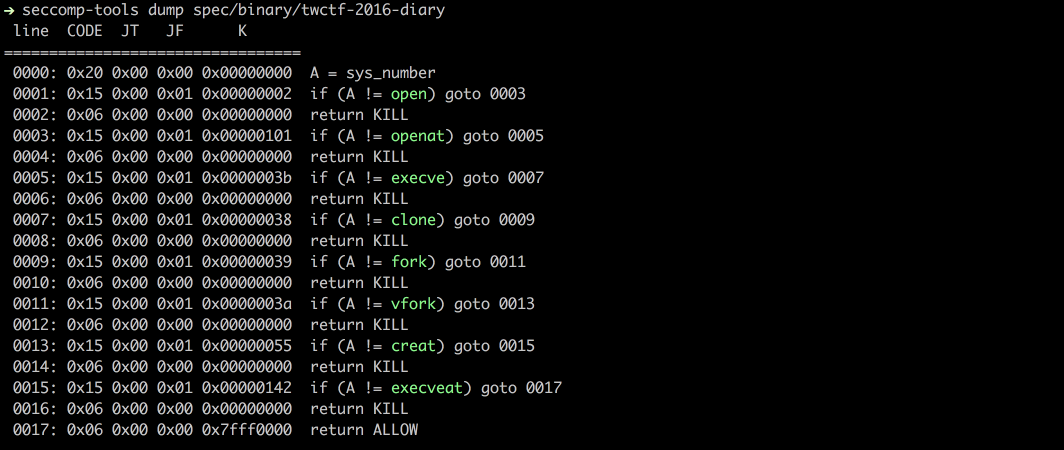
Dumpt das seccomp-BPF aus einer ausführbaren Datei mithilfe des `ptrace`-Syscalls.
HINWEIS: Die Ziel-Ausführbare Datei wird tatsächlich ausgeführt. Seien Sie daher bei nicht vertrauenswürdigen Binärdateien vorsichtig.```bash
$ file spec/binary/twctf-2016-diary
# spec/binary/twctf-2016-diary: ELF 64-bit LSB executable, x86-64, version 1 (SYSV), dynamically linked, interpreter /lib64/ld-linux-x86-64.so.2, for GNU/Linux 2.6.24, BuildID[sha1]=3648e29153ac0259a0b7c3e25537a5334f50107f, not stripped
$ seccomp-tools dump spec/binary/twctf-2016-diary
# line CODE JT JF K
# =================================
# 0000: 0x20 0x00 0x00 0x00000000 A = sys_number
# 0001: 0x15 0x00 0x01 0x00000002 if (A != open) goto 0003
# 0002: 0x06 0x00 0x00 0x00000000 return KILL
# 0003: 0x15 0x00 0x01 0x00000101 if (A != openat) goto 0005
# 0004: 0x06 0x00 0x00 0x00000000 return KILL
# 0005: 0x15 0x00 0x01 0x0000003b if (A != execve) goto 0007
# 0006: 0x06 0x00 0x00 0x00000000 return KILL
# 0007: 0x15 0x00 0x01 0x00000038 if (A != clone) goto 0009
# 0008: 0x06 0x00 0x00 0x00000000 return KILL
# 0009: 0x15 0x00 0x01 0x00000039 if (A != fork) goto 0011
# 0010: 0x06 0x00 0x00 0x00000000 return KILL
# 0011: 0x15 0x00 0x01 0x0000003a if (A != vfork) goto 0013
# 0012: 0x06 0x00 0x00 0x00000000 return KILL
# 0013: 0x15 0x00 0x01 0x00000055 if (A != creat) goto 0015
# 0014: 0x06 0x00 0x00 0x00000000 return KILL
# 0015: 0x15 0x00 0x01 0x00000142 if (A != execveat) goto 0017
# 0016: 0x06 0x00 0x00 0x00000000 return KILL
# 0017: 0x06 0x00 0x00 0x7fff0000 return ALLOW
$ seccomp-tools dump spec/binary/twctf-2016-diary -f inspect
# "\x20\x00\x00\x00\x00\x00\x00\x00\x15\x00\x00\x01\x02\x00\x00\x00\x06\x00\x00\x00\x00\x00\x00\x00\x15\x00\x00\x01\x01\x01\x00\x00\x06\x00\x00\x00\x00\x00\x00\x00\x15\x00\x00\x01\x3B\x00\x00\x00\x06\x00\x00\x00\x00\x00\x00\x00\x15\x00\x00\x01\x38\x00\x00\x00\x06\x00\x00\x00\x00\x00\x00\x00\x15\x00\x00\x01\x39\x00\x00\x00\x06\x00\x00\x00\x00\x00\x00\x00\x15\x00\x00\x01\x3A\x00\x00\x00\x06\x00\x00\x00\x00\x00\x00\x00\x15\x00\x00\x01\x55\x00\x00\x00\x06\x00\x00\x00\x00\x00\x00\x00\x15\x00\x00\x01\x42\x01\x00\x00\x06\x00\x00\x00\x00\x00\x00\x00\x06\x00\x00\x00\x00\x00\xFF\x7F"
$ seccomp-tools dump spec/binary/twctf-2016-diary -f raw | xxd
# 00000000: 2000 0000 0000 0000 1500 0001 0200 0000 ...............
# 00000010: 0600 0000 0000 0000 1500 0001 0101 0000 ................
# 00000020: 0600 0000 0000 0000 1500 0001 3b00 0000 ............;...
# 00000030: 0600 0000 0000 0000 1500 0001 3800 0000 ............8...
# 00000040: 0600 0000 0000 0000 1500 0001 3900 0000 ............9...
# 00000050: 0600 0000 0000 0000 1500 0001 3a00 0000 ............:...
# 00000060: 0600 0000 0000 0000 1500 0001 5500 0000 ............U...
# 00000070: 0600 0000 0000 0000 1500 0001 4201 0000 ............B...
# 00000080: 0600 0000 0000 0000 0600 0000 0000 ff7f ................
Disassembliert rohes Seccomp-BPF in ein lesbares Format.```bash $ xxd spec/data/twctf-2016-diary.bpf | head -n 3
$ seccomp-tools disasm spec/data/twctf-2016-diary.bpf
### asm

Setzt Seccomp-Regeln in rohe Bytes um.
Nützlich, wenn du deine eigenen Seccomp-Regeln schreiben möchtest.

Unterstützt Sprungmarken und Syscall-Namen. Siehe die Beispiele unten.```bash
$ seccomp-tools asm
# asm - Seccomp bpf assembler.
#
# Usage: seccomp-tools asm IN_FILE [options]
#     -o, --output FILE                Write output to FILE instead of stdout.
#     -f, --format FORMAT              Output format. FORMAT can only be one of <inspect|raw|c_array|c_source|assembly>.
#                                      Default: inspect
#     -a, --arch ARCH                  Specify architecture.
#                                      Supported architectures are <aarch64|amd64|i386|riscv64|s390x>.
#                                      Default: auto-detected from the host machine.
#                                      Set it when the filter targets an architecture other than the host.

# Input file for asm
$ cat spec/data/libseccomp.asm
# # check if arch is X86_64
# A = arch
# A == ARCH_X86_64 ? next : dead
# A = sys_number
# A >= 0x40000000 ? dead : next
# A == write ? ok : next
# A == close ? ok : next
# A == dup ? ok : next
# A == exit ? ok : next
# return ERRNO(5)
# ok:
# return ALLOW
# dead:
# return KILL

$ seccomp-tools asm spec/data/libseccomp.asm
# " \x00\x00\x00\x04\x00\x00\x00\x15\x00\x00\b>\x00\x00\xC0 \x00\x00\x00\x00\x00\x00\x005\x00\x06\x00\x00\x00\x00@\x15\x00\x04\x00\x01\x00\x00\x00\x15\x00\x03\x00\x03\x00\x00\x00\x15\x00\x02\x00 \x00\x00\x00\x15\x00\x01\x00<\x00\x00\x00\x06\x00\x00\x00\x05\x00\x05\x00\x06\x00\x00\x00\x00\x00\xFF\x7F\x06\x00\x00\x00\x00\x00\x00\x00"

$ seccomp-tools asm spec/data/libseccomp.asm -f c_source
# #include <linux/seccomp.h>
# #include <stdio.h>
# #include <stdlib.h>
# #include <sys/prctl.h>
#
# static void install_seccomp() {
#   static unsigned char filter[] = {32,0,0,0,4,0,0,0,21,0,0,8,62,0,0,192,32,0,0,0,0,0,0,0,53,0,6,0,0,0,0,64,21,0,4,0,1,0,0,0,21,0,3,0,3,0,0,0,21,0,2,0,32,0,0,0,21,0,1,0,60,0,0,0,6,0,0,0,5,0,5,0,6,0,0,0,0,0,255,127,6,0,0,0,0,0,0,0};
#   struct prog {
#     unsigned short len;
#     unsigned char *filter;
#   } rule = {
#     .len = sizeof(filter) >> 3,
#     .filter = filter
#   };
#   if(prctl(PR_SET_NO_NEW_PRIVS, 1, 0, 0, 0) < 0) { perror("prctl(PR_SET_NO_NEW_PRIVS)"); exit(2); }
#   if(prctl(PR_SET_SECCOMP, SECCOMP_MODE_FILTER, &rule) < 0) { perror("prctl(PR_SET_SECCOMP)"); exit(2); }
# }

$ seccomp-tools asm spec/data/libseccomp.asm -f assembly
# install_seccomp:
#   push   rbp
#   mov    rbp, rsp
#   push   38
#   pop    rdi
#   push   0x1
#   pop    rsi
#   xor    eax, eax
#   mov    al, 0x9d
#   syscall
#   push   22
#   pop    rdi
#   lea    rdx, [rip + _filter]
#   push   rdx /* .filter */
#   push   _filter_end - _filter >> 3 /* .len */
#   mov    rdx, rsp
#   push   0x2
#   pop    rsi
#   xor    eax, eax
#   mov    al, 0x9d
#   syscall
#   leave
#   ret
# _filter:
# .ascii "\040\000\000\000\004\000\000\000\025\000\000\010\076\000\000\300\040\000\000\000\000\000\000\000\065\000\006\000\000\000\000\100\025\000\004\000\001\000\000\000\025\000\003\000\003\000\000\000\025\000\002\000\040\000\000\000\025\000\001\000\074\000\000\000\006\000\000\000\005\000\005\000\006\000\000\000\000\000\377\177\006\000\000\000\000\000\000\000"
# _filter_end:


# let's asm then disasm!
$ seccomp-tools asm spec/data/libseccomp.asm -f raw | seccomp-tools disasm -
#  line  CODE  JT   JF      K
# =================================
#  0000: 0x20 0x00 0x00 0x00000004  A = arch
#  0001: 0x15 0x00 0x08 0xc000003e  if (A != ARCH_X86_64) goto 0010
#  0002: 0x20 0x00 0x00 0x00000000  A = sys_number
#  0003: 0x35 0x06 0x00 0x40000000  if (A >= 0x40000000) goto 0010
#  0004: 0x15 0x04 0x00 0x00000001  if (A == write) goto 0009
#  0005: 0x15 0x03 0x00 0x00000003  if (A == close) goto 0009
#  0006: 0x15 0x02 0x00 0x00000020  if (A == dup) goto 0009
#  0007: 0x15 0x01 0x00 0x0000003c  if (A == exit) goto 0009
#  0008: 0x06 0x00 0x00 0x00050005  return ERRNO(5)
#  0009: 0x06 0x00 0x00 0x7fff0000  return ALLOW
#  0010: 0x06 0x00 0x00 0x00000000  return KILL
Seit v1.6.0 [noch nicht veröffentlicht] ist asm auf einen yacc-basierten Parser umgestiegen, der eine flexiblere und intuitivere Syntax ermöglicht!```bash
$ cat spec/data/example.asm
$ seccomp-tools asm spec/data/example.asm -f raw | seccomp-tools disasm -
Die Ausgabe von `seccomp-tools disasm <datei> --asm-able` ist gültige Eingabe für `asm`:```bash
$ seccomp-tools disasm spec/data/x32.bpf --asm-able
# 0000: A = arch
# 0001: if (A != ARCH_X86_64) goto 0011
# 0002: A = sys_number
# 0003: if (A < 0x40000000) goto 0011
# 0004: if (A == x32_read) goto 0011
# 0005: if (A == x32_write) goto 0011
# 0006: if (A == x32_iopl) goto 0011
# 0007: if (A != x32_mmap) goto 0011
# 0008: A = args[0]
# 0009: if (A == 0x0) goto 0011
# 0010: return ERRNO(5)
# 0011: return ALLOW


# disasm then asm then disasm!
$ seccomp-tools disasm spec/data/x32.bpf --asm-able | seccomp-tools asm - -f raw | seccomp-tools disasm -
#  line  CODE  JT   JF      K
# =================================
#  0000: 0x20 0x00 0x00 0x00000004  A = arch
#  0001: 0x15 0x00 0x09 0xc000003e  if (A != ARCH_X86_64) goto 0011
#  0002: 0x20 0x00 0x00 0x00000000  A = sys_number
#  0003: 0x35 0x00 0x07 0x40000000  if (A < 0x40000000) goto 0011
#  0004: 0x15 0x06 0x00 0x40000000  if (A == x32_read) goto 0011
#  0005: 0x15 0x05 0x00 0x40000001  if (A == x32_write) goto 0011
#  0006: 0x15 0x04 0x00 0x400000ac  if (A == x32_iopl) goto 0011
#  0007: 0x15 0x00 0x03 0x40000009  if (A != x32_mmap) goto 0011
#  0008: 0x20 0x00 0x00 0x00000010  A = addr # x32_mmap(addr, len, prot, flags, fd, pgoff)
#  0009: 0x15 0x01 0x00 0x00000000  if (A == 0x0) goto 0011
#  0010: 0x06 0x00 0x00 0x00050005  return ERRNO(5)
#  0011: 0x06 0x00 0x00 0x7fff0000  return ALLOW
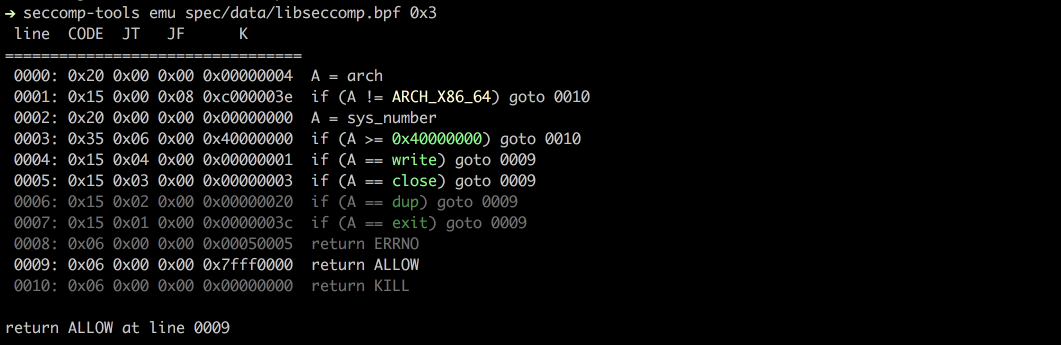
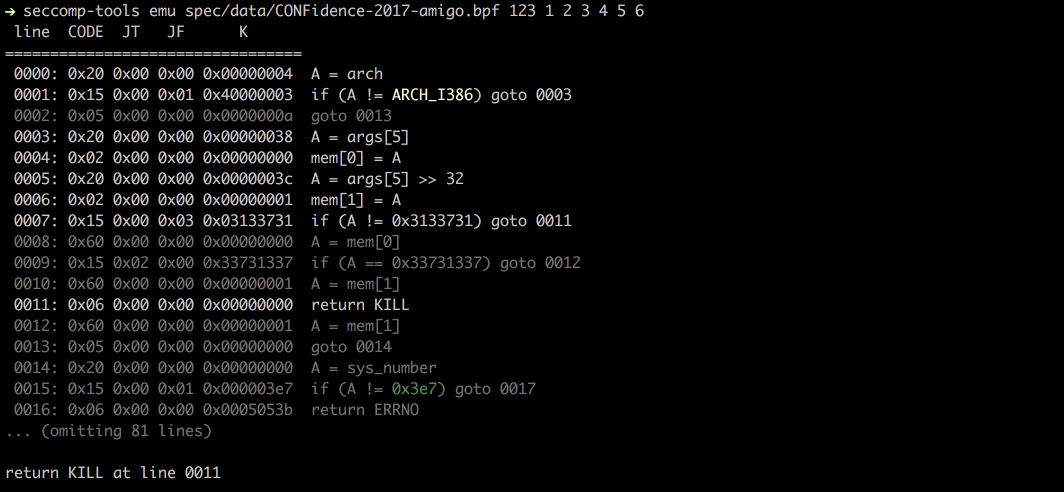
Emuliert seccomp anhand von sys_nr, arg0, arg1 usw.```bash
$ seccomp-tools emu --help
$ seccomp-tools emu spec/data/libseccomp.bpf write 0x3
### Explain

Fasst einen gesamten Filter als Richtlinie pro Aktion zusammen: welche Syscalls in `ALLOW`, `KILL`, `ERRNO` usw. enden,
und unter welchen Argumentbeschränkungen. Die Eingabe kann eine gedumpte BPF-Datei, eine ausführbare Datei (deren seccomp
zuerst gedumpt wird, wie bei `dump`) oder ein laufender Prozess über `--pid` sein.```bash
$ seccomp-tools explain --help
# explain - Summarize a seccomp filter as a per-action policy.
#
# Usage: seccomp-tools explain [options] [BPF_FILE|EXEC]
#     -c, --sh-exec <command>          Executes the given command (via sh) and explains its seccomp.
#                                      Use this to pass arguments or pipe things to the executable.
#                                      e.g. use `-c "./bin > /dev/null"` to keep the program output out of the result.
#                                      Takes precedence over the positional argument.
#     -l, --limit LIMIT                Explain only the first LIMIT installed filters.
#                                      Only meaningful when the input is an executable or --pid. Default: 1
#                                      An executable is killed once it reaches LIMIT.
#     -p, --pid PID                    Explain the seccomp filters installed on an existing process.
#                                      You must have CAP_SYS_ADMIN (e.g. be root) to use this option.
#     -t, --timeout SEC                Timeout (seconds) for the execution. Default: no timeout
#                                      This option is ignored when --pid is given.
#     -a, --arch ARCH                  Specify architecture.
#                                      Supported architectures are <aarch64|amd64|i386|riscv64|s390x>.
#                                      Default: auto-detected from the host machine.
#                                      Set it when the filter targets an architecture other than the host.
#                                      With an executable or --pid the architecture is auto-detected instead.

$ seccomp-tools explain spec/data/libseccomp.bpf -a amd64
# Seccomp policy for spec/data/libseccomp.bpf
#
# Architecture: amd64
#
#   ALLOW:
#     write, close, dup, exit
#
#   ERRNO(5):
#     <default> (any other syscall)
#
#   KILL:
#     sys_number >= 0x40000000  (x32 ABI)
#
# Other architectures: KILL
Ein komplexeres Beispiel – der 0CTF/TCTF 2023 „Nothing is True“-Filter, der separate 32/64-Bit-Allowlists und Argumentprüfungen für open, mmap und execve enthält:```bash
$ seccomp-tools explain spec/data/tctf-2023-nothing-is-true.bpf -a amd64
### Audit

Scannt einen Filter auf Schwachstellen und wahrscheinliche Ausbruchswege – eine fehlende Architektur- oder x32-Absicherung, eine permissive (Denylist-)Standardkonfiguration, Lücken bei äquivalenten Syscalls (z. B. `execve` blockiert, aber `execveat` nicht), eine Open/Read/Write-Kette oder gefährliche Syscalls, die als `ALLOW` erreichbar sind – und meldet jede mit einem Schweregrad. Es läuft auf jeder unterstützten Architektur (architekturspezifische Eigenheiten wie x32 bei amd64 werden nur dort angewendet, wo sie existieren) und akzeptiert dieselbe Eingabe wie `explain` (eine BPF-Datei, eine ausführbare Datei oder `--pid`).```bash
$ seccomp-tools audit --help
# audit - Assess a seccomp filter for weaknesses and escape routes.
#
# Usage: seccomp-tools audit [options] [BPF_FILE|EXEC]
#     -c, --sh-exec <command>          Executes the given command (via sh) and audits its seccomp.
#                                      Use this to pass arguments or pipe things to the executable.
#                                      e.g. use `-c "./bin > /dev/null"` to keep the program output out of the result.
#                                      Takes precedence over the positional argument.
#     -l, --limit LIMIT                Audit only the first LIMIT installed filters.
#                                      Only meaningful when the input is an executable or --pid. Default: 1
#                                      An executable is killed once it reaches LIMIT.
#     -p, --pid PID                    Audit the seccomp filters installed on an existing process.
#                                      You must have CAP_SYS_ADMIN (e.g. be root) to use this option.
#     -t, --timeout SEC                Timeout (seconds) for the execution. Default: no timeout
#                                      This option is ignored when --pid is given.
#     -a, --arch ARCH                  Specify architecture.
#                                      Supported architectures are <aarch64|amd64|i386|riscv64|s390x>.
#                                      Default: auto-detected from the host machine.
#                                      Set it when the filter targets an architecture other than the host.
#                                      With an executable or --pid the architecture is auto-detected instead.
#     -f, --format FORMAT              Output format, one of <human|json>.
#                                      Default: human
Auditing einer Denylist mit mehreren Escape-Routen (der TokyoWesterns CTF 2016 „diary“-Filter):```bash $ seccomp-tools audit spec/data/twctf-2016-diary.bpf -a amd64
Verwende `--format json` für CI oder Tooling:```bash
$ seccomp-tools audit spec/data/gctf-2019-quals-caas.bpf -a amd64 -f json
# {
#   "stacked_filters": 1,
#   "reports": [
#     {
#       "source": "spec/data/gctf-2019-quals-caas.bpf",
#       "arches": [
#         "amd64"
#       ],
#       "truncated": false,
#       "findings": [
#         {
#           "id": "dangerous-allow",
#           "severity": "medium",
#           "title": "connect is allowed",
#           "detail": "connect reaches ALLOW - network access (exfiltration).",
#           "arch": "amd64",
#           "syscalls": [
#             "connect"
#           ],
#           "condition": null,
#           "remediation": "Block connect unless the program genuinely needs it."
#         },
#         {
#           "id": "dangerous-allow",
#           "severity": "medium",
#           "title": "socket is allowed",
#           "detail": "socket reaches ALLOW - network access (exfiltration).",
#           "arch": "amd64",
#           "syscalls": [
#             "socket"
#           ],
#           "condition": "family == 0x2 && type == 0x1 && protocol == 0x0",
#           "remediation": "Block socket unless the program genuinely needs it."
#         }
#       ]
#     }
#   ]
# }
seccomp-tools completion <bash|zsh|fish> gibt ein Vervollständigungsskript für die angegebene Shell aus. Laden Sie es aus der Startdatei Ihrer Shell:```bash
eval "$(seccomp-tools completion bash)"
compinit)eval "$(seccomp-tools completion zsh)"
seccomp-tools completion fish | source
Um die Startkosten der Auswertung bei jedem Aufruf zu vermeiden, schreibe das Skript stattdessen in das Verzeichnis, aus dem deine Shell Vervollständigungen lädt, z. B. `seccomp-tools completion zsh > "${fpath[1]}/_seccomp-tools"`.
## Screenshots
### Dump
### Emu
## Unterstützte Architekturen
- [x] x86_64
- [x] x32
- [x] x86
- [x] arm64 (@saagarjha)
- [x] s390x (@iii-i)
- [x] riscv64
Pull Requests, die Unterstützung für weitere Architekturen hinzufügen, sind willkommen!
## Entwicklung
Ich empfehle die Verwendung von [rbenv](https://github.com/rbenv/rbenv), um deine Ruby-Umgebung zu verwalten.
### Einrichtung
- Installiere bundler
- `$ gem install bundler`
- Klone das Quellverzeichnis
- `$ git clone https://github.com/david942j/seccomp-tools && cd seccomp-tools`
- Installiere Abhängigkeiten
- `$ bundle install`
### Tests ausführen
`$ bundle exec rake`
## Ich brauche dich
Alle Vorschläge oder Feature-Anfragen sind willkommen!
Zögere nicht, Issues zu erstellen oder Pull Requests zu senden.
Und wenn dir dieses Projekt gefällt, erwäge, ihm einen [Stern](https://github.com/david942j/seccomp-tools/stargazers) zu geben :grimacing:








