نفق TCP/UDP سريع عبر HTTP مع تشفير SSH، يدعم إعادة توجيه المنافذ العكسية، ووكيل SOCKS5، والمصادقة من العميل لاختراق الشبكة بأمان وتجاوز جدران الحماية.
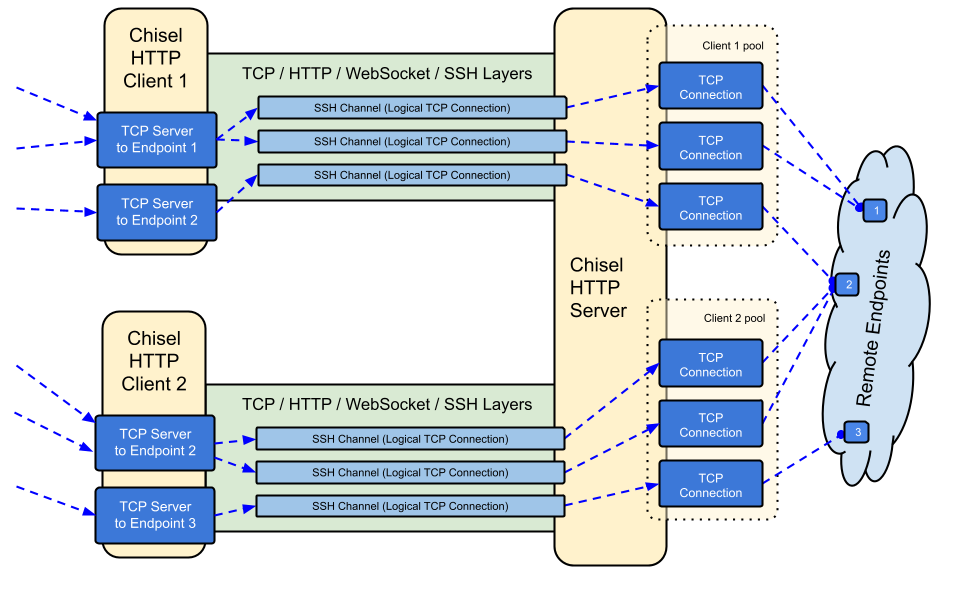
Chisel هو نفق TCP/UDP سريع، يُنقل عبر HTTP، ومؤمَّن عبر SSH. ملف تنفيذي واحد يضم كلًا من العميل والخادم. مكتوب بلغة Go (golang). يُعد Chisel مفيدًا بشكل أساسي لتجاوز جدران الحماية، كما يمكن استخدامه أيضًا لتوفير نقطة نهاية آمنة لشبكتك.

crypto/ssh)--min/max-retry-interval)؛ تنتهي مهلة حزم البقاء على قيد الحياة، لذلك يتم اكتشاف الاتصالات الميتة بصمت (إسبات/استيقاظ، انتهاء مهلة NAT، إعادة تشغيل الخادم) وإعادة إنشائهاssh -o ProxyCommand لتوفير SSH عبر HTTPانظر الإصدار الأحدث أو قم بتنزيله وتثبيته الآن باستخدام curl https://i.jpillora.com/chisel! | bash

تم بناء الملفات الثنائية باستخدام أحدث إصدار من Go، والذي يحدد الحد الأدنى لإصدارات أنظمة التشغيل: Windows 10 / Server 2016، macOS 12، نواة Linux 3.2، FreeBSD 12.2. بالنسبة للأنظمة الأقدم (مثل Windows 7)، استخدم الإصدار v1.8.1 أو إصدارًا أقدم.
```sh
docker run --rm -it jpillora/chisel --help
الصور متعددة البنى وتُنشر إلى كلٍّ من Docker Hub (`jpillora/chisel`) وGitHub Container Registry (`ghcr.io/jpillora/chisel`).
### Fedora
تتم صيانة الحزمة من قِبل مجتمع Fedora. إذا واجهت مشكلات متعلقة باستخدام RPM، فيُرجى استخدام [متتبع المشكلات](https://bugzilla.redhat.com/buglist.cgi?bug_status=NEW&bug_status=ASSIGNED&classification=Fedora&component=chisel&list_id=11614537&product=Fedora&product=Fedora%20EPEL).```sh
sudo dnf -y install chisel
$ go install github.com/jpillora/chisel@latest
## العرض التوضيحي
يمكنك تشغيل خادم العرض التجريبي الخاص بك في دقائق (لقد اختفى عرض Heroku التجريبي القديم مع الخطة المجانية لـ Heroku). [`example/fly.toml`](https://github.com/jpillora/chisel/blob/HEAD/example/fly.toml) ينشر هذا `chisel server` على الحصة المجانية من [fly.io](https://fly.io):```sh
$ chisel server --port $PORT --backend http://example.com
# listens on $PORT, proxies normal web requests to http://example.com
انشره باستخدام fly launch --copy-config من دليل example/، ثم أنشئ نفقًا إلى أي خدمة تعمل بجانب الخادم، على سبيل المثال:```sh
$ chisel client https://.fly.dev 3000
زيارة عنوان URL لتطبيقك في المتصفح تصل إلى الخادم الوكيل الخلفي الافتراضي وتعرض نسخة من [example.com](http://example.com).
## الاستخدام
<!-- قم بتوليد هذه النصوص المساعدة يدويًا،
أو استخدم https://github.com/jpillora/md-tmpl
مع $ md-tmpl -w README.md -->
<!--tmpl,code=plain:echo "$ chisel --help" && go run main.go --help | sed 's#0.0.0-src (go1\..*)#X.Y.Z#' -->``` plain
$ chisel --help
Usage: chisel [command] [--help]
Version: X.Y.Z
Commands:
server - runs chisel in server mode
client - runs chisel in client mode
Read more:
https://github.com/jpillora/chisel
$ chisel server --help
Usage: chisel server [options]
Options:
--host, Defines the HTTP listening host – the network interface
(defaults the environment variable HOST and falls back to 0.0.0.0).
--port, -p, Defines the HTTP listening port (defaults to the environment
variable PORT and falls back to port 8080).
--key, (deprecated use --keygen and --keyfile instead)
An optional string to seed the generation of a ECDSA public
and private key pair. All communications will be secured using this
key pair. Share the subsequent fingerprint with clients to enable detection
of man-in-the-middle attacks (defaults to the CHISEL_KEY environment
variable, otherwise a new key is generate each run).
--keygen, A path to write a newly generated PEM-encoded SSH private key file.
If users depend on your --key fingerprint, you may also include your --key to
output your existing key. Use - (dash) to output the generated key to stdout.
--keyfile, An optional path to a PEM-encoded SSH private key. When
this flag is set, the --key option is ignored, and the provided private key
is used to secure all communications. (defaults to the CHISEL_KEY_FILE
environment variable). Since ECDSA keys are short, you may also set keyfile
to the inline key string itself, exactly as printed by --keygen (a base64
string with a "ck-" prefix); no extra base64 encoding is needed.
--authfile, An optional path to a users.json file. This file should
be an object with users defined like:
{
"<user:pass>": ["<addr-regex>","<addr-regex>"]
}
when <user> connects, their <pass> will be verified and then
each of the remote addresses will be compared against the list
of address regular expressions for a match. Patterns are NOT
anchored by default: "10.0.0.1:80" also matches
"210.0.0.1:8080", and "." matches any character. Anchor your
patterns, e.g. "^10\.0\.0\.1:80$". The empty string ""
matches every address. Addresses will
always come in the form "<remote-host>:<remote-port>" for normal remotes,
"R:<local-interface>:<local-port>" for reverse port forwarding
remotes, and "socks" for SOCKS5 proxy access. Note that SOCKS5
access previously bypassed this list; existing authfiles which
should allow SOCKS5 must add an entry matching "socks" (the
empty wildcard "" matches everything, including "socks"). This
file will be automatically reloaded on change. Reloads apply
to new connections and to new tunnels of connected clients;
established tunnels are not interrupted.
--auth, An optional string representing a single user with full
access, in the form of <user:pass>. It is equivalent to creating an
authfile with {"<user:pass>": [""]}. If unset, it will use the
environment variable AUTH.
--keepalive, An optional keepalive interval. Since the underlying
transport is HTTP, in many instances we'll be traversing through
proxies, often these proxies will close idle connections. You must
specify a time with a unit, for example '5s' or '2m'. Defaults
to '25s' (set to 0s to disable).
--backend, Specifies another HTTP server to proxy requests to when
chisel receives a normal HTTP request. Useful for hiding chisel in
plain sight. --proxy is accepted as an alias for this flag.
--socks5, Allow clients to access the internal SOCKS5 proxy. See
chisel client --help for more information.
--reverse, Allow clients to specify reverse port forwarding remotes
in addition to normal remotes.
--tls-key, Enables TLS and provides optional path to a PEM-encoded
TLS private key. When this flag is set, you must also set --tls-cert,
and you cannot set --tls-domain.
--tls-cert, Enables TLS and provides optional path to a PEM-encoded
TLS certificate. When this flag is set, you must also set --tls-key,
and you cannot set --tls-domain.
--tls-domain, Enables TLS and automatically acquires a TLS key and
certificate using LetsEncrypt. Setting --tls-domain requires port 443.
You may specify multiple --tls-domain flags to serve multiple domains.
The resulting files are cached in the "$HOME/.cache/chisel" directory.
You can modify this path by setting the CHISEL_LE_CACHE variable,
or disable caching by setting this variable to "-". You can optionally
provide a certificate notification email by setting CHISEL_LE_EMAIL.
--tls-ca, a path to a PEM encoded CA certificate bundle or a directory
holding multiple PEM encode CA certificate bundle files, which is used to
validate client connections. The provided CA certificates will be used
instead of the system roots. This is commonly used to implement mutual-TLS.
--pid Generate pid file in current working directory
-v, Enable verbose logging
--help, This help text
Signals: The chisel process is listening for: a SIGINT or SIGTERM to begin a graceful shutdown (a second signal forces an immediate exit), a SIGUSR2 to print process stats, and a SIGHUP to short-circuit the client reconnect timer
Version: X.Y.Z
Read more: https://github.com/jpillora/chisel
<!--/tmpl-->
<!--tmpl,code=plain:echo "$ chisel client --help" && go run main.go client --help | sed 's#0.0.0-src (go1\..*)#X.Y.Z#' -->``` plain
$ chisel client --help
Usage: chisel client [options] <server> <remote> [remote] [remote] ...
<server> is the URL to the chisel server.
<remote>s are remote connections tunneled through the server, each of
which come in the form:
<local-host>:<local-port>:<remote-host>:<remote-port>/<protocol>
■ local-host defaults to 0.0.0.0 (all interfaces).
■ local-port defaults to remote-port.
■ remote-port is required*.
■ remote-host defaults to 127.0.0.1 (server localhost).
■ protocol defaults to tcp.
which shares <remote-host>:<remote-port> from the server to the client
as <local-host>:<local-port>, or:
R:<local-interface>:<local-port>:<remote-host>:<remote-port>/<protocol>
which does reverse port forwarding, sharing <remote-host>:<remote-port>
from the client to the server's <local-interface>:<local-port>.
example remotes
3000
example.com:3000
3000:google.com:80
192.168.0.5:3000:google.com:80
socks
5000:socks
R:2222:localhost:22
R:socks
R:5000:socks
stdio:example.com:22
1.1.1.1:53/udp
When the chisel server has --socks5 enabled, remotes can
specify "socks" in place of remote-host and remote-port.
The default local host and port for a "socks" remote is
127.0.0.1:1080. Connections to this remote will terminate
at the server's internal SOCKS5 proxy. When the server also
has --authfile set, SOCKS5 access requires an entry matching
the token "socks" in the user's address list.
When the chisel server has --reverse enabled, remotes can
be prefixed with R to denote that they are reversed. That
is, the server will listen and accept connections, and they
will be proxied through the client which specified the remote.
Reverse remotes specifying "R:socks" will listen on the server's
default socks port (1080) and terminate the connection at the
client's internal SOCKS5 proxy.
When stdio is used as local-host, the tunnel will connect standard
input/output of this program with the remote. This is useful when
combined with ssh ProxyCommand. You can use
ssh -o ProxyCommand='chisel client chiselserver stdio:%h:%p' \
[email protected]
to connect to an SSH server through the tunnel.
Options:
--fingerprint, A *strongly recommended* fingerprint string
to perform host-key validation against the server's public key.
Fingerprint mismatches will close the connection.
Fingerprints are generated by hashing the ECDSA public key using
SHA256 and encoding the result in base64.
Fingerprints must be 44 characters containing a trailing equals (=).
Legacy MD5 colon fingerprints (deprecated) are still accepted,
but only in their full 16-octet form; truncated prefixes are
rejected.
--auth, An optional username and password (client authentication)
in the form: "<user>:<pass>". These credentials are compared to
the credentials inside the server's --authfile. defaults to the
AUTH environment variable.
--keepalive, An optional keepalive interval. Since the underlying
transport is HTTP, in many instances we'll be traversing through
proxies, often these proxies will close idle connections. You must
specify a time with a unit, for example '5s' or '2m'. Defaults
to '25s' (set to 0s to disable).
--max-retry-count, Maximum number of times to retry before exiting.
Defaults to unlimited.
--min-retry-interval, Minimum wait time before retrying after a
disconnection. Defaults to 1 second.
--max-retry-interval, Maximum wait time before retrying after a
disconnection. Defaults to 5 minutes.
--proxy, An optional HTTP CONNECT or SOCKS5 proxy which will be
used to reach the chisel server. Authentication can be specified
inside the URL. Credentials must be URL-encoded; for example a
"#" in the password must be written as "%23".
For example, http://admin:[email protected]:8081
or: socks://admin:[email protected]:1080
The socks://, socks5:// and socks5h:// schemes are equivalent:
DNS is always resolved by the proxy.
--header, Set a custom header in the form "HeaderName: HeaderContent".
Can be used multiple times. (e.g --header "Foo: Bar" --header "Hello: World")
--hostname, Optionally set the 'Host' header (defaults to the host
found in the server url).
--sni, Override the ServerName when using TLS (defaults to the
hostname).
--tls-ca, An optional root certificate bundle used to verify the
chisel server. Only valid when connecting to the server with
"https" or "wss". By default, the operating system CAs will be used.
--tls-skip-verify, Skip server TLS certificate verification of
chain and host name (if TLS is used for transport connections to
server). If set, client accepts any TLS certificate presented by
the server and any host name in that certificate. This only affects
transport https (wss) connection. Chisel server's public key
may be still verified (see --fingerprint) after inner connection
is established.
--tls-key, a path to a PEM encoded private key used for client
authentication (mutual-TLS).
--tls-cert, a path to a PEM encoded certificate matching the provided
private key. The certificate must have client authentication
enabled (mutual-TLS).
--pid Generate pid file in current working directory
-v, Enable verbose logging
--help, This help text
Signals:
The chisel process is listening for:
a SIGINT or SIGTERM to begin a graceful shutdown
(a second signal forces an immediate exit),
a SIGUSR2 to print process stats, and
a SIGHUP to short-circuit the client reconnect timer
Version:
X.Y.Z
Read more:
https://github.com/jpillora/chisel
التشفير مفعّل دائمًا. عند تشغيل خادم chisel، سيقوم بإنشاء زوج مفاتيح ECDSA عام/خاص في الذاكرة. سيتم عرض بصمة المفتاح العام (SHA256 بترميز base64) عند بدء تشغيل الخادم. بدلاً من توليد مفتاح عشوائي، يمكن للخادم اختياريًا تحديد ملف مفتاح باستخدام الخيار --keyfile. عند اتصال العملاء، سيقومون أيضًا بعرض بصمة المفتاح العام للخادم. يمكن للعميل فرض بصمة معينة باستخدام الخيار --fingerprint. لا تزال بصمات MD5 القديمة مقبولة، ولكن يجب أن تكون بصيغة النقطتين الكاملة 16-ثماني — حيث يتم رفض البادئات المقتطعة. انظر إلى --help أعلاه لمزيد من المعلومات.
كما يحدّ الخادم أحجام رسائل websocket الواردة قبل المصادقة (CHISEL_WS_READ_LIMIT، الافتراضي 512 KiB)، بحيث لا يمكن للأقران غير المصادَق عليهم استنزاف الذاكرة برسائل ضخمة. الافتراضي أعلى بشكل مريح من حد حزمة النقل الأقصى البالغ 256 KiB الخاص بـx/crypto/ssh، لذلك لا يتم رفض أي حزمة SSH صالحة. فقط 0 يعطّل الحد؛ أما القيم السالبة فتعود إلى الافتراضي الآمن.
باستخدام الخيار --authfile، يمكن للخادم اختياريًا توفير ملف إعدادات user.json لإنشاء قائمة بالمستخدمين المقبولين. يقوم العميل بعد ذلك بالمصادقة باستخدام الخيار --auth. انظر إلى users.json للحصول على مثال لملف إعدادات المصادقة. وانظر إلى --help أعلاه لمزيد من المعلومات.
ملاحظات حول سلوك authfile:
^ و $ (يحذّر الخادم من الأنماط غير المثبتة عند التحميل). السلسلة الفارغة "" تطابق كل شيء.socks. تغيير جذري: كان SOCKS5 سابقًا يتجاوز ملف authfile بالكامل؛ يجب على الخوادم التي تشغّل --socks5 مع --authfile منح socks للمستخدمين الذين ينبغي أن يحتفظوا بالوصول عبر البروكسي (إدخالات wildcard "" تستمر في العمل).user:pass) تُعد الآن خطأ بدء تشغيل قاتل على كل من الخادم والعميل — كانت سابقًا تعطّل المصادقة بصمت.--auth يبقى بعد إعادة تحميل ملف authfile ويتفوق في تعارضات الأسماء مع مستخدمي الملف.داخليًا، يتم ذلك باستخدام طريقة مصادقة Password المقدمة من SSH. تعرّف على المزيد حول crypto/ssh هنا http://blog.gopheracademy.com/go-and-ssh/. يتم تسجيل فتح/إغلاق الجلسات (مع المستخدم وعنوان المصدر والأنفاق البعيدة) ومحاولات تسجيل الدخول الفاشلة في مستوى المعلومات.
أبسط إعداد آمن هو --tls-domain، الذي يوفّر شهادة LetsEncrypt تلقائيًا (يتطلب المنفذ 443 وسجل DNS يشير إلى الخادم):```sh
chisel server --port 443 --tls-domain chisel.example.com --auth user:pass
chisel client --auth user:pass https://chisel.example.com R:2222:localhost:22
لاستخدام شهادتك الخاصة (موقّعة ذاتيًا أو من مرجع مصدق داخلي)، قم بإنشاء زوج مفتاح/شهادة ووجّه كلا الجانبين إلى الملفات الصحيحة:```sh
chisel server --port 443 --tls-key key.pem --tls-cert cert.pem
chisel client --tls-ca ca.pem https://chisel.example.com 3000
For mutual TLS، مرّر أيضًا --tls-ca إلى الخادم و --tls-cert/--tls-key إلى كل عميل. لاحظ أن TLS يغلّف نقل بيانات chisel من الخارج؛ طبقة SSH الداخلية لا تزال تقوم بالتشفير والمصادقة، لذلك يعمل التحقق من --fingerprint مع TLS أو بدونه.
اطبع مفتاحًا خاصًا جديدًا في الطرفية
chisel server --keygen -
# or save it to disk --keygen /path/to/mykey
ابدأ تشغيل خادم chisel
jpillora/chisel server --keyfile '<ck-base64 string or file path>' -p 9312 --socks5
اربط عميل chisel (باستخدام بصمة الخادم)
chisel client --fingerprint '<see server output>' <server-address>:9312 socks
وجّه عملاء SOCKS5 لديك (مثل نظام التشغيل/المتصفح) إلى:
<client-address>:1080
الآن لديك اتصال SOCKS5 مشفّر وموثّق عبر HTTP
ملاحظة: إذا كان الخادم يستخدم أيضًا --authfile، يحتاج المستخدمون إلى إدخال مطابق للرمز socks لاستخدام الوكيل (انظر المصادقة).
لتمكين عميل معيّن من العمل كعقدة خروج SOCKS، امنحه عنوان الاستماع لـ reverse-socks (R:socks يستمع على 127.0.0.1:1080 في الخادم):```json
{
"exituser:password": ["^R:127\.0\.0\.1:1080$"]
}
المجتمع```sh
chisel server --reverse --authfile users.json
chisel client --auth exituser:password <server-address> R:socks
# server-side consumers point SOCKS5 clients at 127.0.0.1:1080,
# and their traffic exits via the chisel client's network
انظر أيضًا إلى مثال النفق العكسي خطوة بخطوة.
يعمل chisel من خلال شبكات CDN التي تدعم WebSockets. بالنسبة إلى Cloudflare: فعِّل WebSockets، ووكِّل سجل DNS (السحابة البرتقالية)، واربط العملاء باستخدام https://. تُنهي CDN تشفير TLS، ولكن طبقة SSH الداخلية تعني أن التحقق من --fingerprint ما زال يوثّق خادم chisel من طرف إلى طرف — لا تستطيع CDN قراءة حركة المرور داخل النفق أو تعديلها. أبقِ --keepalive على قيمته الافتراضية 25s لتبقى دون حدود المهلة الخاملة لـ CDN، ولاحظ أن الخوادم الوسيطة (proxies) التي تزيل ترويسات Upgrade لا يمكنها حمل chisel إطلاقًا.
المقابض الأقل شيوعًا هي متغيرات البيئة، وتُقرأ جميعها ببادئة CHISEL_ (مثلًا CHISEL_WS_TIMEOUT=10s):
HOST وPORT وAUTH وCHISEL_KEY/CHISEL_KEY_FILE موثّقة في نصوص --help أعلاه.
نظرًا لأن دعم WebSockets مطلوب:
github.com/jpillora/chisel/share يحتوي على الحزمة المشتركةgithub.com/jpillora/chisel/server يحتوي على حزمة الخادمgithub.com/jpillora/chisel/client يحتوي على حزمة العميل1.0 - الإصدار الأولي1.1 - استبدال التشفير المتماثل البسيط بـ ECDSA SSH1.2 - إضافة دعم SOCKS5 (الخادم) وHTTP CONNECT (العميل)1.3 - إضافة دعم الأنفاق العكسية1.4 - إضافة دعم ترويسات HTTP عشوائية1.5 - إضافة دعم SOCKS العكسي (بواسطة @aus)1.6 - إضافة دعم stdio للعميل (بواسطة @BoleynSu)1.7 - إضافة دعم UDP1.8 - الانتقال إلى صورة Docker scratch1.9 - الترقية إلى Go 1.21. التحول من بذرة --key إلى مفاتيح P256 النصية مع --key{gen,file} (بواسطة @cmenginnz)1.10 - الترقية إلى Go 1.22. إضافة و و إلى الإصدارات. إصلاح مقارنة الإصدارات غير الصحيحة.قد تتطلب أربعة تغييرات إجراءً عند الترقية من 1.11.x أو إصدار أقدم:
--authfile (مُطبَّق منذ v1.11.7): المستخدمون الذين يجب أن يحتفظوا بالوصول عبر الوكيل يحتاجون إدخال authfile يطابق الرمز socks (البدل "" يستمر في العمل). انظر المصادقة. تُسجَّل الطلبات المرفوضة من جهة الخادم كـ Denied connection to socks (ACL).--fingerprint: بصمات MD5 القديمة المقتطعة مرفوضة. استخدم بصمة SHA256 الكاملة التي يطبعها الخادم والعميل (صيغة MD5 الكاملة المكوّنة من 16 ثمانية ما تزال مقبولة، لكنها مهملة).--auth يجب أن تكون القيم <user>:<pass> — السلاسل بدون نقطتين تفشل الآن عند بدء التشغيل بدلًا من تعطيل المصادقة بصمت.chisel client مع --max-retry-count يخرج الآن برمز غير صفري عند استنفاد محاولات الاتصال؛ البرامج النصية التي تفحص $? ووحدات systemd Restart=on-failure ستلاحظ ذلك.MIT © Jaime Pillora
| المتغير | الجهة | الافتراضي | الغرض |
|---|
WS_TIMEOUT | العميل | 45s | مهلة مصافحة websocket |
SSH_TIMEOUT | العميل | 30s | مهلة مصافحة ssh |
CONFIG_TIMEOUT | الخادم | 10s | انتظار طلب الإعدادات من العميل |
SSH_WAIT | كلاهما | 35s | المدة التي تنتظرها الأنفاق الجديدة لاتصال نشط |
PING_TIMEOUT | كلاهما | فترة الإبقاء على الاتصال | مهلة الرد على ping للإبقاء على الاتصال (لا توجد pings إذا كان --keepalive 0) |
DIAL_TIMEOUT | عقدة الخروج | 30s | مهلة اتصال tcp لأهداف النفق |
WS_READ_LIMIT | كلاهما | 524288 | أقصى بايتات لرسالة websocket الواردة (0 = بلا حد؛ القيم السالبة = الافتراضي) |
WS_BUFF_SIZE | كلاهما | إعداد Go الافتراضي | أحجام مخازن القراءة/الكتابة لـ websocket |
UDP_MAX_SIZE | كلاهما | 9012 | أقصى بايتات لحزمة udp |
UDP_DEADLINE | عقدة الخروج | 15s | مهلة قراءة تدفق udp وعمر الكنس الخامل |
UDP_MAX_CONNS | عقدة الخروج | 100 | أقصى تدفقات udp المتزامنة لكل نفق |
SHUTDOWN_GRACE | الخادم | 5s | مدة تصريف طلبات http عند الإيقاف |
.rpm.deb.apk1.11 - الترقية إلى Go 1.25.1. تحديث جميع التبعيات.1.12 - (غير مُصدر) مراجعة الموثوقية والأمان:
CHISEL_PING_TIMEOUT)، لذا تُعاد الاتصالات الميتة الاتصال فورًا بعد النوم/الاستيقاظ، ومهلات NAT، وإعادة تشغيل الخادم--socks5 + --authfile، يتطلب الوصول إلى SOCKS5 الآن إدخال authfile يطابق socks (إدخالات البدل "" تستمر في العمل)--fingerprint بصيغة SHA256 الكاملة (أو صيغة MD5 الكاملة المكوّنة من 16 ثمانية)--auth user) تُعد خطأ فادحًا عند بدء التشغيل بدلًا من تعطيل المصادقة بصمتCHISEL_DIAL_TIMEOUT، الافتراضي 30s)CHISEL_SHUTDOWN_GRACE)؛ الإشارة الثانية تُنهي بالقوةCHISEL_UDP_MAX_CONNS)CHISEL_WS_READ_LIMIT)--max-retry-count؛ إضافة --min-retry-interval جديدة (الافتراضي 1s)؛ قبول socks5:// لـ --proxygo install تُبلغ عن إصدارها الحقيقي؛ الجلسات وعمليات تسجيل الدخول الفاشلة تُسجَّل بمستوى infolatest / X / X.Y